Skip to content Skip to sidebar

This thread is resolved. Here is a description of the problem and solution.

Problem:
You are trying to translate products using WPML, but encounter issues where the translated product shows a stock of zero, you cannot modify the stock, and adding translated products to the cart results in an empty cart.
Solution:
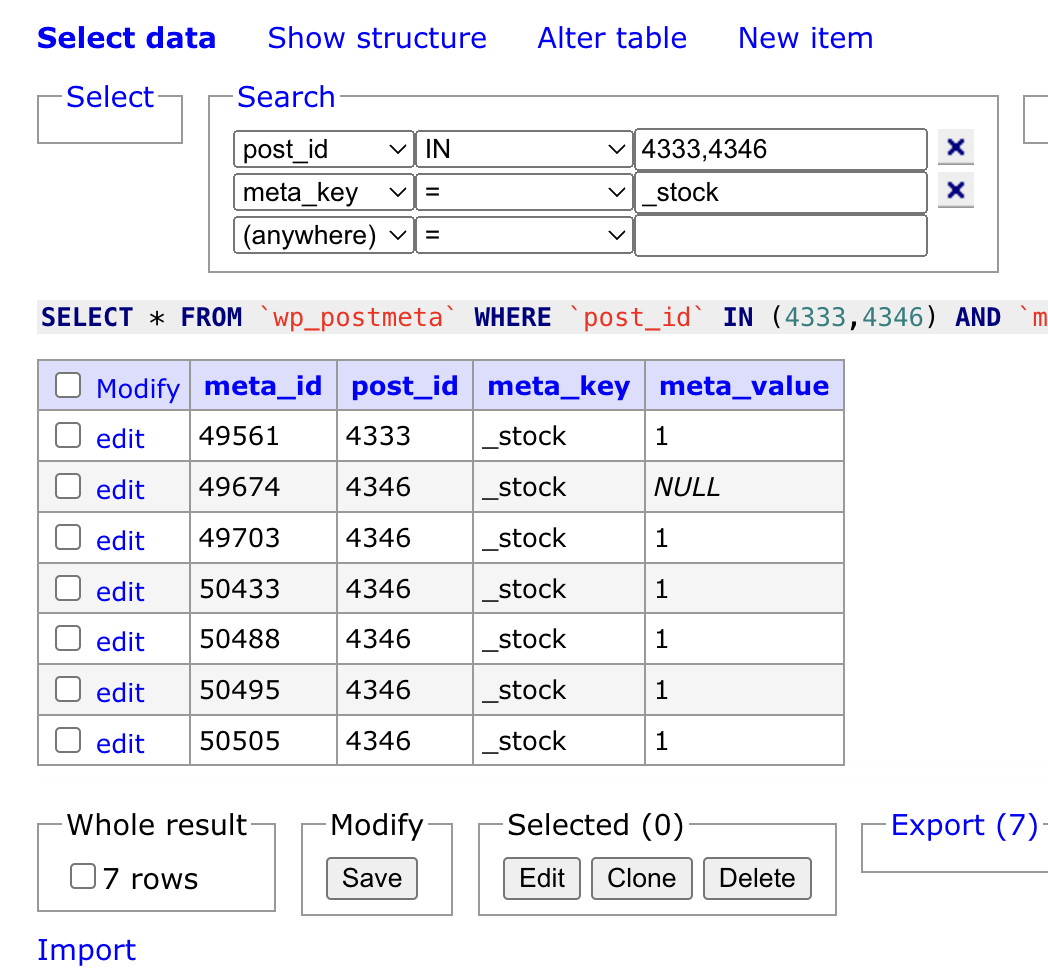
We found that the issue was due to multiple _stock entries in the database for the translated version, with one entry having a NULL value. This was likely caused by a custom code snippet intended to force stock levels. To fix this, we edited the database entries to ensure all translations have correct _stock values and deactivated the problematic code snippet. We recommend you test again to see if you can now add the translated products to the cart correctly.

If this solution does not resolve your issue or seems outdated, please check the related known issues and verify you have the latest versions of themes and plugins installed. If problems persist, we highly recommend opening a new support ticket at WPML support forum.

This is the technical support forum for WPML - the multilingual WordPress plugin.

Everyone can read, but only WPML clients can post here. WPML team is replying on the forum 6 days per week, 22 hours per day.

This topic contains 24 replies, has 0 voices.

Last updated by Paola Mendiburu 9 months ago.

Assisted by: Paola Mendiburu.

Author Posts
July 22, 2025 at 10:08 am #17258602

Carlos Rojas
WPML Supporter since 03/2017

Languages: English (English ) Spanish (Español )

Timezone: Europe/Madrid (GMT+02:00)

Hi there,

There was a problem in the database with the products. Our 2nd-tier specialists fixed the problem and deactivated a code snippet that interferes with the stock.

Can you double-check if the issue has disappeared?

July 26, 2025 at 10:42 am #17272396

mohammadS-27

hello, any update?

July 27, 2025 at 8:01 am #17272849

mohammadS-27

still same issue

July 28, 2025 at 8:30 am #17274065

Paola Mendiburu
WPML Supporter since 11/2020

Languages: English (English ) Spanish (Español ) Italian (Italiano )

Timezone: Europe/Madrid (GMT+02:00)

Hello!

This is Paola and I will continue with the ticket as Carlos is on holidays.

Our second-level support team investigated the issue with the product Saint Laurent (ID 4333 in English, 4346 in Arabic). They found that the problem was due to multiple _stock entries in the database for the Arabic version, one of which had a NULL value. This was preventing the product from being added to the cart.

They’re not certain how this occurred, but they did notice that there was a custom code snippet active to force stock levels. It’s unclear whether the snippet was intended to work around the issue or may have contributed to it.

To resolve the problem, they directly edited the database entries and ensured that all translations now have correct _stock values (either 0 or 1 as appropriate). They also deactivated the code snippet that was modifying the stock.

Could you please test again and confirm whether you’re now able to add the translated products to the cart correctly?

stock-database.png
July 28, 2025 at 11:04 am #17274575

mohammadS-27

problem not solved

Screenshot 2025-07-28 at 14-02-54 Products ‹ Cinafor — WordPress.png
July 28, 2025 at 11:07 am #17274594

Paola Mendiburu
WPML Supporter since 11/2020

Languages: English (English ) Spanish (Español ) Italian (Italiano )

Timezone: Europe/Madrid (GMT+02:00)

Please go to the original product and click on Update and update the translation.

July 29, 2025 at 7:30 am #17277312

mohammadS-27

I try it, but nothing change

July 29, 2025 at 2:11 pm #17279268

Paola Mendiburu
WPML Supporter since 11/2020

Languages: English (English ) Spanish (Español ) Italian (Italiano )

Timezone: Europe/Madrid (GMT+02:00)

Hi there!

I have edit the arabic product and click on update and now appears correctly.

Please let me know if it is working also for you.

July 30, 2025 at 5:29 am #17280508

mohammadS-27

ok, but this is not a solution
why should I do that every time?
I have a large number of products

July 30, 2025 at 8:01 am #17280843

Paola Mendiburu
WPML Supporter since 11/2020

Languages: English (English ) Spanish (Español ) Italian (Italiano )

Timezone: Europe/Madrid (GMT+02:00)

If you go to edit product you will see the stock properly.

You only need to do this after the solution applied.

I have recorded a video for you:
hidden link