
This is the technical support forum for WPML - the multilingual WordPress plugin.
Everyone can read, but only WPML clients can post here. WPML team is replying on the forum 6 days per week, 22 hours per day.
| Sun | Mon | Tue | Wed | Thu | Fri | Sat |
|---|---|---|---|---|---|---|
| - | 9:00 – 14:00 | 9:00 – 14:00 | 9:00 – 14:00 | 9:00 – 14:00 | 9:00 – 14:00 | - |
| - | 15:00 – 18:00 | 15:00 – 18:00 | 15:00 – 18:00 | 15:00 – 18:00 | 15:00 – 18:00 | - |
Supporter timezone: Asia/Dhaka (GMT+06:00)
This topic contains 36 replies, has 2 voices.
Last updated by Prosenjit Barman 1 year, 6 months ago.
Assisted by: Prosenjit Barman.
| Author | Posts |
|---|---|
| August 22, 2024 at 6:35 pm #16096296 | |
 kimberlyW-4 Site owner |
Background of the issue: Symptoms: Questions: |
| August 23, 2024 at 9:18 am #16097921 | |
 Prosenjit Barman WPML Supporter since 03/2023 Languages: English (English ) Timezone: Asia/Dhaka (GMT+06:00) |
Hello There, From what I understand, when you attempted to update the translation using the Advanced Translation Editor, the translated content did not appear in the Editor but was displaying correctly on the Frontend. Please let me know if I have misunderstood. Please note that this issue often arises when translations were initially added using the WordPress Editor or the Classic Translation Editor. Since translation memories are not shared across different editors, translations added through the WordPress Editor or Classic Translation Editor will not appear in the Advanced Translation Editor but will still be visible on the frontend. Therefore, if you added the translation using the WordPress Editor or Classic Translation Editor previously, it’s expected that you won’t see the translation in the Advanced Translation Editor. If you wish to continue using the Advanced Translation Editor to add or update translations, you have the option to copy the translated content from the frontend and paste it into the Advanced Translation Editor as the translation for the subsequent content. This way, you won’t need to re-enter the translation from scratch. I hope you can understand. Please feel free to let me know if you have any other questions or need clarification. I will be happy to help. Best regards, |
| August 23, 2024 at 12:21 pm #16098501 | |
|
kimberlyW-4 Site owner |
None of our pages had content added any other way but via the advanced editor. This is an example of a page that has translated content missing on the backend but is still present on the front-end for German (possibly other languages as well). Yesterday, I attempted to add the translation back but it won't let me save some of the fields. Additionally, this page initially defaulted to Automatic translating when we turned it off globally. 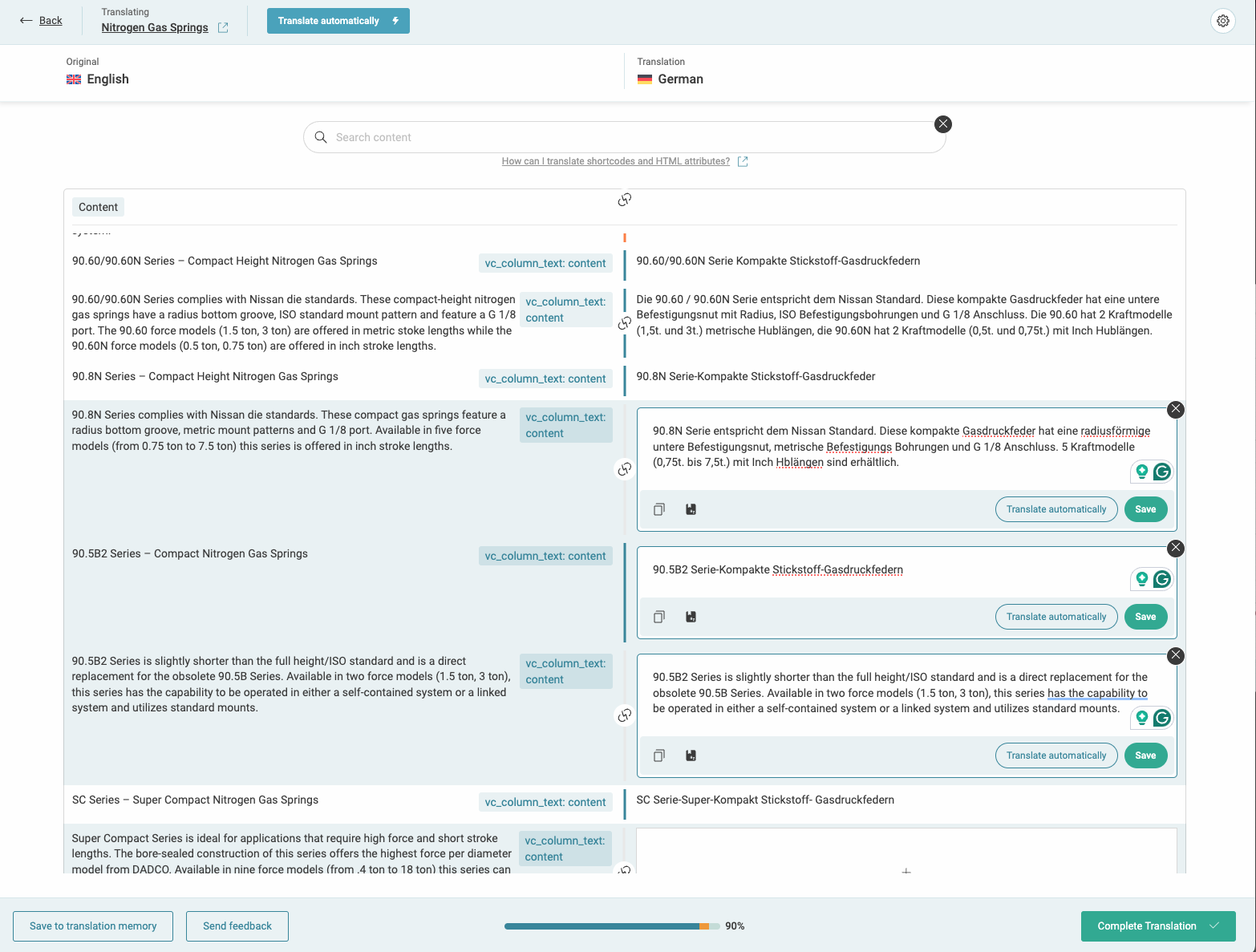 |
| August 26, 2024 at 6:59 am #16102722 | |
|
Prosenjit Barman WPML Supporter since 03/2023 Languages: English (English ) Timezone: Asia/Dhaka (GMT+06:00) |
Hello There, If the pages were translated using the Advanced Translation Editor only, it’s possible that the translations are not synchronized, which might be why they aren’t appearing in the translation editor during updates. Could you please try the following steps and see if they help resolve the issue? - Please go to WPML > Support > Troubleshooting -- Synchronize posts taxonomies [Select the Post type where you're having the issue, from the Dropdown associated with the button then click the buttonn] - Once done, clear the caches from your site and browser. The translated content should appear in the Translation Editor afterward if they were added using the Advanced Translation Editor. Regarding the issue with saving fields—typically, clicking the Save button should save the translation. If you’re unable to save it, please let us know which translations are causing the problem. Additionally, you can try switching to our previous translation editor to see if you can save the translation from there. Here’s how you can switch to the previous translation editor: – Go to the top right corner of the translation editor Please let me know the update. I will be happy to help if you need further assistance in this matter. Best regards, |
| August 27, 2024 at 1:54 pm #16110365 | |
|
kimberlyW-4 Site owner |
I am now able to save translations, but still having some issues. Fields that have ® get an error message when saving. I'm attaching an image here. Some fields are being saved as draft only and not allowing me to complete the translation.   |
| August 28, 2024 at 7:24 am #16112883 | |
|
Prosenjit Barman WPML Supporter since 03/2023 Languages: English (English ) Timezone: Asia/Dhaka (GMT+06:00) |
Hello There, It looks like you've used HTML to format some text. In the translation editor, you'll need to apply the same formatting to the translation to save it. Without matching the formatting, you won’t be able to save the translation. To apply the same formatting: - In the translation box, select the text where you applied the HTML formatting. Based on the screenshot, in the translation box, there is an ® symbol beside the text `MiniLINK`. Select the ® character and click on the `sup` marker button below the translation box, as shown in this screenshot: hidden link. In this way, you'll be able to apply the same HTML formatting to the translation and save them. If you have used HTML formatting in any other texts or paragraphs, please ensure you apply the same formatting to the translation by following the instructions above before saving. Let me know the update. I will be happy to help if you need further assistance in this matter. Best regards, |
| August 30, 2024 at 12:24 pm #16124724 | |
|
kimberlyW-4 Site owner |
The original issue is still there though. Many translations are missing in the ATE on the backend even after I followed the steps above. I can add it back, but why did they go missing? How can we recover them? |
| September 2, 2024 at 4:38 am #16129868 | |
|
Prosenjit Barman WPML Supporter since 03/2023 Languages: English (English ) Timezone: Asia/Dhaka (GMT+06:00) |
Hello There, As I mentioned in my first message, this type of issue often occurs due to switching between translation editors. Since you mentioned that the translation was added using the Advanced Translation Editor from the start, it's important to note that no functionality within the ATE would cause the translation to be removed from the editor. Could you please check the revisions of the translated page to see if restoring a previous version helps in displaying the translated contents in the ATE? Please check the guide below to understand the process of restoring revisions. - hidden link It's also possible that the translation memory of your site may be corrupted and causing the issue. However, please try the solution mentioned above and let me know how it goes. If you need further assistance, I'll be happy to help. Best regards, |
| September 3, 2024 at 4:36 pm #16136913 | |
|
kimberlyW-4 Site owner |
I did a screen capture of every date from when the content was there until it went missing and we added it back. I believe on August 8, you can see that the content was missing but was not removed. We never switched editors, we always used ATE and added translations manually. Here's a link to view the screenshots: hidden link |
| September 3, 2024 at 5:19 pm #16137161 | |
|
kimberlyW-4 Site owner |
I also just looked at another page missing translations within ATE but is showing up on the front-end. Here are screenshots showing the last time a revision was made and how it looks now. hidden link hidden link I'd like to run an SQL query to see if the data is in the database but, for some reason, is not showing up in the editor. I read an article in your support articles that occasionally field names change when using tools like wpbakery. |
| September 4, 2024 at 4:30 am #16138253 | |
|
Prosenjit Barman WPML Supporter since 03/2023 Languages: English (English ) Timezone: Asia/Dhaka (GMT+06:00) |
Hello There, From the screenshots, I can see the revisions and ATE, but to determine how the translation was added (whether via the WP editor or the Classic Translation Editor) or why it might be missing, we need to check the database. To further investigate why the data is missing from the editor, a closer inspection will be necessary to identify the root cause of the issue. I would like to request temporary access (wp-admin and FTP) to your site to take a closer look at the issue. It would be ideal to have a testing site where the issue is replicated. Additionally, if you're sharing access to your main site, I will need your permission to install, activate, or deactivate plugins/themes on your site as part of the debugging process. You will find the needed fields below the comment area when you log in to leave your next reply. The information you will enter is private which means only you and I can see and have access to it. Maybe I'll need to replicate your site locally. For this, I’ll need to temporarily install a plugin called “Duplicator” or "All in One WP Migration" on your site. This will allow me to create a copy of your site and your content. Once the problem is resolved I will delete the local site. Let me know if this is ok with you. IMPORTANT Looking forward to your response. Best Regards, |
| September 5, 2024 at 4:58 am #16143001 | |
|
Prosenjit Barman WPML Supporter since 03/2023 Languages: English (English ) Timezone: Asia/Dhaka (GMT+06:00) |
Hello There, I have checked, and as I suspected, there are signs that translations were added manually using the WP Editor. For more clarity, please take a look at this screenshot: hidden link The issue you're experiencing typically occurs when different translation methods are mixed. Since you made manual changes and then used the editor again, the translation memory wasn't updated, which is likely the main cause of the problem. I would also like to point out that, as you mentioned, if the field name changes for any reason, it could lead to this type of issue. Now, the best approach would be to re-add the translation in the translation editor and continue using the Advanced Translation Editor for adding or updating content. Since the translation already appears on the frontend, you can simply copy the translated content from the frontend, paste it into the translation editor, and save the changes. This way, you won't have to start the translation from scratch. I hope you can understand. Feel free to let me know if you need further assistance or clarification. I will be happy to help. Best regards, |
| September 5, 2024 at 12:50 pm #16145106 | |
|
kimberlyW-4 Site owner |
The fields you highlighted are from a year ago; this issue came up on August 1st. As far as I know, the translations were there in March of this year. |
| September 6, 2024 at 6:12 am #16147266 | |
|
Prosenjit Barman WPML Supporter since 03/2023 Languages: English (English ) Timezone: Asia/Dhaka (GMT+06:00) |
Hi There, Indeed, some of the translations were done using the Native editor a year ago. However, after conducting a thorough investigation of our translation management system, I would like to share my findings. I found that the initial translations were completed on the site "hidden link." Afterward, the site was moved to the production domain, and two more staging sites were created from there. During these migrations, the translation memory may not have been copied correctly or could have been broken, which might explain why the translations now appear incomplete. I also noticed that the translation memory from the original site wasn't copied to your main site. I've now transferred the memory to your main site. However, since I don't have access to the main site, I can't verify whether the translations are displaying correctly in the editor. If you have an in-progress translation job for the "Nitrogen Gas Spring" page, please cancel the job by going to WPML > Translation Management > Jobs and try translating the page again. If the issue persists, it might be best to update the translation memory by re-entering the translation in the translation editor and saving them. You can copy the content from the frontend and paste it into the editor, which should save time compared to translating everything from scratch. I hope the issue will not occur again after that. But, you can keep monitoring the pages and if the issue in the editor occurs again, let me know. I will check and escalate it to the respective team for further investigation. Let me know the update. I will be happy to help if you need further assistance in this matter. Best regards, |
| September 6, 2024 at 12:11 pm #16148893 | |
|
kimberlyW-4 Site owner |
Ok - I cancelled the jobs and went to review the Portuguese version of Nitrogen Gas Springs and once again all the translations that I added back into the ATE about a week ago are now missing again. I know that I can go ahead and add it back again, but that was already done numerous times. Why do so many jobs have a status of "Completed - Needs update"? |




The topic ‘[Closed] Translation was missing from the advanced translator but is still visible on website.’ is closed to new replies.