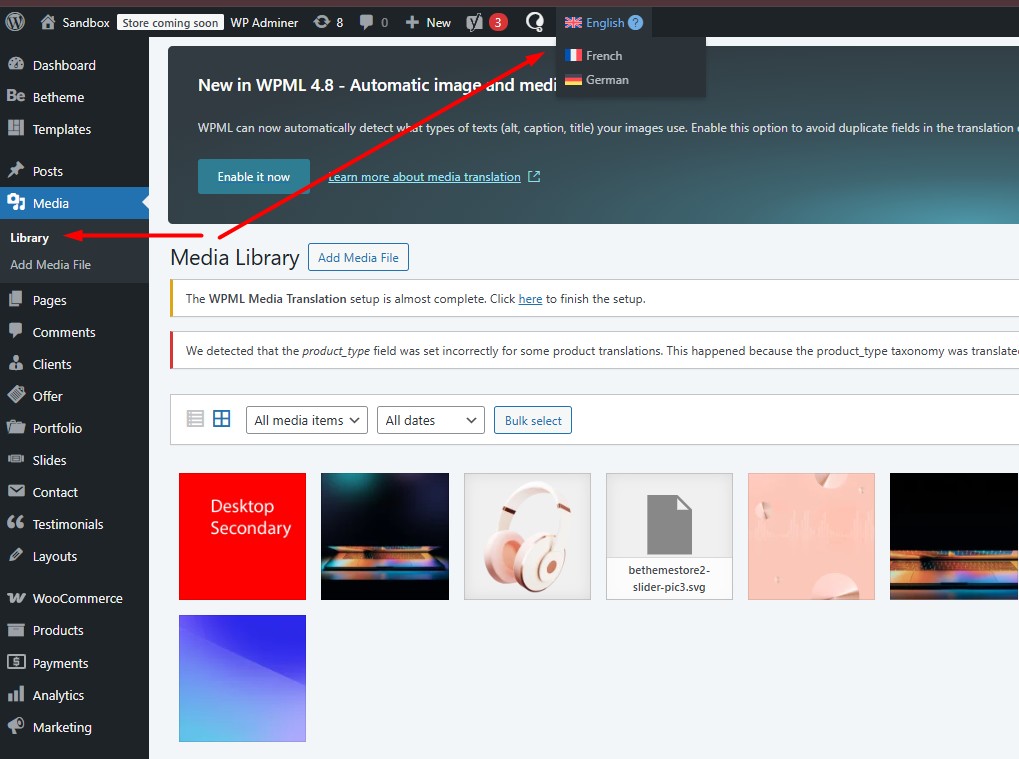
Hello - The website in questions uses DE (main) and EN as languages. Our customer deleted a bunch of images while Media was set to EN. Of course in EN now they see e.g. 200 items but in DE 400. As far as I understand there is no setting to simply keep media "in sync" - e.g. if image in one language is deleted it is actually deleted from the server for good. Can you elaborate on how WPML treats media and how I can make sure my customer just sees the 200 items they wanted to keep? Thanks. Tobias
Thank you for contacting WPML Support. WPML treats media as standard WordPress attachments. When an image is deleted, it is removed from the server and no longer exists in any language.
- In your case, the difference you see (EN: 200 items, DE: 400 items) means those extra images were not deleted. They still exist as attachments in the default language (DE). Deleting media while the Media Library is filtered to EN does not remove DE only attachments.
- WPML only synchronizes media from the default language to secondary languages, not the other way around. Since DE is the site’s default language, you will need to delete the extra images from Media >> Library while selecting the DE from the admin language switcher to reach the intended total. We recommend taking a backup of your site first for safety reasons.
- For future consistency, you may enable “When deleting a post, delete translations as well” in WPML >> Settings. This helps keep translated content in sync when deletions are done from the default language.