Skip to content Skip to sidebar

This thread is resolved. Here is a description of the problem and solution.

Problem:
After installing all WPML components, attempting to translate WooCommerce results in a blank page when following the steps: Wordpress > WooCommerce Multilingual and Multicurrency > Start the confirmation wizard.
Solution:
1. Ensure your site is backed up for safety.
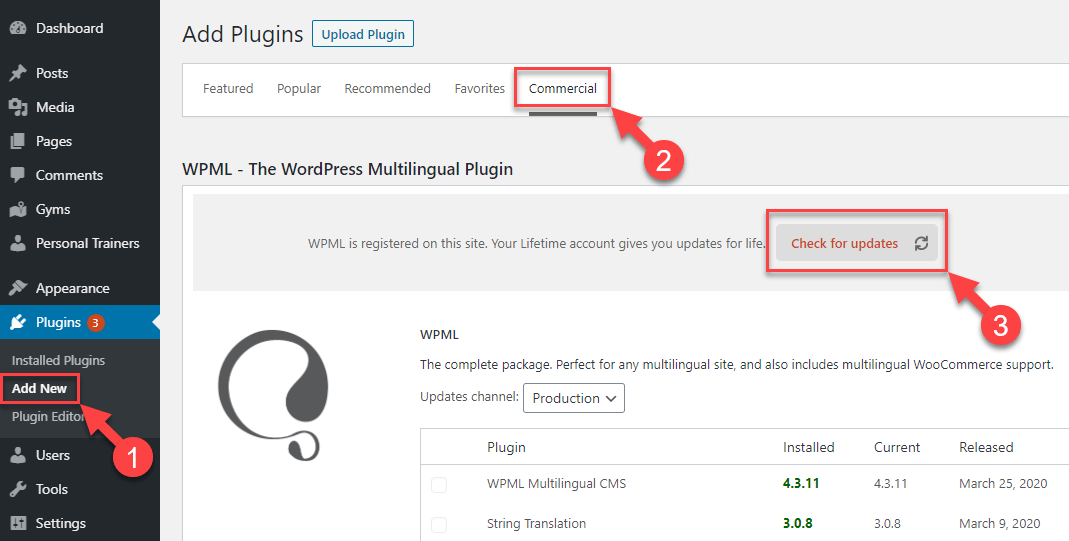
2. Update WPML to the latest version, WPML 4.7.1, from Plugins >> Add New Plugin page, click the Commercial tab, and then click the “Check for updates” button.
3. Clear all types of caches including site/server cache, plugin cache, CDN cache (if applicable), and browser cache.
4. Enable error reporting by modifying the 'wp-config.php' file. Replace

define('WP_DEBUG', false);

with:

// Enable WP_DEBUG mode<br />define( 'WP_DEBUG', true );<br /><br />// Enable Debug logging to the /wp-content/debug.log file<br />define( 'WP_DEBUG_LOG', true );<br /><br />// Disable display of errors and warnings<br />define( 'WP_DEBUG_DISPLAY', false );<br />@ini_set( 'display_errors', 0 );<br /><br />define( 'SCRIPT_DEBUG', true );

Then, attempt to run the WooCommerce setup wizard again and check if a debug.log file is created in your site's wp-content directory. If so, review its contents for errors.

If these steps do not resolve your issue, or if the solution seems outdated or irrelevant to your specific case, we highly recommend checking related known issues, verifying the version of the permanent fix, and confirming that you have installed the latest versions of themes and plugins. If the problem persists, please open a new support ticket.

This is the technical support forum for WPML - the multilingual WordPress plugin.

Everyone can read, but only WPML clients can post here. WPML team is replying on the forum 6 days per week, 22 hours per day.

Tagged: 

This topic contains 1 reply, has 0 voices.

Last updated by Noman 1 year, 2 months ago.

Assisted by: Noman.

Author Posts
February 20, 2025 at 8:17 am #16727945

branding-gestiO-esportiva-s.l.

Hi,

There is only one doubt left. After having installed all the WPML components we see that the translation part of Woocommerce cannot be executed because the page remains blank and does nothing. Would you know why this could be happening?

The steps to follow are, WordPress>WooCommerce Multilingual and Multicurrency> Start the confirmation wizard> and from here the page goes blank and Woocommerce can not be translated.

Thank you very much for your invaluable help

16727808-Captura_de_pantalla_2025_02_20_a_las_9.02.32.png
16727808-Captura_de_pantalla_2025_02_20_a_las_9.02.15.png
February 20, 2025 at 8:41 am #16728101

Noman

Hi,

Thank you for contacting WPML Support. Could you please follow the below steps and see if this resolves the issue:

1. Take a backup of your site first for safety reasons.

2. We have recently released WPML 4.7.1, please update it to the latest version. You can update it from Plugins >> Add New Plugin page, click the Commercial tab, and then click the “Check for updates” button. Here is the screenshot for more details:
https://wpml.org/wp-content/uploads/2020/04/wpml-force-plugin-update-1.png

3. Please delete all sorts of caches on your site/server cache if any / plugin cache / CDN cache (if any), clear browser cache, and then see if it resolves the issue afterward.

4. If still an issue persists, please enable error reporting on your site as I need to see the details of the latest error log to understand the cause of the issue better. To enable it, open your ‘wp-config.php’ file and look for ‘define(‘WP_DEBUG’, false);’. Change it to:

// Enable WP_DEBUG mode
define( 'WP_DEBUG', true );
 
// Enable Debug logging to the /wp-content/debug.log file
define( 'WP_DEBUG_LOG', true );
 
// Disable display of errors and warnings
define( 'WP_DEBUG_DISPLAY', false );
@ini_set( 'display_errors', 0 );
 
define( 'SCRIPT_DEBUG', true );

After adding the above code, please try to run the WooCommerce setup wizard again, and if this process creates a debug.log file in your site's wp-content directory. Please send me its contents.

Please let me know the results,
Thank you