This thread is resolved. Here is a description of the problem and solution.
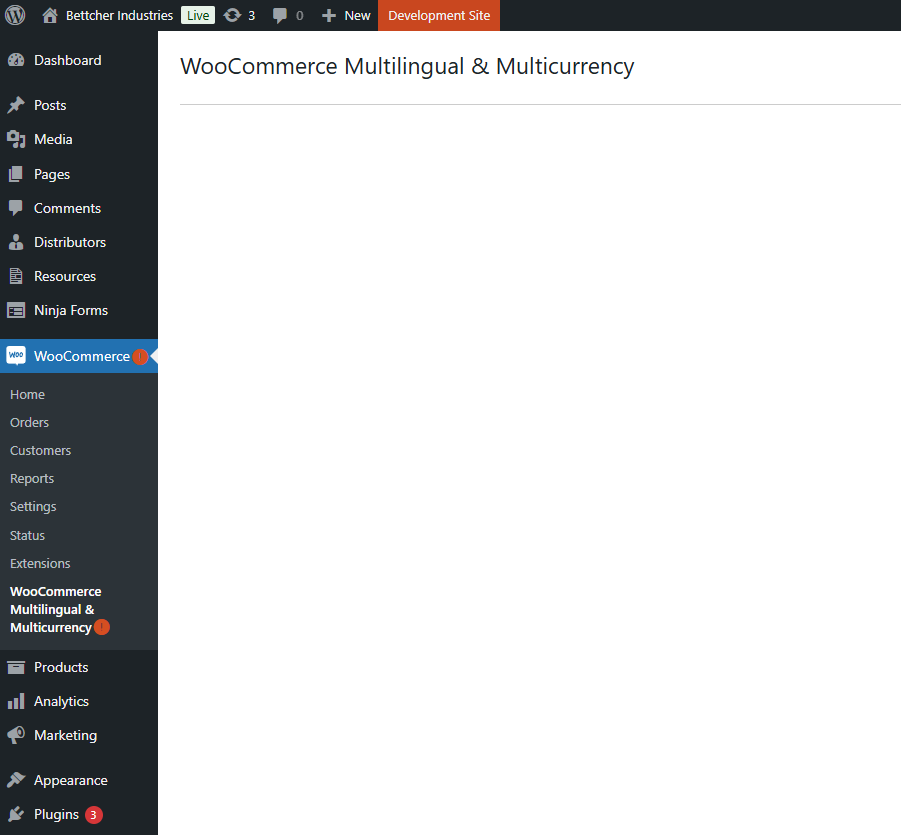
Problem: The client is experiencing a blank screen in WooCommerce Multilingual & Multicurrency, accompanied by an orange alert-circle on the WP Admin entries for WooCommerce and WooCommerce Multilingual & Multicurrency. The alert does not provide information on what it signifies or how to resolve the issue. Solution: We recommend disabling all plugins except for WPML, WooCommerce, and WooCommerce Multilingual to isolate the issue. Additionally, the client discovered that a notification management plugin was suppressing the initial setup wizard message for WooCommerce Multilingual. Once the setup wizard was completed, the functionality returned to normal.
If this solution does not resolve your issue, or if it seems outdated or irrelevant to your case, we highly recommend checking related known issues at https://wpml.org/known-issues/, verifying the version of the permanent fix, and confirming that you have installed the latest versions of themes and plugins. If problems persist, please open a new support ticket.
This is the technical support forum for WPML - the multilingual WordPress plugin.
Everyone can read, but only WPML clients can post here. WPML team is replying on the forum 6 days per week, 22 hours per day.
Background of the issue:
I am working on a site under development using WooCommerce Multilingual & Multicurrency with WPML.
Symptoms:
The WooCommerce Multilingual & Multicurrency is showing a blank screen with just the title. There is also an orange alert-circle on both that entry and the main WooCommerce entry in the WP Admin, but it does not provide any information about what the alert means or how to fix it.
Questions:
What does the orange alert-circle mean in WooCommerce Multilingual & Multicurrency?
How can I fix the blank screen issue in WooCommerce Multilingual & Multicurrency?
The blank page means that there is an error in the PHP code that your site runs. When errors are not caught, the server stops everything and returns a page that says “500 error” or an empty page. Different servers are configured to display these errors slightly differently, but they all mean the same – there is an unhandled PHP error in the site’s code.
First, you need to see what the errors are. Guessing what might be the problem and trying different solutions may lead to even more trouble. The first step is to enable debug. You can do this by adding a few lines to the site’s wp-config.php file. With error log enabled, you will see what the actual problem is.
To enable it, open your wp-config.php file and look for define(‘WP_DEBUG’, false);. Change it to:
define('WP_DEBUG', true);
In order to enable the error logging to a file on the server you need to add yet one more similar line:
define( 'WP_DEBUG_LOG', true );
In this case, the errors will be saved to a debug.log log file inside the /wp-content/directory.
I've enabled debugging and I get a bunch of depreciation errors from Oxygen Builder (specifically in it's Gutenberg and WooCommerce add-ins) and a couple warnings for misc stuff. Nothing directly related to WPML or WooCommerce itself. Also no critical errors.
Could you show me some screenshots related to the problem? I suggest quickly testing with no plugins except WPML, WooCommerce, and WooCommerce Multilingual.
Looks like I had a notification management plug-in that was suppressing the initial set-up wizard message for WooCommerce Multi-Language. Once I ran that setup everything seems to be working. My fault! Thanks for your help.