
This thread is resolved. Here is a description of the problem and solution.
Problem:
You are trying to use default WooCommerce translations for your shop, but WPML can't load the default .mo file.
Solution:
1) Go to Dashboard > Updates and load the latest updates for WordPress.
2) Go to WPML > Theme & Plugin Localization and scan the theme and plugins for strings.
Before running these steps on the staging, ensure to fix collation issues and run WPML troubleshooting options to clean up string tables (WPML > Support > troubleshooting).
If these steps do not resolve the issue, it could be due to various factors such as minimum server requirements, server limitations like missing writing permissions, corrupted data on the string tables, corrupted language files, or issues between plugins or the theme.
If you encounter issues on the live site after applying these steps, we recommend opening a new support ticket. Additionally, we highly recommend checking related known issues at https://wpml.org/known-issues/, verifying the version of the permanent fix, and confirming that you have installed the latest versions of themes and plugins.
If the solution provided here is not relevant or outdated, please contact us for further assistance at WPML support forum.
This is the technical support forum for WPML - the multilingual WordPress plugin.
Everyone can read, but only WPML clients can post here. WPML team is replying on the forum 6 days per week, 22 hours per day.
Tagged: Exception
This topic contains 46 replies, has 2 voices.
Last updated by Andreas W. 1 year, 6 months ago.
Assisted by: Andreas W..
| Author | Posts |
|---|---|
| October 7, 2024 at 6:21 pm #16263240 | |
 Andreas W. WPML Supporter since 12/2018 Languages: English (English ) German (Deutsch ) Timezone: America/Lima (GMT-05:00) |
Yes, please give this a try and then go to WPML > Support > Troubleshooting and in the bottom section use the button to force the dialog for creating custom .mo language files. I hope this will solve the issue. |
| October 7, 2024 at 6:46 pm #16263281 | |
 daivyM |
Just done it, but problem still occurs. |
| October 8, 2024 at 1:48 am #16263711 | |
|
Andreas W. WPML Supporter since 12/2018 Languages: English (English ) German (Deutsch ) Timezone: America/Lima (GMT-05:00) |
This seems to be a server issue and we do not have any onfluence on this from our end. In this case, please consult your hosting support team, explain that WPML is trying to create files on the server and for some reason is getting blocked. Further, I would suggest you make sure to register WPML on the staging site and ask your hosting company to verify that they are not blocking any of those domains: wpml.org |
| October 8, 2024 at 7:02 am #16264013 | |
|
daivyM |
Could you also check I've done everything correctly on the staging website ? As mentioned, I changed the collation for the database, and changed writing permissions. Was that all I had to do? |
| October 8, 2024 at 8:08 am #16264220 | |
|
daivyM |
By the way, I noticed that clicking "Fix WPML tables collation" does not work either. When I click on it, nothing happens. 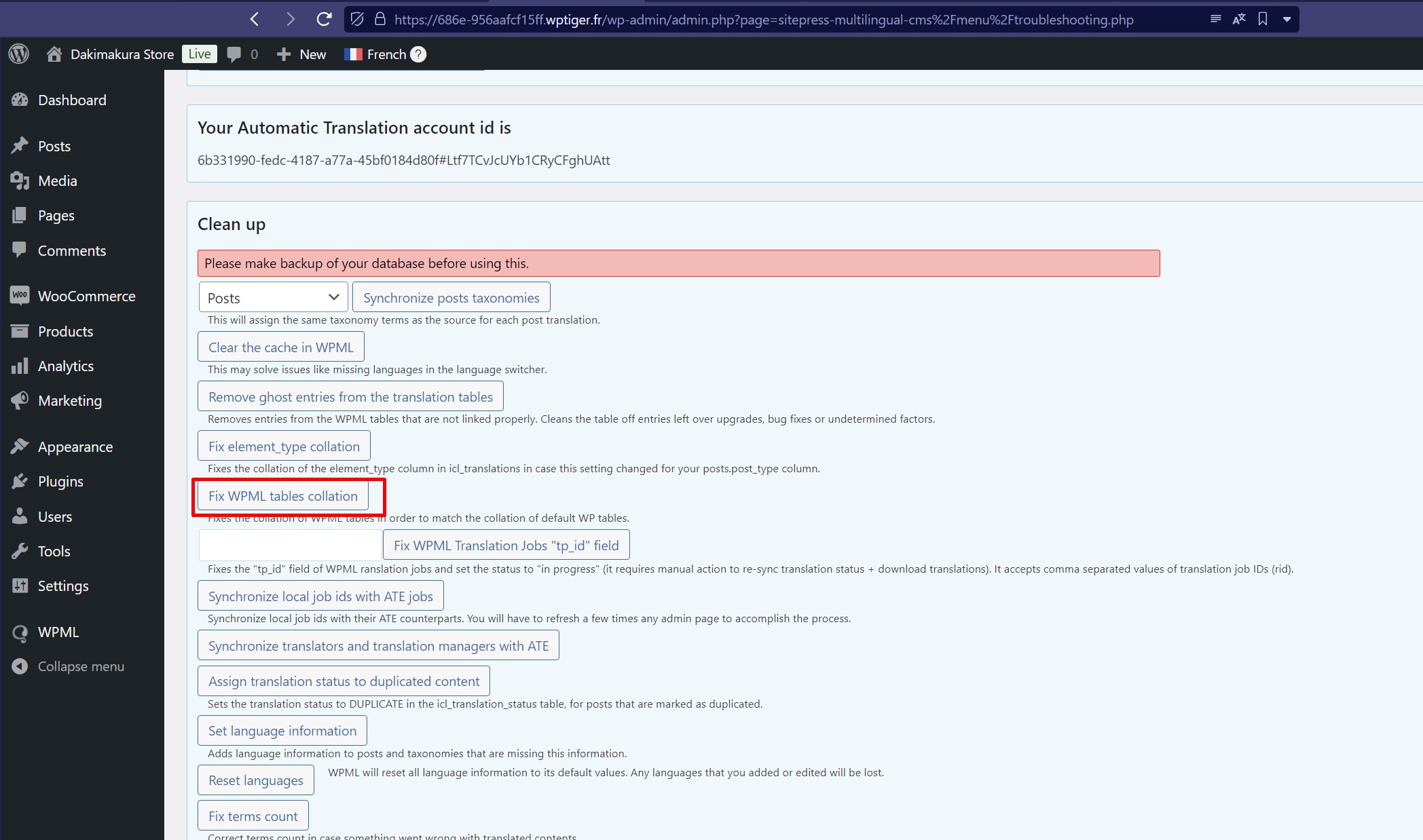 |
| October 9, 2024 at 1:58 pm #16270818 | |
|
Andreas W. WPML Supporter since 12/2018 Languages: English (English ) German (Deutsch ) Timezone: America/Lima (GMT-05:00) |
I was able to access the DB today, which did not work earlier, and the tables are looking correct now. I can not tell you more about the folder permissions, as FTP access is denied. Please consult your hosting company and ask them to verify if the permissions are set correclty. Also, ask if they are blocking any of our domains, as mentioned earlier. Further, it looks like WPML > Support > Troubleshooting displays that the REST API is disabled, but I can access it on front end. Please also ask the hosting support of the REST API is somehow limited on this hosting platform. Please tell them, that this issue did not occur on a local copy of the site on a virtual server. More details: |
| October 9, 2024 at 4:16 pm #16271734 | |
|
daivyM |
I already gave you my FTP account, please check my previous messages. Permissions are set correctly, and hosting company is not blocking your domains. The REST API was working fine on the live website, and is showed as "enabled". This problem only occurs on the staging website, maybe you changed something that disabled the REST API. |
| October 9, 2024 at 7:53 pm #16272277 | |
|
Andreas W. WPML Supporter since 12/2018 Languages: English (English ) German (Deutsch ) Timezone: America/Lima (GMT-05:00) |
On your staging I went to Dashboard > Updates and made sure to download the latest language files from WordPress. --- Also, I realized, that the issue about default strings appears not to be the the .mo files dialog for WPML not opening. After reviewing this further, this dialog will only appear, once you create your own translations. The default translations will be loaded on my test site even without having .mo files. --- - I did not change anything regarding REST API on the staging site. I do not see this REST disabled notification on my local site copy, which is an identical copy of your staging site. Anyhow, this seems to be a false postitive, as you can see here that the REST API is functioning: hidden link --- - I did receive the FTP credencials, but once I enter them I get the message: --- Could you please provide me an example on the Frontend where strings are not loading as expected? I can see for example here, that the translations are actually loading: Also, take note that in your specific case the Woodmart Theme overwrites many of the default WooCommerce strings. |
| October 9, 2024 at 8:11 pm #16272400 | |
|
daivyM |
"After reviewing this further, this dialog will only appear, once you create your own translations." What do you mean by that ? I just looked at several pages on the staging website the problem seems to have been solved, thank you. Can you give me a summary of the steps to be taken on the production site in order to solve the problem once and for all? |
| October 10, 2024 at 1:49 am #16272740 | |
|
Andreas W. WPML Supporter since 12/2018 Languages: English (English ) German (Deutsch ) Timezone: America/Lima (GMT-05:00) |
Hi, I am glad to hear that the issue seems to be solved. 1) Go to Dashboard > Updates and load the latest Updates for WordPress. 2) Go to WPML > Theme & Plugin Localization and scan the theme and plugins for strings. What was solved before running those steps on the staging: - fixed collation issues If, this will not direclty solve the issue there could be various points that cause the issue, like: - Minimum requierments for the server If you run into issues on the live site applying step 1) and 2), please let me know and i can offer to take a look at the site. Best regards |
| October 10, 2024 at 6:43 am #16273013 | |
|
daivyM |
Hello, Thanks for the recap but you did not answer to my last post's question : After reviewing this further, this dialog will only appear, once you create your own translations." It seems to be an important step but I don't understand what you mean by that. |
| October 10, 2024 at 4:59 pm #16276525 | |
|
Andreas W. WPML Supporter since 12/2018 Languages: English (English ) German (Deutsch ) Timezone: America/Lima (GMT-05:00) |
The custom language files, which WPML generates at /wp-content/languages/wpml are using the translations of WPML > String-Translation and convert them into .mo files. The goal of this approach is a performance enhancement. Those files are not requiered to display translation that are based on files coming from theme's and plugins. |
| October 10, 2024 at 5:18 pm #16276535 | |
|
daivyM |
Okay, but I don't see how that helps me solve the problem or understand how it was solved, and I'm getting tired of going around in circles in total vagueness, as well as waiting almost a day for an answer that doesn't say much. Sorry if that's a bit harsh for you to hear, but that's how I feel. On another pre-prod site, I did steps 1 and 2 (fixing collations tables and cleaning up string tables), but that didn't solve the problem. So it looks like you've done something else to make the Woocommerce and Woodmart translations appear by default. What did you do? |
| October 10, 2024 at 5:35 pm #16276583 | |
|
Andreas W. WPML Supporter since 12/2018 Languages: English (English ) German (Deutsch ) Timezone: America/Lima (GMT-05:00) |
I am sorry to hear that you are unhappy with my support. Take note, that you can open a new ticket anytime and one of my colleagues will be glad to assist you and maybe have a different approach towards investigating this problem. I am honeslty not sure at this point what was cuasing the issue, as there are too many factors that need to be considered. It simply worked at some point after running step 1) and 2). When I last visited the site, all the translatiosn showed up on Frontend but not on WPML > String Translation. This is an unexpected and rare behavior and I was not able to figure out what is causing it. On the local copy I had the same issue. Somehow everything was registered inside WPML to the text-domain "default". I cleaned up the whole string table, then scanned theme and plugins again and then it worked. You find an option on WPML > String Translation to delete strings by domain. This was another step I took, but take note, that you might remove strings that you translated aleady. You reported that the issue got solved and I did not take a further look at the staging site. I currently I can not longer log in. If you would like me to check this on the live site, let me know. The private reply form is enabled again. |
| October 10, 2024 at 5:39 pm #16276586 | |
|
daivyM |
I did not change the login and password for staging website, so I don't know why you can't connect. "I cleaned up the whole string table" How did you do that ? I will try to do this on the another staging website to see if it fixes the problem. |






