
This is the technical support forum for WPML - the multilingual WordPress plugin.
Everyone can read, but only WPML clients can post here. WPML team is replying on the forum 6 days per week, 22 hours per day.
| Sun | Mon | Tue | Wed | Thu | Fri | Sat |
|---|---|---|---|---|---|---|
| - | 10:00 – 17:00 | 10:00 – 17:00 | 10:00 – 17:00 | 10:00 – 17:00 | 10:00 – 17:00 | - |
| - | 18:00 – 19:00 | 18:00 – 19:00 | 18:00 – 19:00 | 18:00 – 19:00 | 18:00 – 19:00 | - |
Supporter timezone: Asia/Kathmandu (GMT+05:45)
This topic contains 15 replies, has 0 voices.
Last updated by Shekhar Bhandari 1 month, 1 week ago.
Assisted by: Shekhar Bhandari.
| Author | Posts |
|---|---|
| March 6, 2026 at 4:25 am #17876479 | |
 allenC-2 |
Hello WPML Support Team, I would like to request assistance with a WPML issue that occurred after migrating our website server. Website URL: Issue description: Current situation: * The site was migrated to a new server. However, the following problems remain: * Language switching changes the URL correctly (e.g., /en/). Troubleshooting already attempted: * Refreshed WPML license data Despite these steps, the issue remains unchanged. Because the site contains hundreds of translated pages, manually recreating translations is not feasible. We would appreciate guidance on how to restore synchronization between original and translated pages after a server migration. If needed, we can provide administrator access or additional technical details. Thank you for your assistance. Best regards |
| March 9, 2026 at 7:53 am #17880821 | |
 Shekhar Bhandari WPML Supporter since 03/2015 Languages: English (English ) Timezone: Asia/Kathmandu (GMT+05:45) |
Hello there, Thank you for contacting WPML support. I'd be happy to assist you on this issue. Can you please go to WPML->Translation Dashboard and see if you can see wpml migrations notices there? https://wpml.org/documentation/translating-your-contents/advanced-translation-editor/using-advanced-translation-editor-when-you-move-or-use-a-copy-of-your-site/ If the migration is completed and the problem still exists, To debug this issue further, I would need to check your site settings once, for this I would need temporary access (wp-admin and ftp) to your site. So could you please provide me with those details, you will find the needed fields for this below the comment area when you log in to leave your next reply. This info is private and available to you and WPML supporters only. Note: Look forward to your reply. Thanks |
| March 10, 2026 at 8:04 am #17884194 | |
|
Shekhar Bhandari WPML Supporter since 03/2015 Languages: English (English ) Timezone: Asia/Kathmandu (GMT+05:45) |
Hello there, The provided login details is not administrative one, can you please upgrade the privileges? Also, can you provide me few page links where I can see the issue? Thanks |
| March 11, 2026 at 10:38 am #17888290 | |
|
Shekhar Bhandari WPML Supporter since 03/2015 Languages: English (English ) Timezone: Asia/Kathmandu (GMT+05:45) |
Hello there, The provided login details is not administrative one, can you please upgrade the privileges? Also, can you provide me few page links where I can see the issue? Thanks |
| March 12, 2026 at 2:45 am #17890638 | |
|
allenC-2 |
Hello, The login details I provided already have WordPress Administrator privileges. The issue is not limited to just a few pages — in fact, no page on the site was translated successfully. You can check the issue directly on the site here: On the desktop version, there is a language switcher menu at the top right. However, when switching languages, none of the pages appear to be translated correctly. So this seems to be a site-wide translation issue, not a single page issue. Could you please check the site directly from the front end and let me know specifically which admin permission is missing on your side, if any? From my side, the account is already set as Administrator. Thank you. |
| March 12, 2026 at 2:48 am #17890639 | |
|
Shekhar Bhandari WPML Supporter since 03/2015 Languages: English (English ) Timezone: Asia/Kathmandu (GMT+05:45) |
Hello there, Please check the screenshot, I don't have access to WPML, Plugins, themes at all. Thanks 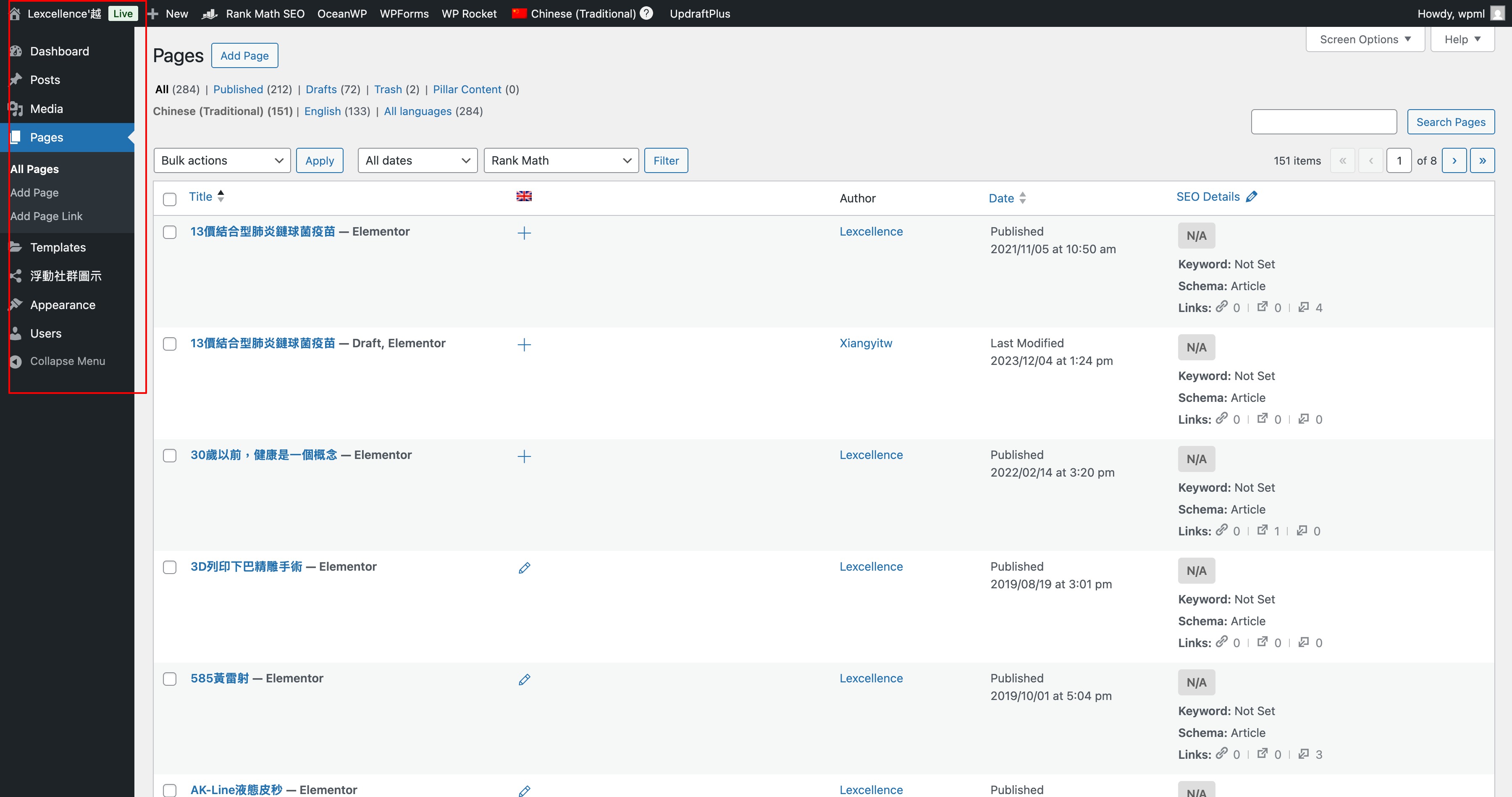 |
| March 12, 2026 at 2:48 am #17890654 | |
|
allenC-2 |
Hello, Apologies for the confusion. I checked again and found that the client had permission management enabled, which affected the access. I have now logged in and enabled the required permissions. Please check again when you have a moment, and let me know if everything is accessible now. Thank you. |
| March 12, 2026 at 2:56 am #17890659 | |
|
Shekhar Bhandari WPML Supporter since 03/2015 Languages: English (English ) Timezone: Asia/Kathmandu (GMT+05:45) |
Hello there, The login works now. Can you let me know how you translated the content before migrating the site, from what I see it looks like it's duplicated instead of translated. Further, But WPML shows the message: "WPML is no longer synchronizing this page with the original document." * The translated pages are no longer synchronized with the original language content. I can't see this message at all, can you send me a link where I can see this. Further, provide me links where I can see the broken layout. Thanks |
| March 12, 2026 at 10:09 am #17891652 | |
|
allenC-2 |
Hi, Before the migration, all translations were done using WPML's Translation Editor. The content was properly translated, not duplicated. Chinese (original, working fine): hidden link The English site was fully functional before the migration. After migrating, the translation relationships appear to be broken, the English pages show broken layouts, and the translated content is not displaying correctly. |
| March 12, 2026 at 12:26 pm #17892306 | |
|
Shekhar Bhandari WPML Supporter since 03/2015 Languages: English (English ) Timezone: Asia/Kathmandu (GMT+05:45) |
Hello there, hidden link shows 403 for me now, can you fix this, probably your server blocked the access, I am trying it from Nepal. Also, can you please follow the below steps and see if it helps: Look forward to your reply. Thanks |
| March 13, 2026 at 5:28 am #17894215 | |
|
Shekhar Bhandari WPML Supporter since 03/2015 Languages: English (English ) Timezone: Asia/Kathmandu (GMT+05:45) |
Hello there, I can access the site now, I would like to know if you were using the same WPML advanced translation editor before, as on our end I couldn't see you were using this editor before. Do you still have backup of the site before migration as I believe the migration is corrupt. Look forward to your reply. Thanks |
| March 13, 2026 at 9:24 am #17894849 | |
|
allenC-2 |
Hi, Thank you for your response. Regarding the backup — unfortunately, a clean pre-migration backup is not available. The site went through two migrations: The original backup was from after the first migration, so it is possible the data was already corrupted at that point. However, I can provide the following from the current server (hosted on RunCloud): 1. **Database backup** — SQL export from RunCloud → Databases Please let me know which of these would be most helpful, and I will get them to you right away. Thanks |
| March 13, 2026 at 9:38 am #17894899 | |
|
Shekhar Bhandari WPML Supporter since 03/2015 Languages: English (English ) Timezone: Asia/Kathmandu (GMT+05:45) |
Hello there, Can you provide me a feedback on this too?
I suggest sharing a backup of your wp-content folder and your database (the oldest). You can zip the files and send them to me via Google Drive. With these, I can set up a local copy of your site and take a closer look at the issue. Look forward to your reply. Thanks |
| March 16, 2026 at 3:27 am #17898656 | |
|
Shekhar Bhandari WPML Supporter since 03/2015 Languages: English (English ) Timezone: Asia/Kathmandu (GMT+05:45) |
Sure, let me know when the backup file is ready. |
| March 17, 2026 at 1:26 am #17901957 | |
|
allenC-2 |
Hi, the backup file is ready and I have already shared the Google Drive link with you via private message. Please check your messages. Let me know if you need anything else! |






The topic ‘[Closed] WPML Translation Synchronization Issue After Server Migration’ is closed to new replies.