
This is the technical support forum for WPML - the multilingual WordPress plugin.
Everyone can read, but only WPML clients can post here. WPML team is replying on the forum 6 days per week, 22 hours per day.
This topic contains 17 replies, has 1 voice.
Last updated by Christopher Amirian 1 month, 1 week ago.
Assisted by: Christopher Amirian.
| Author | Posts |
|---|---|
| February 26, 2026 at 1:16 pm | |
 sfatL |
The problem I reported last time is still not resolved. In the backend everything's looks normal - category titles and description are shown in Slovakian, but on the front-end they are shown in Polish. Not all of them - some of them - e.g. hidden link. Quick fix is to open category on the backend and hit save, but after some time it switches back to Polish. |
| February 26, 2026 at 1:54 pm #17856830 | |
 Kor |
Thanks for your patience. Here is the ticket and please let me know how it goes. |
| February 26, 2026 at 2:51 pm #17857130 | |
|
sfatL |
I've added string translation for this category: hidden link, but nothing changed on front-end. It still shows Polish version. |
| February 26, 2026 at 4:05 pm #17857383 | |
|
Kor |
Thanks for your reply. Do you have any server cache running on the server? I've checked the Slovak language here hidden link and the Yoast SEO desc is showing the correct version as shown in attached screenshot. 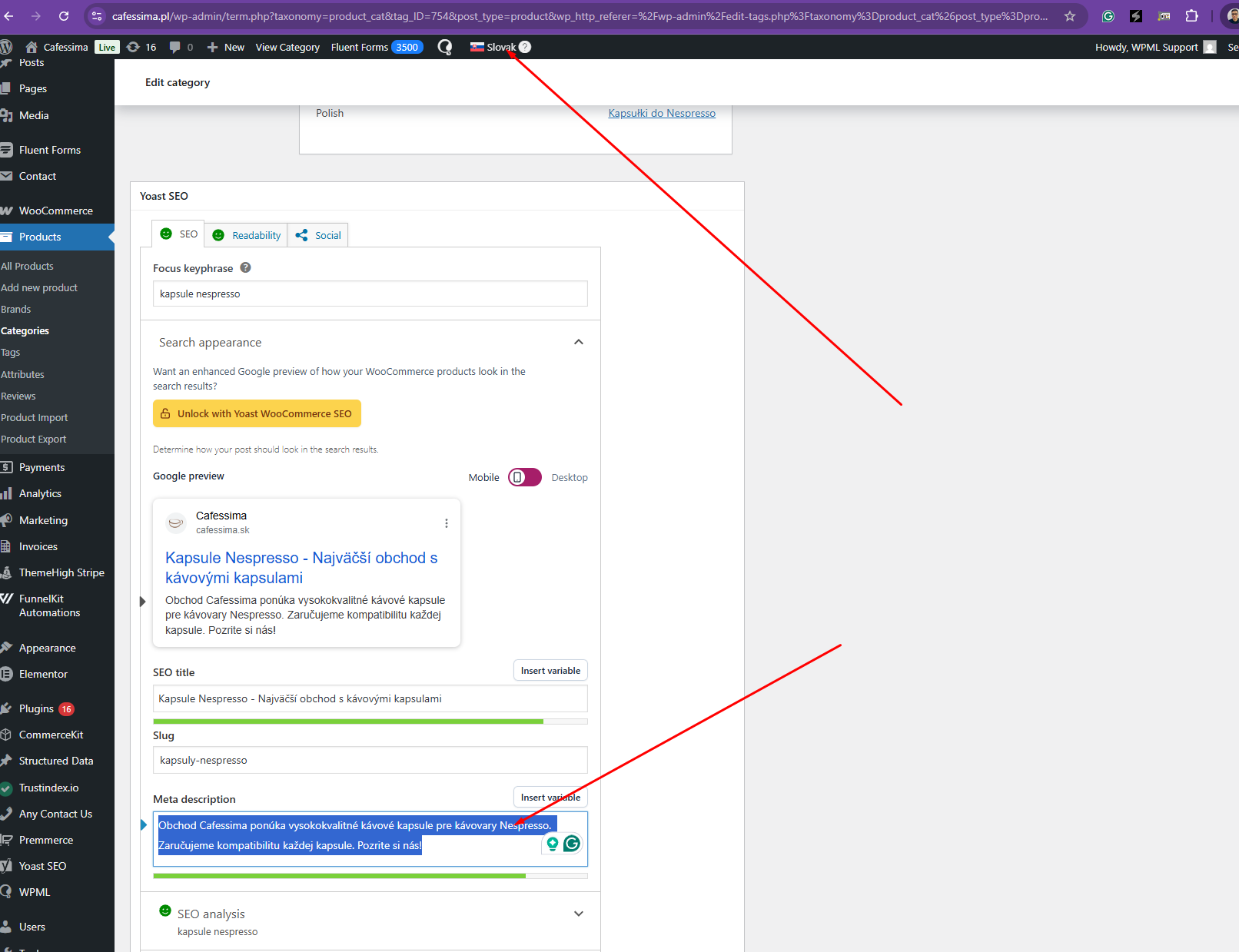 |
| February 28, 2026 at 9:06 pm #17862215 | |
|
sfatL |
No, currently all caching has been turned off. Yes, what you show on the screenshot is the backend, where everything seems to be fine, but front-end is showing it wrong, even after adding it to string translation. |
| March 2, 2026 at 7:05 am #17863334 | |
|
Kor |
Thanks for your reply. Could you please whitelist my country again? I’m currently encountering the same error shown in the attached screenshot. Additionally, it would be best if you could clone the site to a staging environment so I can troubleshoot the issue without impacting your production site. I've enabled the private reply option just in case you'd like to share the credentials.  |
| March 5, 2026 at 8:55 am #17874039 | |
 Christopher Amirian WPML Supporter since 07/2020 Languages: English (English ) Timezone: Asia/Yerevan (GMT+04:00) |
Hello, This is Christopher taking over the ticket. Thank you for the login information. I had to change the language switcher mode to directory as the staging version was redirected to the main website for the other languages. So for this page: hidden link And the translation: hidden link May know which part of the front end is not translated? I checked the title and it seems to be translated but maybe I am wrong as I am not familiar wth Polish or Czech. Thanks. |
| March 6, 2026 at 7:36 pm #17878615 | |
|
sfatL |
Wrong language. Czech seems to work fine, at least on this particular page. But if you check Slovak version: hidden link and compare it to its Polish counterpart, you will notice Slovak meta title, description and OpenGraph are the same as on Polish version. They are in fact in Polish. And if you open this category page on the backend, you will notice that all the Yoast description are written correctly in Slovak. Just hitting "Update" on category page will repair it, but only for some time. According to our client it is a recurring problem. Adding translations through String Translation didn't help. |
| March 8, 2026 at 2:26 pm #17880204 | |
|
Christopher Amirian WPML Supporter since 07/2020 Languages: English (English ) Timezone: Asia/Yerevan (GMT+04:00) |
Hello, Thank you for the details. I updated the Category in SK and as you mentioend it fixed the issue: hidden link What I have done was to deactivate all other plugins except WPML and Woocomemrce and Elementor. I am going to check the page each day to see if the same thing happens. That is the only way I can think of to be able to see when the issue happens. Unless you have a specific step that causes the issue. |
| March 9, 2026 at 11:52 am #17881788 | |
|
Christopher Amirian WPML Supporter since 07/2020 Languages: English (English ) Timezone: Asia/Yerevan (GMT+04:00) |
Hello, I checked today and everything is ok: hidden link I'd appreciate it if you could monitor this page for a week or so. Let's find out if the issue surfaces back or not. Thanks. |
| March 11, 2026 at 4:48 am #17887360 | |
|
sfatL |
I've just updated some plugins and WP to 6.9.3 on production and client is reporting the problem appeared again. |
| March 11, 2026 at 5:32 am #17887370 | |
|
sfatL |
Looks like this is a long overdue bug that you still haven't fixed. Sad. |
| March 11, 2026 at 1:20 pm #17888882 | |
|
Christopher Amirian WPML Supporter since 07/2020 Languages: English (English ) Timezone: Asia/Yerevan (GMT+04:00) |
Hello, I checked the link you shared and it does not seem to be related to the issue you are experiencing. I studied the Github entries and found this: That issue happens when the Yoast Indexables are reset for some reason. I installed the Yoast Test Helper plugin and went to: hidden link And clicked the Reset Indexable Tables and Migration button but the issue did not occur and I still see everything in SV language. In the Github comment the customer said, adding the code below to functions.php file of the theme fixed the issue: add_filter( 'Yoast\WP\SEO\should_index_indexables', '__return_false' ); If the current issue with your website is the same then please add the code above to functions.php file to prevent Yoast to generate new indexables and see if it fixes the issue? If not, then it is not related to that issue. Thanks. |
| March 14, 2026 at 12:27 am #17896870 | |
|
sfatL |
First tests didn't look very promising, but I need to test it further. I will get back to you on this. |
| March 15, 2026 at 11:08 am #17898014 | |
|
Christopher Amirian WPML Supporter since 07/2020 Languages: English (English ) Timezone: Asia/Yerevan (GMT+04:00) |
Sure thanks. If there is a step or something that we can follow to be able to replicate the issue, I will be able to report. This way, I am not sure what causes the issue to be able to know what to do next. Thanks. |








