
This is the technical support forum for WPML - the multilingual WordPress plugin.
Everyone can read, but only WPML clients can post here. WPML team is replying on the forum 6 days per week, 22 hours per day.
| Sun | Mon | Tue | Wed | Thu | Fri | Sat |
|---|---|---|---|---|---|---|
| - | 7:00 – 15:00 | 7:00 – 15:00 | 7:00 – 15:00 | 7:00 – 15:00 | 7:00 – 15:00 | - |
| - | - | - | - | - | - | - |
Supporter timezone: Pacific/Easter (GMT-05:00)
Tagged: ATE, Compatibility, Custom Work
This topic contains 14 replies, has 0 voices.
Last updated by Ilyes 2 days, 16 hours ago.
Assisted by: Ilyes.
| Author | Posts |
|---|---|
| November 14, 2025 at 10:18 am #17575390 | |
 Peggy Vancorenland |
Background of the issue: Symptoms: Questions: |
| November 15, 2025 at 12:11 am #17580362 | |
 Bobby WPML Supporter since 04/2015 Languages: English (English ) Timezone: America/Los_Angeles (GMT-07:00) |
Hi there, While in the Advanced Translation Editor (ATE) screen, please use the search function at the top and search for the shortcode, are you able to locate it this way within the editor? Let me know your results, please. |
| November 17, 2025 at 9:58 am #17583148 | |
|
Peggy Vancorenland |
Hello! No unfortunately can't locate anything. No results. |
| November 17, 2025 at 7:58 pm #17586095 | |
|
Bobby WPML Supporter since 04/2015 Languages: English (English ) Timezone: America/Los_Angeles (GMT-07:00) |
I would like to request temporary access (wp-admin and FTP) to your site to test the issue. **Before we proceed It is necessary to take FULL BACKUP of your database and your website. Providing us with access, you agree that a backup has been taken ** I often use the Duplicator plugin for this purpose: http://wordpress.org/plugins/duplicator/ NOTE: If access to the live site is not possible and the staging site does not exist please provide me with a duplicator package created with the duplicator plugin. Thank you, |
| November 18, 2025 at 10:49 pm #17589841 | |
|
Bobby WPML Supporter since 04/2015 Languages: English (English ) Timezone: America/Los_Angeles (GMT-07:00) |
Thank you for the access details! The site has Dutch as it's default language. Based on that the translations should happen from Dutch to English and not the other way, this practice will ensure everything works well and avoids any issues down the road. That being said your homepage is created in English first and then translated to Dutch which is not ideal. With that in mind I will proceed the way it is and resolve the issue of the shortcode not showing in the editor as it should show regardless which language you are working on. ------------------------ To resolve the issue of the Elements coming from Qode showing up in the ATE I registered them using a custom xml configuration code. 1. Go to WPML->Settings
<?xml version="1.0"?>
<wpml-config>

    <!-- Elementor widgets from Qode/Brok core -->

    <elementor-widgets>

        <!-- brok_core_section_title -->
        <!-- Used for titles like "Get ahead with Bamboo", "Applications", etc. -->
        <widget name="brok_core_section_title">
            <fields>
                <!-- Main heading -->
                <field type="Section title" editor_type="LINE">title</field>

                <!-- Body text below the title -->
                <field type="Section text" editor_type="AREA">text</field>
            </fields>
        </widget>

        <!-- brok_core_button -->
        <!-- Your "Contact us" CTA button -->
        <widget name="brok_core_button">
            <fields>
                <!-- Visible button label -->
                <field type="Button text" editor_type="LINE">text</field>

                <!-- Button URL; usually copied, but exposing it lets you localize URLs if needed -->
                <field type="Button link" editor_type="LINK">link</field>
            </fields>
        </widget>

        <!-- qi_addons_for_elementor_clients_slider -->
        <!-- Repeater with multiple "client" items in a slider -->
        <widget name="qi_addons_for_elementor_clients_slider">
            <fields>
                <!-- Title per slide (repeater) -->
                <!-- 'children' is the repeater name, 'client_title' is the field -->
                <field type="Client title" editor_type="LINE">children::client_title</field>
            </fields>
        </widget>

    </elementor-widgets>

    <!-- Slider Revolution -->
    <!-- The 'slider_revolution' widget here only stores the [rev_slider] shortcode.
         Translation should be handled on the Slider Revolution side with WPML,
         so no additional ATE config is strictly necessary. -->

</wpml-config>
Related Documentation: NOTE: I have performed the above already all you have to do now is access the ATE Editor and finish the translation 🙂 Let me know your results, please. 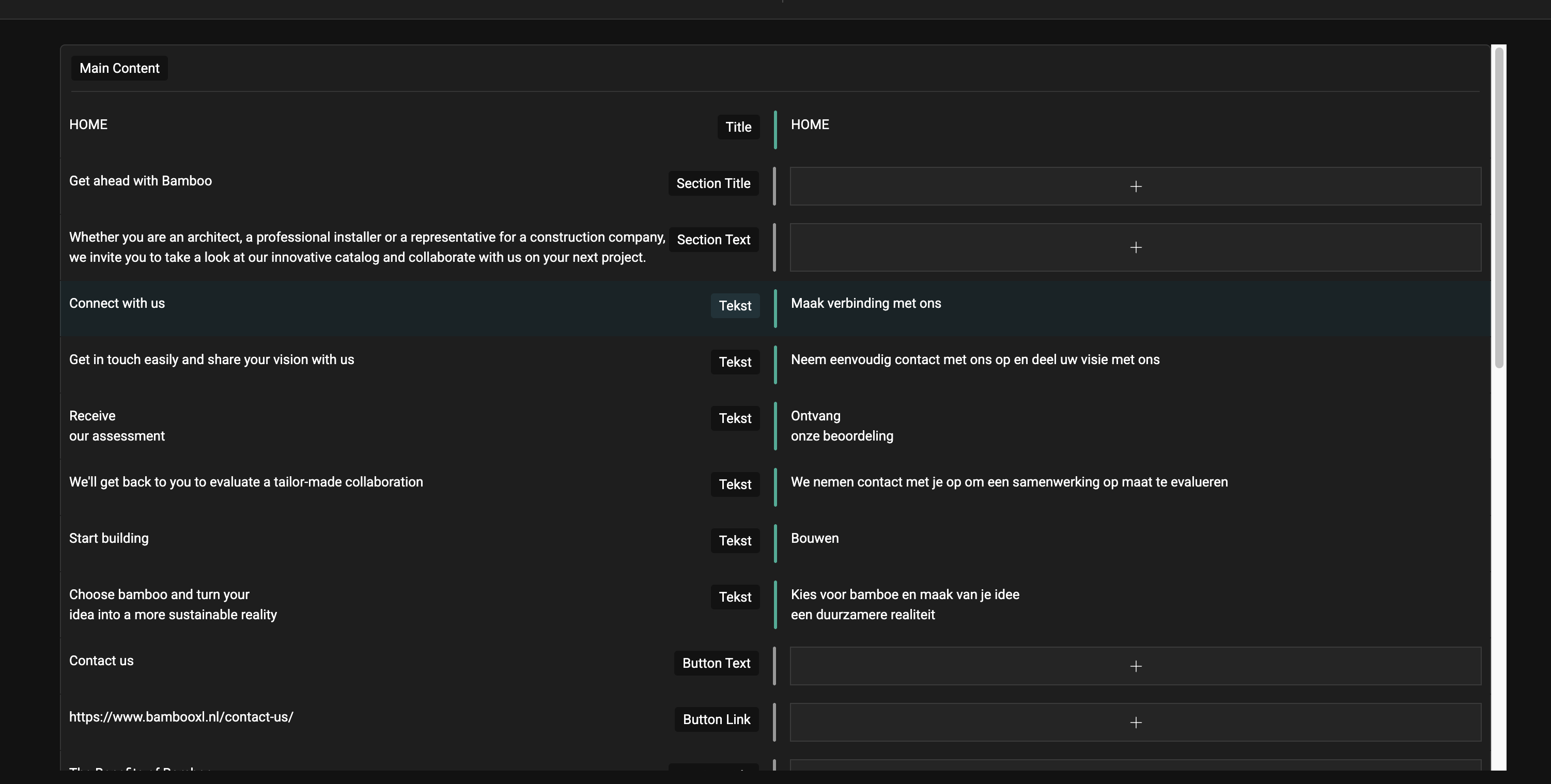 |
| November 19, 2025 at 10:18 am #17591104 | |
|
Peggy Vancorenland |
This works perfect thank you very much. Yes we initially created the website in English, and then translated it to Dutch. But the client prefers Dutch to be the default language. Will this lead to more problems in the future ? Then another question which might be related to this as well. If we change uploads, like a "newer pdf" on the English site, it should automatically change on the Dutch site as well right? (In the Dutch translations we cannot change uploads). However sometimes this does not change, or takes a really long time. Do you have any advice for this? Thanks!! |
| November 19, 2025 at 8:17 pm #17593464 | |
|
Bobby WPML Supporter since 04/2015 Languages: English (English ) Timezone: America/Los_Angeles (GMT-07:00) |
It’s fine that the default language was switched. Ideally, though, translations should always be created from the default language to the secondary language. If that’s not possible, just ensure you keep the workflow consistent. Regarding your question: “If we replace a PDF on the English site, will it update on the Dutch site?” Updating the default language triggers an update for the translation, but it won’t sync automatically. The Dutch version will show the update icon (spinning circle), and you’ll need to open it to update the translation. Please test this and let me know the results. |
| November 20, 2025 at 10:59 am #17595127 | |
|
Peggy Vancorenland |
Hello! Just tested it, and that works perfect, thank you very much. Then another question, hope this is ok. There are a lot of pages in the backend (French & Spanish) that we might want to use in the future. There all under the English pages at the moment. What would be the best way to get in correctly? Can I assign the pages to the correct language? Or should I just use the French & Spanish text and translate the English pages trough the ATE? Thanks a lot! |
| November 20, 2025 at 10:27 pm #17597230 | |
|
Bobby WPML Supporter since 04/2015 Languages: English (English ) Timezone: America/Los_Angeles (GMT-07:00) |
Glad to hear that! "Can I assign the pages to the correct language?" I'd recommend doing that if possible, you can edit the page and then on the drop down select the language that is appropriate so they are correctly indexed. |
| November 24, 2025 at 9:49 am #17603883 | |
|
Peggy Vancorenland |
Ok unfortunately there is still going a lot wrong with the translations. If we want to edit the Dutch translation, on the page of hidden link for example. Everything is in Dutch atm, but if we change a file of the datasheet (below on the page) then some parts of the Dutch text switch back to English. Also the images need to be translated in order to save the changes that were made. But then the whole page is loaded incorrectly. If we go back to translate editor and delete the translation from the images, for some reason the second time we can save the changes. And then the page is loaded correctly again. But then the name of the page is switched. This just happened with the page of hidden link. In the menu the page is now called: Ctech Cladding - as it was before and should be Ctech. I left it open on the hidden link for you to try and see what happens. Also it looks like the menu is not translated anymore? If I go to menu's i don't see the Dutch anymore? I'm not sure what exactly is happening.. |
| November 25, 2025 at 4:15 pm #17609156 | |
 Ilyes Supporter Languages: English (English ) French (Français ) Arabic (العربية ) Timezone: Pacific/Easter (GMT-05:00) |
Hello, Bobby is currently on vacation, so I will be taking care of your ticket in the meantime, As explained before, editing a translation directly from your site editor will cause issues, I understand that you have changed the site language to Dutch, but this page : hidden link Was originally created in English and then translated as shown here : hidden link So here we have two different parameters : If you'd like to also change the original language of a page, it is possible by redoing the translation from Dutch to English (deleting the English page) Or you can manually edit the page using this workflow : 1- Unlink the translation: https://wpml.org/fr/faq/how-to-disconnect-translations-from-the-default-language-page-or-post/ 2- Edit the translation (Dutch) using your site's editor 3- Relink the translation: https://wpml.org/fr/faq/how-to-link-already-translated-pages/ However, this means that you cannot use WPML editor for this page, and that any subsequent changes will have to be made manually by you using the site editor. I hope this is clear, let me know if you have any questions, |
| November 26, 2025 at 9:53 am #17610804 | |
|
Peggy Vancorenland |
Hi Ilyes! Thanks! We are using the English site as default, and only change the Dutch pages with the ATE, but still something is going wrong. For example the page: hidden link is in Dutch in the frontend, but if I open the ATE then all paragraphs are in English again, even though it has already been translated. And if I change something then, the whole page will be in English again. And for example in the page: hidden link if I go to the ATE I cannot find Benefits anywhere to translate, or Standard size (length x width x thickness). |
| November 26, 2025 at 9:47 pm #17613490 | |
|
Ilyes Supporter Languages: English (English ) French (Français ) Arabic (العربية ) Timezone: Pacific/Easter (GMT-05:00) |
Hello, Here is a video showing how to let WPML detect the undetected fields (benefits, size...) and what to do about the lost translation : hidden link I can retranslate the page using automatic translation, then edit the English page and see if any of the translations is lost, let me know if I'm missing anything. |
| November 27, 2025 at 1:17 pm #17615087 | |
|
Peggy Vancorenland |
Hi Ilyes, Thank you very much, this is very clear. Please retranslate the page with automatic translation and check, just to be sure everyhting works fine now:) If so, I can go trough all the other pages! |
| November 28, 2025 at 4:05 pm #17618697 | |
|
Ilyes Supporter Languages: English (English ) French (Français ) Arabic (العربية ) Timezone: Pacific/Easter (GMT-05:00) |
Hello, I have completed the translation for both : Please review the translation and see if everything is working as expected. I followed the following workflow : 1- If the page has fields not detected by WPML, then simply edit the English (original language) page slightly (add a space or character to the content) PS: I have assigned 5000 credits to your site and used the automatic translation for those parts using this icon : hidden link Best, |








