Background of the issue:
I am working on a live website hidden link and trying to remove CM Tooltip Glossary Spanish and Dutch translations from the original English page using WPML.
Symptoms:
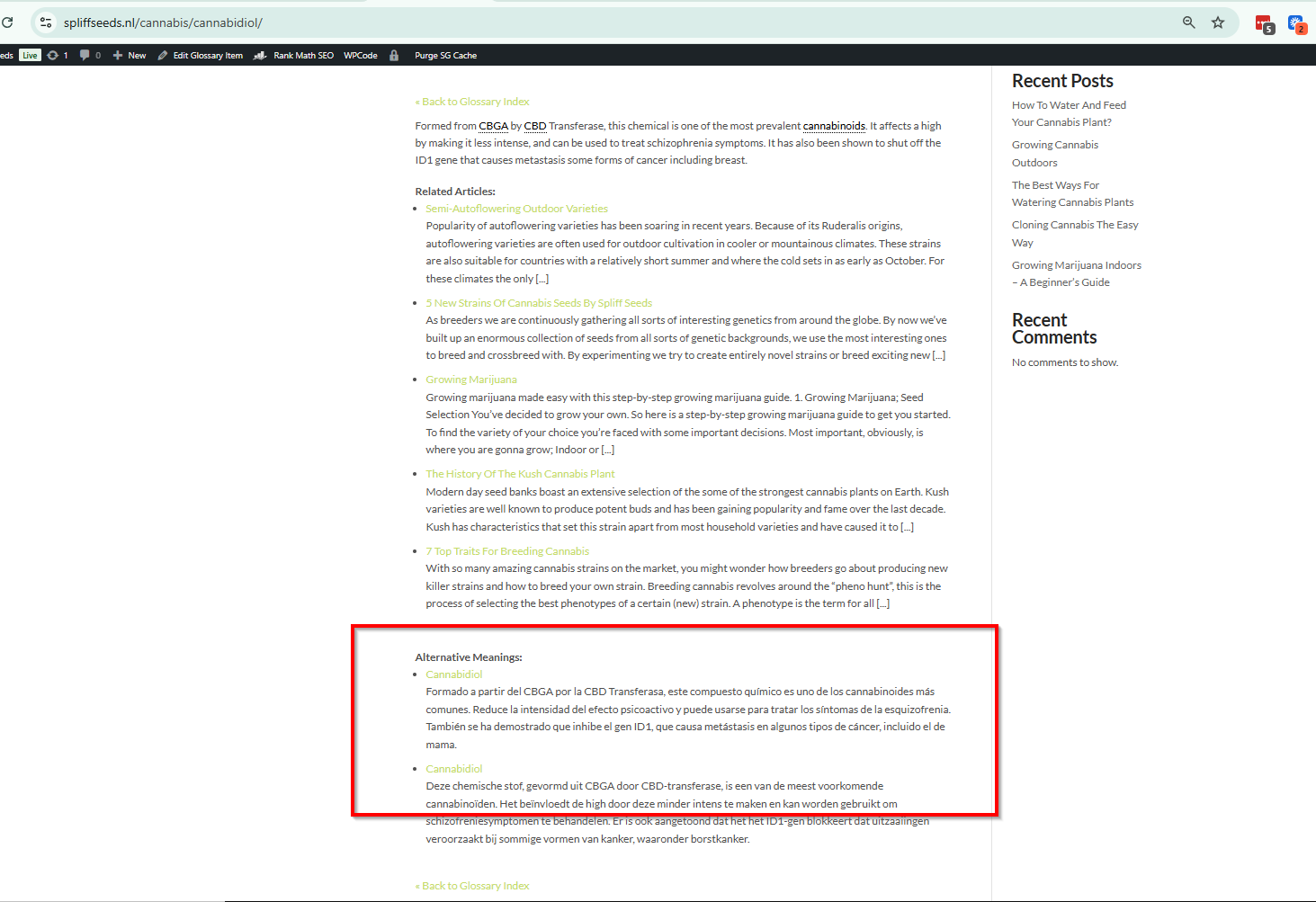
CM tooltip shows translations on the original English page.
Questions:
How to remove the Dutch and Spanish transalation from the English page.
Languages: English (English )Spanish (Español )German (Deutsch )
Timezone: America/Lima (GMT-05:00)
Hello,
Have you already tried to disable the option Enable Caching Mechanisms?
- Revise Admin Dashboard → CM Tooltip Glossary → Settings → General Settings tab → Performance & Debug section.
Thanks for your reply. I need to check the backend of your Website to see what's going on.
I will require temporary access (WP-Admin and FTP) to a test site where the problem has been replicated, if possible. This will enable me to provide better assistance and determine if any configurations need to be modified.
Please note that it is important to have a backup for security purposes and to prevent any potential data loss. You can use the UpdraftPlus plugin (https://wordpress.org/plugins/updraftplus/) to fulfill your backup requirements.
Your upcoming reply will be treated with confidentiality and will only be visible to you and me.
✙ To resolve the issue, I may need your consent to deactivate and reactivate plugins and the theme, as well as make configuration changes on the site if necessary. This emphasizes the significance of having a backup.
Thanks for your reply. I've checked this page hidden link in the backend, and could you tell me how the contents on the frontend are displayed? hidden link
In the backend, I can only see one paragraph of text.
Thanks for your reply. Sorry, it still doesn't explain how it works. Anyway, I've prepared a sandbox site here hidden link and could you please install the required plugin and theme and replicate the issue over there?
Once it's replicated, I will troubleshoot this and get back to you with a solution.
We have some problems making a staging website at the moment. We have forwarder the problem to the developer. The website is somehow also very large 15gb. Please this support question open till we have made the staging website thank you.
Thanks for your reply. I’ve deactivated some unrelated plugins to make the troubleshooting process easier.
I’ve checked this page again hidden link
and I can now see the Articles and Meanings sections.
Could you let me know how the “Related Articles” section is being populated with posts, and how the “Alternative Meanings” section is filled with Glossary items?
I think the related articles is set in the CM Tooltip plugin settings under >Glosssary Term>Glossary Term - Related Articles>Show custom related articles
Alternative Meanings i think this is set under General Settings>Display Alternative Meanings on Glossary Term Page.






![2025-11-26 22_04_06-iMUIS Verkenner 4.7.9d_ - [60463] Spliff (meijers) (ts.imuisonline.com).png](https://cdn.wpml.org/wp-content/uploads/2025/11/17613333-2025_11_26_22_04_06_iMUIS_Verkenner_4.7.9d__60463_Spliff_meijers_ts.imuisonline.com_.png "17613333-2025_11_26_22_04_06_iMUIS_Verkenner_4.7.9d__60463_Spliff_meijers_ts.imuisonline.com_.png")
![2025-12-04 21_57_02-iMUIS Verkenner 4.7.9d_ - [60463] Spliff (meijers) (ts.imuisonline.com).jpg](https://cdn.wpml.org/wp-content/uploads/2025/12/17636202-2025_12_04_21_57_02_iMUIS_Verkenner_4.7.9d__60463_Spliff_meijers_ts.imuisonline.com_.jpg "17636202-2025_12_04_21_57_02_iMUIS_Verkenner_4.7.9d__60463_Spliff_meijers_ts.imuisonline.com_.jpg")
![2025-12-04 21_57_59-iMUIS Verkenner 4.7.9d_ - [60463] Spliff (meijers) (ts.imuisonline.com).jpg](https://cdn.wpml.org/wp-content/uploads/2025/12/17636202-2025_12_04_21_57_59_iMUIS_Verkenner_4.7.9d__60463_Spliff_meijers_ts.imuisonline.com_.jpg "17636202-2025_12_04_21_57_59_iMUIS_Verkenner_4.7.9d__60463_Spliff_meijers_ts.imuisonline.com_.jpg")