[Resolved] Getting WPML to work and solve error alerts in WP back-end
This thread is resolved. Here is a description of the problem and solution.
Problem: The client was experiencing issues with non-functioning URLs on their multilingual website. They suspected that WPML was not working correctly despite being up-to-date. Additionally, the WPML CMS plugin did not appear in the Plugins page after installation, and the client continued to see messages indicating that it should be installed. Solution: We installed the core WPML plugin for the client. The issue was that the plugin package was incomplete, which prevented it from appearing in the plugin overview and functioning properly. After the correct installation, the .nl subdomain became accessible, and the 404 errors, likely caused by the plugin's previous deactivation, were resolved.
If this solution does not resolve your issue, or if it seems outdated or irrelevant to your case, we recommend opening a new support ticket. We also highly recommend checking related known issues at https://wpml.org/known-issues/, verifying the version of the permanent fix, and confirming that you have installed the latest versions of themes and plugins. For further assistance, please visit our support forum at https://wpml.org/forums/.
This is the technical support forum for WPML - the multilingual WordPress plugin.
Everyone can read, but only WPML clients can post here. WPML team is replying on the forum 6 days per week, 22 hours per day.
Right now, many URL's of my multilingual website hidden link are not functioning correctly.
Upon investigation I suspect that this was caused by the fact that WPML isn't working as it should, although all is up to date.
I also have been seeing a message in my WP dashboard that WPML CMS should be installed, but as far as I knew all was installed and up to date. Then I went to my WPML account, info@mencare.com and to Downloads.
Followed the instructions from: https://wpml.org/faq/install-wpml/ with the .zip upload and then to tab Commercial. Installed CMS as per the instructions on your site. But still CMS does not appear in my Plug-ins page. Therefore manually addes both seperate plugins:
CMS
String translations
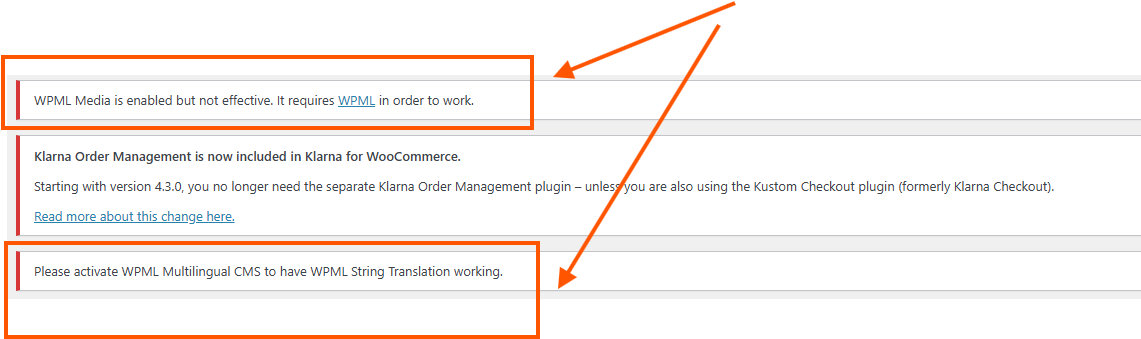
And activated them... but stil not working. And I also keep seeing these messages:
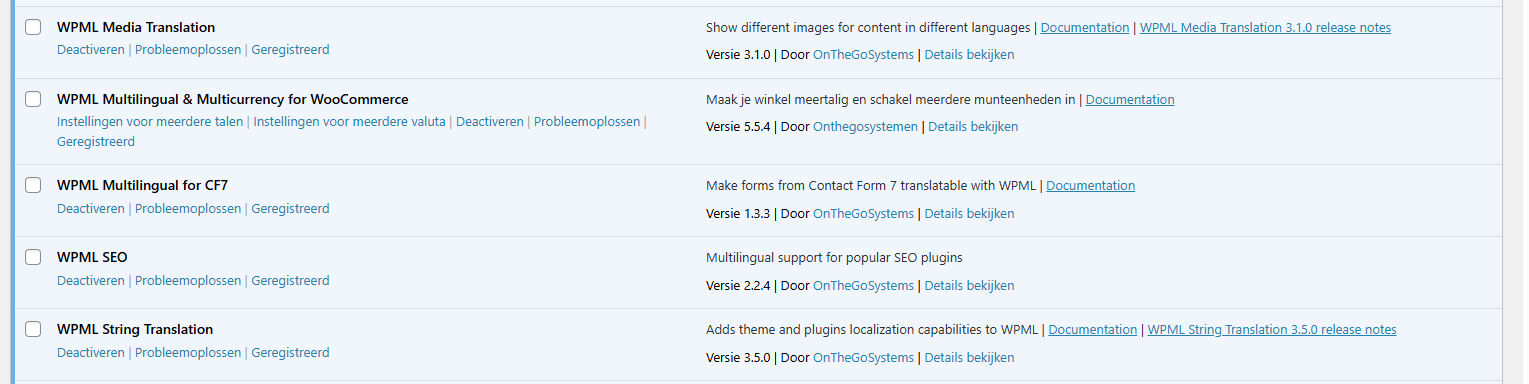
These are all active WPML plugins right now:
I've tried many times in different ways now, but can't get it to work. 😓 And as mentioned, main links on my homepage are not functioning right now, I think as a result of the string translations missing. Because I believe the whole NL and EN languages are not functioning as is meant to.
I am asking you: Can I please provide you with a temporary admin login, so you guys can check around what's happening and solve this matter, please?
Looking forward to your assistance, for which I thank you in advance. 🙏
With caring regards, Met verzorgende groet, Mit freundlichen Grüßen, Avec mes salutations distinguées,
Languages: English (English )Spanish (Español )German (Deutsch )
Timezone: Europe/Vienna (GMT+02:00)
Hi Edwin,
Based on your screenshot, I can see that the WPML core plugin is not activated, only the add-ons.
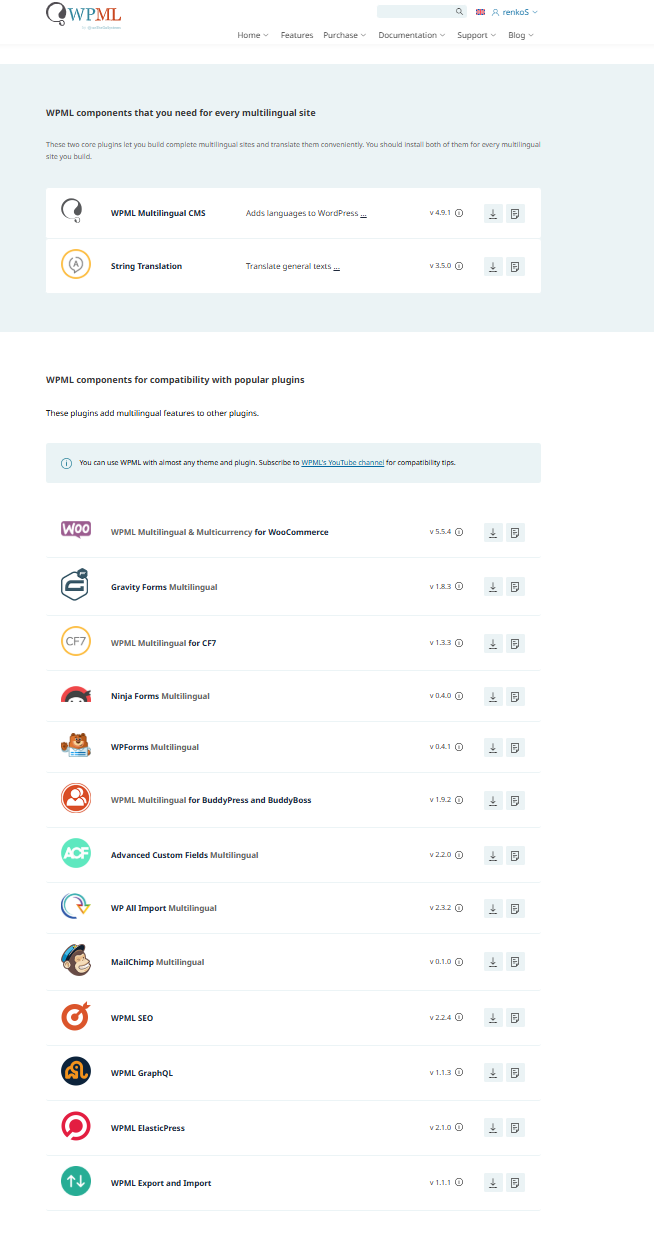
Please ensure that the core plugin is installed and activated. You can download the ZIP file from https://wpml.org/account/downloads/ by selecting “Download WPML manually”.
I already thought as much, but which one is the 'core' plugin right now? I have the following options as you can see in the attached image.
I already tried: "WPML Multilingual & Multicurrency for WooCommerce", but when I wanted to upload the .zip via the plug-in screen, it said that this path already exists. But as you can see from my lists of plug-ins it isn't there.
As mentioned earlier, I'm happy to provide a temporary admin login for faster solving of the issue.
Thank you!
Languages: English (English )Spanish (Español )German (Deutsch )
Timezone: Europe/Vienna (GMT+02:00)
Hi,
in the link I shared you just need to download "WPML Multilingual CMS". Afer installation, it will shown on the plugin list as "WPML Multilingual CMS".
I would eventually also need to request temporary access (WP-Admin and FTP) to your site
– preferably to a test site where the problem has been replicated if possible –
in order to be of better help and check if some configurations might need to be changed
Your next answer will be private which means only you and I have access to it.
❌ Please backup your database and website ❌
✙ I would additionally need your permission to de-activate and re-activate Plugins and the Theme, and to change configurations on the site. This is also a reason the backup is really important.
✙ Please add the Links to the […] Edit Screen, the Page/Post where you insert the […] and the corresponding Front End Page/Screen
Languages: English (English )Spanish (Español )German (Deutsch )
Timezone: Europe/Vienna (GMT+02:00)
Hi Edwin,
I’ve installed the core plugin and everything is working correctly now. The plugin was already present, but the package appeared to be incomplete, which is why it didn’t show up in the overview.
I also performed a quick check of the settings, and the .nl subdomain is accessible again. The 404 error was most likely caused by the plugin being deactivated.
Thank you, thank you, thank you, Marcel!!!
Top notch! Please send me over a review link so I can give a 5 star review, if I'm able to do it again.
Bye!!