Skip to content Skip to sidebar

This is the technical support forum for WPML - the multilingual WordPress plugin.

Everyone can read, but only WPML clients can post here. WPML team is replying on the forum 6 days per week, 22 hours per day.

Sun Mon Tue Wed Thu Fri Sat
9:00 – 18:00 9:00 – 18:00 9:00 – 18:00 9:00 – 18:00 9:00 – 18:00 - -
- - - - - - -

Supporter timezone: Africa/Cairo (GMT+02:00)

Tagged: 

This topic contains 5 replies, has 0 voices.

Last updated by Osama Mersal 19 hours, 36 minutes ago.

Assisted by: Osama Mersal.

Author Posts
December 11, 2025 at 6:35 am #17654337

jesperS-11

Okay seems like this is working now...

Now the next problem is? how do i make the menu work with divi - see the video... i have a global header? how do i make this work?

hidden link in here you can see i only have 3 layouts?

But i can't select like a langue for the global header...

loom.com/share/951ef00ca1ea4f4a9a06aa48e00c02d6?focus_title=1&muted=1&from_recorder=1

Please help me with this ASAP - so my header menu will be shown in the correct langue also...

And please also let me know why the images are not working? hidden link i have like hidden link 562 pages, can it be true i have to translate them manual? if you would send me a video on how i do it automatic, or if you would set it so its translating it manual - it would help me a lot, so i could put the website live, as soon as possible....

December 11, 2025 at 8:47 am #17654779

Osama Mersal
WPML Supporter since 02/2020

Languages: English (English ) Arabic (العربية )

Timezone: Africa/Cairo (GMT+02:00)

Hi,

I'm Osama from the WPML forums support team. I'll be glad to help you today.

I checked your previous ticket, checked the site, and the video. From what I understood, you want to change the menu for all headers.

In order to add the menu and translate the global header, please check the following steps:

1- Go to Divi-> Theme Builder
2- Edit the global header in Danish
3- Select the menu and update the header
4- Go to WPML-> Translation Management
5- Select the header template and send it to translation

To translate the menu, please refer to this guide.

Please let me know if I missed something, and if you want to achieve something else.

Best regards,
Osama

December 12, 2025 at 11:50 pm #17660924

jesperS-11

Go to WPML-> Translation Management? how do i find the management thing?

I need like a different logo and different link on logo, from skier.dk to snowkom.se.... please let me know how to do this in a short video

December 14, 2025 at 10:55 am #17661984

Osama Mersal
WPML Supporter since 02/2020

Languages: English (English ) Arabic (العربية )

Timezone: Africa/Cairo (GMT+02:00)

Hi,

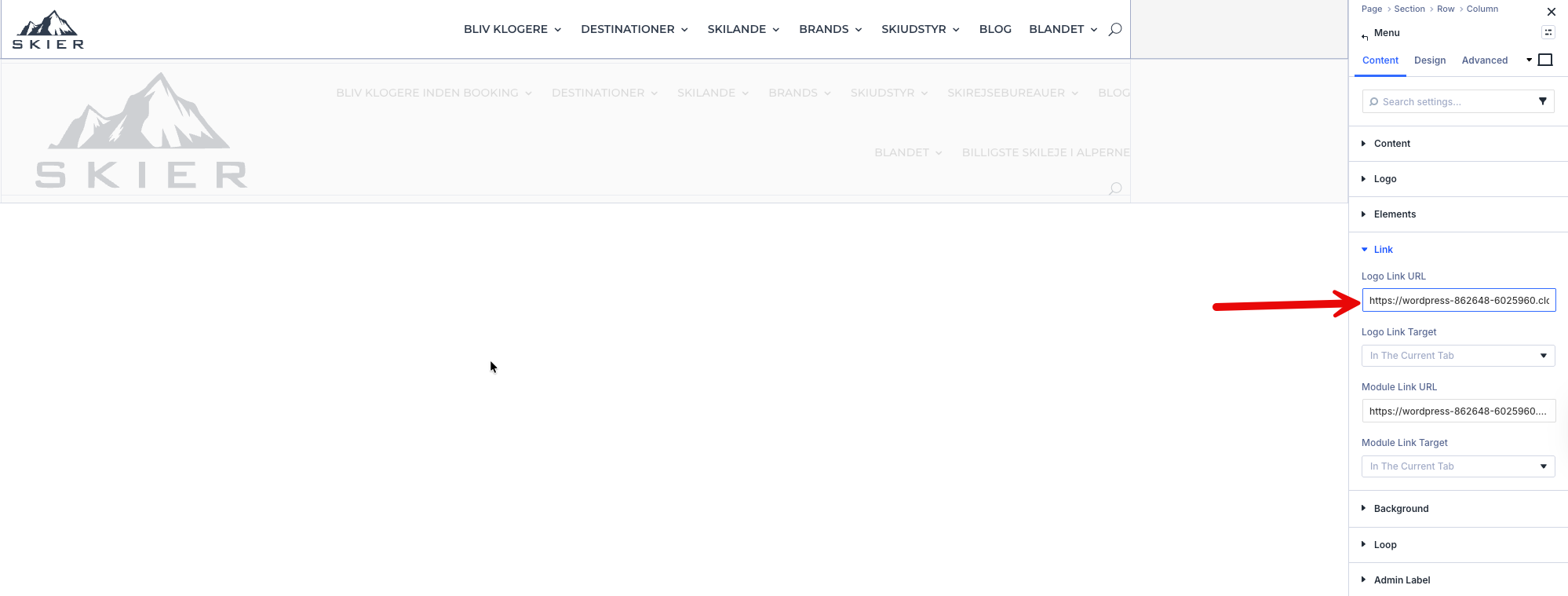
The logo and its link are added inside a menu module using Divi. (Kindly check the attached screenshot)

We have some known issues with Divi5, but this menu module is not one of them, so I created a sandbox site to debug and escalate the issue to our compatibility team.

Please log in to this hidden link">sandbox site and install Divi. After that, please create a test header with the same menu module to replicate the issue.

If the issue is reproducible, please let me know so I can escalate it.

Best regards,
Osama

3.png
December 26, 2025 at 9:42 pm #17688908

jesperS-11

Now i have fixed the menu, but the logo is now the only problem - how do i fix this.

skier.dk is the main website - snowkom.se is the translated version?

December 28, 2025 at 12:32 pm #17690457

Osama Mersal
WPML Supporter since 02/2020

Languages: English (English ) Arabic (العربية )

Timezone: Africa/Cairo (GMT+02:00)

Hi,

Apologies for the delayed response due to the weekend.

1) Please share the access details with me, as the provided access details have been deleted because the previous ticket is closed.

2) Please let me know if the logo is added as shown in my previous reply or with a different method.

Best regards,
Osama