[Resolved] Installation is not going well it stops at step 4
This thread is resolved. Here is a description of the problem and solution.
Problem: You are finding it difficult to translate your website after installing WPML and the String Translation plugin. Solution: We recommend deactivating WPML and the String Translation plugin, deleting them, and then installing a fresh copy of WPML 4.9.0. This approach resolved the issue in a test environment and should display the AI Translation step in the WPML Setup wizard correctly on your site. Please verify if this resolves your issue.
If this solution does not apply to your case, or if it seems outdated, we highly recommend checking related known issues at https://wpml.org/known-issues/, verifying the version of the permanent fix, and confirming that you have installed the latest versions of themes and plugins. If the problem persists, please do not hesitate to open a new support ticket at WPML support forum for further assistance.
100% of people find this useful.
This is the technical support forum for WPML - the multilingual WordPress plugin.
Everyone can read, but only WPML clients can post here. WPML team is replying on the forum 6 days per week, 22 hours per day.
In other words, I can’t proceed there, and when I click skip, I see NO tickets in my support history. I’ve tried this twice. I’m becoming less and less enthusiastic about your plugin. And before you say that it doesn’t work with the “here” folder — at least 26 installations of WPML on various websites work that way.
I would really like to hear from your support team
I am sorry for any inconvenience you may have experienced.
Could you please explain what is at hidden link?
In other words, what is the /here/ folder that you mention?
If you need further help with this, please share the access details to your site with me. I'm enabling a private message for the following reply.
Privacy and Security Policy
We have strict policies regarding privacy and access to your information. Please see: https://wpml.org/purchase/support-policy/privacy-and-security-when-providing-debug-information-for-support/ **IMPORTANT**
- - Please back up the site files and database before providing us access. --
-- If you have a staging site where the problem can be reproduced, it is better to share access to the staging site.--
Hi, Govard-Jan de Jong, and thanks for the access details.
I can see the problem on WPML's setup screen. Indeed, it is stuck at stage 4.
Can you please try resetting WPML and see if that helps resolve the problem?
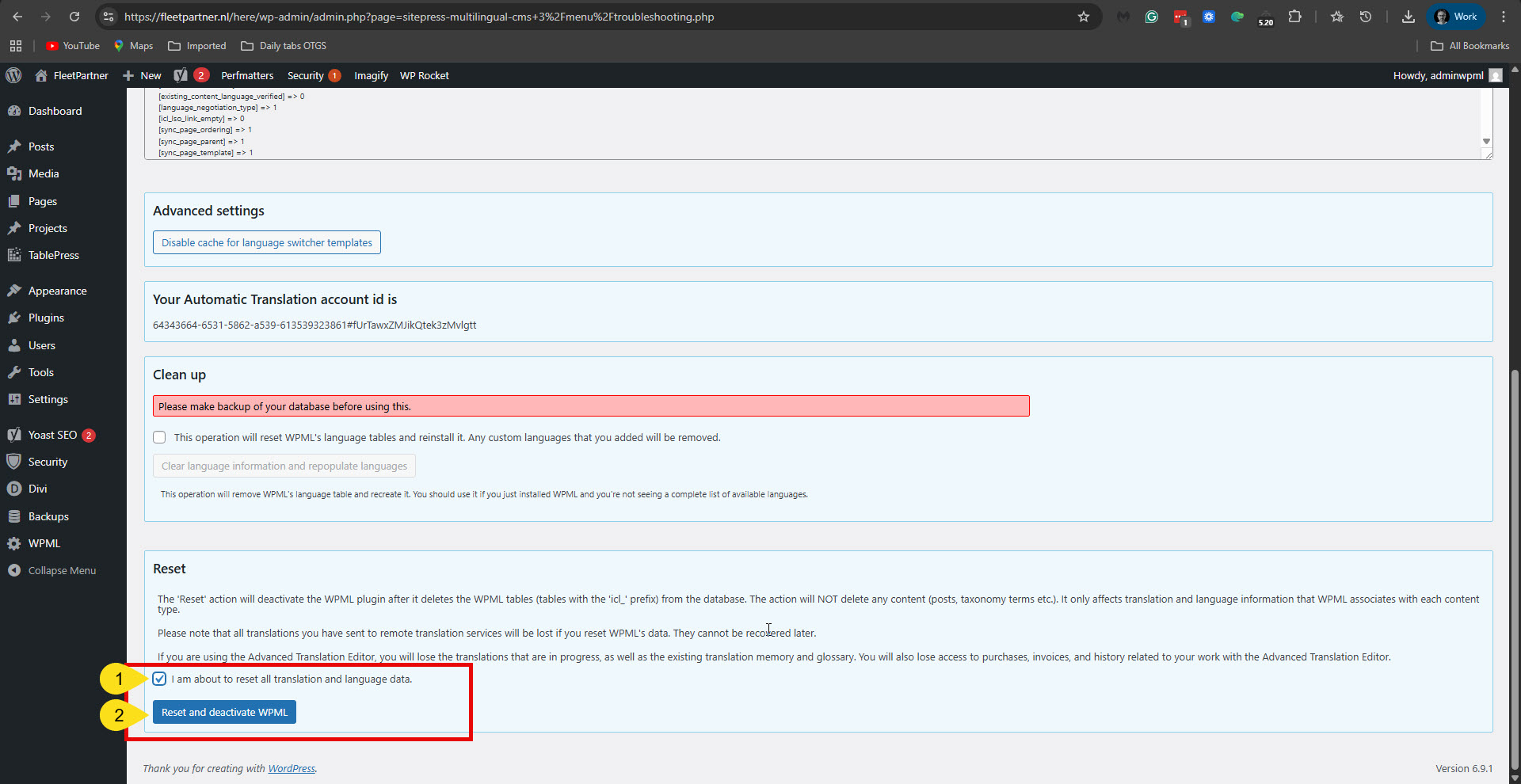
To reset WPML, please go to WPML -> Support, and click the Troubleshooting option. Then scroll down to the Reset section. Check the 'I am about to reset all translation and language data.' And click the 'Reset and deactivate WPML' button. Please see the attached screenshot. After this, please activate WPML and try to set it up again.
**** Important! Please make a full site backup (files and DB) before you proceed with those steps****
If it does not work, please allow me to take a copy of your site. To do this, I must install a plugin such as Duplicator or All-in-One Migration. Please let me know if you agree.
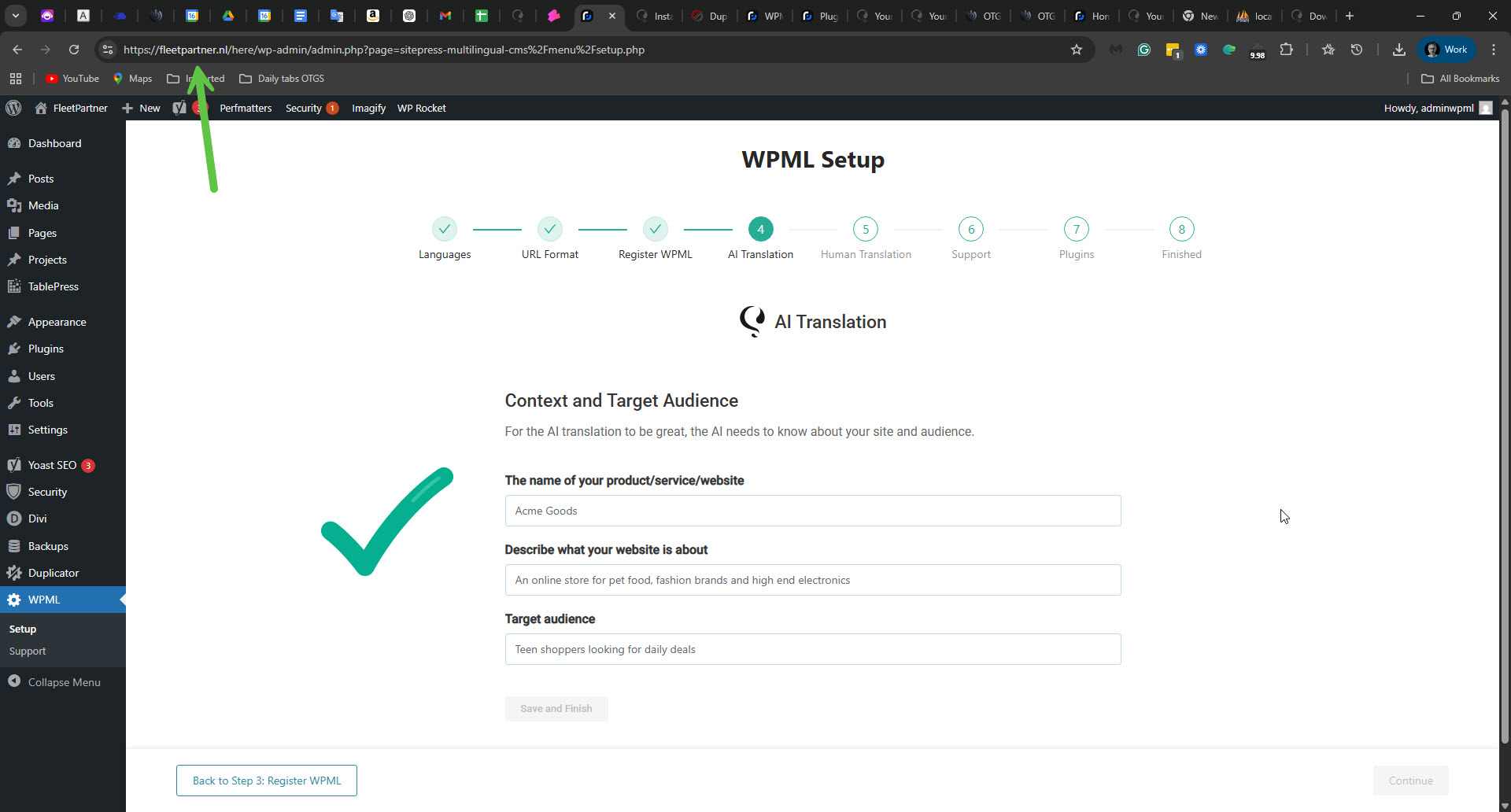
I checked on a copy of your site on my local server and found that deactivating WPML and Strings Translation, deleting them, and installing a fresh copy of WPML 4.9.0 resolved the issue. I just did the same on your site, and the problem is fixed. Step 4 - AI Translation in the WPML Setup wizard is working—the screen is displaying, and you can continue with the setup. Please see the attached screenshot.
Can you please confirm that this issue is fixed now?