
This thread is resolved. Here is a description of the problem and solution.
Problem:
The client is unable to translate the answer texts to multiple-choice questions and section body texts in quizzes and courses using LearnPress with the WPML plugin. Despite following the available guides and documentation, these specific strings do not appear in the WPML String Translation interface.
Solution:
We recommend translating the quizzes and courses directly in the WordPress editor after running them through the WPML translation process. This method allows for manual translation of all content, including the problematic strings that do not show up in the WPML String Translation interface. For detailed steps on using different translation editors, please refer to our documentation: Using Different Translation Editors for Different Pages.
Please note that this solution might be outdated or not applicable to your specific case. If these steps do not resolve your issue, we highly recommend checking related known issues at https://wpml.org/known-issues/, verifying the version of the permanent fix, and confirming that you have installed the latest versions of themes and plugins. If the problem persists, please open a new support ticket.
100% of people find this useful.
This is the technical support forum for WPML - the multilingual WordPress plugin.
Everyone can read, but only WPML clients can post here. WPML team is replying on the forum 6 days per week, 22 hours per day.
Tagged: Compatibility
This topic contains 7 replies, has 0 voices.
Last updated by Nicolas V. 1 month ago.
Assisted by: Bruno Kos.
| Author | Posts |
|---|---|
| January 26, 2026 at 10:41 pm #17764469 | |
 cassandraW-2 |
We have WPML installed as well as the 30$ "LearnPress - WPML" plugin. Both are active on the site (which I selected above so you should have the link). All plugins are up to date, we're on WordPress 6.9 hosted on WordPress.com. I'm previewing how the translation process will go before making the changes live and assigning it to human translators. I've searched everywhere for answers, including pretty much all of the threads about LearnPress available on the WPML forums. I am able to translate the following elements by following the guide from LP " Translate content in course" hidden link * Course body text But I'm unable to translate the following: ## Question Answer Text i.e. The actual answers to multiple-choice questions inside of Quizzes. I haven't been able to find any mention of this anywhere by googling, so I'm honestly not clear that this is even supposed to work. The ThimPress documentation mentions Quizzes but never questions let alone the answers to the questions, so while I assume from their marketing for the 30$ add-on that it should obviuosly work, I have no idea HOW it's expected to work. Can you confirm that this feature is functional, and that I should be able to translate the answers to multiple-choice questions? Can you lay out the expected workflow to "find" the answers to a multiple-choice question and load them for translation? [Additionally I've encountered a bug, as seen in one of my screenshots, where the options are duplicated in the translated version of the quiz, showing two copies of each English string. Hopefully if you work to reproduce a solution, you'll be able to confirm if this happens to you as well.] ## "Section body text" i.e. the textarea at the top of each "Section". It seems the sections are metadata that are part of the "Course" rather than their own post type. I've read that they should show up in the "String Translation" system, but no matter what I try, I can't find them. If it's possible to translate the custom "Section" title and body texts, please tell me how with specific instructions. ## FWIW I have already tried to use the "String Translation" tools To avoid going back and forth unnecessarily, I'll point out that I have already looked through these two documents and tried to use them to solve my problems, but nothing worked: https://wpml.org/documentation/getting-started-guide/string-translation/ If you're going to recommend these documents, I'll thank you in advance for giving me specific instructions on how they can solve the particular problems outlined above 🙏🏻 I already ran the scan on LearnPress and reviewed the WPML > String Translation screen to see if my "Question Answers" or "Section" text was there and couldn't find it anywhere. I also set the "Auto register untranslated strings" setting to "Untranslated strings that I encounter while logged in", as instructed, and visited the sections and quizzes while logged in, but the section strings continue to not be available under WPML > String translation. I can see a TON of strings related to questions and translations, but they're strings from the interface provided by LearnPress, not my custom strings related to Sections ## For reference, here was my process for creating and translating the course and content * Create course (Everything is named so that it can easily be searched for, e.g. "JTC1", as you can see in the attached screenshots) I also tried translating the question directly by going to LearnPress > Questions and clicking on a language + button, but it had the same result: Can't find the answer strings to translate anywhere. ## P.S. Could you please write a WPML guide to translating a LearnPress course? The LearnPress guide for the 30$ plugin linked above is incomplete and difficult to understand. We need thorough instructions to succeed, which is basically what I'm asking for here. I think you could do a better job than they have, and then you wouldn't have to answer support requests like this one over and over. The WPML page about LearnPress claims it works well, but it seems it barely works, pleas help those of us taking your suggestion to combine the two. Thank you for any help you can provide 🙏🏻 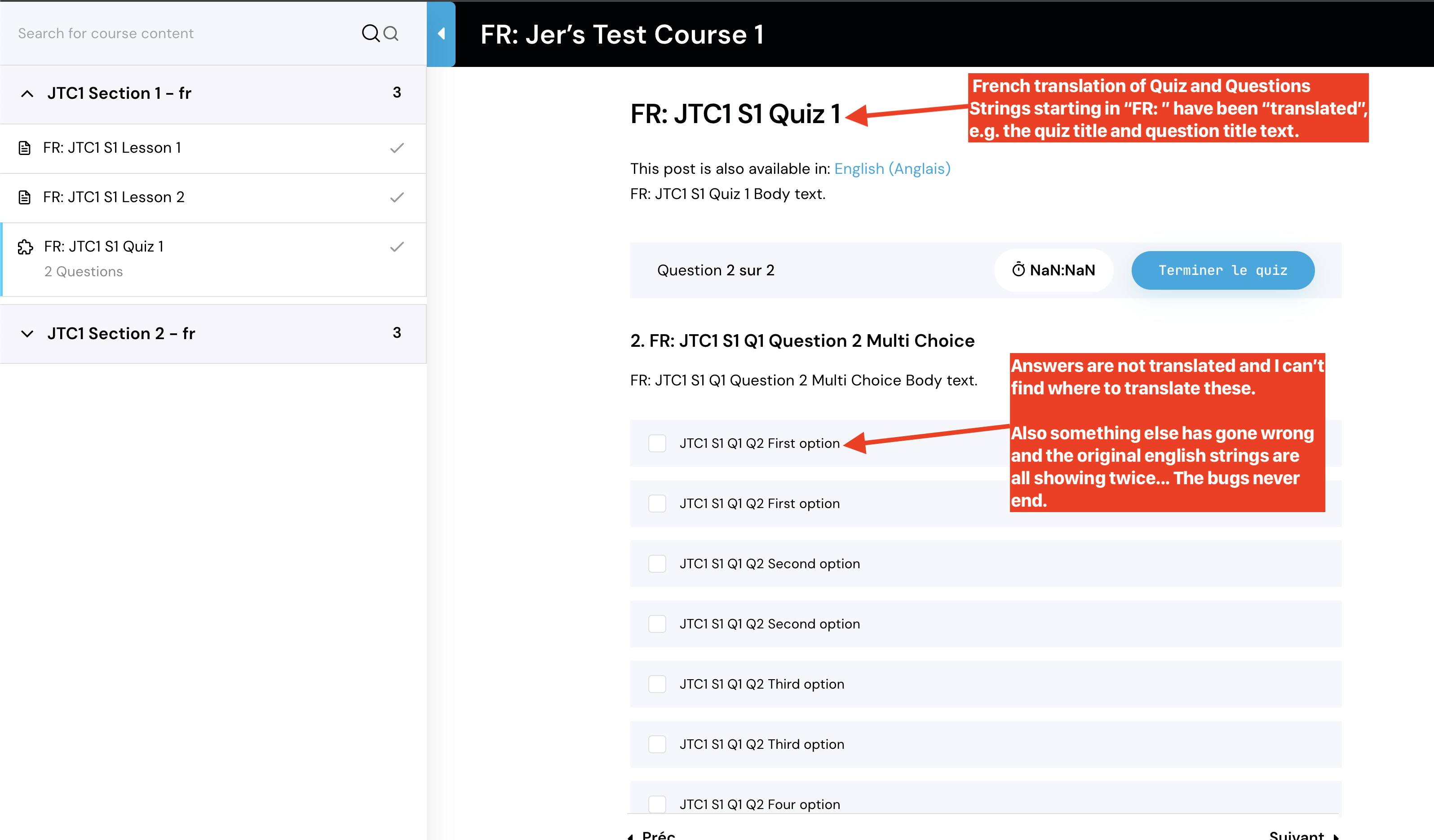 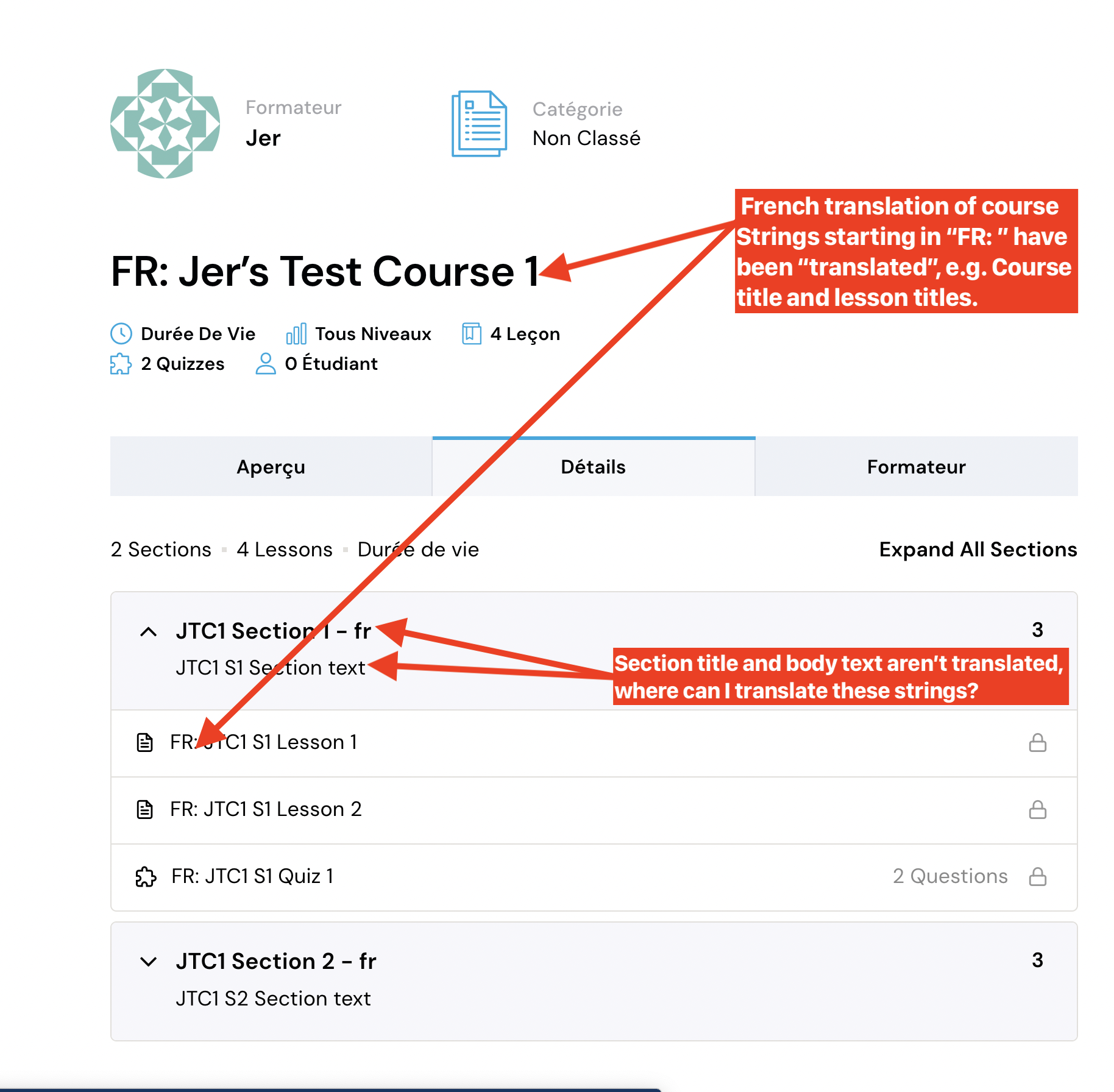 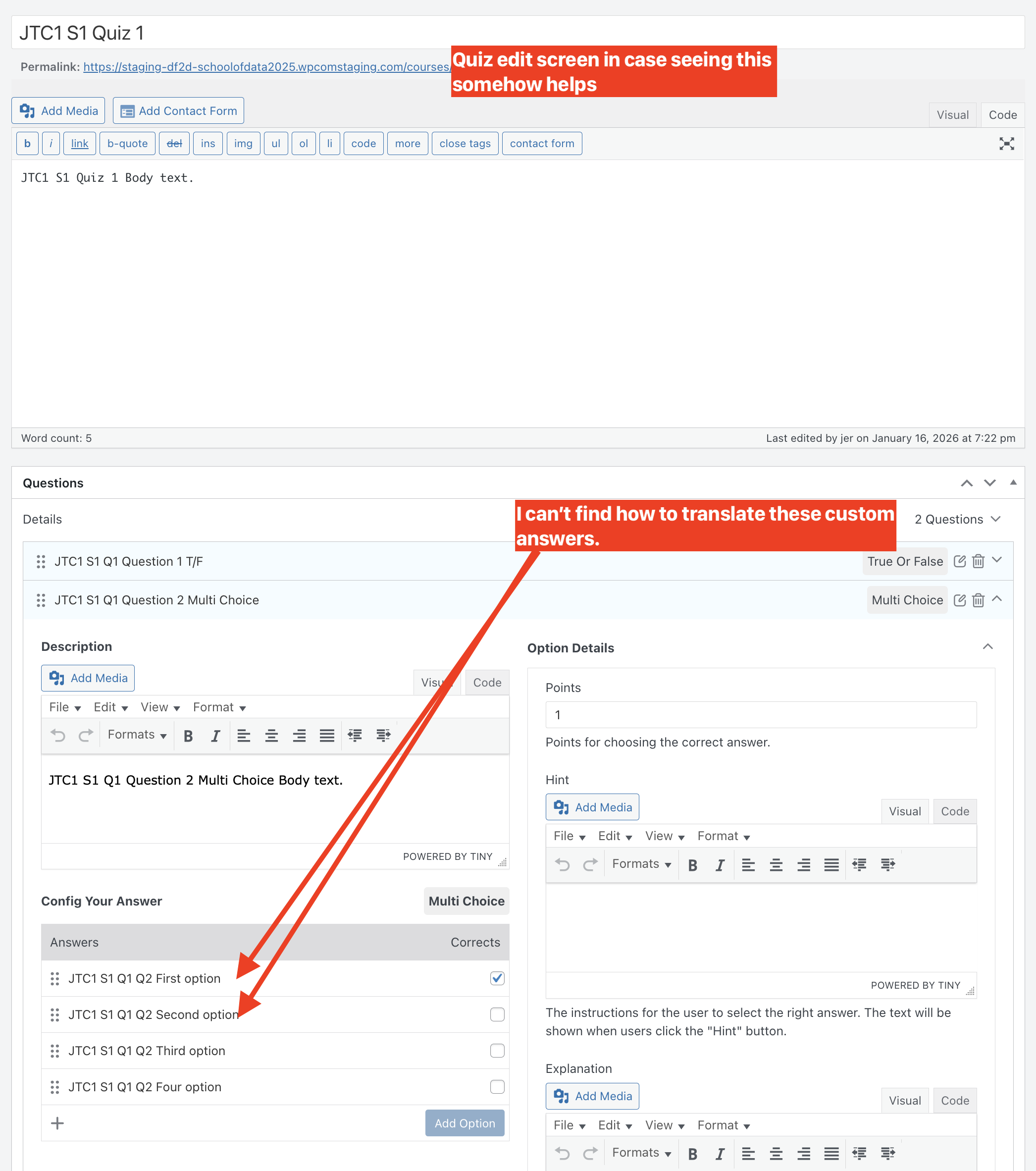 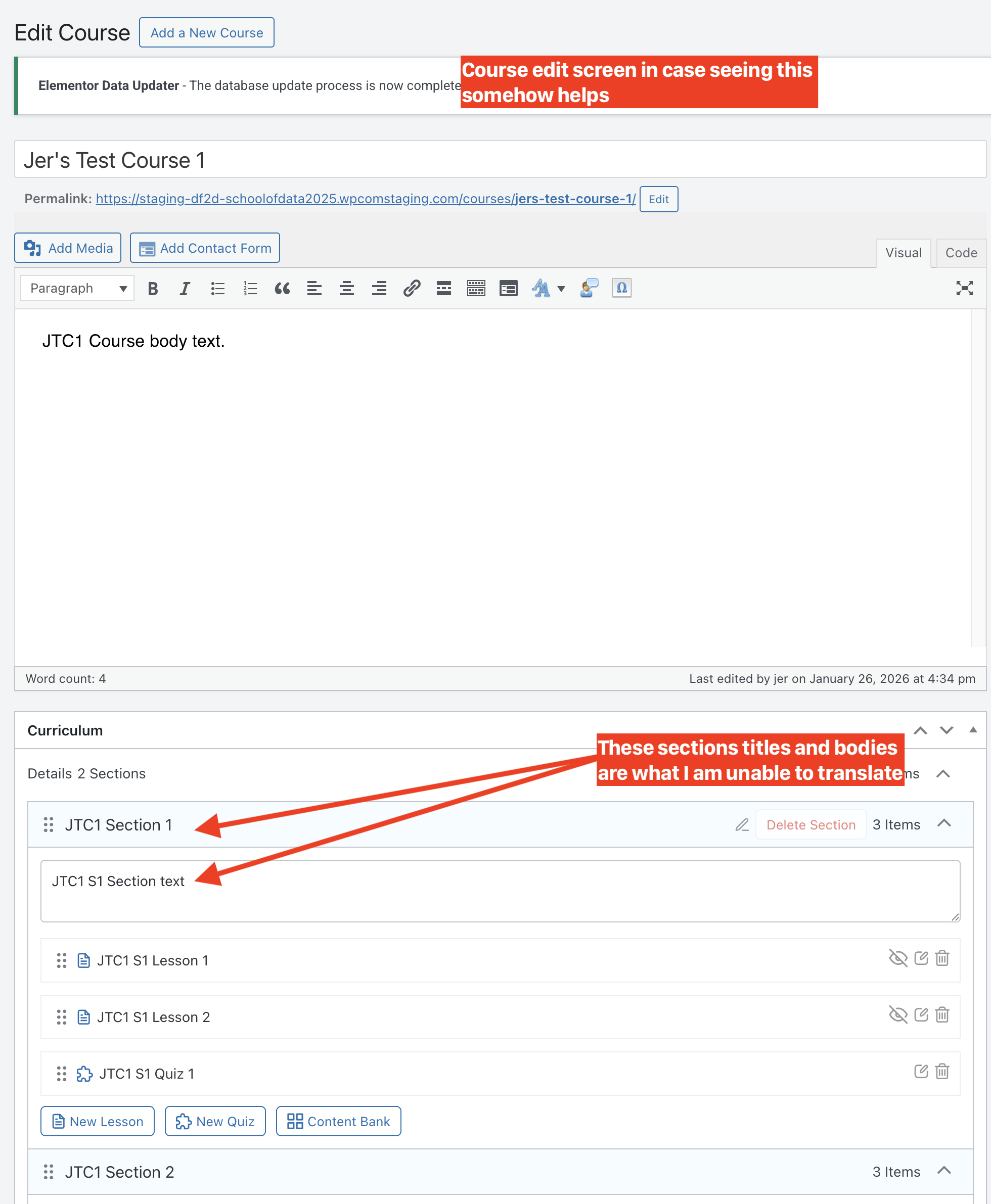 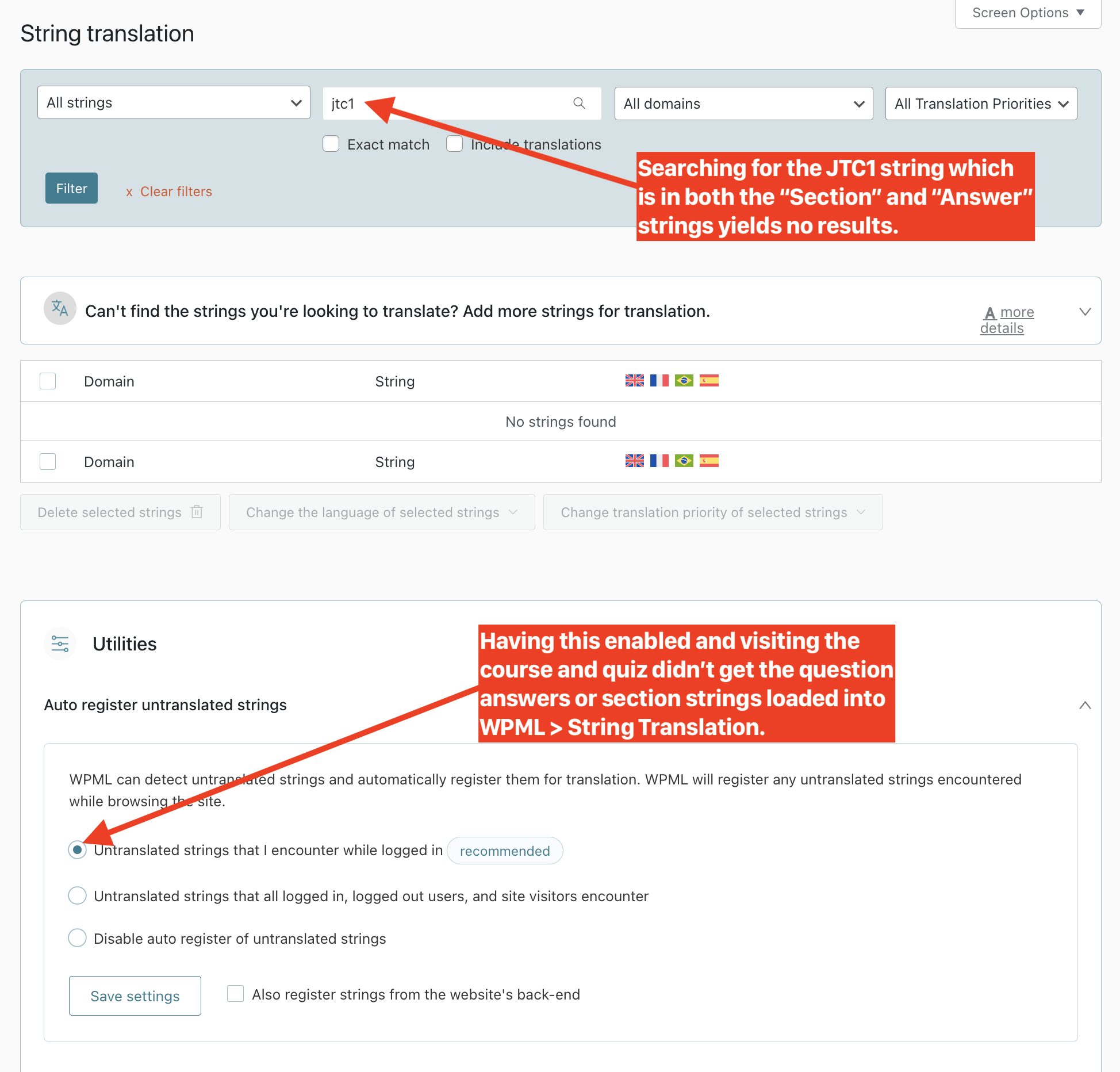 |
| January 27, 2026 at 8:01 am #17765470 | |
 Bruno Kos WPML Supporter since 12/2018 Languages: English (English ) German (Deutsch ) French (Français ) Timezone: Europe/Zagreb (GMT+02:00) |
Hello, To further investigate this, could you please install the LearnPress – WPML Add-on on the following sandbox site (if possible): hidden link Once installed, please create a simple quiz that includes at least one multiple-choice question with answer text (Question Answer Text). The goal is to reproduce the issue so I can check internally with our compatibility team whether translating quiz answers is supported, or at least possible through a workaround. At the moment, I haven’t found any documented cases of this in our archives or forums, and this functionality is also not covered in the LearnPress documentation here: hidden link Once the quiz is created, please let me know which quiz it is, and I’ll continue testing and follow up with you. |
| January 28, 2026 at 11:46 pm #17771966 | |
|
cassandraW-2 |
Thanks for the reply. * I installed the add-on plugin on the temporary site. The quiz is called: TC1 S1 Quiz 1 TC1S1Q1 Thank you for looking into and confirming whether you can find a way to make it work. ________ More information from ThimPress, hopeully it helps: I also submitted a version of this support request to ThimPress. Their response was very disappointing and makes me wonder if they realize that this doesn't work. This was their reply: > We understand that you are currently facing problems where you cannot find the text for Question Answer Text and Section body text. By default, some values related to LearnPress will be copied in WPML. You can follow the video instructions below to enable those two options to translate them. As you'll see if you watch the video, it is not very clear at all what they expect me to do, other than that it involves the "WPML > Settings > Custom Fields Translation" configuration. My guess is that they thought that somehow I could enable translation of a `_lp_*` Custom Field to address this issue, but the video ends without the person clicking on a specific field. At least that's my understanding, the video is totally unclear. After looking at the database in PHPMyAdmin, it seems that the answers are in a table called `wp_learnpress_question_answers` , not the `postmeta` table where Custom Fields are stored, so I'm pretty confident that their reply won't solve the problem of translating "Answers". I searched through all recently-added `postmeta` fields and couldn't find anything starting with `_lp_` that had text in it. When it comes to the "Section text", I found it in a table called `wp_learnpress_sections`, where it's stored in the `section_description` field. In that table I do notice that the `section_name` of my translated section has been modified, and the translated duplicate is called "JTC1 Section 2 - fr" rather than "JTC1 Section 2". This seems like it's a signal that the WPML integration is doing something, but there's no clarity on how I can get at that " - fr" version and actually translate it. I don't know what's going on, because I have to assume that at some point this did work, but right now it's not and no one seems to know how it was even supposed to function. Thank you for digging into this. Quizzes are a fundamental aspect of courses. If the Quizzes don't work, then both WPML and ThimPress should stop selling/recommending the combination. |
| January 29, 2026 at 7:30 am #17772451 | |
|
Bruno Kos WPML Supporter since 12/2018 Languages: English (English ) German (Deutsch ) French (Français ) Timezone: Europe/Zagreb (GMT+02:00) |
Thank you for setting it all up! Just to confirm, you want to translate these Answers, correct? I've tried thorugh translation dashboard, but noting shows up in the translation editor. 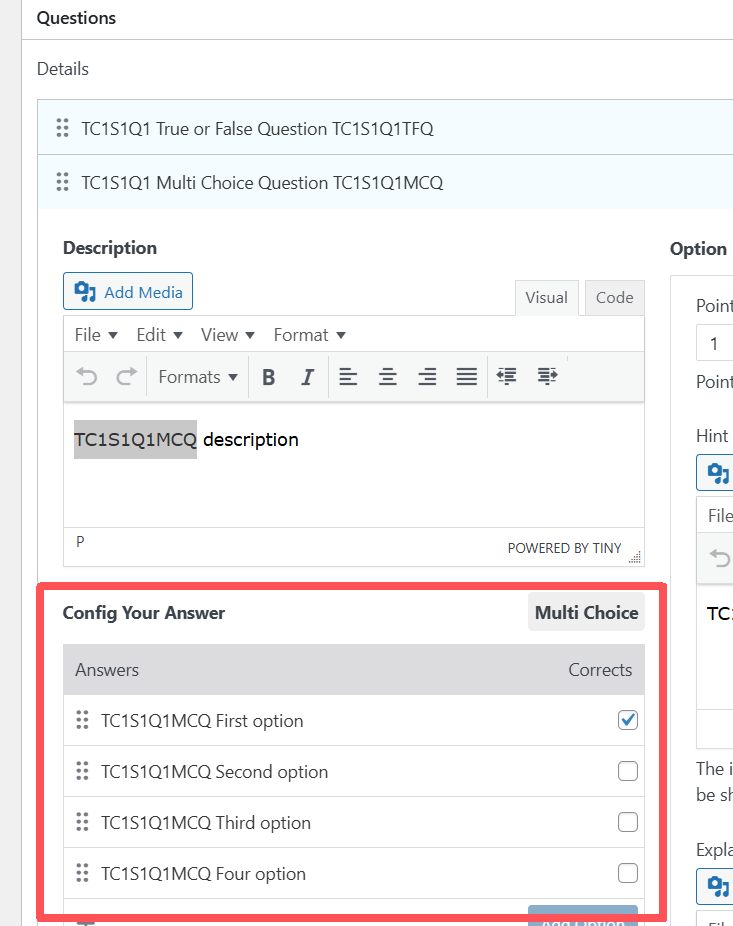 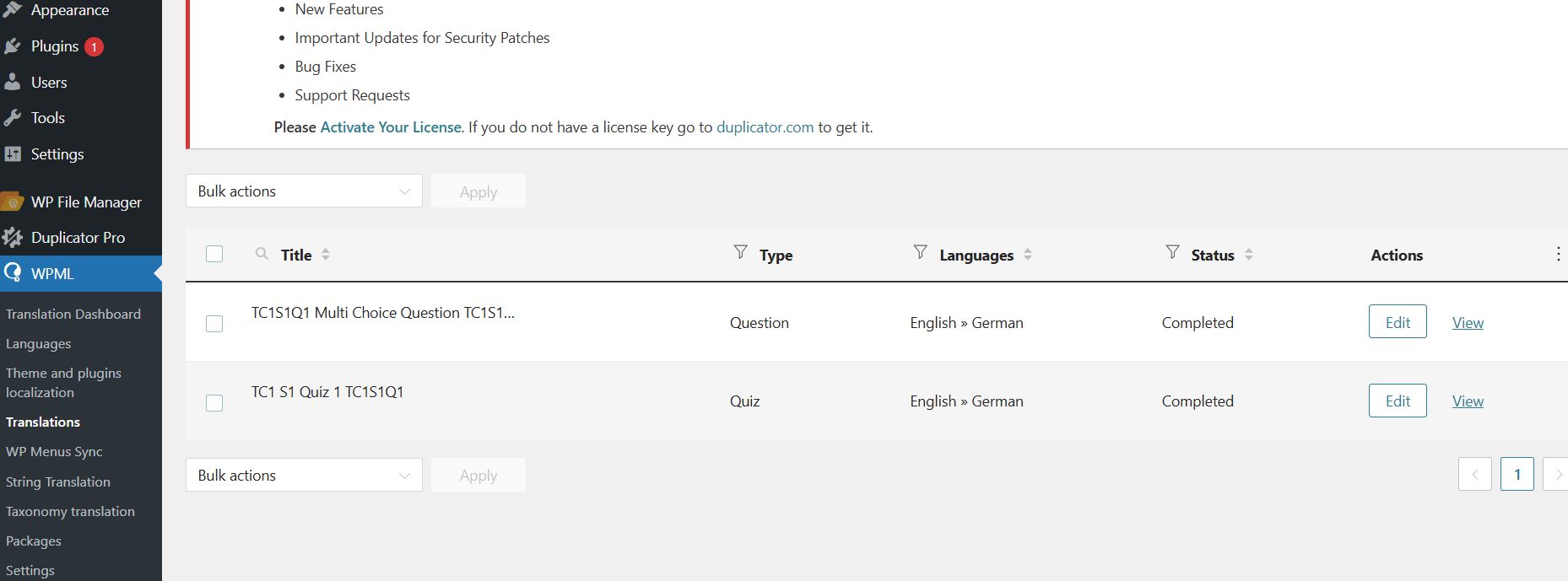 |
| January 29, 2026 at 3:22 pm #17774441 | |
|
cassandraW-2 |
Yeah, I mean, what I want is to be able to use the Quiz feature while creating English courses, with the confidence that everything will be translated. That's the promise of the Add-On. But as a first step, making sure I can translate those answers is the bare minimum. The other elements of the question, like the description, hint, and explanation, should also be translatable, by any sensible definition of the text from the add-on marketing: "Enables complete translation of every course element, including course titles, descriptions, lessons, quizzes, questions, and the entire purchasing flow." |
| January 30, 2026 at 8:22 am #17776078 | |
|
Bruno Kos WPML Supporter since 12/2018 Languages: English (English ) German (Deutsch ) French (Français ) Timezone: Europe/Zagreb (GMT+02:00) |
This has been escalated to our Compatibility team and may take some debugging time, I'll get back to you as soon as I have any news or questions for you. |
| February 3, 2026 at 6:13 am #17785543 | |
|
Bruno Kos WPML Supporter since 12/2018 Languages: English (English ) German (Deutsch ) French (Français ) Timezone: Europe/Zagreb (GMT+02:00) |
We are unable to provide a workaround for it as the issue is too complex, so we contacted their authors about further implementations. As for now, you can translate quizzes like this: So directly in WordPress, there is no other way at the moment unfortunately. |
| February 3, 2026 at 7:02 pm #17789438 | |
|
cassandraW-2 |
Thank you Bruno and to the team at WPML. While you weren't able to find a good solution, you gave me a fallback to make up for the failures of the ThimPress team, and I appreciate it. You've gone above and beyond, IMO, and this experience makes me happy to be a OTGS customer, even as it makes me never want to deal with ThimPress again. # Partial solution from ThimPress For the sake of any future WPML users who are lost with this question, ThimPress did finally offer me a workaround solution, after several back-and-forths where they offered useless suggestions that had no chance of addressing my questions. The answer is similar to yours: Both Course and Quiz translations have to be edited manually, directly in the WP editor rather than WPML Advanced editor, in order to translate all content. The difference is that they demonstrated how you can edit the translated posts *after* running the Courses/Lessons/Quizzes through the WPML translation process, which at least makes a cleaner workflow. In the case of the "Section" title and body text, you have to edit the course after it's been translated, at which point you can use the "Curriculum" metabox to update the Section text directly. It's similar for Quizzes, where you can edit the quiz after "translation" and use the "Questions" metabox to translate the questions. I'll share my full instructions below. This is what I'm putting in the documentation I'm creating for my client. The real crime of ThimPress is not having these instructions in their own documentation! It's a foolish omission that makes their 30$ add-on incomplete and makes both LearnPress and WPML look bad to new users. In my support thread with them I demanded they update their documentation to make it clear for new users, hopefully more clients won't have to waste hours of consultant time for no reason. # My detailed instructions for fully translating a LearnPress course with WPML If you see anything foolish in these, please let me know! I'm not a WPML expert, just trying to resolve this issue for a client. # WPML Translation Dashboard - Assign courses, lessons, and questions - **Courses**: Select the course # Translations Queue ( WPML > Translations ) as translator - Translate Questions (only question title and description is present in WPML editor) # Edit Translated Course post directly to translate section text - *Needed because “Section” text is not available during WPML translation in the previous step.* - In the **Curriculum** metabox, edit the section titles and body texts (everything not yet translated). # Edit Translated Quiz post directly to translate question text - *Similar to Course steps above, but for the Quizzes, which also have text that can’t be translated using the WPML interface.* After the page reloads, review the **Questions** box to confirm everything is translated. |
| March 12, 2026 at 10:28 pm #17894077 | |
 Nicolas V. WPML Supporter since 12/2021 Languages: English (English ) French (Français ) Timezone: America/Lima (GMT-05:00) |
Hello, Just a quick message to let you know that the author released LearnPress WPML v4.0.6 which should fix the issue. We closed the corresponding erratum. |





