This thread is resolved. Here is a description of the problem and solution.
Problem: The client is facing an issue where unique HubSpot forms added to contact pages in different languages are overwritten by WPML each time translations are updated. Solution: We recommend using the WordPress Editor to manage the content of the pages where unique forms are required, as the WPML Editor and the WordPress Editor are independent. Content created with one cannot be edited with the other. You should set the WordPress Editor on a page/post level basis, for a post type, or for the entire website, specifically for pages that need different designs or custom HTML per language. It is crucial to have a backup before testing any settings.
If this solution does not apply to your case, or if it seems outdated, we highly recommend checking related known issues at https://wpml.org/known-issues/, verifying the version of the permanent fix, and confirming that you have installed the latest versions of themes and plugins. Should you need further assistance, please do not hesitate to open a new support ticket at WPML support forum.
This is the technical support forum for WPML - the multilingual WordPress plugin.
Everyone can read, but only WPML clients can post here. WPML team is replying on the forum 6 days per week, 22 hours per day.
WPML is intended to mostly to translate texts. In order to have different HTMLs on each language, it's best that you use the WordPress Editor (it seems that you're already using it, but make sure that this option is selected, as highlighted in the link below):
In order for your content not to get overwritten, make sure that the translation is not a duplicate of the original. If it is you can click on "Translate independently". Let me know if you have any questions regarding that.
I don't have the options the thread is mentioning.
I have an English contact page that has been translated to Porteguese. I want to the connection between the pages to remain (meaning Google should see that it's a language variation of the english one) BUT I want to edit it without WPML overwriting everything every time.
We are also getting an issue now where we have content that is translated, when going back into the advance editor it's suddenly flagged and back to english???
- This is causing a ton on back and forth
The site was refreshed, it overwrote the FAQs which had been translated into Italian, back into English.
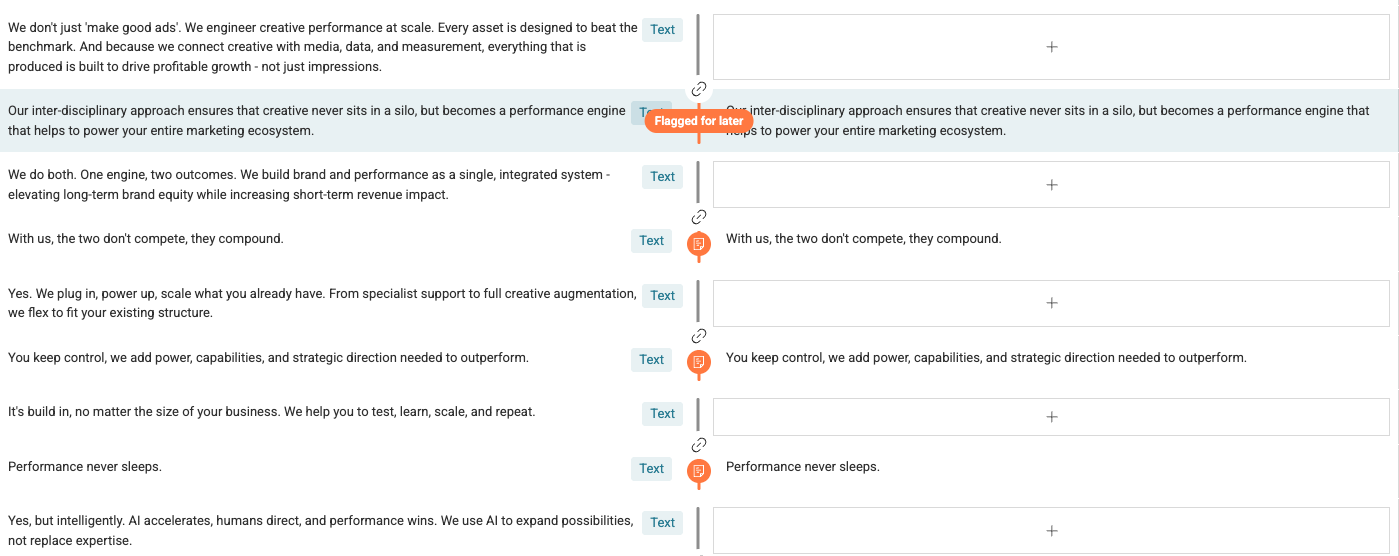
This seems to be happening across random sections of the site. As you can see in the image below anything that has been "Flagged for Later" has converted back to English. Which is odd as on the site it is currently translated into the appropriate language. This is happening accross multiple languages
Yes, as you noted in the video, the options to switch editors only show on the default language page. Let me explain the WPML Editor and the WordPress editor are independent, that means that content created with one, cannot be edited with the other. You can either use one, but not both at the same time.
If you want to switch to the WordPress Editor, please note that you'll need to recreate the translations with it. You can set it on a page/post level basis, for a post type, or for the entire website. I recommend you use it only for pages that need different designs or custom HTML per language.
Make sure to have a backup before testing any setting. Let me know if this answers your question.