This thread is resolved. Here is a description of the problem and solution.
Problem: The client is experiencing an issue where the footer, although correctly translated in WPML, still displays in English on the live website in the French version and other translated pages. This footer is a custom post type created by the theme and selected from the theme options.
Solution: We resolved the issue by identifying the footer block IDs for each language from the footer template pages. In WPML → String Translation, we registered the English footer ID and added the corresponding IDs for the other languages. This configuration ensures that WPML knows which footer template to use for each language in the MedCity theme. After saving these settings, each language now correctly loads the appropriate footer template. Additionally, some footer links are custom menu links, which must be manually translated in WPML → String Translation. It's also necessary to translate the menus themselves to ensure all footer links display correctly in every language.
If this solution does not resolve your issue, or if it seems outdated or irrelevant to your case, we highly recommend checking related known issues at https://wpml.org/known-issues/, verifying the version of the permanent fix, and confirming that you have installed the latest versions of themes and plugins. If further assistance is needed, please open a new support ticket at WPML support forum.
This is the technical support forum for WPML - the multilingual WordPress plugin.
Everyone can read, but only WPML clients can post here. WPML team is replying on the forum 6 days per week, 22 hours per day.
Problem
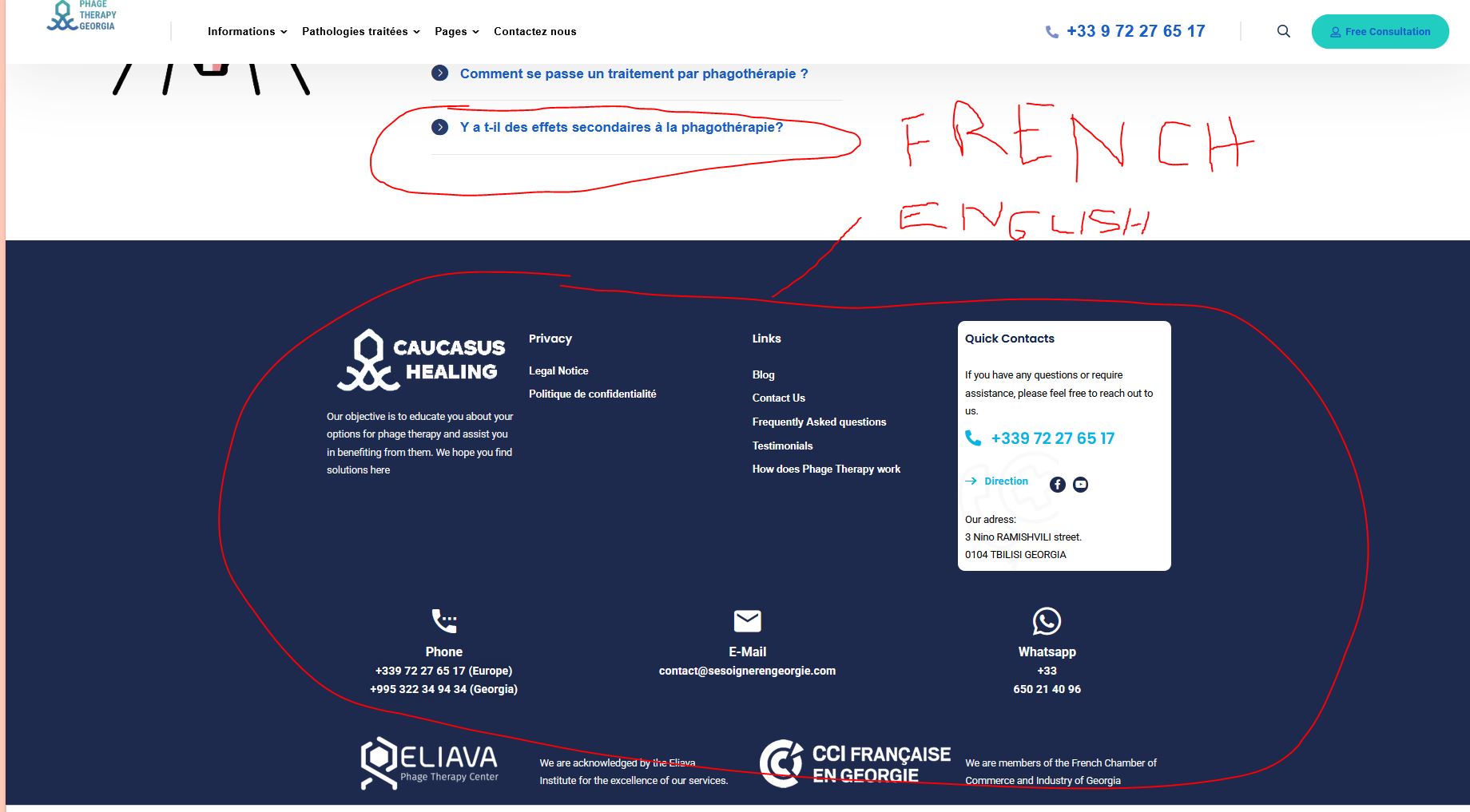
My footer is correctly translated in WPML, but on the live website, the footer still appears in English (fully or partially) on the French version and other translated pages.
Important detail
The footer is not a normal page. It is a custom post type created by the theme called “Footers”.
In MedCity > Theme Options > Footer**, the site uses a custom footer layout selected from these “Footers”.
What I already checked**
I identified the published footer template currently used by the theme.
I verified that the footer translations exist in WPML.
I set the custom post type **Footers** as translatable.
I changed the related custom fields to **Translate**:
* `custom_footer`
* `footer_layout`
* `footer_layout_custom`
* I cleared all caches:
* Kinsta cache
* browser cache
* I also rechecked the selected footer in theme options.
**Current result**
Even after all this, the live website still loads the English footer instead of the translated one.
**My question**
Could you please check whether this is a known compatibility issue between:
and especially whether the footer custom post type / footer layout fields are being mapped correctly by WPML?
Please let me know:
1. if my custom fields should be set differently (**Translate / Copy / Copy once**),
2. if there is a specific compatibility setting for MedCity footers,
3. if I need to register any additional custom fields or admin texts,
4. or if this requires a compatibility patch.
If needed, I can provide screenshots of:
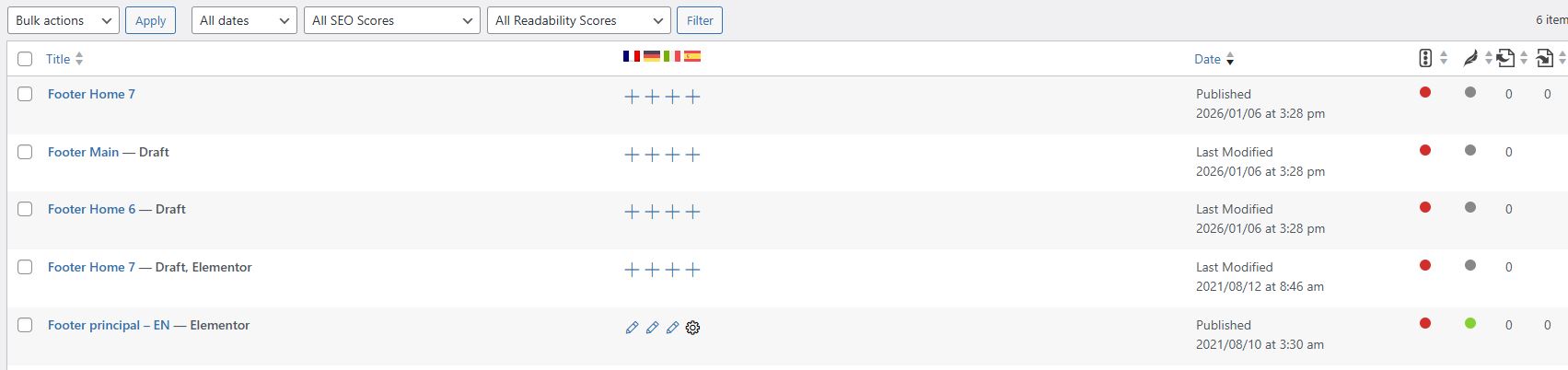
* the “Footers” custom post type list,
* WPML translation settings,
* the footer custom fields translation settings,
* and the live frontend showing the English footer on the French page.
Welcome to WPML support. As I am not familiar with how Medcity works, I have to login to your website most probably.
But from what I undertsand you create a footer and translate it. Then in Medcity options you select which footer should be used.
Now WPML need sto know that.
- Go to the Footer page in the original language.
- From the top address bar of your browser, write down the post ID.
- From the top admin langauge switcher change the language to the secondary one.
- Write down the translated post ID too.
- Follow the steps below to go to the Admin Text section of the string translation: https://wpml.org/documentation/getting-started-guide/string-translation/finding-strings-that-dont-appear-on-the-string-translation-page/#register-admin-and-setting-strings-for-translation
- Search for the ID of the original language.
- If you find it, select it and add it to string translation.
- For the translation of that ID use the second language ID.
- That way you will tell WPML that the theme option should use which ID for the footer translation.
If you did not manage that, I'd appreciate it if you could give me the URL/User/Pass of your WordPress dashboard after you make sure that you have a backup of your website.
It is absolutely important that you give us a guarantee that you have a backup so if something happens you will have a point of restore.
Thank you for the login information. I recorded what I have done to fix the problem for the footer content, and showed you how to do translation for the footer menu called (Menu Link):
hidden link
Video Summary:
- I identified the footer block IDs for each language (EN, FR, DE, IT, ES) from the footer template pages.
- In WPML → String Translation, I registered the English footer ID and added the corresponding IDs for the other languages.
- This tells WPML which footer template should be used for each language in the MedCity theme.
- After saving, each language now loads the correct footer template.
- Some footer links are custom menu links, so they must be translated manually in WPML → String Translation.
- You may also need to translate the menus themselves to ensure all footer links display correctly in every language.
------------------------
The link to the WPML String translation for the menu:
hidden link
You can learn how to do translation for custom link menu items here:
Thank you very much for your help in improving my situation.
However, I still do not understand how to change the text or the logo in each footer. I now understand how to manage the menus, but I am still not sure how to edit the other content.
You would simply go to WP Dashboard > Footers, Select the Footer in question and click the + icon or gear icon or pencil icon next to it to do the translation of the text like any other page that you do in WPML.
For the media, you will need the WPML > media Translation.
yes ok thank you but i haven't been precised enough.
U need to change the logo that should be different from a language to another one, is it possible to do that ?
Mostly the French logo is different than all the other languages
Is it doable?
Regards
Alain