Background of the issue:
I am trying to find the translation management option in WPML to add a copy of an event via a bulk process on my site hidden link.
Symptoms:
I didn't find the translation management option in the WPML menu.
Questions:
Where is the translation management option in WPML?
It looks like your site was previously registered with a Multilingual Blog license. When I re-registered it using my account, the registration worked correctly. So, please try to register the site by following the below steps:
1. Login to your WPML.org account >> Go to the Sites page: https://wpml.org/account/sites/
2. Delete the existing site key by pressing the little trash icon (if the key exists for that site).
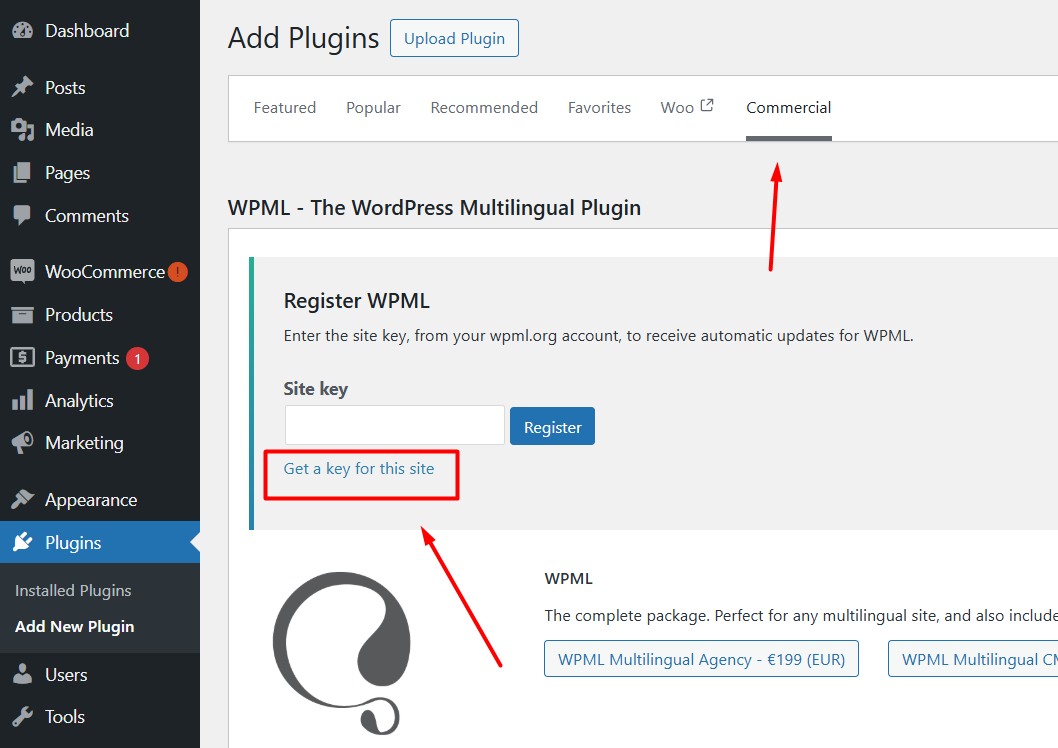
3. Login to your site and go to the Dashboard >> Plugins >> Add new > Commercial tab and click the Unregister WPML from this site link if that link exists.
4. Then click the Register WPML link.
5. Click the Get a key for this site link (screenshot attached).
6. It will generate the Key for your site
7. Copy the key, and paste it back into the input box, and press the Register button and see if this resolves the issue.
Kindly let me know the results,
Thank you
The topic ‘[Closed] Where is the translation management?’ is closed to new replies.