Skip to content Skip to sidebar

This is the technical support forum for WPML - the multilingual WordPress plugin.

Everyone can read, but only WPML clients can post here. WPML team is replying on the forum 6 days per week, 22 hours per day.

Sun Mon Tue Wed Thu Fri Sat
9:00 – 18:00 9:00 – 18:00 9:00 – 18:00 9:00 – 18:00 9:00 – 18:00 - -
- - - - - - -

Supporter timezone: Africa/Cairo (GMT+02:00)

This topic contains 7 replies, has 0 voices.

Last updated by kasperG 1 day, 4 hours ago.

Assisted by: Osama Mersal.

Author Posts
February 3, 2026 at 12:04 pm

kasperG

The danish and english attributes for Woocommerce are switched for some attributes and not for others.

February 3, 2026 at 1:09 pm #17787944

Itamar
WPML Supporter since 02/2016

Languages: English (English )

Timezone: Asia/Jerusalem (GMT+02:00)

Hi,

Please try the following.

Go to WooCommerce -> WCML -> Settings (tab) and scroll down and click the Troubleshooting link. There try WCML's troubleshooting options. If it does not help, please also try WPML's main troubleshooting section.

1. Take a backup of the DB of your site.

2. Go to WPML -> Support -> Troubleshooting (link)

3. Once on the troubleshooting screen, press the following buttons and check if it helps. Press each button at a time and wait for the process to complete.

- 'Disable cache for language switcher templates'

- 'Clear language information and repopulate languages' button (if it is showing)

- 'Synchronize posts taxonomies' for 'Products'

- 'Clear the cache in WPML'

- 'Remove ghost entries from the translation tables'

- 'Fix element_type collation'

- 'Fix WPML tables collation'

- 'Synchronize local job ids with ATE jobs'

- 'Set language information'

- 'Reset languages' Press this button only if you didn't add a custom language!

- 'Fix terms count'

- 'Fix post type assignment for translations'

- 'Cleanup and optimize string tables'

- 'Clear invalid strings'

*** Please make a backup of your database before using this.***

You can read more about the troubleshooting options here:
https://wpml.org/documentation/support/wpml-troubleshooting-options/

Please let me know how it goes.

Regards,
Itamar.

February 3, 2026 at 1:25 pm #17787987

kasperG

I tried all of the above steps. I am still not seeing the correct attribute names,

February 3, 2026 at 1:43 pm #17788158

Itamar
WPML Supporter since 02/2016

Languages: English (English )

Timezone: Asia/Jerusalem (GMT+02:00)

Hi, and thanks for trying my suggestions.

You shared the access to the staging site in a public message. I've hidden this reply. Please share it in the private message below; otherwise, I'm not allowed to access your site.

If needed, please allow me to take a copy of your site. To do this, I must install a plugin such as Duplicator or All-in-One Migration. Please let me know if you agree.
Privacy and Security Policy
We have strict policies regarding privacy and access to your information. Please see:
https://wpml.org/purchase/support-policy/privacy-and-security-when-providing-debug-information-for-support/
**IMPORTANT**
- - Please back up the site files and database before providing us access. --
-- If you have a staging site where the problem can be reproduced, it is better to share access to the staging site.--

Regards,
Itamar.

February 4, 2026 at 12:55 pm #17791516

Osama Mersal
WPML Supporter since 02/2020

Languages: English (English )

Timezone: Africa/Cairo (GMT+02:00)

Hi,

I'm Osama from the WPML support team. I'll be glad to help you today.

I checked this hidden link">product, and the attributes seem to be in the correct language. (Kindly check the attached screenshot)

Please let me know if there is another example product where I can see the issue.

Thanks for your cooperation

Best regards,
Osama

2026-02-04_14-46-15.png
February 4, 2026 at 12:58 pm #17791637

kasperG

Hi. Indeed it does. How can I implement this on the live site?

Also "length" in the attached should be "Længde". Can this be corrected as well?

Screenshot 2026-02-04 at 13.57.22.png
February 5, 2026 at 11:08 am #17795672

Osama Mersal
WPML Supporter since 02/2020

Languages: English (English )

Timezone: Africa/Cairo (GMT+02:00)

Hi,

Please go to WPML-> Taxonomy Translation, select the product attributes, and make sure that they are in the correct language.

Best regards,
Osama

February 6, 2026 at 7:45 am #17798296

kasperG

Hi

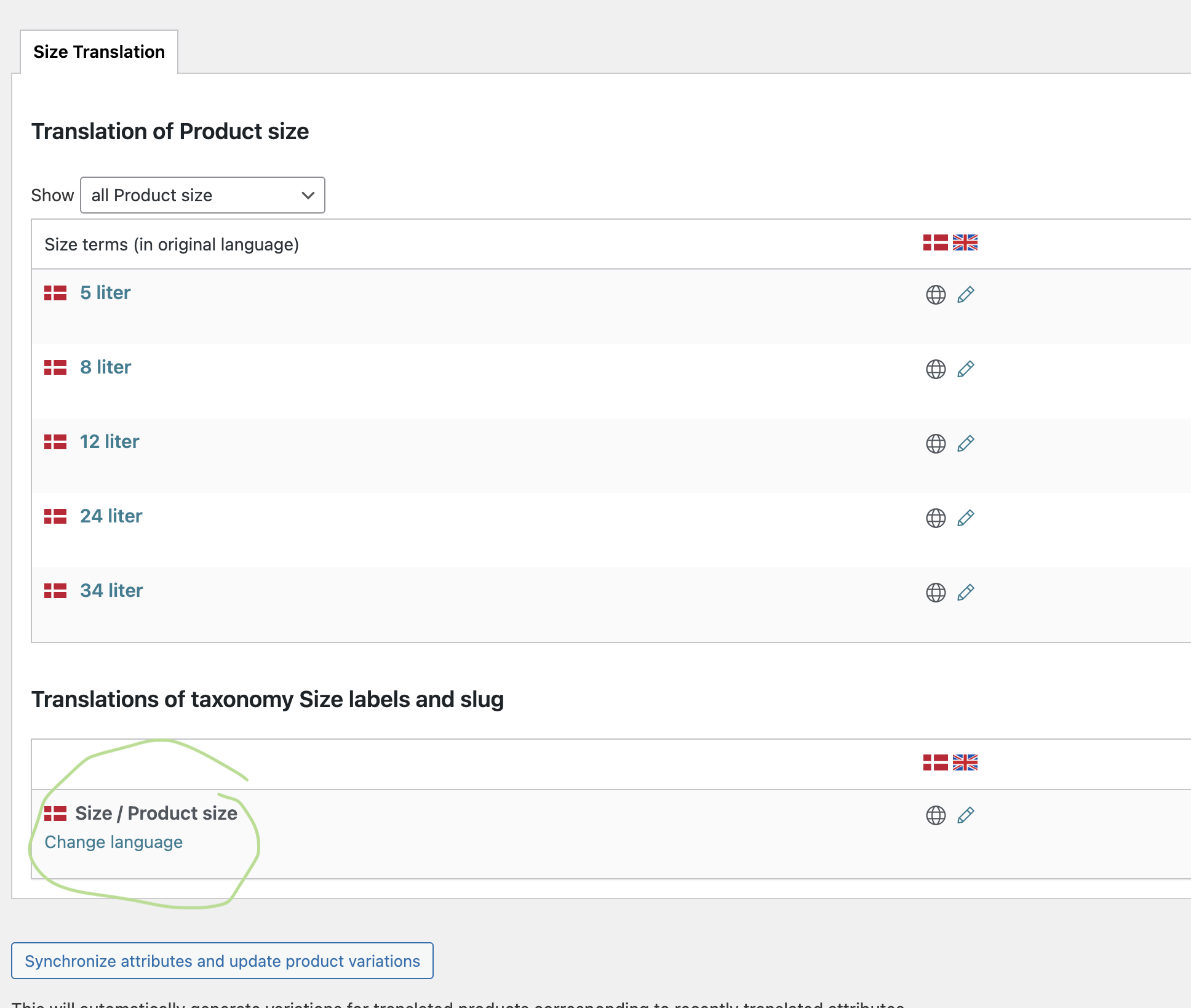
See attached. The text reads "Størrelse" in Danish - but when translating it is displayed as "Product Size".

The same goes for "Length" in my previous answer.

Something is not right.

Screenshot 2026-02-06 at 08.42.33.png
Screenshot 2026-02-06 at 08.42.18.png
Screenshot 2026-02-06 at 08.42.09.png
Screenshot 2026-02-06 at 08.42.37.png