
This is the technical support forum for WPML - the multilingual WordPress plugin.
Everyone can read, but only WPML clients can post here. WPML team is replying on the forum 6 days per week, 22 hours per day.
| Sun | Mon | Tue | Wed | Thu | Fri | Sat |
|---|---|---|---|---|---|---|
| - | 7:00 – 12:00 | 7:00 – 12:00 | 7:00 – 12:00 | 7:00 – 12:00 | 7:00 – 12:00 | - |
| - | 13:00 – 15:00 | 13:00 – 15:00 | 13:00 – 15:00 | 13:00 – 15:00 | 13:00 – 15:00 | - |
Supporter timezone: Europe/Madrid (GMT+02:00)
Tagged: Exception
This topic contains 13 replies, has 1 voice.
Last updated by Carlos Rojas 14 hours, 24 minutes ago.
Assisted by: Carlos Rojas.
| Author | Posts |
|---|---|
| April 14, 2026 at 10:47 pm #17970094 | |
 upliftL |
Yes, I suddenly realized today that the smartphone view of our site is very different between our English language version and our Spanish language version. This is only occurring on an actual smartphone. I created a screen recording to show you. Here is the link: Can you give us ideas on how to fix this? |
| April 15, 2026 at 12:30 pm #17971358 | |
 Alejandro WPML Supporter since 01/2018 Languages: English (English ) Spanish (Español ) Italian (Italiano ) Timezone: Europe/Rome (GMT+02:00) |
Hello, I see you're using Divi but are you using a template or something on the homepage? the section on the translated language seem like one of those default layouts some themes come with, but divi doesn't really have that as far as I know. Is that layout maybe an old one you used to have before or something similar? Let us know so we can understand what to do next. |
| April 15, 2026 at 9:28 pm #17972321 | |
|
upliftL |
Yes, it's Divi using the Avanti theme. The layout are not older versions. |
| April 16, 2026 at 11:35 am #17974226 | |
 Carlos Rojas WPML Supporter since 03/2017 Languages: English (English ) Spanish (Español ) Timezone: Europe/Madrid (GMT+02:00) |
Hello, 1.- I kindly ask you to share the URL to edit the template of the homepage, or share another video showing the steps to edit the mobile version of the homepage in English. 2.- Also, please share the access credentials to the site in your next message, which I have set private, so I can reproduce the same steps described in the previous point and double-check the WPML configuration. Confirm you have created a full site backup that you can restore if necessary. Looking forward to your message. |
| April 17, 2026 at 9:53 am #17976390 | |
|
Carlos Rojas WPML Supporter since 03/2017 Languages: English (English ) Spanish (Español ) Timezone: Europe/Madrid (GMT+02:00) |
Hi, To rule out a conflict with a third-party functionality, I kindly ask you to create a staging site with a copy of the production site. You can use the WP Staging plugin for free, and share the access credentials in your next message, which I have set private again. This will allow us to run more tests without affecting the live site. |
| April 17, 2026 at 7:37 pm #17977521 | |
|
upliftL |
Hi Carlos, Great idea, thank you for suggesting a staging site before proceeding. I have created a staging site and password-protected it. The password credentials are: [REMOVED] The credentials I shared with you before for admin & FTP access are still active. hidden link hidden link Thanks for your help, have a good weekend and nos hablaremos en la semana proxima |
| April 18, 2026 at 6:11 pm #17978293 | |
|
upliftL |
For some reason my last message is not set entirely to private |
| April 20, 2026 at 9:10 am #17979957 | |
|
Carlos Rojas WPML Supporter since 03/2017 Languages: English (English ) Spanish (Español ) Timezone: Europe/Madrid (GMT+02:00) |
Hi there, I have removed the credentials from your message so they are not publicly available. After running many tests in a minimal setup, the issue persists, so I kindly ask your authorization to create a copy of the staging site to escalate this ticket to our 2nd tier of support, where our specialists will take a deeper look at the issue to isolate its cause. |
| April 20, 2026 at 9:25 pm #17982217 | |
|
upliftL |
Hello, I can't tell what you are asking. It appears you are asking for my authorization or approval to create a copy of the staging site. well, yes you have my authorization or approval to create a copy of the staging site. But are you asking me to do it? To create another copy of the staging site? |
| April 21, 2026 at 8:01 am #17982979 | |
|
Carlos Rojas WPML Supporter since 03/2017 Languages: English (English ) Spanish (Español ) Timezone: Europe/Madrid (GMT+02:00) |
I'm sorry if I wasn't clear on my message. Yes, I'm asking for your authorization to create a copy of the staging site to escalate this ticket to our 2nd-tier of support and send them the copy. Can you confirm you authorize me to create a copy of the staging site? |
| April 21, 2026 at 4:22 pm #17985048 | |
|
upliftL |
Yes |
| April 21, 2026 at 4:23 pm #17985050 | |
|
upliftL |
Yes, I authorize you to create a copy of the staging site. I already did, but yes. Yes. Yes. |
| April 22, 2026 at 7:25 am #17986151 | |
|
Carlos Rojas WPML Supporter since 03/2017 Languages: English (English ) Spanish (Español ) Timezone: Europe/Madrid (GMT+02:00) |
Thank you very much for your authorization. I have escalated this ticket to our 2nd-tier of support, where our specialists will take a deeper look at this issue, isolate its cause, and find a solution. I will get back to you as soon as I get an answer from them. Thank you very much for your patience and understanding! |
| April 24, 2026 at 9:18 am #17992213 | |
|
Carlos Rojas WPML Supporter since 03/2017 Languages: English (English ) Spanish (Español ) Timezone: Europe/Madrid (GMT+02:00) |
Hi there, The cause of the issue is that the page has the meta viewport declaration (which normally appears in the document head) twice; the second time it also appears in the document body. It doesn't create any problems with the English original, but the second declaration in the body gets translated by WPML, and the broken second declaration invalidates the first, but is required for the browser to handle the mobile version correctly. Our 2nd-tier specialists went to WPML > Settings and disabled the raw HTML setting -see attached image-, then resent the content for translation, and that solved the problem. Can you confirm that the issue is solved after disabling the mentioned option and resending the content for translation? 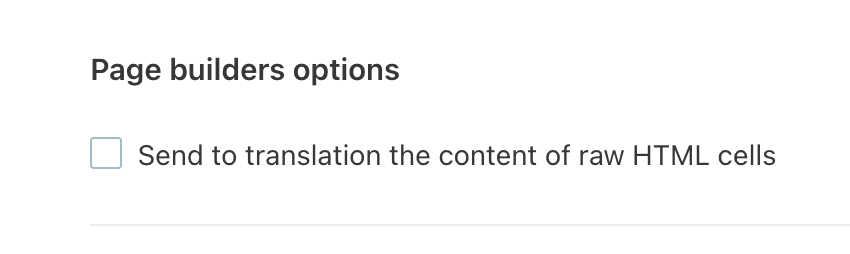 |









