I'm trying to use the Translate Automatically feature in WPML to translate a page, but I keep getting the message: "WPML didn't manage to translate this page."
Also, I get issues when i translate a pure custom html page. My team tried translating it manually, but after triggering the automatic translation the section is removed.
Welcome to WPML support. One point about pure HTML pages. It is very hard for the advanced translation editor to detect all the details of complicated HTML code if the page is completely HTML-based.
For such scenarios, I suggest that only for that page use the WP Native editor for translation:
Regarding the automatic translation error that you encounter, is it happening on a normal page?
If yes, may I ask you to do as follows?
- IMPORTANT STEP! Create a backup of your website. Or better approach will be to test this on a copy/staging version of the website to avoid any disruption of a live website.
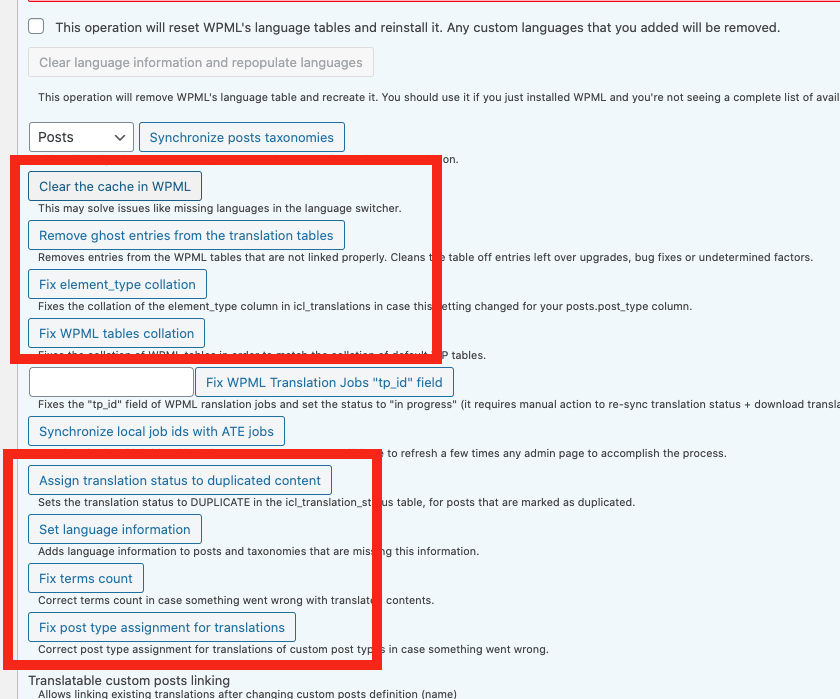
- Go to "WordPress Dashboard > WPML > Support > Troubleshooting (link)".
- Click the buttons annotated in the screenshot below one by one and wait for each button process to finish: https://wpml.org/wp-content/uploads/2020/10/7206941-buttons.png
Also check if the WPML plugin is regsitered, if not please do this:
- Make sure that you are logged in wpml.org.
- Go to "WordPress Dashboard > Plugins > Add New > Commercial (Tab)".
- Click the "Unregister WPML" link. (Your translations will be safe)
- Click the "Register WPML" at the right section of the screen.
- Click the "Get a key for this site" link annotated in the screenshot below.
- A new page will open up and the auto-generated key will show in pop-up.
- Copy the key and paste it into the "Site Key" input box annotated in the screenshot below.
- Click the "OK" button.
After the steps above, check and see if it works. If not, please test to see if there is a plugin of some sort that might cause the problem and prevent the translation:
- IMPORTANT STEP! Create a backup of your website. Or better approach will be to test this on a copy/staging version of the website to avoid any disruption of a live website.
- Switch to the default theme such as "TwentyTwenty" by going to "WordPress Dashboard > Appearance > themes".
- Go to "WordPress Dashboard > Plugins" and deactivate all plugins except:
. WPML Multilingual CMS
. WPML String translation
. WooCommerce
. WooCommerce Multilingual
- Check if you can still recreate the issue.
- If not, re-activate your plugins one by one and check the issue each time to find out the plugin that causes the problem.
And finally, if the issue persists, go to Wp Dashboard > WPML > Support > Installer Support > Error Log and give me the error details you see at the top row of the table.
I also need to know the result of each step mentioned above.