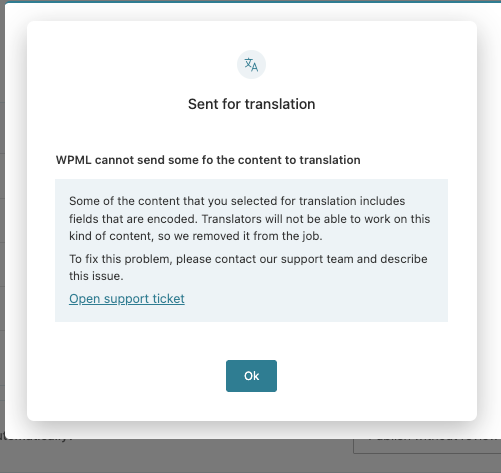
I sent a page to translation from the Translation Dashboard and got this popup:
WPML cannot send some fo the content to translation
Some of the content that you selected for translation includes fields that are encoded. Translators will not be able to work on this kind of content, so we removed it from the job.
To fix this problem, please contact our support team and describe this issue.
I'm not sure what the problem is. What does it mean ?
I'm David, from the WPML dev team. For sure, this is not the ideal experience when you are trying to translate content using the WPML plugin. This is a known issue for us and we have fixed it on the 4.9.1 version.
Why is this happening?
Because your content contains unexpected characters. You probably are copying content from another tool/app (like Figma for instance) that has weird things like this ie:
<h2><span data-metadata="<!--(figmeta)eyJmaWxlS2V5IjoiTGdQYTU0ZUFtemtQSXdJNzdLTjNGSyIsInBhc3RlSUQiOjEwNzAzMjc3MDYsImRhdGFUeXBlIjoic2NlbmUifQo=(/figmeta)-->"></span>Conditions et équipements de nos cabanes dans les Landes</h2>
This
data-metadata
information with a weird long string is the one that causes this issue. So, probably you have something like that in your content.
Next steps
First, I'd like you to check if you have the WPML version 4.9.1, otherwise please update it.
If the issue persists, you can avoid the problem by:
- Sending content for translation directly from the post edit screen, or
- Sending content from the post list screen using the + icon.
Please let me know if updating the plugin version solved the issue or if the second recommendation did.
yes, we are on 4.9.1.
Indeed, i did find the workaround of launching the translations from the post edit screen.
Your explanation does makes sense as that page was indeed first created in figma.