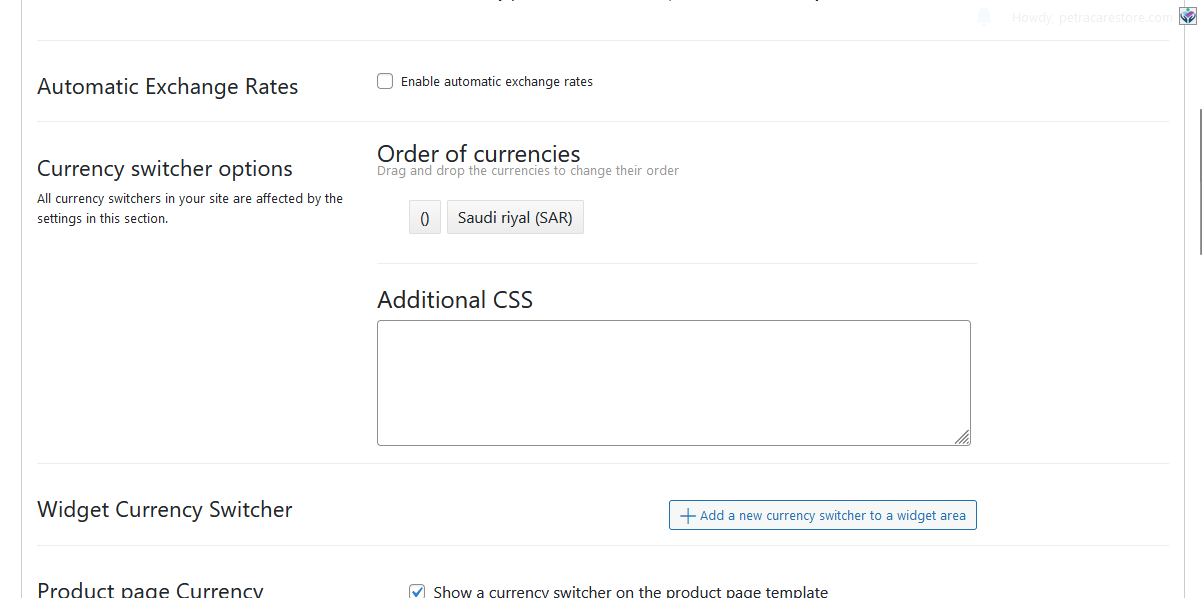
This thread is resolved. Here is a description of the problem and solution.
Problem: You have enabled the multicurrency mode on your site using WPML, but you can only see your local currency (SAR) and not any other currencies. Solution: First, ensure you have reviewed the documentation on using multiple currencies with WooCommerce Multilingual, which can be found here: https://wpml.org/documentation/related-projects/woocommerce-multilingual/#multiple-currencies.
If you wish to add the shortcode to a menu, you might consider using a plugin like 'Shortcode in Menus', which facilitates this process. More information on this plugin can be found here: https://wordpress.org/plugins/shortcode-in-menus/.
If this solution does not resolve your issue or seems outdated, we recommend checking related known issues at https://wpml.org/known-issues/, verifying the version of the permanent fix, and confirming that you have installed the latest versions of themes and plugins. Should you need further assistance, please do not hesitate to open a new support ticket at WPML support forum.
This is the technical support forum for WPML - the multilingual WordPress plugin.
Everyone can read, but only WPML clients can post here. WPML team is replying on the forum 6 days per week, 22 hours per day.
I need to request temporary access (wp-admin and FTP) to your site – preferably to a test site where the problem has been replicated if possible – in order to be of better help. You will find the needed fields for this below the comment area when you log in to leave your next reply. The information you will enter is private which means only you and I can see and have access to it.
If I need to debug the problem further, I want to ask you about the possibility of replicating your site locally. I'll need to install a "Duplicator" temporarily or "All In One Migration" plugin on your site. This will allow me to create a copy of your site and your content. If you prefer to do it independently, you can provide the snapshot and send me the zipped package you downloaded.
I have logged into your test website and set the language to English in the profile settings, but I am still experiencing RTL styles. Are there any plugins that might be affecting the styles?
Here’s what I have noticed so far that needs your attention:
- Please update the WPML and WooCommerce plugins.
- Temporarily deactivate all plugins except for WPML and WooCommerce to see if the issue persists.
Thank you for your feedback. When you enable the multicurrency mode, try to choose the option from "Show currencies based on". I have shown the screenshot.
To achieve this, you can use the following shortcode either as a menu item or in a footer widget, or you can implement it directly in your theme's template file using PHP:
Since the original issue has been resolved, I opened a new ticket for your new question. This will also help other users with similar problems find solutions when searching the forum.