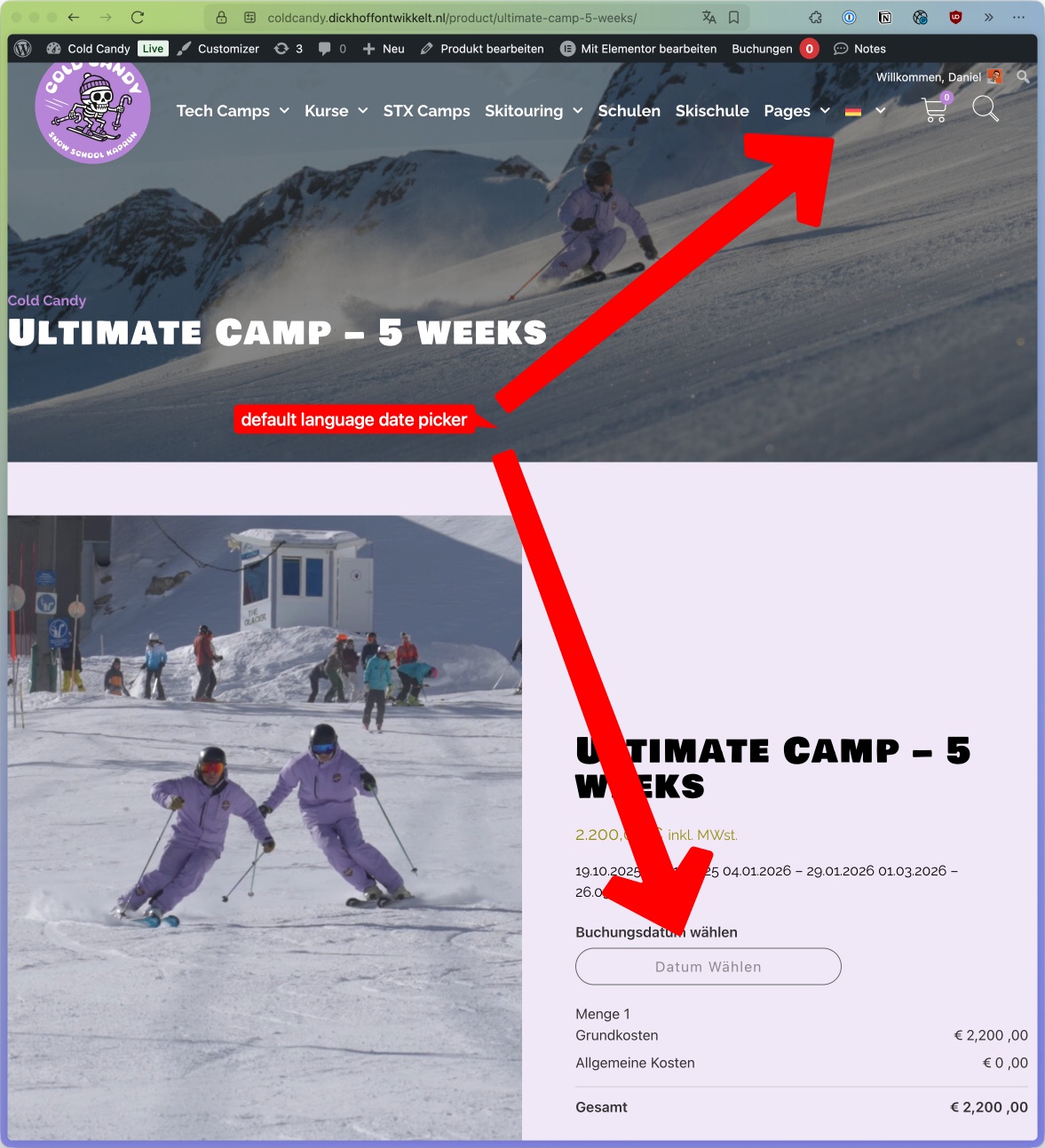
[Resolved] WooCommerce date picker not shown in translated pages
This thread is resolved. Here is a description of the problem and solution.
Problem: You are using WPML with Elementor Pro, WooCommerce, and Bookings for WooCommerce on your website and are trying to translate a single booking product page. However, the date picker is not visible on the translated page, which prevents service purchases. Solution: We have identified that this issue has been resolved in the latest versions of the Bookings for WooCommerce plugin. The plugin's author has included a fix in the recent update. Here are the details from the plugin's change log:
3.10.1 – Released on 28 November 2025<br />New: Latest compatibility With WP[6.8.3] and WC[10.3.5].<br />New: Compatibility with WPML
We recommend updating the Bookings for WooCommerce plugin to the latest version to resolve this issue.
If this solution does not apply to your case, or if it seems outdated, we encourage you to open a new support ticket. We also highly recommend checking related known issues at https://wpml.org/known-issues/, verifying the version of the permanent fix, and confirming that you have installed the latest versions of themes and plugins. For further assistance, please visit our support forum at WPML Support Forum.
This is the technical support forum for WPML - the multilingual WordPress plugin.
Everyone can read, but only WPML clients can post here. WPML team is replying on the forum 6 days per week, 22 hours per day.
Background of the issue:
I am using WPML on our website, which is based on Elementor Pro, WooCommerce, and Bookings For WooCommerce. We are trying to translate a single booking product page. Bookings for WooCommerce plugin: https://wordpress.org/plugins/mwb-bookings-for-woocommerce/
Symptoms:
The date picker is not visible on the translated page, making it impossible to buy a service.
Questions:
How can we fix the issue of the date picker not showing on the translated page?
I was able to replicate this problem on my test site. The problem is caused by a broken WPML configuration file for the Bookings for WooCommerce plugin. The problem is not only with the calendar, which is not displaying. It also fails to copy over any of the Bookings for WooCommerce settings to the translation. Here is a workaround you can apply to your site to fix this issue.
1. Go to WPML -> Settings -> Custom XML Configuration (tab).
4. At this stage, you might need to update the original booking product and its translation to make the calendar show.
I'll esclate this problem to our compatibility team so it will be fixed in future versions of the plugin. I'll keep you updated here on any news regarding this issue.
Update
Our compatibility team will contact the authors of Bookings for WooCommerce to let them know they need to add translation support for their plugin.
Our compatibility team has let me know that this issue has been fixed with the latest versions of the Bookings for WooCommerce. The fix has been provided by the author in the plugin's files. The following is from the plugin's change log.
3.10.1 – Released on 28 November 2025
New: Latest compatibility With WP[6.8.3] and WC[10.3.5].
New: Compatibility with WPML
We're closing this ticket. Please don't hesitate to contact us again with any WPML-related issues or questions.