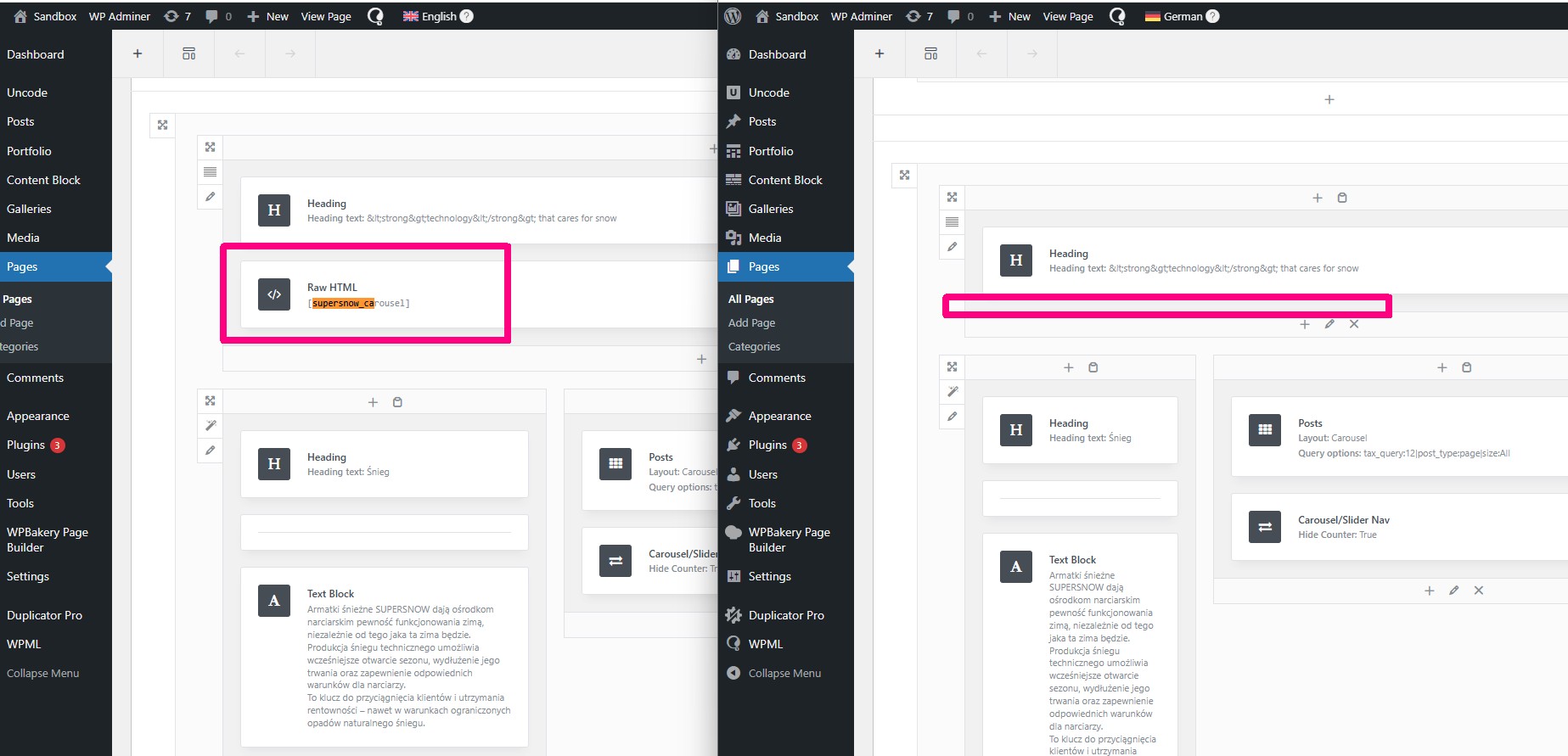
I'm experiencing an issue where the **Advanced Translation Editor completely removes the content of `vc_raw_html` shortcodes** when translating pages built with WPBakery (Uncode theme). The same translation works correctly when using the Classic Translation Editor.
I have a homepage built with WPBakery that contains `vc_raw_html` shortcodes with base64-encoded custom shortcodes inside:
[vc_raw_html]JTVCc3VwZXJzbm93X2Nhcm91c2VsJTVE[/vc_raw_html]
(The base64 decodes to `[supersnow_carousel]`)
**When using Advanced Translation Editor:**
- The `vc_raw_html` shortcode is completely removed from the translated page
- The base64 content disappears entirely
- The translated page is missing entire sections
**When using Classic Translation Editor:**
- The `vc_raw_html` shortcode is preserved correctly
- The base64 content remains intact
- The translated page displays correctly with all modules
## Configuration Attempted
I have tried the following configurations without success in Advanced Editor:
1. **Database setting:** Changed `wpml_page_builders_options` to `translate_raw_html = 1`
2. **Custom XML configuration in WPML Settings:**
```xml
vc_raw_html
```
3. Also tried with `raw-html="1"` attribute:
```xml
vc_raw_html
```
None of these configurations resolved the issue with Advanced Translation Editor.
## Verification
I verified the issue by comparing database content:
- **Original page (PL):** Contains 4 instances of `vc_raw_html` with base64 content
- **Translated with Advanced Editor:** 0 instances of `vc_raw_html`, content completely removed
- **Translated with Classic Editor:** 4 instances of `vc_raw_html` preserved correctly
## Uncode's wpml-config.xml
The Uncode theme includes proper configuration for `vc_raw_html`:
```xml
vc_raw_html
```
This configuration is being ignored by the Advanced Translation Editor.
## Questions
1. Is this a known issue with Advanced Translation Editor and `vc_raw_html`?
2. Is there a configuration option to make Advanced Editor preserve base64-encoded shortcode content?
3. Is there a workaround other than using Classic Translation Editor?
## Workaround
Currently, using Classic Translation Editor works correctly, but it's significantly slower for large pages. I would prefer to use Advanced Editor if possible.
Ok, but this issue concerns a custom element that requires additional files on the server.
Anyway, I copied the content of the home page and you can see there's a shortcode: [supersnow_carousel] — however, after performing the translation, the shortcode disappeared.
Languages: English (English )German (Deutsch )French (Français )
Timezone: Europe/Zagreb (GMT+01:00)
Just to confirm my understanding: after the page was translated using the Translation Editor, this field was removed from the translation, and as a result, its content is also not being rendered on the frontend?
If this is correct, I will escalate the case to our Compatibility Team for further investigation.
Languages: English (English )German (Deutsch )French (Français )
Timezone: Europe/Zagreb (GMT+01:00)
This has been escalated to our Compatibility team and may take some debugging time, I'll get back to you as soon as I have any news or questions for you.