
This is the technical support forum for WPML - the multilingual WordPress plugin.
Everyone can read, but only WPML clients can post here. WPML team is replying on the forum 6 days per week, 22 hours per day.
Tagged: Compatibility
This topic contains 10 replies, has 0 voices.
Last updated by mulhamZ-2 5 days, 7 hours ago.
Assisted by: Lucas Vidal de Andrade.
| Author | Posts |
|---|---|
| January 16, 2026 at 1:39 pm | |
 mulhamZ-2 |
Hello WPML Support Team, I am facing a strange issue regarding the visibility of WordPress Menus in the backend, which seems to be related to WPML. The Issue: When I navigate to Appearance > Menus, I cannot see or select my existing menus to edit them. However, I noticed that the menu count is actually visible (it indicates that menus exist), but the dropdown list or the selection tabs are empty/missing. Current Behavior: Backend: Menus are invisible in the dashboard (cannot be edited). Frontend: All menus are rendering and working perfectly on the live site in all languages. It seems like the data exists in the database but is failing to load specifically in the WordPress Admin interface. Troubleshooting: I have cleared all caches (Server, Browser, and WPML cache). Best regards, 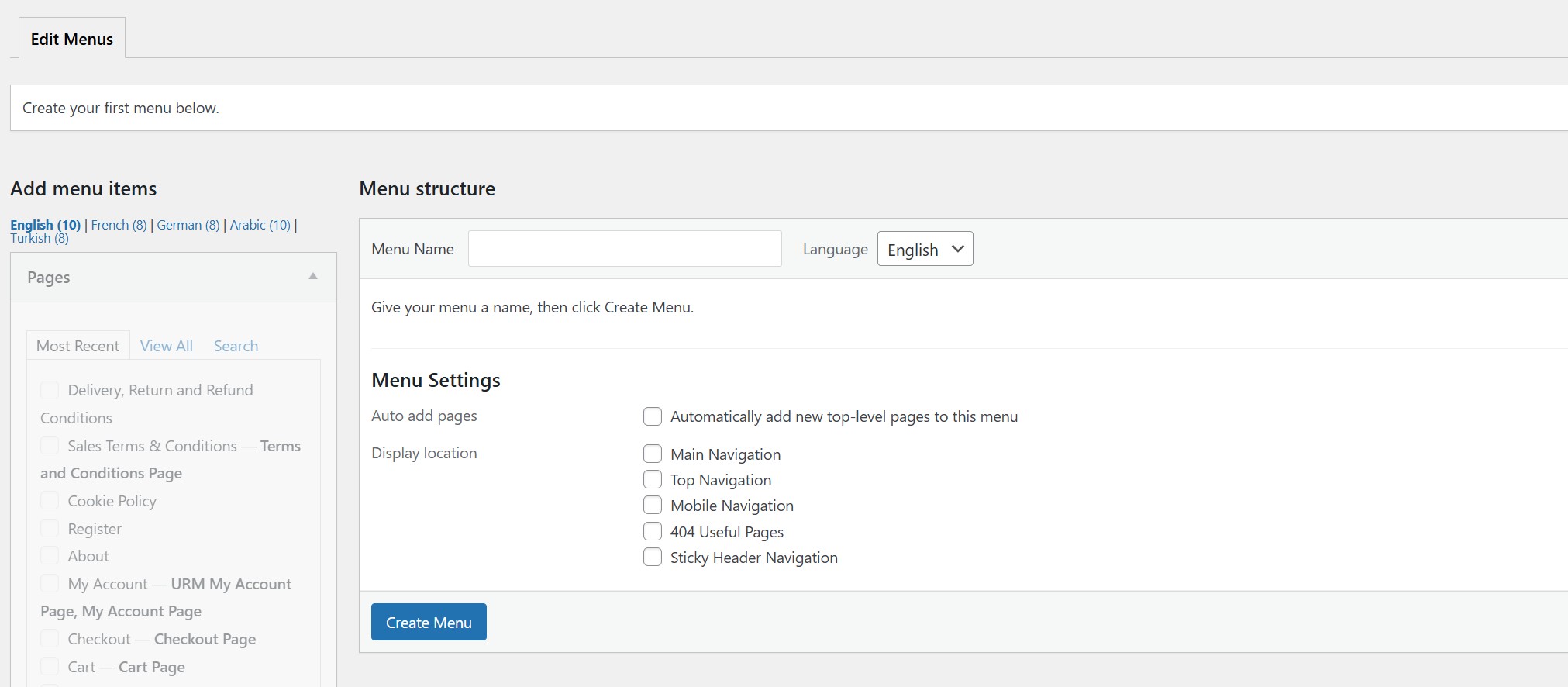 |
| January 19, 2026 at 9:17 am #17741521 | |
|
mulhamZ-2 |
Hello WPML Team, I am writing to provide a crucial update regarding the missing menus issue. I restored a backup from Nov 16, 2025, and performed updates one by one. I found that updating WPML to the latest version did not break the menus. Even updating the "User Registration" plugin did not break them. The issue occurred only after I updated Avada from version 7.14 to 7.14.2. It seems the latest Avada patch introduced a conflict that affects how WPML or User Registration handles menus in the backend. I have already contacted Avada support with these findings, but I wanted to keep you informed in case you have other users facing similar issues with the new Avada version. Best regards, Mulham Zakkar |
| January 19, 2026 at 11:03 am #17742008 | |
 Lucas Vidal de Andrade WPML Supporter since 11/2023 Languages: English (English ) Timezone: Europe/Vienna (GMT+01:00) |
Hello Mulham, Thank you so much for the updates. If possible, please check my last message, and follow the provided steps. Or, if you wish, we can wait for Avada's feedback on the issue. |
| January 22, 2026 at 10:17 am #17753150 | |
|
mulhamZ-2 |
Hi Lucas, Sorry for the late response. I did what you said on the sandbox website |
| January 22, 2026 at 10:18 am #17753153 | |
|
mulhamZ-2 |
This was Avada reply: When I enabled debug mode, I saw this error: hidden link I recommend you to contact your hosting support and ask them to fix memory error and check the database." |
| January 22, 2026 at 1:09 pm #17754004 | |
|
Lucas Vidal de Andrade WPML Supporter since 11/2023 Languages: English (English ) Timezone: Europe/Vienna (GMT+01:00) |
Hi Mulham, I'm not sure where they are making these tests, or why - so I don't know what are the memory settings in this environment. If possible, tell them to create the menu translations manually instead of using the menu sync, so they can proceed. I can check the error for you later, if you wish. Tell them to check "Translating Menus with Custom Links", it explains how to add translations manually: https://wpml.org/documentation/getting-started-guide/translating-menus/#custom-links Also, I don't have access to the website hidden link anymore. Can you please share the credentials again, using the private fields? IMPORTANT Please make a backup copy of the site files and database before giving us access. - If you do not see the wp-admin/FTP fields, this means your post and site login details are being made PUBLIC. DO NOT post your website details if you do not see the required wp-admin/FTP fields. If you do not, ask me to enable the private box. The private box looks like this: hidden link |
| January 23, 2026 at 2:55 pm #17757499 | |
|
Lucas Vidal de Andrade WPML Supporter since 11/2023 Languages: English (English ) Timezone: Europe/Vienna (GMT+01:00) |
Hello there, I was able to sync the available menu items while Avada was inactive. There are many untranslated URLs that need translation before being synced. I'm not sure why they're tesing this on your website, though. Again, I recommend that they usual manual translation for testing purposes. |
| January 24, 2026 at 4:12 pm #17759168 | |
|
mulhamZ-2 |
Thanks Lucas, I don't need to sync the menus. The main problem is that when activating Avada, the menus disappear, and the (Menu Switcher) disappears from the Arabic Header |
| January 26, 2026 at 10:57 am #17762018 | |
|
Lucas Vidal de Andrade WPML Supporter since 11/2023 Languages: English (English ) Timezone: Europe/Vienna (GMT+01:00) |
Hi Mulham, Thanks for all the details you've shared. Honestly, I’m a bit lost at this point — while the issue initially appeared to involve WPML, User Registration, and Avada, you’ve since confirmed that it only occurs after updating Avada to version 7.14.2. You mentioned that Avada support is investigating the issue, but so far you haven’t shared any clear feedback or position — only a separate issue with the menu sync tool, which you said yourself isn’t even relevant to the original problem. Since WPML is still part of the equation, and there may be deeper compatibility issues at play, I’ve escalated this to our developers for further investigation. I’ll update you as soon as I hear back from them. Thanks again for your patience and troubleshooting efforts! Best, |
| January 28, 2026 at 3:14 pm #17771077 | |
|
Lucas Vidal de Andrade WPML Supporter since 11/2023 Languages: English (English ) Timezone: Europe/Vienna (GMT+01:00) |
Hey there, Thank you for waiting. The problem lies with the User Registration & Membership plugin, which includes some flawed WPML compatibility code. Please ensure to have a full website backup before proceeding. You can fix this issue by disabling the relevant part of that plugin code by adding this code to your site (functions.php or via some code snippet plugin):
add_action( 'init', function(){
    remove_filter( 'user_registration_get_endpoint_url', 'ur_filter_get_endpoint_url', 10 );
});
This could have some unwanted side effects on the User Registration & Membership plugin, though. It's best that you contact them and explain the situation. The problem is with this code in the file plugins/user-registration-pro/includes/functions-ur-core.php They unnecessarily create a new instance of the SitePress class (which is what leads to the double hooking issue mentioned above). They should be using our developer API; I think they are looking for the wpml_permalink filter: https://wpml.org/documentation/support/wpml-coding-api/wpml-hooks-reference/#hook-662194 |
| January 28, 2026 at 5:04 pm #17771482 | |
|
mulhamZ-2 |
Thank you very much, it works correctly now. |
