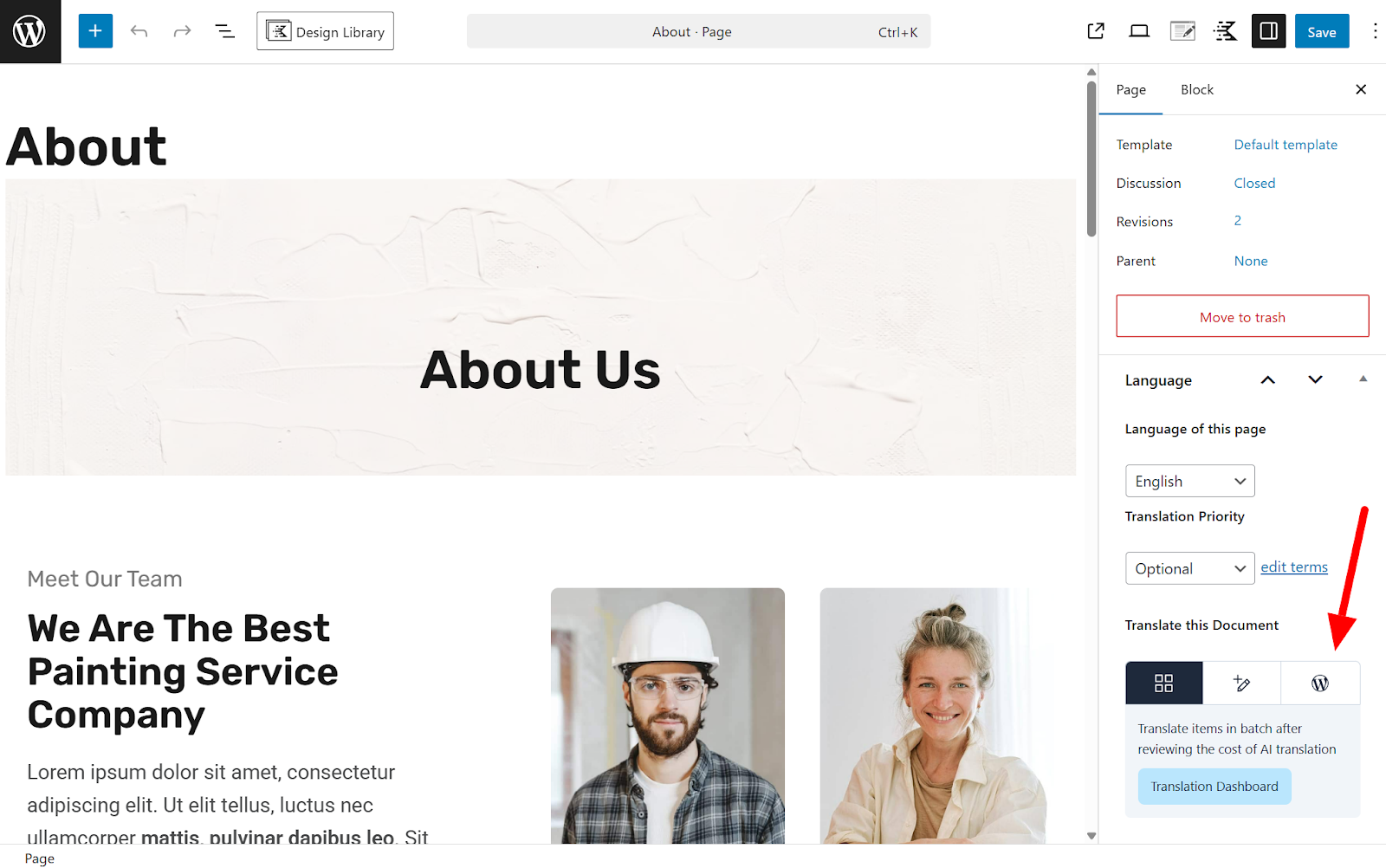
I am working on a Gutenberg-based WordPress site and I need to use WPML only for language connection (hreflang, language URLs, and relationships between pages) — not as a translation editor.
My requirements are:
I want to disable Advanced Translation Editor (ATE) completely
I want to disable Classic Translation Editor
I want to manually translate pages using the native WordPress Gutenberg editor
I need to:
copy Gutenberg blocks manually
edit content freely
insert my own internal links
manage SEO (Yoast) independently per language
At the same time, I want to keep:
correct hreflang implementation
language relationships between pages
/de/, /fr/, /es/ URL structure
automatic language switching between connected pages
The problem
Even after disabling ATE and using manual editing:
WPML still loads previous translation memory / segments
Old translated fields and broken links keep reappearing
Resetting translations does not fully clear stored data
The system continues forcing link synchronization and "missing required link" errors
My questions
How can I completely disable both ATE and Classic editors permanently?
How can I reset translation memory and stored segments for specific pages?
Is there a way to use WPML in a "manual translation mode only", where:
translated pages are independent Gutenberg pages
no automatic link or content synchronization is enforced
How can I prevent WPML from injecting or restoring old translation data?
Why does resetting or deleting translations not fully clear previous translation states?
Expected workflow
I want a workflow like this:
Create translation → empty page
Edit translation manually in Gutenberg
Keep only language connection (hreflang + URL structure)
No automatic content or link handling
If this setup is not fully supported, please clarify the recommended configuration or confirm limitations.
Thank you for the detailed explanation, I understand the workflow you’re aiming for. What you want is possible, but it requires switching away from the WPML Translation Editors and using the WordPress (Gutenberg) editor instead.
Here’s how to achieve that setup:
- Edit the default language page and in the right side find Language section, select WordPress editor. In popup select to make this change only for this page or all website
- Once switched, you can open the translated page and edit it directly in Gutenberg. From that point on, WPML will not overwrite or sync content automatically, you are fully in manual mode.
- If the page was previously translated using ATE/Classic and you want to remove data the best approach is to delete the translated page (move to trash and permanently delete)
- Then create a new translation manually
Important notes regarding your questions:
Automatic link/content synchronization happens only when using WPML editors. When using the WordPress editor, pages behave independently. WPML will still keep the language connection (URL + hreflang), but content will not be synced.