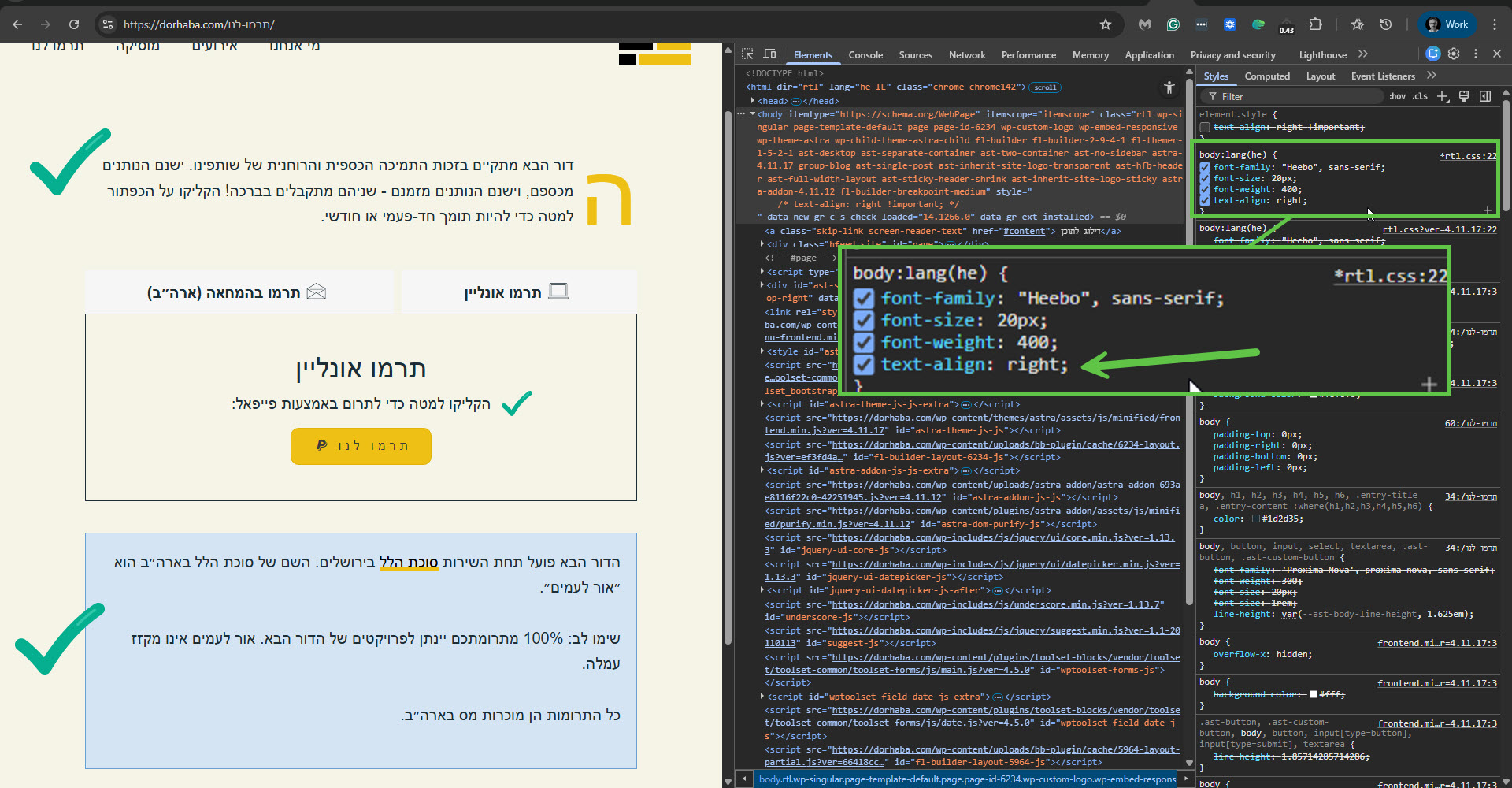
This thread is resolved. Here is a description of the problem and solution.
Problem:
If you're experiencing issues with text alignment in Hebrew and Arabic translations appearing left-aligned instead of right-aligned on your pages created with Beaver Builder, despite the text being RTL.
Solution:
We recommend adjusting the CSS directly in your theme to ensure proper RTL text alignment. Here's how you can do it:
1. Access your Astra child theme's RTL CSS file, which you can find here: https://dorhaba.com/wp-content/themes/astra-child/rtl.css.
2. Open the file in a code editor or through WordPress by navigating to Appearance -> Theme File Editor.
3. Locate the section for Hebrew and add
text-align: right;
under the body:lang(he) directive. It should look like this:
body:lang(he) {<br /> font-family: "Heebo", sans-serif;<br /> font-size: 20px;<br /> font-weight: 400;<br /> text-align: right;<br />}4. Similarly, update the Arabic section by ensuring the text-align is set to right.
5. Save your changes.
This adjustment will align your Hebrew and Arabic text to the right without affecting centrally aligned sections.
Please note that this solution might be outdated or not applicable to your specific case. If these steps do not resolve your issue, we highly recommend checking related known issues, verifying the version of the permanent fix, and confirming that you have installed the latest versions of themes and plugins. If the problem persists, please open a new support ticket.
This is the technical support forum for WPML - the multilingual WordPress plugin.
Everyone can read, but only WPML clients can post here. WPML team is replying on the forum 6 days per week, 22 hours per day.
This topic contains 1 replies, has 0 voices.
Last updated by 4 months, 1 week ago.
Assisted by: Itamar.