
This is the technical support forum for WPML - the multilingual WordPress plugin.
Everyone can read, but only WPML clients can post here. WPML team is replying on the forum 6 days per week, 22 hours per day.
| Sun | Mon | Tue | Wed | Thu | Fri | Sat |
|---|---|---|---|---|---|---|
| - | - | 9:00 – 18:00 | 9:00 – 18:00 | 9:00 – 18:00 | 9:00 – 18:00 | 9:00 – 18:00 |
| - | - | - | - | - | - | - |
Supporter timezone: America/Lima (GMT-05:00)
Related documentation:
This topic contains 14 replies, has 0 voices.
Last updated by Andreas W. 1 day, 1 hour ago.
Assisted by: Andreas W..
| Author | Posts |
|---|---|
| March 18, 2026 at 9:53 am #17907230 | |
 simeonN-2 |
When we receive an order with a product with variations, it shows a different variation for me and the shop admin. For example.   |
| March 19, 2026 at 6:40 pm #17912289 | |
 Andreas W. WPML Supporter since 12/2018 Languages: English (English ) Spanish (Español ) German (Deutsch ) Timezone: America/Lima (GMT-05:00) |
Hello, It seems the minimum server requirements are not met: Could you please increase the WordPress memory limit (WP Memory Limit) to at least 256 MB? WPML requires at least 128 MB. Your current values are: To do this, you need to connect to your website's server and open the wp-config.php file in a text editor. The file is located in the WordPress root directory. Add this code to the wp-config.php file to increase WordPress's memory:
define ('WP_MEMORY_LIMIT', '256M');
Add this just before this comment: // That's all, stop editing! Happy blogging. The current values can be viewed under WPML > Support > WordPress. These settings can be restricted directly by your hosting provider. Therefore, I recommend contacting them and asking them to change them directly if the changes are not applied automatically. After adjusting the limit, please test if you can still replicate the issue. In doubt, please also test with a newly created order. If this did not solve the issue, I will be glad to take a closer look into this for you. Best regards |
| March 25, 2026 at 12:24 pm #17926277 | |
|
simeonN-2 |
Hello! Thank you and sorry for the late answer but I guess i havent seen the email about your reply. I have increased it to 512M. Now we will test again and update you! Thanks! |
| March 25, 2026 at 2:48 pm #17926750 | |
|
simeonN-2 |
Hello, The issue persists. I have a video which I can share in a private form. |
| March 25, 2026 at 5:32 pm #17927219 | |
|
Andreas W. WPML Supporter since 12/2018 Languages: English (English ) Spanish (Español ) German (Deutsch ) Timezone: America/Lima (GMT-05:00) |
Hello, I'd like to request temporary access (wp-admin and FTP) to the website to investigate the issue further. You'll find the necessary fields below the comment section if you log in to leave the next reply. The information you provide will be private, meaning only you and I will be able to see and access it. IMPORTANT If you don't see the "wp-admin / FTP" fields, your login credentials for the post and website will be set to "PUBLIC." Do NOT publish the information unless you see the required wp-admin / FTP fields. The private reply form looks like this: When replying again, click "I still need assistance". Video: Please note that we are required to request this information individually on each ticket. We are not permitted to access any login information that was not specifically provided in the private reply form for this ticket. Best regards |
| March 31, 2026 at 8:28 pm #17941312 | |
|
Andreas W. WPML Supporter since 12/2018 Languages: English (English ) Spanish (Español ) German (Deutsch ) Timezone: America/Lima (GMT-05:00) |
Before we investgiate this issue further, I need to ask you to update all plugins and the theme. After that, test if you can still replicate the issue with a new order. The questions further are here, if the order is using the wrong products, or simply the email is using the wrong info. I would usually expect that it is the email that has the wrong info. Please confirm. |
| April 7, 2026 at 6:49 am #17952694 | |
|
simeonN-2 |
Hello, |
| April 7, 2026 at 3:09 pm #17954749 | |
|
Andreas W. WPML Supporter since 12/2018 Languages: English (English ) Spanish (Español ) German (Deutsch ) Timezone: America/Lima (GMT-05:00) |
I took a visit to your site, and yet not all plugins have been updated. Please update all plugins, and then test again with a new order. If this does not solve the issue, I will take a copy of your site for debugging. I just need to make sure that the issue persists while all components are updated. Leave me a comment once you are done with this task. |
| April 7, 2026 at 4:11 pm #17954865 | |
|
simeonN-2 |
Hello, I updated all plugins and the issue persists. I have a video which I can upload in a private message showing this. |
| April 7, 2026 at 6:42 pm #17955081 | |
|
Andreas W. WPML Supporter since 12/2018 Languages: English (English ) Spanish (Español ) German (Deutsch ) Timezone: America/Lima (GMT-05:00) |
Thank you! I will be taking now a local copy of the site for troubleshooting this issue and then get back to you. |
| April 8, 2026 at 1:38 am #17955409 | |
|
Andreas W. WPML Supporter since 12/2018 Languages: English (English ) Spanish (Español ) German (Deutsch ) Timezone: America/Lima (GMT-05:00) |
In the dashboard, it says: --- ⚠ El plugin API REST heredada y HPOS están ambos activos en este sitio. Por favor, ten en cuenta que la API REST heredada de WooCommerce no es compatible con HPOS. Gestionar funciones --- Please disable "WooCommerce Legacy REST API", Further, please provide detailed steps on how the issue can be replicated. I see in your example that the issue occurs for a free gift that is added to the cart once a specific purchase amount is met, but from the plugins currently active, none of them directly seem to provide the “gift with purchase” feature out of the box. How is this behavior achieved? Note that I took a local copy of your site, added three items of "Sérum para pestañas Evoeye 1ml + 3ml" to the cart, and this product was added to the cart: Now, if we check the actual product: The Spanish version uses: Medio | Claro | Oscuro The order in Spanish is incorrect. Workaround: Now enable WPML Multilingual & Multicurrency for WooCommerce again and make a new order. Can you still confirm the issue? |
| April 8, 2026 at 8:32 am #17955928 | |
|
simeonN-2 |
Hello, 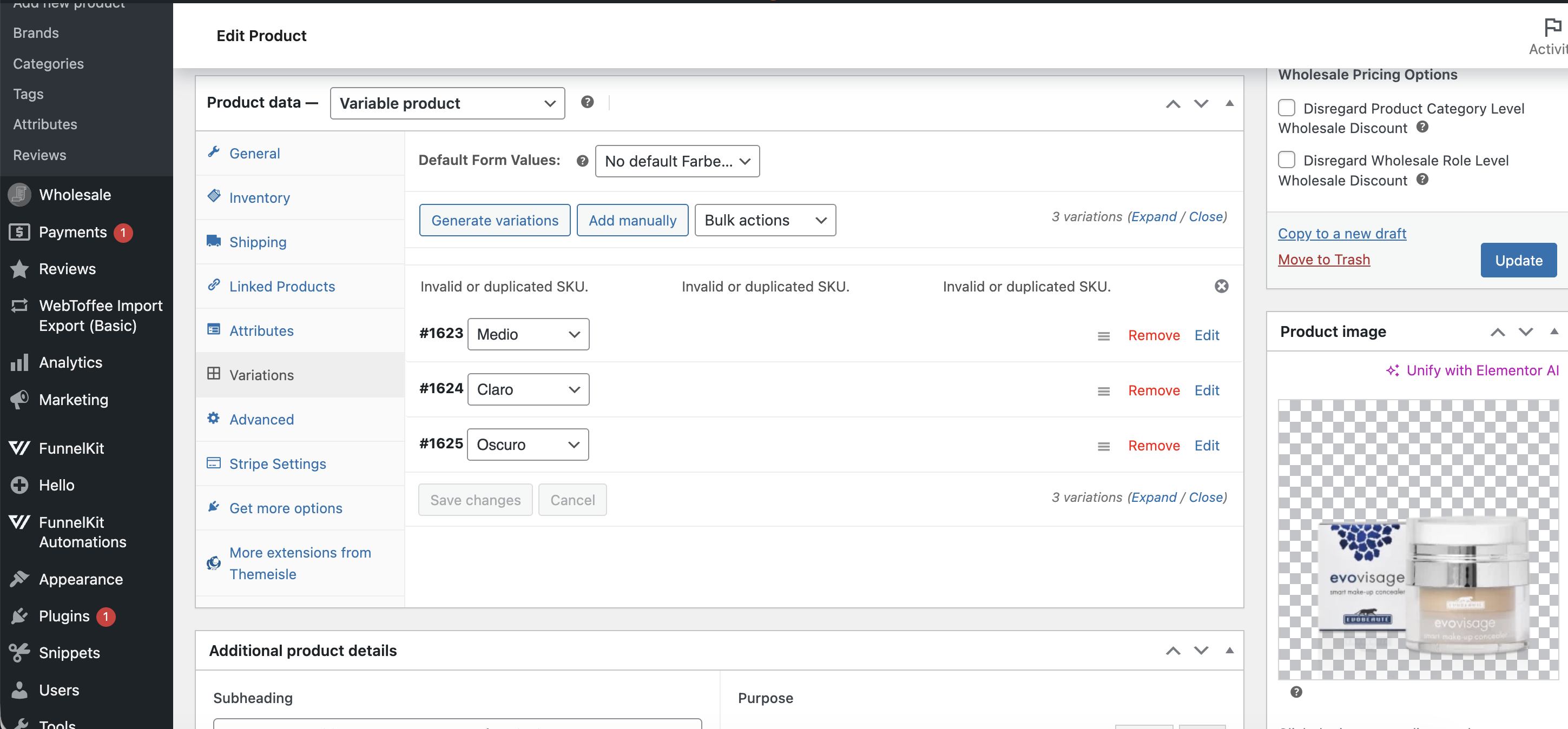 |
| April 8, 2026 at 6:39 pm #17957523 | |
|
Andreas W. WPML Supporter since 12/2018 Languages: English (English ) Spanish (Español ) German (Deutsch ) Timezone: America/Lima (GMT-05:00) |
I was able to confirm an issue with the translation of products. In ACF (Advanced Custom Fields), field names must follow WordPress’s general rules for meta keys. That means: ✅ Allowed: lowercase letters, numbers, and underscores (_) ❌ Not allowed: special characters like &, #, spaces, or punctuation So your example: Example field names: application_&_application_time is not valid because it contains & and #. These characters will cause issues when saving or retrieving the field, since ACF stores field names as meta keys in the database. In this case, it breaks the translation. Please solve this issue by renaming the field accordingly, and then get back to me. Note that you will also need to adjust the template that is rendering the field on the frontend. |
| April 9, 2026 at 3:22 pm #17960000 | |
|
simeonN-2 |
I have changed them. Please check now. |
| April 9, 2026 at 8:26 pm #17960626 | |
|
Andreas W. WPML Supporter since 12/2018 Languages: English (English ) Spanish (Español ) German (Deutsch ) Timezone: America/Lima (GMT-05:00) |
I have updated the Spanish translation for this product now. Note that I have not translated the attributes into the Spanish Language. At the moment, they will use Light | Medium | Dark in all languages. You can adjust this while translating the product inside the WPML Translation Editor. Please test now if the issue still occurs on a new order. |