Skip to content Skip to sidebar

This thread is resolved. Here is a description of the problem and solution.

Problem:
The client is experiencing multiple issues with WPML. Sometimes, when editing posts, a message appears indicating that the WordPress editor is being used, despite the client never switching from the WPML editor. Additionally, when duplicating pages to a different language, WPML options such as the 'Translate Independently' button disappear. The client also encounters critical errors during plugin updates, with logs showing only deprecated errors.
Solution:
We recommend the following steps to address the issues:
1. Ensure that you are not inadvertently using the WordPress editor to edit translations that were originally created with the WPML Translation Editor. This could lead to the unexpected message about using the WordPress editor.
2. If the problem persists, please provide detailed information about the deprecated messages and the critical errors you are encountering. This will help us in diagnosing the issue more accurately and possibly creating new support tickets to resolve each specific problem.

Please note that the solution provided might be outdated or not applicable to your specific case. We highly recommend checking related known issues at https://wpml.org/known-issues/, verifying the version of the permanent fix, and confirming that you have installed the latest versions of themes and plugins. If the issue continues, do not hesitate to open a new support ticket at WPML support forum for further assistance.

This is the technical support forum for WPML - the multilingual WordPress plugin.

Everyone can read, but only WPML clients can post here. WPML team is replying on the forum 6 days per week, 22 hours per day.

Tagged: 

This topic contains 3 replies, has 0 voices.

Last updated by Lucas Vidal de Andrade 3 weeks, 1 day ago.

Assisted by: Lucas Vidal de Andrade.

Author Posts
January 15, 2026 at 1:02 pm

mirsadS

I have been having trouble with WPML overall. Sometimes when I want to edit post it tells me that I am using WordPress editor, even though I have never changed that. Sometimes when I duplicate a page to a different language and change to that language all wpml options are gone like the Translate independantly button.
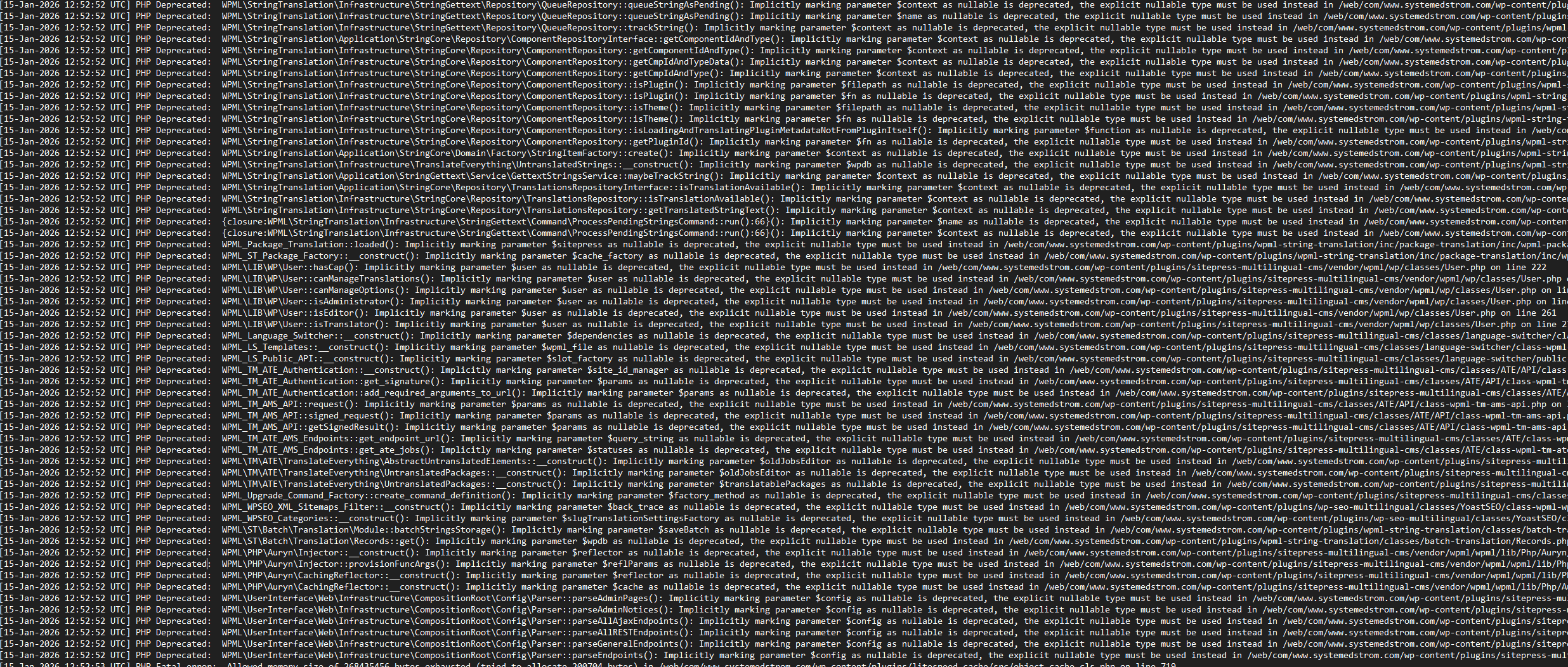
But overall I have had a lot of issues that throw Critical errors but I dont se anything in the debug log, except for Deprecated logs.
And when i try and update plugins i get a critical error and the log is just full with depracated errors.
I have attached an image but that is not all in the log.

January 15, 2026 at 2:00 pm #17734025

Lucas Vidal de Andrade
WPML Supporter since 11/2023

Languages: English (English ) Spanish (Español ) German (Deutsch ) Portuguese (Brazil) (Português )

Timezone: Europe/Vienna (GMT+01:00)

Hello there,

Please share the details from the deprecated messages you're getting, and also the critical error. With that information, I can create new tickets and start working on them 🙂

January 19, 2026 at 7:34 am #17741113
mirsadS

Hi,

There are a lot of depricated messsages in the log.
You can see that in the image above from my previous message. And that is not all of the depricated messages.

How do you want me to share them?
Pasting them in here is probably not an option since there are a lot of them.

January 19, 2026 at 10:28 am #17741823

Lucas Vidal de Andrade
WPML Supporter since 11/2023

Languages: English (English ) Spanish (Español ) German (Deutsch ) Portuguese (Brazil) (Português )

Timezone: Europe/Vienna (GMT+01:00)

That's enough for now. Thanks for sharing.

I've created a new ticket to address the PHP deprecated messages:
https://wpml.org/forums/topic/split-debug-log-show-a-lot-of-php-deprecated-errors/

And another to address the critical error when updating plugins:
https://wpml.org/forums/topic/split-critical-error-when-updating-plugin/

I'll answer you there. Thank you.