
This is the technical support forum for WPML - the multilingual WordPress plugin.
Everyone can read, but only WPML clients can post here. WPML team is replying on the forum 6 days per week, 22 hours per day.
| Sun | Mon | Tue | Wed | Thu | Fri | Sat |
|---|---|---|---|---|---|---|
| 12:00 – 20:00 | 12:00 – 20:00 | 12:00 – 20:00 | 12:00 – 20:00 | 12:00 – 20:00 | - | - |
| - | - | - | - | - | - | - |
Supporter timezone: Asia/Karachi (GMT+05:00)
Tagged: Bug
This topic contains 15 replies, has 0 voices.
Last updated by Noman 2 days, 6 hours ago.
Assisted by: Noman.
| Author | Posts |
|---|---|
| November 26, 2025 at 12:21 pm | |
 nicolaH-6 |
Background of the issue: Symptoms: Questions: |
| November 27, 2025 at 12:12 pm #17614822 | |
 Noman WPML Supporter since 06/2016 Languages: English (English ) Timezone: Asia/Karachi (GMT+05:00) |
I checked the issue in detail and found that the site links were using https, while the site was set to http, which caused the mismatch. So, I followed the below steps: 1. Updated the site URL to https from Settings >> General (screenshot attached). However, English language variant links still didn’t work. I’m going to replicate this issue at a fresh WP site and get back to you with an update soon. Thank you for your cooperation 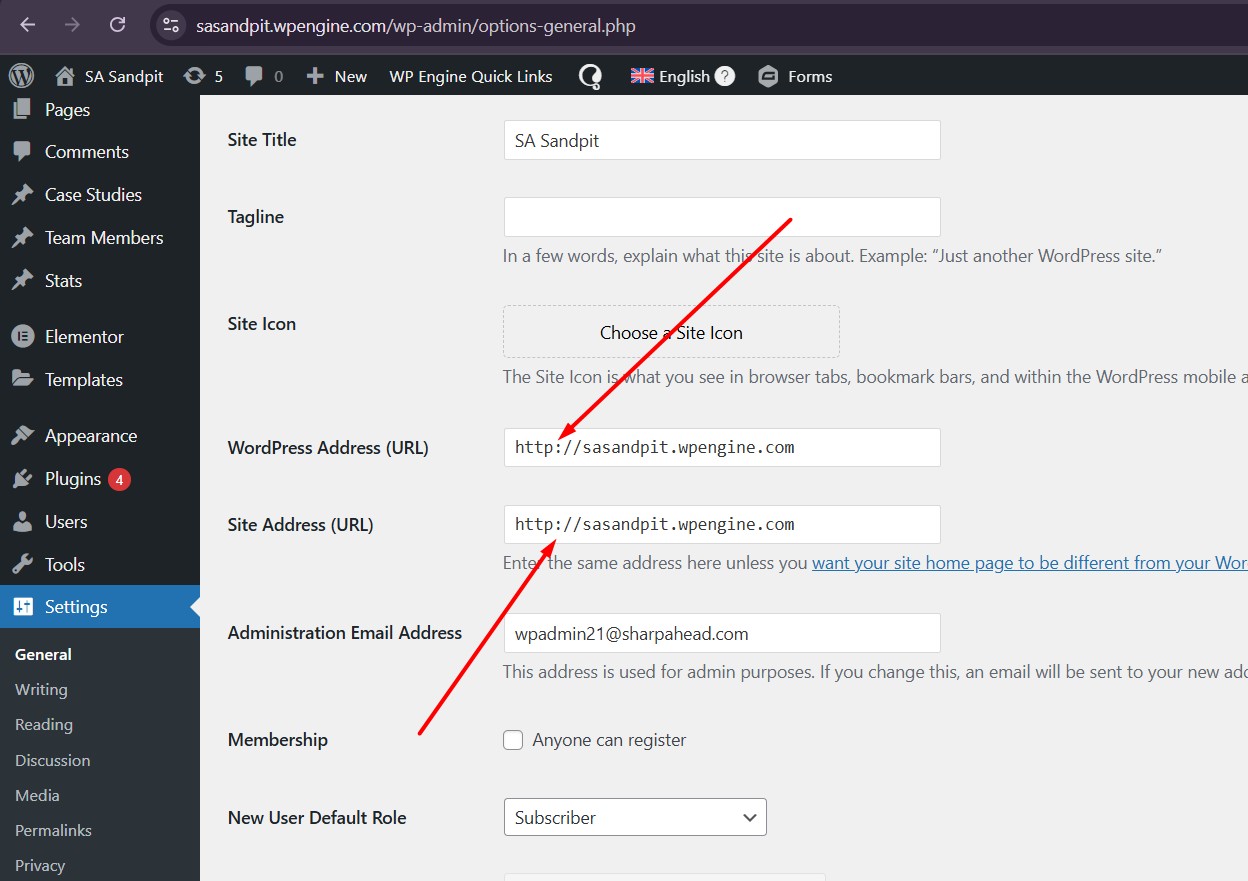 |
| November 28, 2025 at 2:57 pm #17618504 | |
|
nicolaH-6 |
Thanks. Let me know what your findings are |
| November 30, 2025 at 4:22 pm #17620651 | |
|
Noman WPML Supporter since 06/2016 Languages: English (English ) Timezone: Asia/Karachi (GMT+05:00) |
Sorry for the delay, I was off over the weekend. I’ve checked this on a fresh WP setup and managed to get the language variant links working correctly by following these steps: 1. Edit the default-language page in Elementor. With this method, the links now correctly point to the translated variant pages. Here’s an example page where it works: hidden link Here is the auto-login link for the test site: hidden link Please check and let me know if this helps or if you need anything else. Thank you 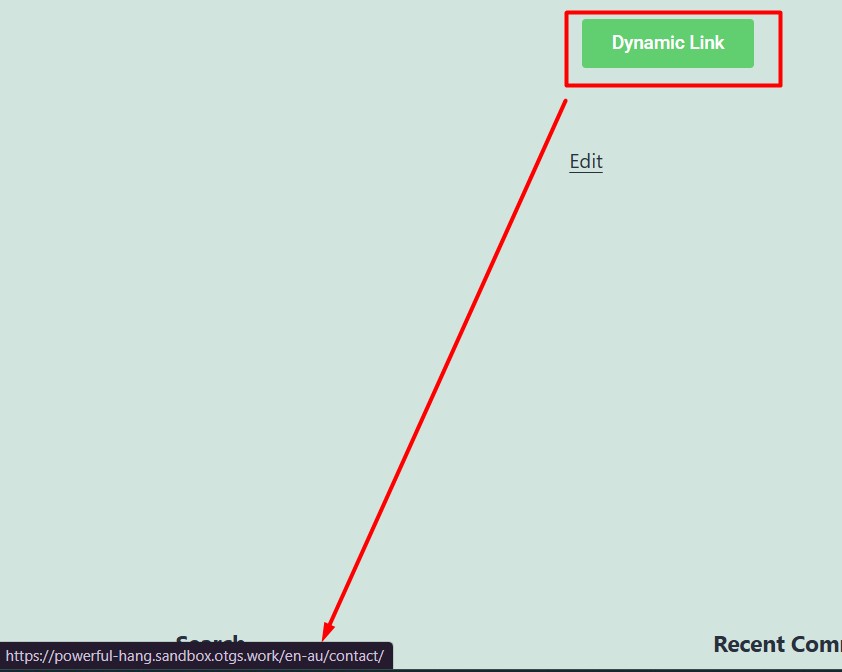   |
| December 1, 2025 at 1:01 pm #17622611 | |
| nicolaH-6 |
Thanks for checking that through Noman. Seems to be overly complicated and not a workflow anyone uses to develop websites in Elementor. I have a follow up question regarding this US english variant. I know WPML is automatically translated to the users browser language settings. For example, if I'm in Germany checking a multilingual website I would see the English version automatically. New threads created by Noman and linked to this one are listed below: https://wpml.org/forums/topic/browser-language-detection-with-language-variant/ |
| December 1, 2025 at 5:02 pm #17623593 | |
|
Noman WPML Supporter since 06/2016 Languages: English (English ) Timezone: Asia/Karachi (GMT+05:00) |
For browser language redirect questions, it’s a different issue/question and will be handled separately as per our support policy. I've created a new ticket for this at: https://wpml.org/forums/topic/browser-language-detection-with-language-variant/ Thank you for your cooperation |
| December 3, 2025 at 3:11 pm #17631353 | |
|
nicolaH-6 |
Another thought I've had about this internal linking issue is your workaround won't work with a text block in Elementor as you could have multiple links within the text editor? I still think it's not effectively workaround. Unfortunately, this isn't the way anyone would develop a website using this linking solution. And now it transpires it also doesn't work for Elementor text editors. I trialled a different multilingual plugin called Translatepress and although it was lacking in other areas, it automatically switched the internal link urls out of the box, even with the free version. I really can't see the point in being able to duplicate a language's pages and posts only to then have to go into every page / post and change potentially hundreds of button links. |
| December 4, 2025 at 5:28 pm #17635798 | |
|
Noman WPML Supporter since 06/2016 Languages: English (English ) Timezone: Asia/Karachi (GMT+05:00) |
Thanks for sharing your observations and the additional context. I understand your concern about handling multiple links in text blocks, that definitely needs a proper solution rather than a manual workaround. I’ll take some time to debug this thoroughly and will also escalate it to our 2nd-tier support to ensure we find the most reliable solution for internal links in Elementor text blocks. I’ll provide you with an update as soon as I have more information. Appreciate your patience |
| December 7, 2025 at 8:33 pm #17642368 | |
|
Noman WPML Supporter since 06/2016 Languages: English (English ) Timezone: Asia/Karachi (GMT+05:00) |
I further debugged the issue and found that it also occurs with other languages, such as French, when using Elementor, while links work correctly with the Block Editor. I have escalated this to our 2nd tier support and will update you once I receive their feedback. Thank you |
| December 8, 2025 at 5:36 pm #17645123 | |
|
Noman WPML Supporter since 06/2016 Languages: English (English ) Timezone: Asia/Karachi (GMT+05:00) |
[Escalated to the development team] As a workaround, you can try using the “Translatable – use translation if available or fallback to default language” option in WPML >> Settings > Post Types Translation instead of duplicating. I tested it here: hidden link and the links appear to work correctly using this method. Thank you |
| December 9, 2025 at 10:51 am #17646895 | |
|
nicolaH-6 |
Hi Noman. So I've tested out the above workaround and it works for automatically adding the en-us. I've also tested duplicating a couple of pages with the above workaround implemented and it does still work it seems. The one thing where it falls over is if the client needs to actually navigate to from a US page to an English page, which may well happen. I tried adding a button and pointed it to the default language page, but because there's no locale in the url for the English version it still points back to the en-us. For example, button on en-us page has link of hidden link you would expect it to go to the English version of testpage, but it doesn't, it actually goes to hidden link |
| December 9, 2025 at 11:03 am #17646994 | |
|
nicolaH-6 |
Actually, I think I've realised my mistake there, it's /en-gb/ and that works to navigate between one language to another. |
| December 9, 2025 at 3:51 pm #17648653 | |
|
nicolaH-6 |
All that said we still need a stable WPML / Elementor workflow, rather than a workaround. It's probably fine so far it seems for the smaller site we're currently developing, however, we've got a massive site to do in Jan and I really don't feel super confident in this current process. |
| December 9, 2025 at 5:29 pm #17648930 | |
|
Noman WPML Supporter since 06/2016 Languages: English (English ) Timezone: Asia/Karachi (GMT+05:00) |
I completely understand your concern. The issue has already been escalated to our development team. I don’t have an ETA at the moment, but I’ll update you here as soon as I hear back from them. Thank you for your understanding. |
| December 9, 2025 at 5:31 pm #17648939 | |
|
nicolaH-6 |
Also with the workaround above does that also mean they have to have everything that is on English language show on the US language variant? Because I know for a fact the client wants to have some specific pages NOT show up on US variant, but likewise have some new pages only show on US. |






