Skip to content Skip to sidebar

This thread is resolved. Here is a description of the problem and solution.

Problem:
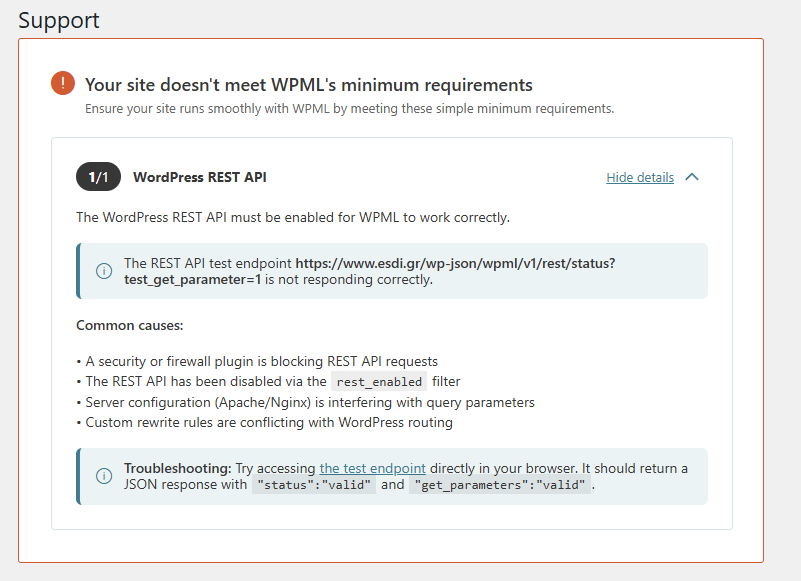
The client was experiencing an issue where their site did not meet WPML's minimum requirements because the WordPress REST API was not responding correctly. This was initially suspected to be due to WPML's requests to the REST API being blocked or not properly authenticated.

Solution:
1. The client was advised to modify the

WordPressRestApiStatus.php

file within the WPML plugin directory to include cookie authentication in addition to the existing basic authentication.
2. After implementing the suggested changes, the issue persisted, leading to further investigation.
3. It was eventually identified as a false positive caused by a minor bug in WPML's code. A workaround was provided by the second-tier support, and a permanent fix is expected in the next WPML version.

If this solution does not resolve your issue or seems irrelevant due to being outdated or not applicable to your case, we highly recommend checking related known issues at https://wpml.org/known-issues/, verifying the version of the permanent fix, and confirming that you have installed the latest versions of themes and plugins. If further assistance is needed, please open a new support ticket at WPML support forum.

This is the technical support forum for WPML - the multilingual WordPress plugin.

Everyone can read, but only WPML clients can post here. WPML team is replying on the forum 6 days per week, 22 hours per day.

Tagged: 

This topic contains 5 replies, has 0 voices.

Last updated by Carlos Rojas 3 weeks, 3 days ago.

Assisted by: Carlos Rojas.

Author Posts
January 13, 2026 at 10:04 am

sophieG-10

I need help with this issue!

Your site doesn't meet WPML's minimum requirements
Ensure your site runs smoothly with WPML by meeting these simple minimum requirements.

1/1
WordPress REST API
The WordPress REST API must be enabled for WPML to work correctly.
The REST API test endpoint hidden link is not responding correctly.

January 13, 2026 at 10:33 am #17724556

Carlos Rojas
WPML Supporter since 03/2017

Languages: English (English ) Spanish (Español )

Timezone: Europe/Madrid (GMT+01:00)

Hi again,

I have already solved the problem with a workaround provided by our second-tier support. Can you confirm that the issue has been resolved?

January 13, 2026 at 10:33 am #17724559

sophieG-10

Please be very careful with your work as it is a live site with a lot of traffic and critical posts-publications.
If anyone needs further testing, maybe we can look at a stage environment.

January 13, 2026 at 10:34 am #17724592

Carlos Rojas
WPML Supporter since 03/2017

Languages: English (English ) Spanish (Español )

Timezone: Europe/Madrid (GMT+01:00)

Hi again,

I have already solved the problem with a workaround provided by our second-tier support. Can you confirm that the issue has been resolved?

January 13, 2026 at 3:07 pm #17726302

sophieG-10

Correct, it has been fixed!

Could you explain me better, what happened?

Thank you!

January 14, 2026 at 8:30 am #17728031

Carlos Rojas
WPML Supporter since 03/2017

Languages: English (English ) Spanish (Español )

Timezone: Europe/Madrid (GMT+01:00)

Hi,

The error was a false positive caused by a minor bug in WPML's code. Our developers are aware of this bug, and they created a workaround to fix it. In the next WPML version, this issue won't be there 🙂