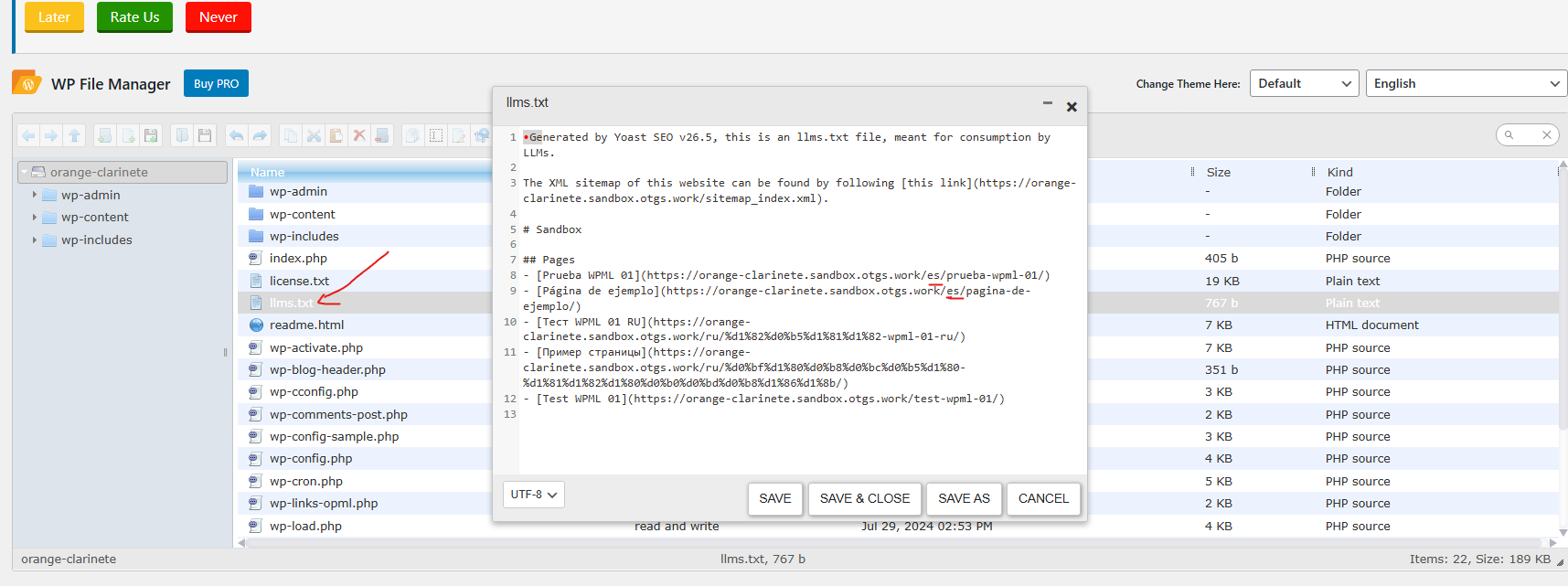
I am writing because the Yoast SEO llms.txt file is generating incorrect URLs for all our translated Russian pages, despite using the WPML SEO "glue" plugin. The URLs are missing the required /ru/ language directory.
My Setup
Primary Language: English
Secondary Language: Russian (/ru/ directory structure is used)
Active Plugins: WPML Multilingual CMS, Yoast SEO, WPML SEO (glue plugin).
Problem: The llms.txt file lists URLs like: hidden link... instead of the required: hidden link...
Proof of Conflict
The standard sitemap.xml file generated by Yoast is completely correct (it includes the /ru/ slug for all translated pages).
The llms.txt file is the only part of the site structure failing.
Troubleshooting Already Performed
To resolve this sync failure, I have already taken the following steps:
Plugin Check: Confirmed WPML SEO (glue plugin) is installed and active.
WPML Setting Fix: Went to WPML → Settings and set the Page URL slug option to "Translate (the slug as well as the content)" to force URL assembly.
Page Test: For the Business Visitor Visa page, I manually updated the slug in the ATE (copying the English slug to the Russian field) and marked the translation as complete. The llms.txt file for this single page is still incorrect.
Full Cache/Rule Flush:
Deleted the physical llms.txt file.
Flushed Permalinks (Settings → Permalinks → Save Changes).
Cleared all plugin and browser caches.
Toggled the Yoast LLM Optimization feature OFF and ON to force regeneration.
WPML System Checks: Ran the "Clear the cache in WPML" troubleshooting step.
Request
The failure to generate the correct URL for the llms.txt file appears to be a deeper integration issue between the two plugins concerning a newer Yoast file. Please advise on the necessary database cleanup or configuration change required to force the system to apply the /ru/ directory to these translated URLs.
I set up Yoast and generated an llms.txt file as requested.
It appears to me that while your output is slightly different - maybe due to your setup and translating the page slugs, it does not have the right file name / directory structure required to work.
Thank you for sharing. It seems that this feature is not yet compatible with WPML. I've escalated this ticket to our dev team, they will check if there's a workaround or solution to it. That might take a few days. I'll keep you up to date.
It seems Yoast SEO is able to export the correct URLs, but initially, it exported a version without any language directories.
Please ensure to have a backup before proceeding. To regenerate the file from scratch :
1. Go to your root directory and delete the file llms.txt
2. Go to Yoast SEO > Settings > advanced > llms.txt
3. Disable the Automatic page selection
4. Save
5. Enable again
6. Save
7. Access to the same link in a private browser: hidden link
This should regenerate the file with all languages. Please let me know how it goes.
Thank you for sharing your results. Would it be ok, if I re-apply the solution on your live website? Please ensure to have a full website backup, and confirm if I can proceed.
For that, I'd need admin website access. The required fields can be found below the comments section. The information you enter is private, i.e. only you and I can see it and have access to it.
I may need to replicate your website locally. To do this, I need to temporarily install a plugin called "Duplicator" or "All in One WP Migration" on your website. This will allow me to create a copy of your website and content. Once the issue is resolved, I will delete the local website. Let me know if this works for you.
IMPORTANT
Please make a backup copy of the site files and database before giving us access.
- If you do not see the wp-admin/FTP fields, this means your post and site login details are being made PUBLIC. DO NOT post your website details if you do not see the required wp-admin/FTP fields. If you do not, ask me to enable the private box. The private box looks like this:
hidden link
The topic ‘[Closed] Yoast SEO llms.txt file generating incorrect URLs for translated Russian pages (Missing /ru/ slug)’ is closed to new replies.