
This is the technical support forum for WPML - the multilingual WordPress plugin.
Everyone can read, but only WPML clients can post here. WPML team is replying on the forum 6 days per week, 22 hours per day.
| Sun | Mon | Tue | Wed | Thu | Fri | Sat |
|---|---|---|---|---|---|---|
| 10:00 – 14:00 | 10:00 – 14:00 | 10:00 – 14:00 | 10:00 – 14:00 | 10:00 – 14:00 | - | - |
| 16:00 – 20:00 | 16:00 – 20:00 | 16:00 – 20:00 | 16:00 – 20:00 | 16:00 – 20:00 | - | - |
Supporter timezone: Asia/Jerusalem (GMT+02:00)
Tagged: Compatibility
| Author | Posts |
|---|---|
| January 5, 2026 at 8:25 am | |
 josephN-12 |
Hello, |
| January 5, 2026 at 11:16 am #17703515 | |
 Itamar WPML Supporter since 02/2016 Languages: English (English ) Timezone: Asia/Jerusalem (GMT+02:00) |
Hi, I took a copy of your site. If you notice any problems with the homepage (I think something has broken with the table of contents), you are welcome to fix it or restore your site from a backup. Regards, |
| January 5, 2026 at 2:25 pm #17704252 | |
| josephN-12 |
I have two other problems: 1- The menu isn't fully translated; some parts aren't translated into English. 2- When I try to translate other pages, the translation doesn't work. It's the same problem as with the homepage. Is there a way to enable automatic translation and translate the entire site without interruption? New threads created by Itamar and linked to this one are listed below: https://wpml.org/forums/topic/split-the-menu-isnt-fully-translated/  |
| January 6, 2026 at 12:49 pm #17706672 | |
|
josephN-12 |
Hello, Just following up on this ticket. The translation issue is still present (pages and menu not fully translating). Could you please recheck or escalate this issue? Thank you, |
| January 6, 2026 at 2:28 pm #17706930 | |
|
Itamar WPML Supporter since 02/2016 Languages: English (English ) Timezone: Asia/Jerusalem (GMT+02:00) |
Hi, Joseph. I've added to the XML code in WPML -> Settings -> Custom XML Configuration the Elementor elements from this page: hidden link. The updated code is this:
<wpml-config>
  <elementor-widgets>
    <widget name="saaspik-hero">
      <fields>
        <field>title_text</field>
        <field>subtitle</field>
        <field>btn_text</field>
        <field>play_btn_title</field>
        <field>link_text</field>
        <field>top_title_text</field>
      </fields>
    </widget>
    <widget name="saaspik-heading">
      <fields>
        <field>title_text</field>
        <field>sub_title</field>
      </fields>
    </widget>
    <widget name="saaspik-funfact">
      <fields>
        <field>lists</field>
        <field>title_text</field>
      </fields>
      <fields-in-item items_of="lists">
        <field>title</field>
      </fields-in-item>
    </widget>
    <widget name="saaspik-icon-box">
      <fields>
        <field>title_text</field>
        <field>description_text</field>
        <field>more_link_text</field>
      </fields>
    </widget>
    <widget name="saaspik_parallax_images">
      <fields>
        <field>pairs</field>
        <field>title_text</field>
        <field>sub_title</field>
        <field>list_items</field>
        <field>link_title</field>
        <field>description_text</field>
        <field>button_subtext</field>
        <field>link>url</field>
      </fields>
    </widget>
    <widget name="saaspik-call-to-action">
      <fields>
        <field>title_text</field>
        <field>description_text</field>
        <field>link_text</field>
        <field>link>url</field>
      </fields>
    </widget>
    <widget name="eael-post-grid">
      <fields>
        <field>show_load_more_text</field>
        <field>excerpt_expanison_indicator</field>
        <field>read_more_button_text</field>
      </fields>
    </widget>
    <widget name="saaspik-button">
      <fields>
        <field>text</field>
      </fields>
    </widget>
    <widget name="saaspik-team">
      <fields>
        <field>name</field>
        <field>position</field>
        <field>desc</field>
      </fields>
    </widget>
  </elementor-widgets>
</wpml-config>
Now you need to follow these steps. 1. Edit the original French page: hidden link 2. Make a small change. (You can add space in the title.) 3. Click the Save button. 4. You will see that the pencil icon next to English changes to a circled-arrow button. This means that the translation needs an update. 5. Click to edit the English translation with the Advanced Translation Editor. 6. Complete the translation. 7. Do the same for all the pages with this problem. Please note that you can also go to WPML -> Translation Dashboard and send those pages and posts for automatic translation. Please read about WPML's Translation Dashboard here: https://wpml.org/documentation/translating-your-contents/ It is very important for me to remind you that the Saaspik plugin/theme that adds custom Elementor elements is not officially compatible with WPML. Therefore, translation support must be added to support those elements. I already added the elements I could find on the homepage and the other page you mentioned. Please read our guide here: https://wpml.org/documentation/support/multilingual-tools/registering-custom-elementor-widgets-for-translation/. If you have any doubts about this process, we can always help with adding translation support. Please note that for now, I removed the Multilingual Tools plugin from your site. This is because we don't leave plugins we installed on clients' sites. In our chat, you mentioned that the table content on the homepage is not translated. You referred to the table in the attached screenshot, homepage-table.jpg. You added this table in Elementor's Text Editor element. I've checked this issue on my local test server and consulted one of our developers. Regarding this specific issue of handling HTML for the table, we might have a problem here, and I'm going to esclate it to our second-tier supporters. I'll keep you updated on this specific issue. It is important for me to mention, as I already mentioned in our chat, that the table does not look the same as in the screenshot you shared in our chat. I'm referring to this screenshot: https://wpml.org/wp-content/uploads/2026/01/17703478-Screenshot_from_2026_01_05_10_36_31.png. I mention this so you will be aware. Regarding the menu problem you reported. In our forum, we try to keep one issue per ticket. Therefore, I've split the other ticket and created a new ticket with this issue. Please see the new ticket here: https://wpml.org/forums/topic/split-the-menu-isnt-fully-translated/. Regards, |
| January 8, 2026 at 1:41 pm #17713086 | |
|
josephN-12 |
Hello Itamar, Thank you for your previous assistance with the WPML configuration. I have re-translated the pages as instructed, but I'm still encountering translation issues. I wanted to inform you that I have re-translated only 8 pages out of the 74 pages on the website. After completing the re-translation of these 8 pages, I have documented all the remaining translation problems I found. I have created a detailed document with screenshots showing all the locations where content is still not translating properly. You can access it here: All the screenshots in this document come from these 8 pages only, which gives you an idea of the scope of the translation issues we're facing. Additionally, I would like to mention that the tables on the website are now created using HTML code. This might be relevant for the translation configuration. Could you please review the document and help me resolve these translation issues? I'm particularly concerned about: Thank you for your continued support. Best regards, |
| January 8, 2026 at 9:08 pm #17714361 | |
|
Itamar WPML Supporter since 02/2016 Languages: English (English ) Timezone: Asia/Jerusalem (GMT+02:00) |
Hi, Joseph. Our job in the WPML support team is to answer any questions related to WPML, guide you through translation processes, identify issues with WPML, and esclate them to our developers. I'm sorry, but we cannot do all the work for you. In other words, I can go through each problem you specify in the attached documentation and correct it myself. However, I can show you what to do with a few examples. I already explained where the problem stems from. And I also provided examples on how to fix things. And I'll be happy to provide another example. As a reminder, the problem stems from the Elementor plugin you are using. I'm referring to the Saaspik Addons plugin and the Saaspik theme. To add support to those custom Elementor widgets, you need to follow our guide here: https://wpml.org/documentation/support/multilingual-tools/registering-custom-elementor-widgets-for-translation/. Let's take as an example some text that is not getting translated on this page:
This text is coming from the Heading Description field of the Saaspik Heading widget. Please see the attached screenshot saaspik-heading.jpg. In WPML -> Settings -> Custom XML Configuration, I already added support for the Saaspik Heading widget. However, it missed the support for the Heading Description. It was like this:
    <widget name="saaspik-heading">
      <fields>
        <field>title_text</field>
        <field>sub_title</field>
      </fields>
    </widget>
But now that we have text in the Heading Description field, we can also add translation support for it, like so:
    <widget name="saaspik-heading">
      <fields>
        <field>title_text</field>
        <field>sub_title</field>
        <field>description_text</field>
      </fields>
After adding this, I went to the page's editing screen here: hidden link and ensured the translation was complete. If it is not completed, I complete it. It is important to do that because it was incomplete before I added the translation support I mentioned above. Now that it is complete, I make a small change to the original page and click the Save button. Now you will see the circled-arrow icon next to English. And now, when you edit the translation with the Advanced Translation Editor, you will be able to translate the heading description. Please see the attached screenshot, complete-trans-in-ate.jpg. If you check the frontend, you will see it is completed. Please see the attached screenshot translation-ofdescription.jpg. Now this was just an example. But it is possible that adding <field>description_text</field> will also fix other parts on other pages that are not translated. So you need to repeat what I explained on other pages. And if there are other Saaspik widgets without translation support, you need to add them. I'm not sure if it's practical for you, but as an alternative, you can consider using one of the officially compatible Elementor add-ons: https://wpml.org/plugin-functionality/page-builders-addons/elementor-add-ons/. But I understand if it is not practical for you, since you have already done a lot of work in the site's default language. The problem of translating HTML tables using Elementor Text Editor or HTML widgets is a separate issue from the Saaspik issue. This issue I'm going to esclate to our second-tier supporters. Please note that my weekends are Friday to Saturday. If you have further questions, I'll be available to get back to you next week. Regards, 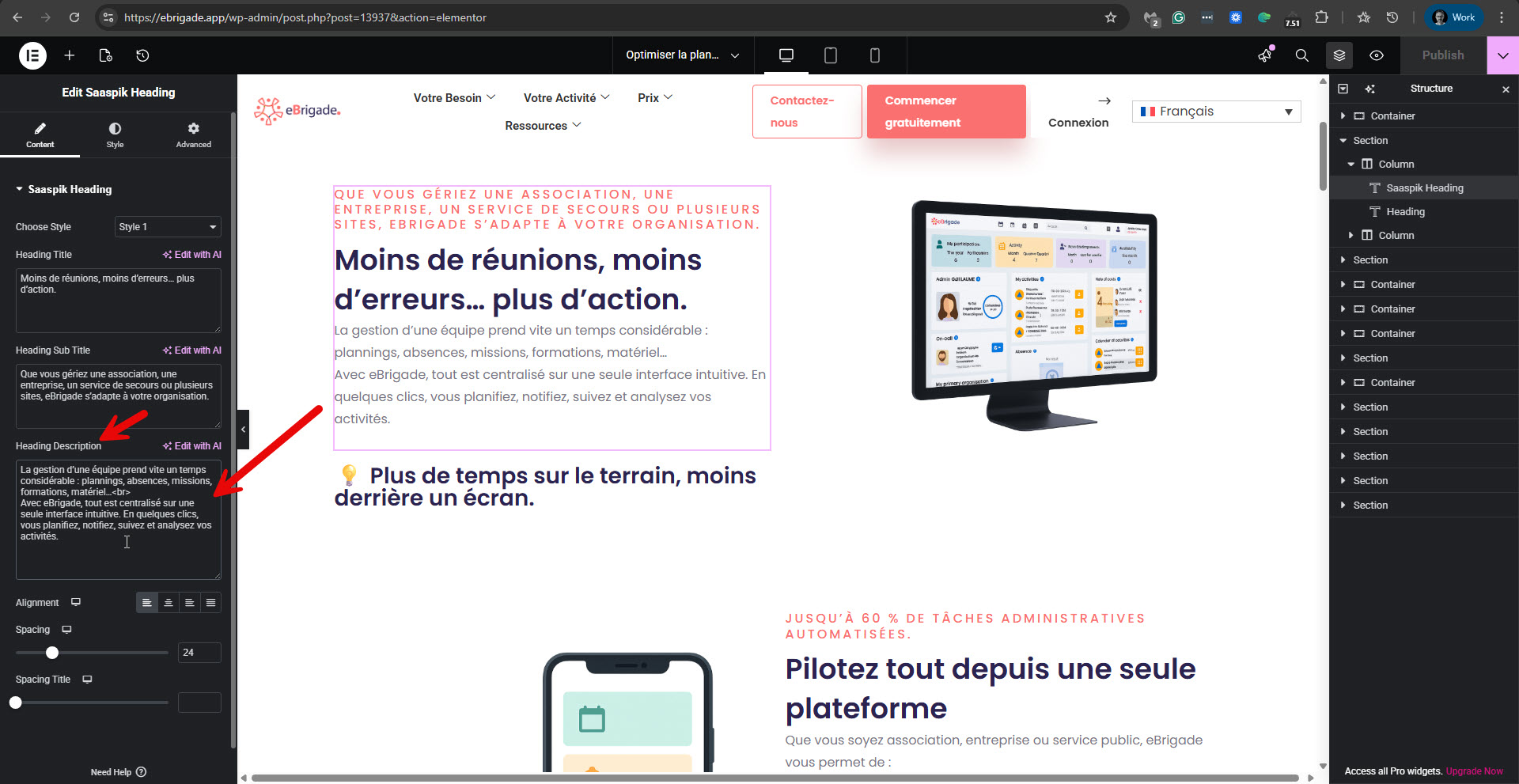 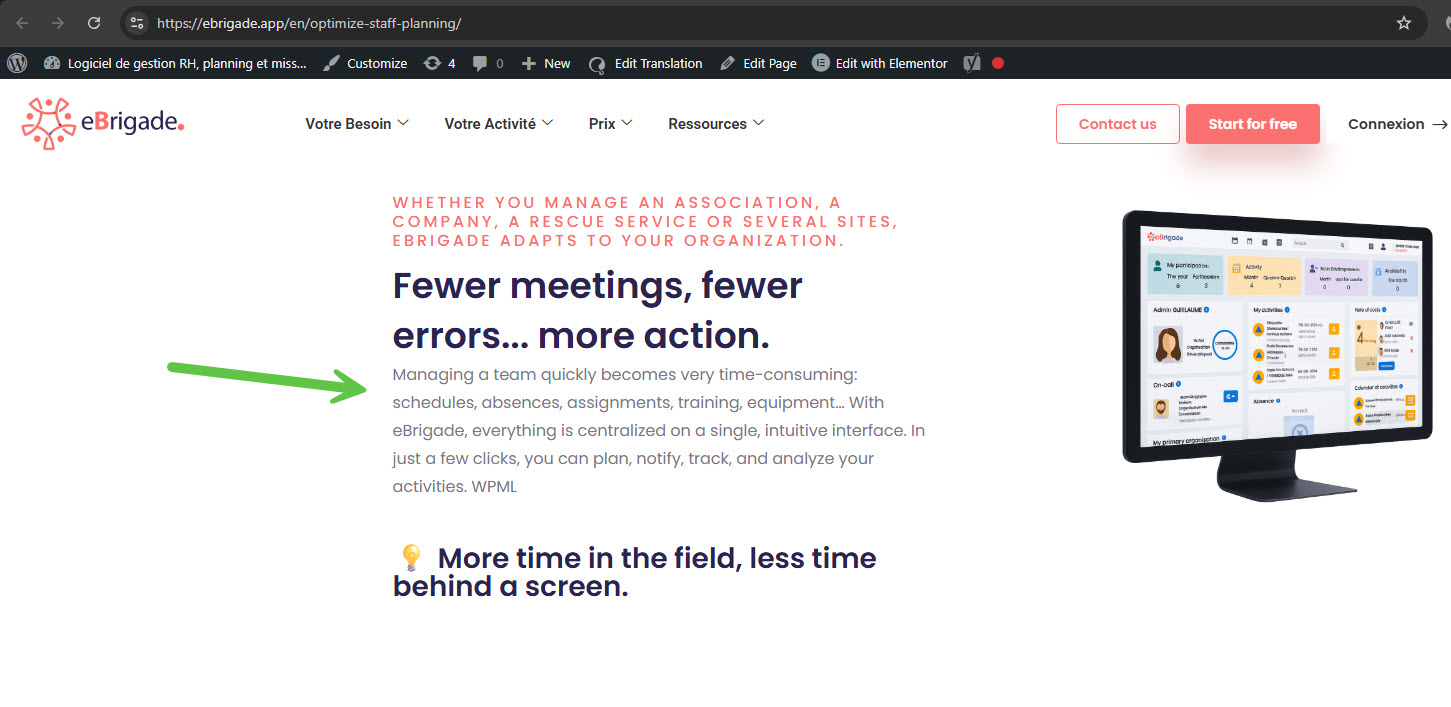 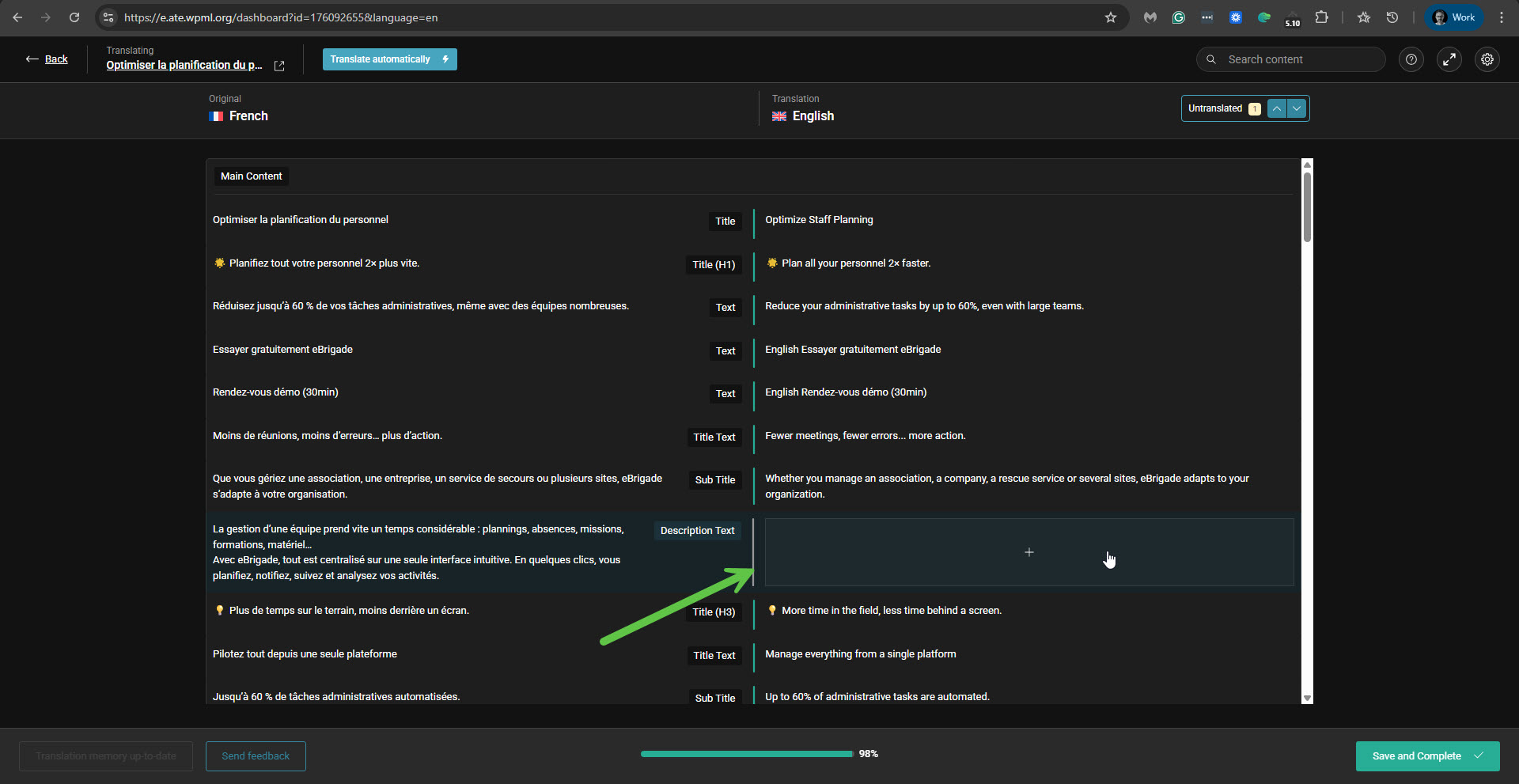 |
| January 12, 2026 at 4:17 pm #17722512 | |
|
Itamar WPML Supporter since 02/2016 Languages: English (English ) Timezone: Asia/Jerusalem (GMT+02:00) |
Hi, The following answer concerns the translation of an HTML table with CSS styles using the Text Editor widget. After investigating this issue on my test site, I've concluded that it is possible to achieve what you need. Here are the steps you need to take. The important part is separating the CSS and HTML for the table. And use the Text Editor widget, not the HTML widget, since the HTML widget will not display the content in the Advanced Translation Editor by default. 1. Copy only the CSS style from your table.
    .tb {
        width: 100%;
        max-width: 100%;
        border-collapse: collapse;
        background: #fff;
        font-family: Arial, sans-serif;
        box-shadow: 0 2px 4px rgba(0, 0, 0, 0.1);
        margin: 0 auto
    }

    .tb th {
        background: linear-gradient(90deg, #F3F6FA 0%, #EEF2F7 100%);
        color: #1f2937;
        padding: 12px;
        text-align: center;
        font-weight: 600;
        border: 1px solid #e0e0e0;
        white-space: nowrap
    }

    .tb th:first-child {
        background: linear-gradient(90deg, #F3F6FA 0%, #EEF2F7 100%);
        text-align: left
    }

    .tb td {
        padding: 10px 12px;
        text-align: center;
        border: 1px solid #e0e0e0;
        vertical-align: middle
    }

    .tb tbody tr:nth-child(even) {
        background: #f8f9fa
    }

    .tb tbody tr:nth-child(even) td.bc {
        background: #dcfce7 !important
    }

    .tb tbody tr:nth-child(odd) td.bc {
        background: #dcfce7 !important
    }

    .tb td:first-child {
        text-align: left;
        font-weight: 600;
        color: #1f2937;
        background: #fff !important
    }

    .tb tbody tr:nth-child(even) td:first-child {
        background: #f8f9fa !important
    }

    .bc {
        background: #dcfce7 !important
    }

    .badge {
        display: inline-block;
        background: #22c55e;
        color: #fff;
        padding: 3px 8px;
        border-radius: 3px;
        font-size: 10px;
        font-weight: 700;
        margin-bottom: 4px;
        line-height: 1.2
    }

    .ok {
        color: #22c55e;
        font-size: 18px;
        font-weight: 700;
        display: inline-block
    }

    .no {
        color: #ef4444;
        font-size: 18px;
        font-weight: 700;
        display: inline-block
    }

    .partial {
        font-size: 10px;
        color: #6b7280;
        display: block;
        margin-top: 3px;
        line-height: 1.3
    }

    @media (max-width:992px) {
        .tb {
            font-size: 14px
        }

        .tb th,
        .tb td {
            padding: 10px 8px
        }
    }

    @media (max-width:768px) {
        .tb {
            font-size: 12px;
            display: block;
            overflow-x: auto;
            -webkit-overflow-scrolling: touch
        }

        .tb th,
        .tb td {
            padding: 8px 6px;
            font-size: 12px
        }

        .badge {
            font-size: 9px;
            padding: 2px 6px;
            margin-bottom: 3px
        }

        .ok,
        .no {
            font-size: 16px
        }
    }

    @media (max-width:480px) {
        .tb {
            font-size: 11px
        }

        .tb th,
        .tb td {
            padding: 6px 4px
        }

        .badge {
            font-size: 8px;
            padding: 2px 4px
        }

        .ok,
        .no {
            font-size: 14px
        }

        .partial {
            font-size: 9px
        }
    }
3. Click the publish button.
<table class="tb">
    <thead>
        <tr>
            <th>Fonctionnalité</th>
            <th class="bc"><span class="badge">★ MEILLEUR CHOIX</span><br>eBrigade</th>
            <th>Odoo</th>
            <th>SAP</th>
            <th>Dendreo</th>
        </tr>
    </thead>
    <tbody>
        <tr>
            <td>Prix / mois</td>
            <td class="bc">35 €</td>
            <td>200-500 €</td>
            <td>300-800 €</td>
            <td>350-900 €</td>
        </tr>
        <tr>
            <td>Application mobile terrain</td>
            <td class="bc"><span class="ok">✓</span></td>
            <td><span class="no">✗</span></td>
            <td><span class="ok">✓</span></td>
            <td><span class="no">✗</span></td>
        </tr>
        <tr>
            <td>40+ modules inclus</td>
            <td class="bc"><span class="ok">✓</span></td>
            <td><span class="no">✗</span></td>
            <td><span class="no">✗</span></td>
            <td><span class="no">✗</span></td>
        </tr>
        <tr>
            <td>Missions & convocations</td>
            <td class="bc"><span class="ok">✓</span></td>
            <td><span class="no">✗</span></td>
            <td><span class="ok">✓</span></td>
            <td><span class="no">✗</span></td>
        </tr>
        <tr>
            <td>Formation / compétences</td>
            <td class="bc"><span class="ok">✓</span></td>
            <td><span class="no">✗</span></td>
            <td><span class="no">✗</span></td>
            <td><span class="ok">✓</span></td>
        </tr>
        <tr>
            <td>QR Code (présence, matériel)</td>
            <td class="bc"><span class="ok">✓</span></td>
            <td><span class="no">✗</span></td>
            <td><span class="ok">✓</span><span class="partial">Couverture partielle</span></td>
            <td><span class="no">✗</span></td>
        </tr>
        <tr>
            <td>Multi-organisation</td>
            <td class="bc"><span class="ok">✓</span></td>
            <td><span class="no">✗</span></td>
            <td><span class="no">✗</span></td>
            <td><span class="no">✗</span></td>
        </tr>
    </tbody>
</table>
6. Click the Save button to update the page. While trying this, I recorded a video. Please watch it here, as I hope it will help you understand what you need to do: hidden link Please let me know if you have any further questions. Regards, |







