[Resolved] Page break when connecting it's translated page
This thread is resolved. Here is a description of the problem and solution.
Problem: The client is experiencing an issue where connecting translated pages in different languages (French and English) and then saving causes the page to break, despite no edits being made. This occurs when using the Greenshift Block Theme. Solution: We recommended the following steps: 1. Ensure that the pages are connected correctly by following the guide on using different translation editors for different pages, which can be found here: https://wpml.org/documentation/translating-your-contents/using-different-translation-editors-for-different-pages/ 2. If the issue persists, we suggested recreating the page from scratch to see if the problem resolves. 3. Additionally, creating a staging site using the WP Staging plugin to test if the issue still occurs there might help identify if the problem is specific to the production environment or a broader issue.
If these steps do not resolve the issue or if the solution seems outdated or irrelevant to your specific case, we highly recommend checking related known issues at https://wpml.org/known-issues/, verifying the version of the permanent fix, and confirming that you have installed the latest versions of themes and plugins. If problems persist, please open a new support ticket at WPML support forum for further assistance.
This is the technical support forum for WPML - the multilingual WordPress plugin.
Everyone can read, but only WPML clients can post here. WPML team is replying on the forum 6 days per week, 22 hours per day.
Hello,
My name is Carlos, and I will continue working on this ticket
Please follow these steps:
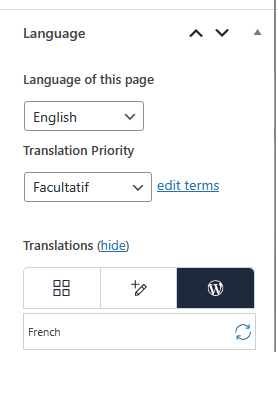
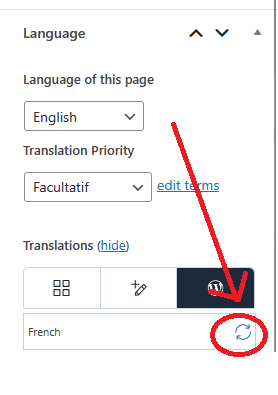
- Edit the page in the original language
- Go to the right column -> Language block
- Share a screenshot or let me know that the configuration is for the translation
1.- Please share the URL of the page in the original language
2.- Also, I kindly ask you to share the access credentials to the site in your next message, which I have set private. This will allow me to reproduce the issue and double-check the configuration.
Confirm you have created a full site backup that you can restore if necessary.
I kindly ask you to record a video showing the steps you are following so I can do exactly the same on the site. You can create the video with Loom or Kommodo and share the link in your next message.