This thread is resolved. Here is a description of the problem and solution.
Problem: The client was unable to update the English translation of a static block, and products on translated pages were leading to broken links after translating some categories. Solution: We recommended translating categories in bulk using automatic translation. The client should create a product, assign all available categories to it, and send it for automatic translation via WPML > Translation Management > Dashboard. This should translate all assigned categories. Additionally, for the issue with the widget not being translated, the client should translate the widget at WPML > String Translation by selecting the text-domain "widgets". If this does not resolve the issue, creating one widget per language might be necessary. For further guidance, we suggest reading the quick guide on sending content for automatic translation at https://wpml.org/documentation/translating-your-contents/#sending-content-for-automatic-translation.
If the provided solution does not apply or is outdated, we recommend opening a new support ticket. It is also advisable to check related known issues at https://wpml.org/known-issues/, verify the version of the permanent fix, and confirm that you have installed the latest versions of themes and plugins. For further assistance, please visit our support forum at https://wpml.org/forums/.
This is the technical support forum for WPML - the multilingual WordPress plugin.
Everyone can read, but only WPML clients can post here. WPML team is replying on the forum 6 days per week, 22 hours per day.
Thank you , that solved the problem, i was finaly ablle to translate it, i take the oportunity to solve another problem i have with traalation of one of the static blocks:
hidden link
Wen i try to tranlate the english it is not updated, all the other languages have translated automatycly, i mean, i did not did anything, they just got translated.
In the EN version it apears a old version instead of the version i currently have on the native PT language, i am not shure how to proceed in this case or how to fix it...
I have added s sign and saved it, then i tried to update the English translation but it still apears an old version, it did not update to the current version i have...
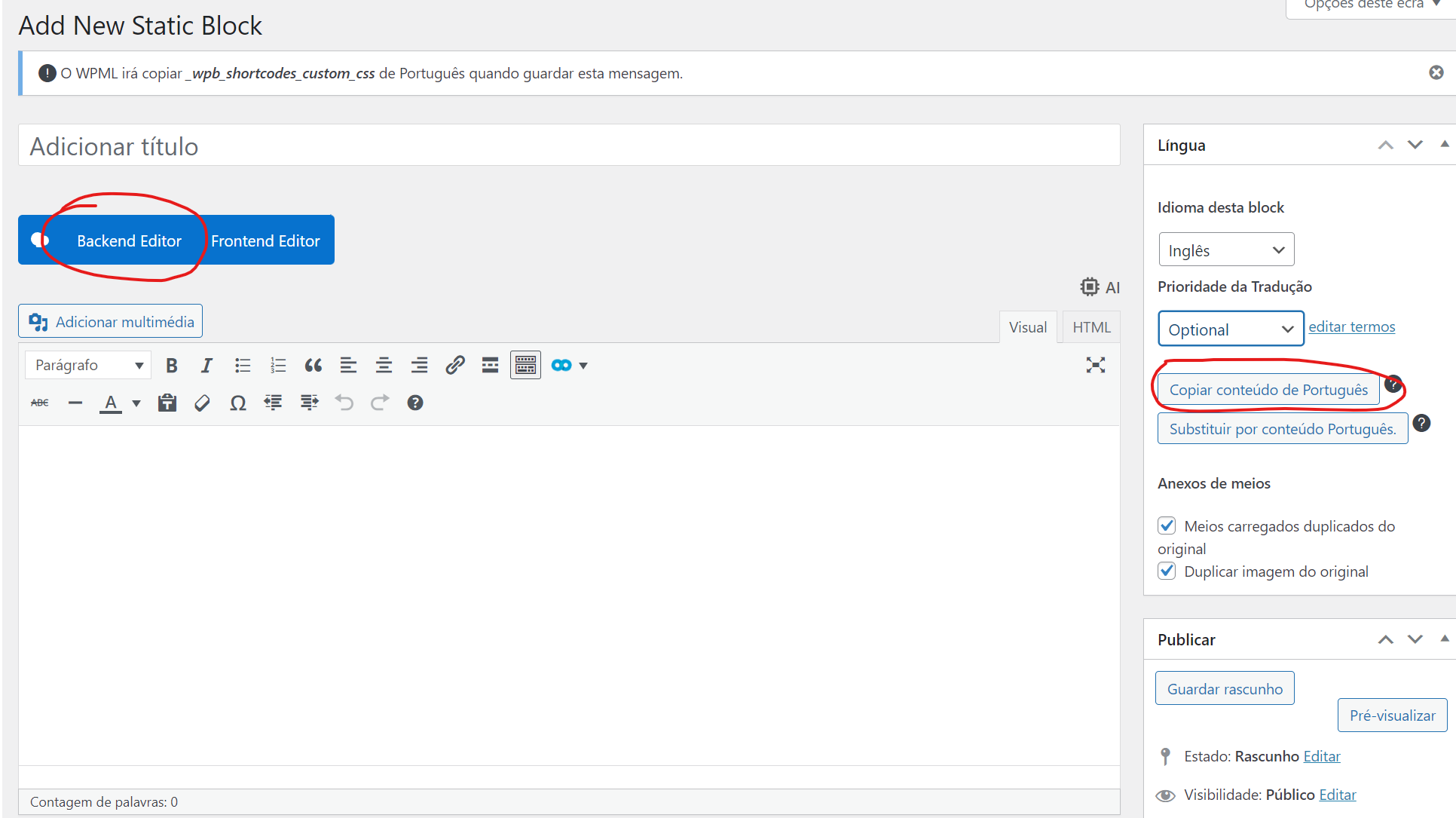
1- click on the button "Copy content from Portuguese"
2- after, the content is copied you need to click the blue button "Backend Editor" which will show the blocks with WPBakery
3- you can edit the modules as needed (if there is any need to change anything)
4- publish the page
Thank you, i managed to translate to english, but now wen i try to trasnlate the others languages it asks me to copy from the English, i want to copy from the PT (Portuguese) witch is the original and translate from there to the other languages: hidden link
Also i have the statick block duplicated?Not shure if i can delete one of them: hidden link
I saw that the solution was to tranlate the products, i do not intend to translate them, they are to many in many languages its not viable so i would do what they reccomend in the other thread:
"You can use the duplicate option instead of translating the products, this option will create a copy of the original product in the secondary language.
You can duplicate them individually from the product editing screen or in bulk using WPML's Translation Management (Please check the attached screenshots)"
Could you please do this bulk action to to duplicate for the other languages?
This is very stressfull to us, we have the store broken at the moment and want to fix as soon has possible, and i dont want to mess anything any worse...
I think i will also have to finish translate all the remaining categories, is there a bulk action to do the same for them?
The problem here is at the moment all the products from the translated pages go to broken links because i translated some categories, the products need to be translated like recommended here i think:
"You can duplicate them (products) individually from the product editing screen or in bulk using WPML's Translation Management (Please check the attached screenshots)"