Skip to content Skip to sidebar

This thread is resolved. Here is a description of the problem and solution.

Problem:
The category thumbnail is missing in the secondary language.
Solution:
If you're experiencing this issue, we recommend you try the following steps:
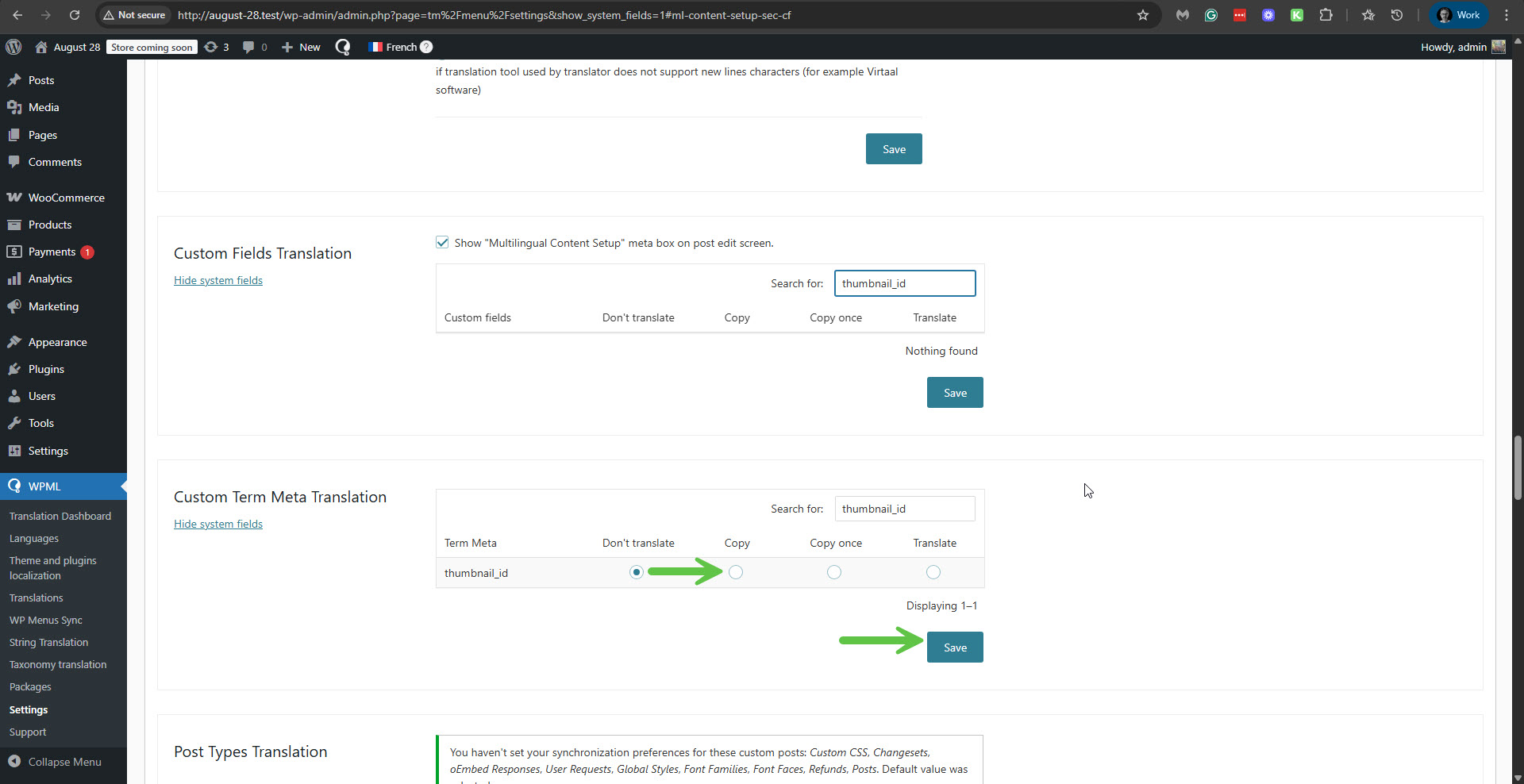
1. Navigate to WPML -> Settings -> Custom Term Meta Translation.
2. Search for

thumbnail_id

.
3. Change its setting from 'Don't translate' to 'Copy', and then click the Save button.
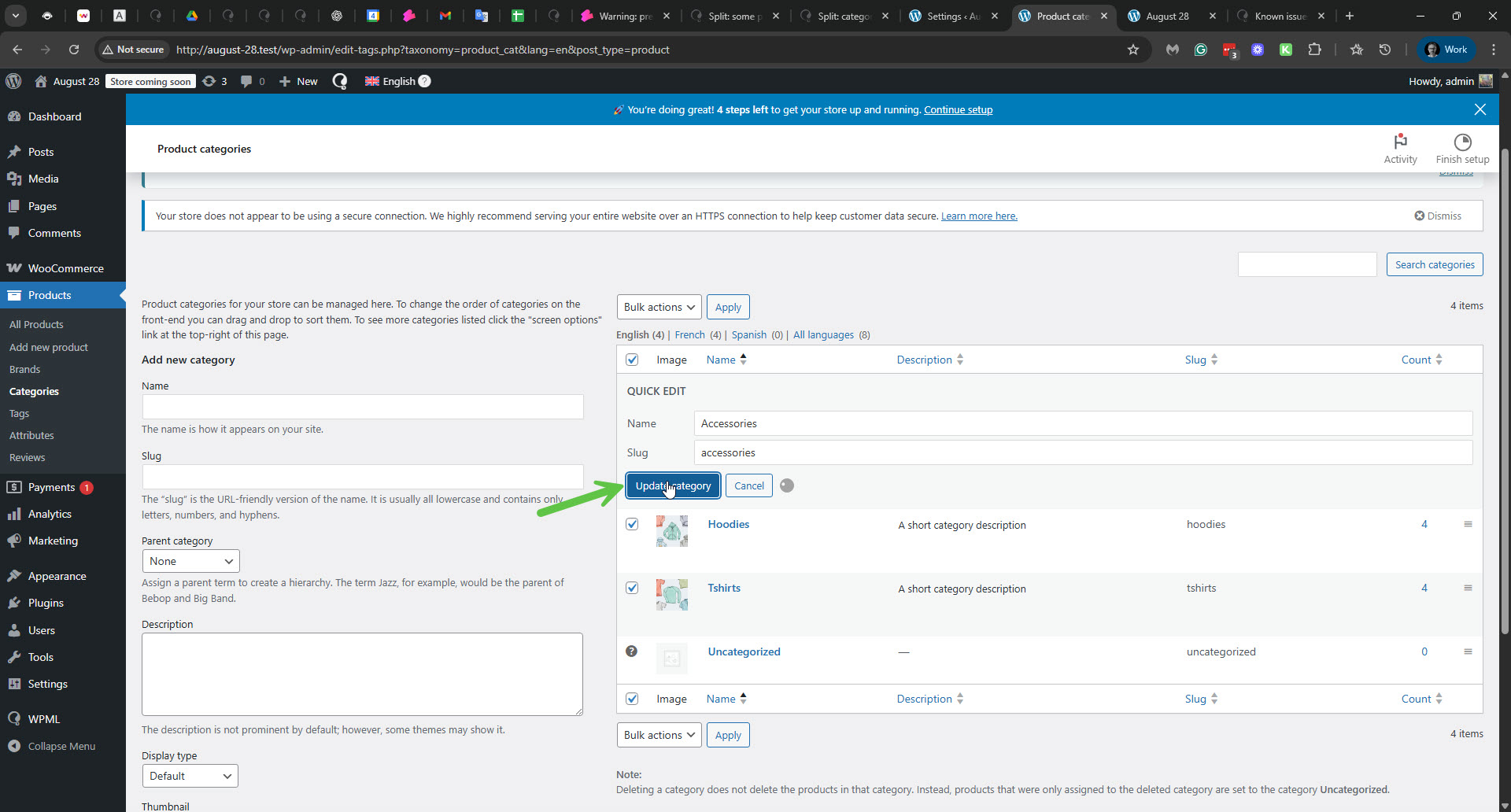
4. Go to Products -> Categories, and use the 'Quick Update' option by clicking the 'Update category' button.
This should ensure that the thumbnails are copied over to the translated terms.
Additionally, this issue has been addressed in the latest version of WPML Multilingual & Multicurrency for WooCommerce. We recommend updating to this version to permanently resolve the problem.

Please note that this solution might be irrelevant if it's outdated or not applicable to your case. We highly recommend checking related known issues at https://wpml.org/known-issues/, verifying the version of the permanent fix, and confirming that you have installed the latest versions of themes and plugins. If the issue persists, please open a new support ticket.

This is the technical support forum for WPML - the multilingual WordPress plugin.

Everyone can read, but only WPML clients can post here. WPML team is replying on the forum 6 days per week, 22 hours per day.

Tagged: 

This topic contains 7 replies, has 0 voices.

Last updated by Itamar 1 week, 4 days ago.

Assisted by: Itamar.

Author Posts
September 2, 2025 at 7:36 pm #17367510

rhettY

3. The category thumbnail is missing in secondary language.

Please check the video: hidden link

September 2, 2025 at 8:08 pm #17367526

Itamar
WPML Supporter since 02/2016

Languages: English (English )

Timezone: Asia/Jerusalem (GMT+02:00)

Hi,

Please check your site here: hidden link, click the Check For Updates button, and see that we have a new version 4.8.1 for WPML. Update WPML, and then go to the categories with the problem and update them and their translations to check if it fixes the issue.

**** Important! Please make a full site backup (files and DB) before you proceed with those steps****

You can check the change log for the relevant entries: https://wpml.org/download/wpml-multilingual-cms/?section=changelog.

Does it help to solve the issue?

Regards,
Itamar.

September 3, 2025 at 2:42 am #17367942

rhettY

I updated WPML to 4.8.1 and it didn't help
I think I have to manually add the thumbnails

September 3, 2025 at 8:15 pm #17372539

Itamar
WPML Supporter since 02/2016

Languages: English (English )

Timezone: Asia/Jerusalem (GMT+02:00)

Hi, and thanks for trying my suggestions.

Please go to WPML -> Settings -> Media translation and ensure the 'Automatically detect best options for translating image texts' option is enabled. Next, update the original product category term and check if the term's image is duplicated in the translation. You can read about it here:

https://wpml.org/documentation/getting-started-guide/media-translation/#keep-media-meta-information-translated-automatically

If it does not help, then manually adding a thumbnail is an option.

Regards,
Itamar.

September 4, 2025 at 1:29 am #17372931

rhettY

Hi Itamar,

Thanks. Yes I've turned the smart detection for media before starting translation.

For now manually adding is the only option.

Thanks,

Rhett

September 4, 2025 at 9:31 am #17374183

Itamar
WPML Supporter since 02/2016

Languages: English (English )

Timezone: Asia/Jerusalem (GMT+02:00)

Hi, Rhett.

It should not be like that. The product category thumbnails should be copied over to the translation. TO fix it, please proceed as follows.

1. Go to WPML -> Settings -> Custom Term Meta Translation.

2. Search for 'thumbnail_id'.

3. Set it from 'Don't translate' to 'Copy'.And click the Save button. Please see the attached screenshot.

4. Go to Products -> Categories, and use the 'Quick Update' option. Just click the 'Update category' button. Please see the attached screenshot.

This will make the terms' thumbnails ' be copied over to the translated terms.

I've escalated this issue to our second-tier supporters. When I have news from them I'll update you here.

I appreciate your patience.
Itamar.

2025-09-04_11-58-15.jpg
2025-09-04_12-00-57.jpg
September 4, 2025 at 10:37 am #17374720

Itamar
WPML Supporter since 02/2016

Languages: English (English )

Timezone: Asia/Jerusalem (GMT+02:00)

Hi again.

The issue has been escalated to our developers. Until they fix it in future versions of WPML, please apply the suggested workaround.

Regards,
Itamar.

January 21, 2026 at 11:49 am #17750139

Itamar
WPML Supporter since 02/2016

Languages: English (English )

Timezone: Asia/Jerusalem (GMT+02:00)

Hi,

The fix for this issue has already been included in the latest version of WPML Multilingual & Multicurrency for WooCommerce.

I'm closing this ticket. Please don't hesitate to contact us again with any WPML-related issues or questions.

Regards,
Itamar.