
This is the technical support forum for WPML - the multilingual WordPress plugin.
Everyone can read, but only WPML clients can post here. WPML team is replying on the forum 6 days per week, 22 hours per day.
| Sun | Mon | Tue | Wed | Thu | Fri | Sat |
|---|---|---|---|---|---|---|
| 10:00 – 14:00 | 10:00 – 14:00 | 10:00 – 14:00 | 10:00 – 14:00 | 10:00 – 14:00 | - | - |
| 16:00 – 20:00 | 16:00 – 20:00 | 16:00 – 20:00 | 16:00 – 20:00 | 16:00 – 20:00 | - | - |
Supporter timezone: Asia/Jerusalem (GMT+02:00)
Tagged: Translation Service
This topic contains 14 replies, has 0 voices.
Last updated by justinb-4 2 weeks ago.
Assisted by: Itamar.
| Author | Posts |
|---|---|
| February 17, 2026 at 9:10 am #17828332 | |
 justinb-4 |
I’m trying to fix technical SEO issues like improper URLs. There may be an http instead of an https. These are code changes. I fix on the US side, but I need those changes propagated to the DE, JP and KO sites. Our developer showed me that I simply need to send it for translation, and “Save” the page. I tested by assigned translations to myself. I opened it up and just hit save. No copy changes. Then my code changes are pushed to DE, JP, and KO. Most of the time, when I send batches to BLEND, and it works. Other times it does not. I made the video to explain to your team why I’m sending 100’s of files over with no real copy changes. and I wanted to check if this process is ok with you. |
| February 17, 2026 at 9:40 am #17828470 | |
 Itamar WPML Supporter since 02/2016 Languages: Hebrew (עברית ) Timezone: Asia/Jerusalem (GMT+02:00) |
Hi, Thanks for sending us the video with the problem. I watched your video. If I understand correctly, the problem occurs with translations received from the Blend Translation Service. I mention this because, according to your video, resending those translation jobs through our Advanced Translation Editor fixes the problem. We will, of course, investigate the issue and, if needed, communicate with the Blend Translation Service about it. For this, we have Translation Service experts. But before moving this issue to our Translation Service experts, we need your access to your site and a few examples of translation jobs with these problems (double slashes in a URL and http instead of https). If you need further help with this, please share the access details to your site with me. I'm enabling a private message for the following reply. |
| February 26, 2026 at 4:17 pm #17857439 | |
|
justinb-4 |
Hi, 1) Can you remove our brand name Sumo Logic from the ticket title and URL? 2) Here are some examples. I recently sent to Blend, but they returned with the same issue. On our site reports, I had over 3000 of these, and now we're down to just a couple hundred. So, I know this trick worked before. For some reason it's not working any more. I make the SEO fix to the US version, then send it to Blend. The DE, KO and JP versions come back with the original issue. Examples - Page has image URL with double slash - hidden link - hidden link I've also fixed issues like changing http to https, replacing images over 1mb, broken URLs, etc. For the most part, sending to Blend has allowed me to push the US fix to the other sites seamlessly. |
| February 26, 2026 at 6:44 pm #17857872 | |
|
Itamar WPML Supporter since 02/2016 Languages: Hebrew (עברית ) Timezone: Asia/Jerusalem (GMT+02:00) |
Hi, and thanks for the access details. I've escalated this issue to our Translation Service experts team. I appreciate your patience. |
| March 2, 2026 at 6:35 pm #17866086 | |
|
Itamar WPML Supporter since 02/2016 Languages: Hebrew (עברית ) Timezone: Asia/Jerusalem (GMT+02:00) |
Hi, Regards, |
| March 3, 2026 at 3:58 pm #17869382 | |
|
justinb-4 |
Hi Itamar, yes, you can go ahead. |
| March 4, 2026 at 10:40 am #17871513 | |
|
Itamar WPML Supporter since 02/2016 Languages: Hebrew (עברית ) Timezone: Asia/Jerusalem (GMT+02:00) |
Hi, Thanks for approving taking a copy of your site; however, there is no need for that. Our second-tier supporter has identified the source of the problem causing double slashes (//) in media links and has escalated the issue to our developers. The problem of this case didn't come from the Blend Translation Service, but it is in the Media translation add-on files. We've also published an errata about it, which you can read here: https://wpml.org/errata/with-media-translation-double-slashes-may-appear-in-image-urls-on-translated-content/. For your convienence I'm also adding the workaround below. 1. Take a backup of your site in case something goes wrong. 2. Edit this file with a code editor. 3. Locate these lines (around line 211): $filename = array_pop( $file_subdirectory_parts ); $image_url_parts[] = implode( '/', $file_subdirectory_parts ); 4. Edit like so:
$filename          = array_pop( $file_subdirectory_parts );
if ( !empty( $file_subdirectory_parts ) ) {
    $image_url_parts[] = implode( '/', $file_subdirectory_parts );
}
5. Save the changes in the file. Regards, |
| March 4, 2026 at 11:05 pm #17873377 | |
|
justinb-4 |
Thanks for the update. We can wait for your developers to research a fix. Once that happens, let us know what the procedure should be. Should I just send the same pages through the Blend translation process again? That way the fix can propagate to the three translated sites. |
| March 5, 2026 at 2:34 pm #17875356 | |
|
Itamar WPML Supporter since 02/2016 Languages: Hebrew (עברית ) Timezone: Asia/Jerusalem (GMT+02:00) |
Hi, There will be no need to resend the translations to the Blend service. The problem is in the Media translation file, and most likely occurred when you sent the translations via WPML rather than externally to the Blend service. When the fix is applied, you can simply send them through WPML -> Translation Dashboard. Regards, |
| March 5, 2026 at 8:03 pm #17876255 | |
|
justinb-4 |
Do you mean I should assign them to myself through the WPML dashboard? If so, the problem is that we have 100 plus pages, and then that's multiplied by the 3 translated sites we have. Sending each page to myself and then saving takes a very long time, unless you can suggest a batch process available to us. If I send to Blend, they don't charge since it just runs through their AI tool and they just save the file. I think it's somewhat automatic. Previously, I only sent a few to myself to test. Those worked and got rid of the double slash. |
| March 8, 2026 at 10:59 am #17879975 | |
|
Itamar WPML Supporter since 02/2016 Languages: Hebrew (עברית ) Timezone: Asia/Jerusalem (GMT+02:00) |
Hi, First, it is important to reiterate that the problem does not lie with the Blend side or any other Translation Service, for that matter. The problem occurs in the following terms: As mentioned in the errata, the suggested workaround is to avoid this problem for new translations. However, I tested the workaround on my local test site and on your staging site. After applying the workaround and updating the original post, the problem was fixed in the translations. For example, this post is in Japanese and was translated by Blend: hidden link. Please see the attached screenshots double-slash-before-fix.jpg and single-slash-after-fix.jpg. With WordPress, you can update translations in bulk by selecting all posts and editing them at once. Please see the attached screenshot select-to-edit.jpg. Then all you have to do is click the Update button. Please see the attached screenshot update-in-bulk.jpg. This is the batch process you can take to correct the problem. However, if resending the translations to Blend is easier for you, does not carry any extra cost, and fixes the problem, then you can proceed in this way. We'll keep you updated when the fix for this issue is included in the Media translation add-on. Regards, 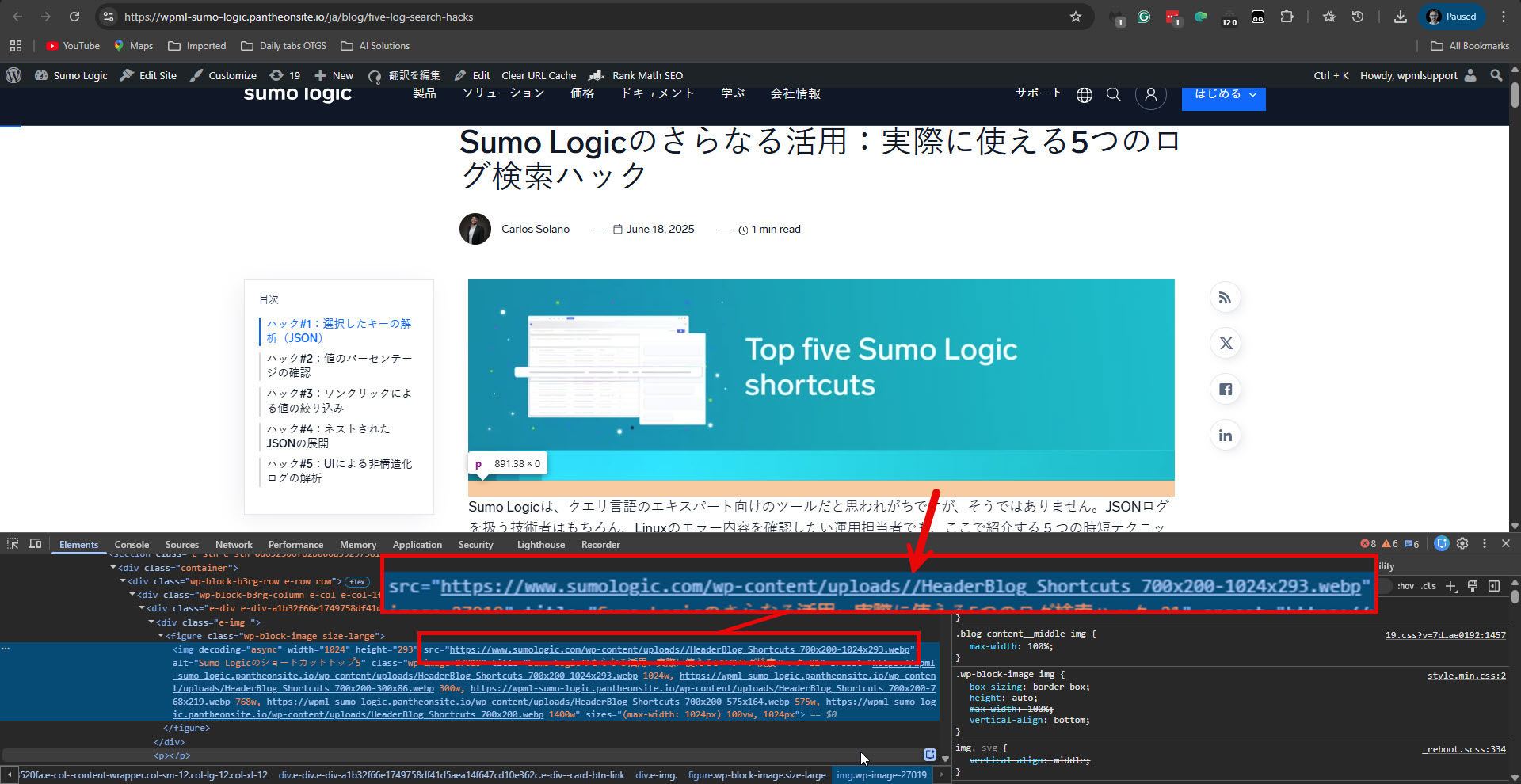 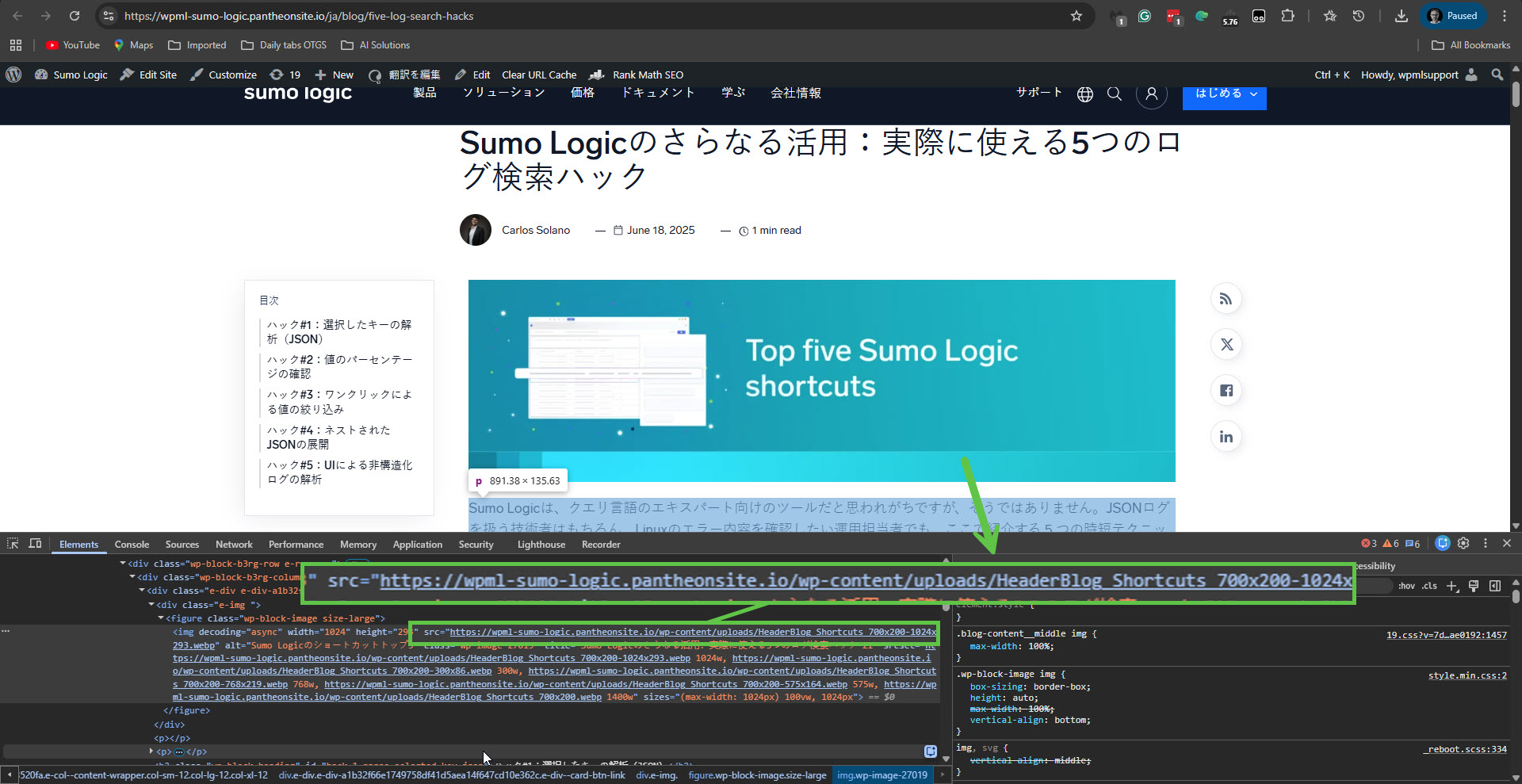 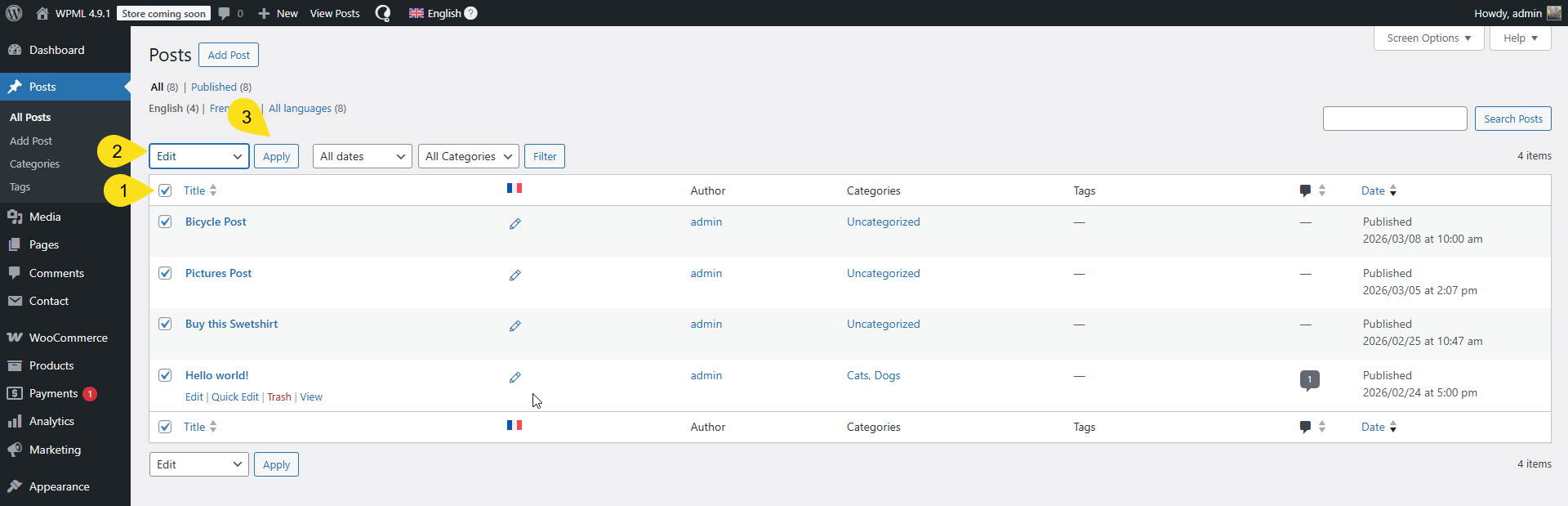 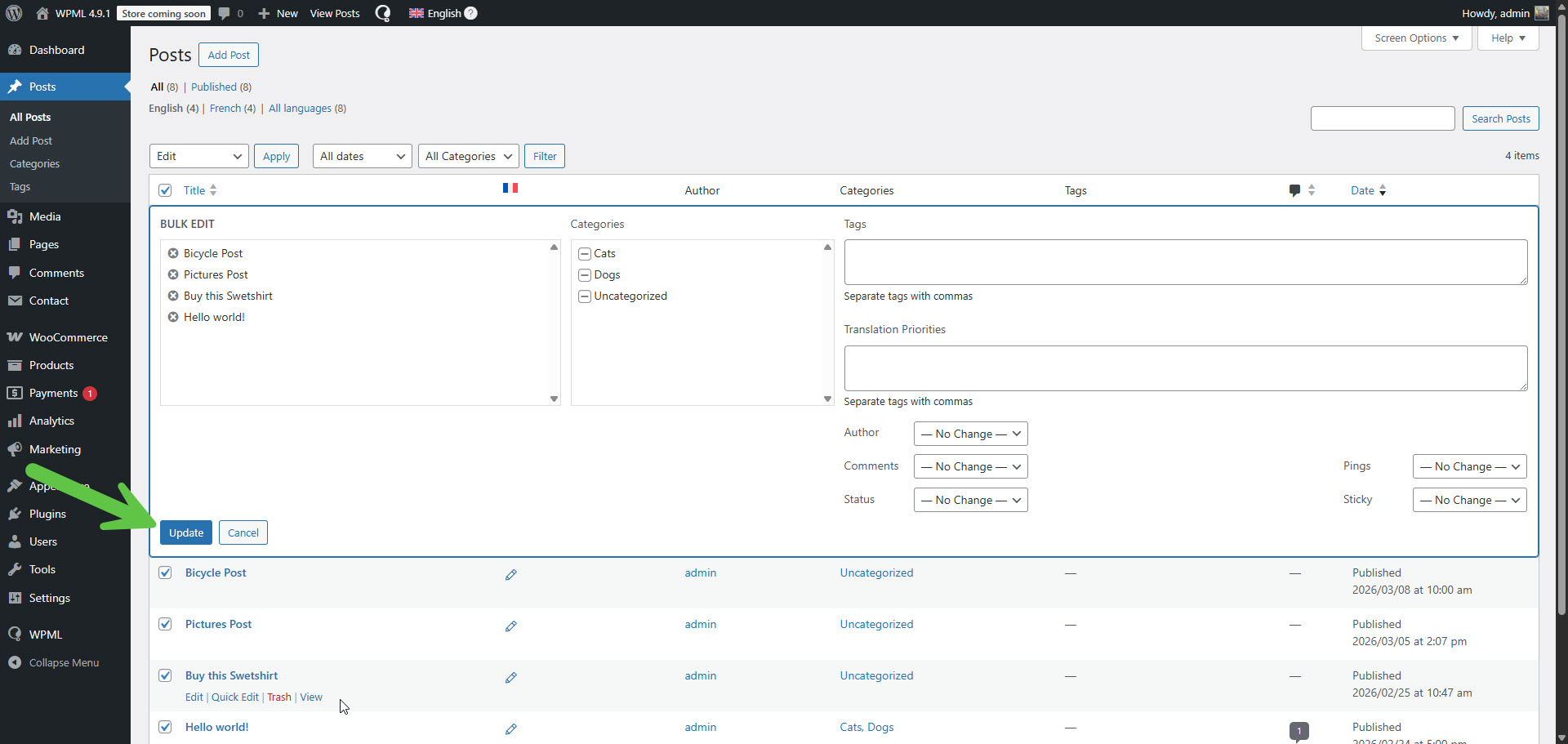 |
| March 10, 2026 at 4:42 pm #17886442 | |
|
justinb-4 |
Ok, thanks. Let me know when the fix is in and I'll figure out a way to batch this through. I understand this is not a Blend issue. Your screenshots are showing a way to bulk edit posts, which is fine. I was trying to figure out a way to bulk "Save" multiple files once they're assigned to me for translation. This would be on the WPML dashboard, not the posts. If there's a way, let me know. See screenshots. Unfortunately, whenever I send a translation to myself, this whole process can take up to a minute to click through all the screens. if I'm fixing 100 files on the US side, then it'll be 300 files I have to Save individually to update the DE, KO and JP sites. Anyways, I understand WPML was designed for translations, not for bulk editing code fixes in the manner I'm doing. Thanks for all your help. I'll wait for the code fix. 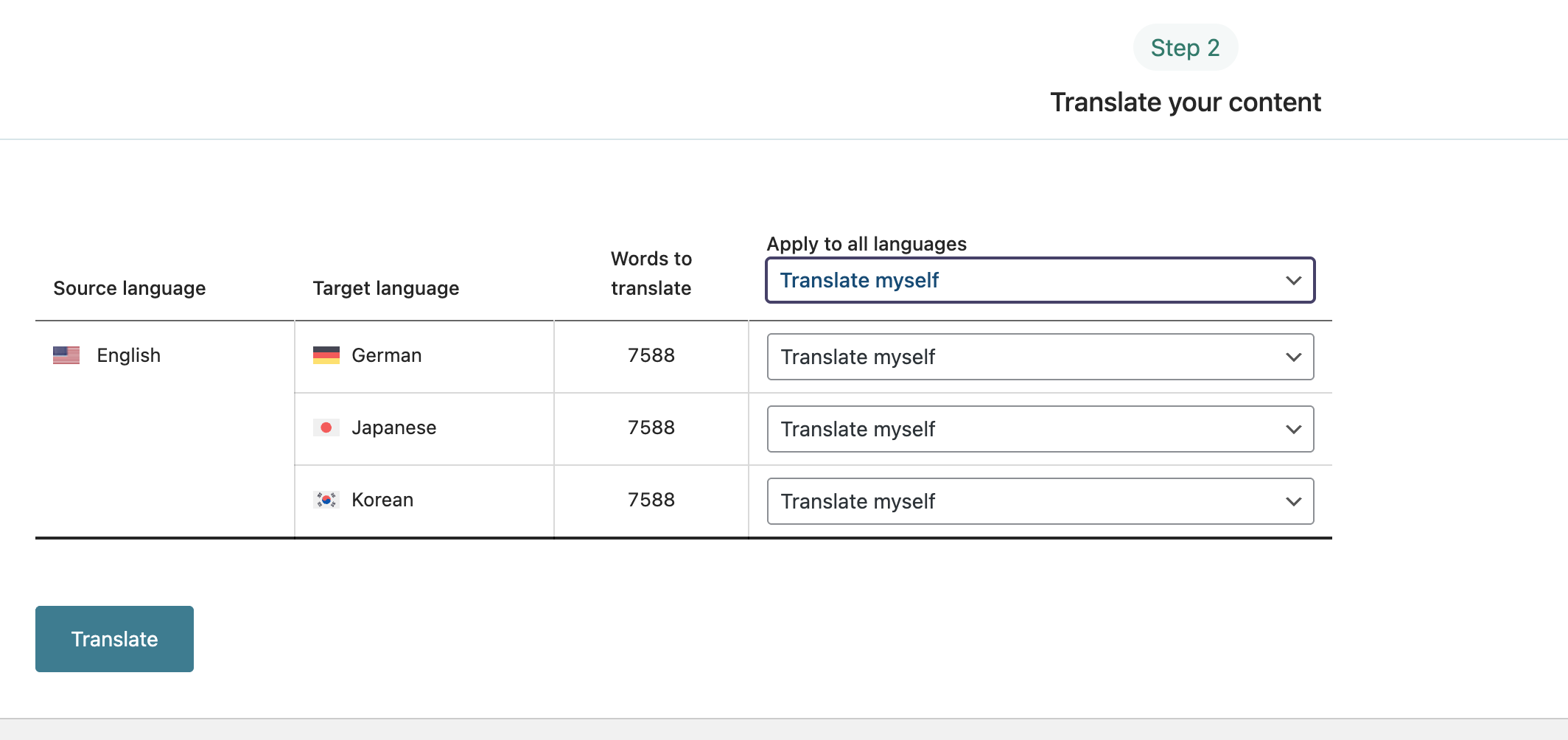  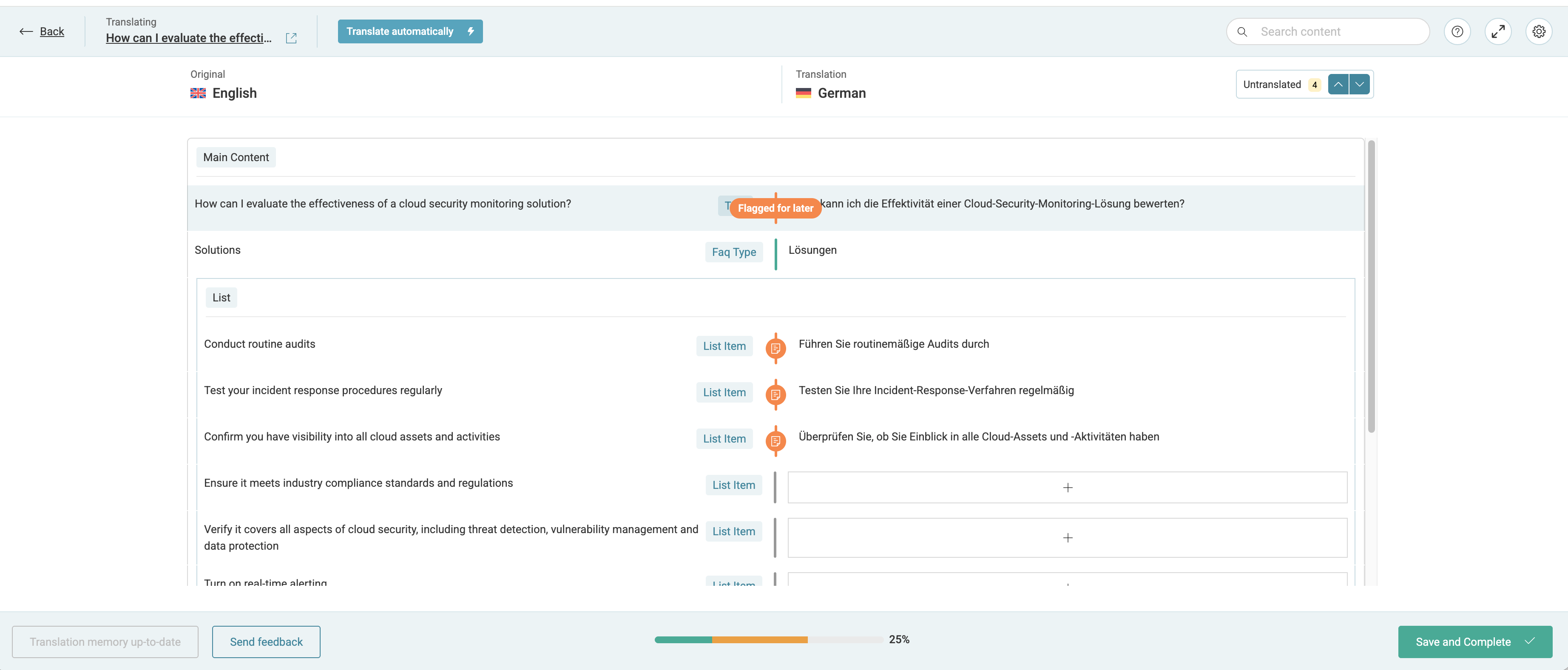  |
| March 10, 2026 at 9:49 pm #17887150 | |
|
Itamar WPML Supporter since 02/2016 Languages: Hebrew (עברית ) Timezone: Asia/Jerusalem (GMT+02:00) |
Hi, Assuming that the workaround has been applied, the method I suggested, updating the original English posts in bulk using the WordPress option, should fix the translations as well without doing anything else. This is true regardless of whether the translations were made by Blend. You are correct, there is no equivalent method or option in WPML -> Translation Dashboard. Furthermore, translations that have been translated with the Blend Translation Service, or any Translation Servicefor that matter, should not be edited afterwards using the Advanced Translation Editor. Doing this is prone to problems. We explain this here: https://wpml.org/documentation/translating-your-contents/using-the-translation-editor/switching-from-classic-to-advanced-translation-editor/#frequently-asked-questions. Please see the question: Can I use the Advanced Translation Editor for pages I translated using another method? Please let me know if this explains your doubts, or if you have further questions. Regards, |
| March 10, 2026 at 10:09 pm #17887157 | |
|
justinb-4 |
Ah great. I'll try bulk editing just US versions and seeing if that works once your fix is in. During these SEO changes, some fixes were done just on the US side, but it didn't automatically fix it on the translated sites. For example, I changed out an image that was 2mb and flagged as too large. But the change didn't take place on the translated sites. So, that's why I was sending to Blend. But, we'll see if this works. Note, the double slash is not seen on the US side, but I can still try to hit the edit button and bulk update to see if it works. Thanks |
| March 24, 2026 at 11:08 pm #17924145 | |
|
justinb-4 |
Hi, just checking in. Has the fix been applied yet? thanks |






