
This is the technical support forum for WPML - the multilingual WordPress plugin.
Everyone can read, but only WPML clients can post here. WPML team is replying on the forum 6 days per week, 22 hours per day.
This topic is split from https://wpml.org/forums/topic/once-again-core-image-blocks-translated-in-wpml-media-translation-are-not-translated-anymore-in-fro/
| Sun | Mon | Tue | Wed | Thu | Fri | Sat |
|---|---|---|---|---|---|---|
| 10:00 – 14:00 | 10:00 – 14:00 | 10:00 – 14:00 | 10:00 – 14:00 | 10:00 – 14:00 | - | - |
| 16:00 – 20:00 | 16:00 – 20:00 | 16:00 – 20:00 | 16:00 – 20:00 | 16:00 – 20:00 | - | - |
Supporter timezone: Asia/Jerusalem (GMT+02:00)
Tagged: Bug
This topic contains 5 replies, has 0 voices.
Last updated by Itamar 1 day, 18 hours ago.
Assisted by: Itamar.
| Author | Posts |
|---|---|
| December 14, 2025 at 2:36 pm #17662163 | |
 T4ng |
Another specific issue I noticed, is that the CSS class wp-image-ID don't seem to translate properly, wathever the media format. I did a test on your sandbox: I feel this test is pretty basic, but obviously, something already goes wrong here. Currently, the only way I found to get the images I translated (through the media translation) on the frontend, is to manually : Replace > Open Media Library > Select my image > Validate. With this method, the ID class is moved to the right one, and I can swith the size (if needed) without breaking anything. And it seems to be the only way. However, it's not translation anymore: it's all manual! Here, the Media Translation becomes useless, it's just a media library organization tool. Can you please confirm you notice the behaviors I encounter? This is a very annoying issue, since in these conditions, my content translated through your tool (and not edited individually) don't get the translated images they should. Therefore, for now, I can't publish content with translated medias in an organized process, which is what the Media Translation is made for. |
| December 18, 2025 at 9:45 pm #17676259 | |
 Itamar WPML Supporter since 02/2016 Languages: English (English ) Timezone: Asia/Jerusalem (GMT+02:00) |
Hi, Thanks for reporting this issue. I appreciate your patience. |
| December 19, 2025 at 9:19 am #17676884 | |
|
T4ng |
Hi Sorry, that's not what I notice during my tests. In case, I did it another test on your sandbox. 1. I uploade a media (PNG) from the Media library (with title and alt data) 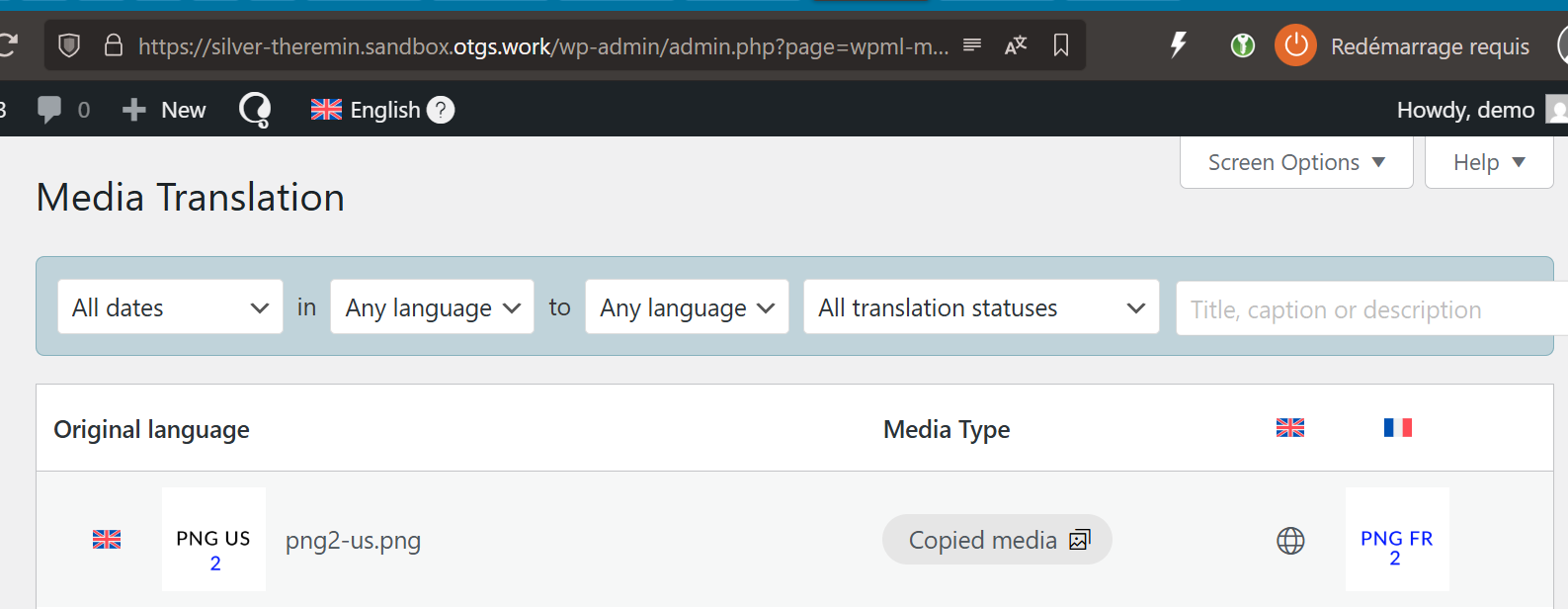 |
| December 24, 2025 at 7:44 pm #17687373 | |
|
Itamar WPML Supporter since 02/2016 Languages: English (English ) Timezone: Asia/Jerusalem (GMT+02:00) |
Hi, Thanks for reporting this. However, you should not edit the translated page in the WordPress editor if the translation is using WPML's Translation Editor. Nevertheless, even with the steps you mentioned, the replaced image appears again after refreshing the editing screen in French. We can't consider it a bug; it's only an issue with the translation workflow. The issue I mentioned has been escalated to our developers and will be fixed in the next major version of our plugins. Best Regards, |
| December 29, 2025 at 1:17 pm #17694864 | |
|
T4ng |
Hi, I've been thinking quite a lot to your last message. Now, I understand you're saying that the image translation works (= allows to get the media uploaded from the media translation in the translated page instead of the original one) as long as we edit the translation: However, it WON'T work as long as, while remaining with the CTE/ATE setting, we click Admin bar:"Edit page" from the translated page to edit the translation. Just so you know, I used to follow this workflow because with to remain on the ATE as long as possible, before applying individual changes. It just prevents more manual changes afterwards, in case the original content changes. Then, I have 2 options to edit the page individually: The second one was obviously the quickest. And since the button was available, and I had no idea it would break something, besides, the risk being moved to the WPML Editor when working from the original page, and crush my individual changes. Now you say it's not bug. In other words, I feel that, if it leads to issues, this " Edit page" button should just not be available from the translated pages as long as the editor setting hasn't been switched to WordPress Editor. I tested the workflow you suggested, and indeed: Now, you say: "The issue I mentioned has been escalated to our developers and will be fixed in the next major version of our plugins." I imagine you're talking about: "The core problem is that the replaced images disappear from Media translation once the translated page is edited with the WordPress editor. Images are **removed** from the "Media Translation", really? or only from the page after edition/or from the library? >> Can you elaborate/show me what happens? I didn't notice it, on our environments, nor your sandbox during these tests. However, I did notice, for years now, images suddenly missing from translations and the library, without really understanding where this came from. Finally, you say it'll be fixed in the next major versions of WPML. So I feel we'll have to wait. In the meantime we have 3 fixes for these Media Translations issues. I guess we'll have to rely on these until you guys have something more robust to offer. |
| December 30, 2025 at 4:31 pm #17697146 | |
|
Itamar WPML Supporter since 02/2016 Languages: English (English ) Timezone: Asia/Jerusalem (GMT+02:00) |
Hi, If I understand correctly what you are trying to achieve, you can do so by following our guide: How to Create Different Designs per Language: The following are the steps to replicate the issue I escalated to our developers. 1. Upload images to the media library in the primary language. (I tried it with these image types: JPG, PNG, WEBP.) If there is a feature missing for you in Media translation, please describe it, and I'll send that feature request to our second-tier supporters. Please explain it as briefly and directly as possible. Thanks, |






