
This is the technical support forum for WPML - the multilingual WordPress plugin.
Everyone can read, but only WPML clients can post here. WPML team is replying on the forum 6 days per week, 22 hours per day.
| Sun | Mon | Tue | Wed | Thu | Fri | Sat |
|---|---|---|---|---|---|---|
| - | 9:00 – 13:00 | 9:00 – 13:00 | 9:00 – 13:00 | 9:00 – 13:00 | 9:00 – 13:00 | - |
| - | 14:00 – 18:00 | 14:00 – 18:00 | 14:00 – 18:00 | 14:00 – 18:00 | 14:00 – 18:00 | - |
Supporter timezone: America/Argentina/Buenos_Aires (GMT-03:00)
Tagged: Exception
This topic contains 47 replies, has 1 voice.
Last updated by Otto 9 months, 3 weeks ago.
Assisted by: Otto.
| Author | Posts |
|---|---|
| June 11, 2025 at 2:04 am #17123831 | |
 lic-2 |
We noticed that the translation edits from June 3 appear to have been deleted. We would like to understand how this could have happened, as logically speaking, we would never intentionally delete any translations — especially considering that the current Chinese content is still present on the website. So how could it be classified as a deletion of translations? We genuinely want to know how to avoid such issues in the future, because losing translation content causes significant disruptions to our workflow and operations. |
| June 11, 2025 at 4:15 am #17123864 | |
|
lic-2 |
And how can I refund translation points for hidden link? |
| June 11, 2025 at 3:54 pm #17127089 | |
 Otto |
Hello, It's hard to tell. Most “vanished-but-still-visible” cases stem from either (a) mixing editors or (b) restoring the database without resynchronizing the Advanced Translation Editor (ATE). Why the edits could appear as “deleted”? How to prevent this in future? With these safeguards in place, the risk of losing translation work is effectively eliminated. I added 10000 credits to your WPML account. You can assign them to the site to use them: As far as I can see the cost for that translation was 2434. I added a bit more because of the trouble. Please apologize. Best Regards, |
| June 12, 2025 at 2:16 am #17128140 | |
|
lic-2 |
This morning I found that the WPML Chinese translation of another old article was lost!!!  |
| June 12, 2025 at 2:55 am #17128225 | |
|
lic-2 |
My current points are 0. Where are they added? 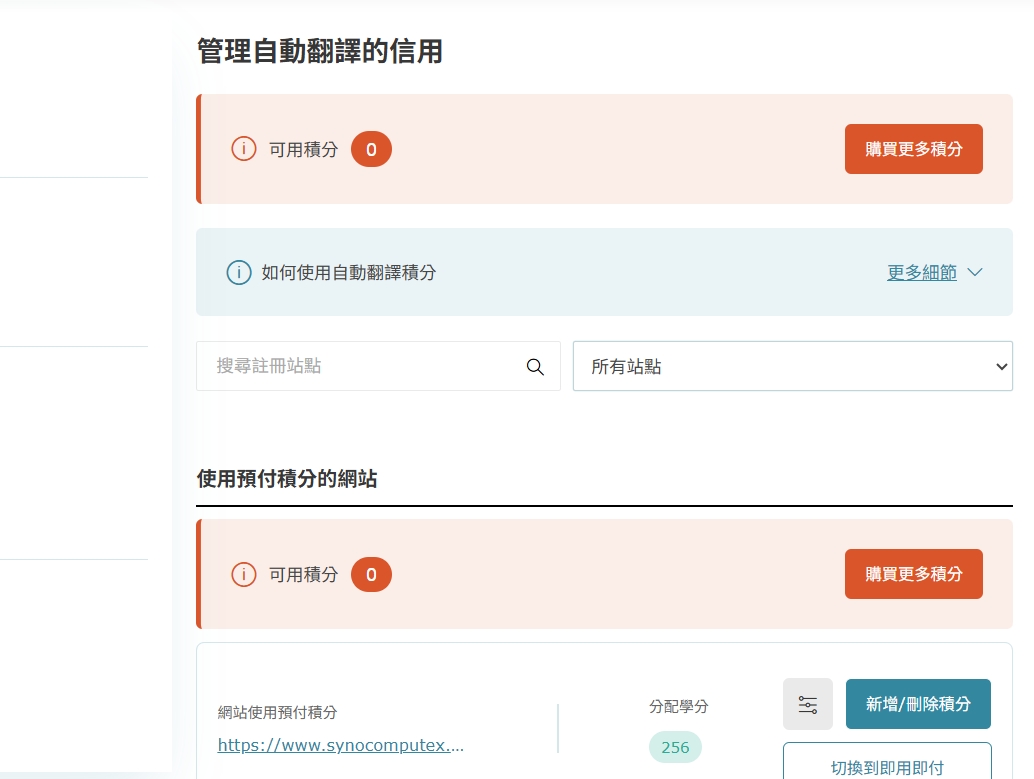 |
| June 12, 2025 at 3:30 am #17128243 | |
|
lic-2 |
1. Currently, all the articles reporting the disappearance of Chinese are only using the WPML editor, and there is no problem of using mixing editors as mentioned in a. Therefore, the possibility of the disappearance of Chinese is that WPML is speculated to restore the data base on 6/3 as mentioned by b. I have asked the engineer to confirm whether this is the case. 2. If it is really the case of b, since we all have backups, can we ask WPML how we can revert the translation of the WPML database? Instead of spending time translating again... 3. Finally, WPML mentioned "Schedule incremental backups before translation sprints so you can restore both database and WPML tables together and avoid desynchronization. (Best-practice recommendation, general.)" How can this be done? What is the purpose of doing this? We don't quite understand what it means... |
| June 12, 2025 at 3:40 am #17128264 | |
|
lic-2 |
1.The engineer just responded that we did not restore the data base on 6/3. First of all, we did not mix editor translations, nor did we restore the database as WPML speculated. Anyway, my focus is to solve the problem |
| June 12, 2025 at 3:23 pm #17130717 | |
|
Otto |
Hello, This is really weird... 🤔 The original content of the page was edited, right? Did those changes affect the layout/structure of the post? All the other languages are OK, no? How were those languages translated? How the translations were updated after editing the original content? What's the difference between them and Chinese? Best Regards, |
| June 16, 2025 at 4:12 am #17136976 | |
|
lic-2 |
Please check out my operation video The original content is written in Engish. FR and GE- I used auto translation and they were working fine. There were originally three issues I reported to you. This indicates that the issue is system-wide, not limited to a single post or page. “The Footer template has not yet been translated in WPML > Translation Management.” Relevant documentation links were also provided: |
| June 17, 2025 at 7:49 am #17141112 | |
 Alejandro WPML Supporter since 01/2018 Languages: English (English ) Spanish (Español ) Italian (Italiano ) Timezone: Europe/Rome (GMT+02:00) |
Hello there, I think I know what the problem here was, but before I can confirm this I need to know: When did you change the default locale of the chinese language? Because we have contrasting information. your site has been on numerous staging sites and you have translated content on those staging sites as well. not many but some. However on those staging sites like stg-uprtekcom-stage.kinsta.cloud, I could find references of the chinese language code to be "zh", on other jobs and on the current site you have it as "zh-TW" Now a few things to bear in mind here: 1) The default locale is wrong as "zh-TW". it should be at most "zh_TW" (with an undersore). 2) If your previous translation existed when you had "zh" as the language code, then that is seen as a different language, thus, possible different translation, thus "Missing translation". The language code exists mainly to help crawlers and other systems to understand your language and when it comes to search engines, using "zh" will include all of their kinds, including "tw". This could be the reason why, because you actually do have a lot of translation memory and on the page you once used as a refence, you actually did have content translated from before, but it wasn't all of it. --------------- It's normal that when you make even a typo fix on the original language of a page, the rest will appear as "needs update", that's expected and that won't translate anything, it will just let you know there's something to be done. Please let me know So I can understand what we can do to find a solution for this problem. |
| June 18, 2025 at 6:47 am #17144700 | |
|
lic-2 |
"If we just change zh-TW back to zh_TW, will that be enough? Is there anything else we need to do?" |
| June 18, 2025 at 7:30 am #17144785 | |
|
Alejandro WPML Supporter since 01/2018 Languages: English (English ) Spanish (Español ) Italian (Italiano ) Timezone: Europe/Rome (GMT+02:00) |
No no, here's the thing: Whenever you set a deafault locale, it will be seen as a new language, so if you had content with the locale "zh" then the translation memory will be there for that locale, then if you switched it to "zh-TW" and checked the same pages, the translation memory would be 0 and that page would look empty because well, it's as if you had added a different language! If you change it again you'll end up having everything deleted as well. We can ask our devs to merge them all together, of course, but we need to know how many locales you used. can you in the meantime confirm you had "zh" and then switched to "zh-TW"? That way I can talk to our devs and we can then fix the locale to zh_TW and move everything to that locale, ok? |
| June 18, 2025 at 7:47 am #17144854 | |
|
lic-2 |
hidden link Our engineer changed zh-TW back to zh_TW in the staging environment. However, as shown in the video, I’m unable to access the WPML Chinese section, so I can’t confirm whether the Chinese translations are still there. |
| June 18, 2025 at 8:17 am #17144963 | |
|
Alejandro WPML Supporter since 01/2018 Languages: English (English ) Spanish (Español ) Italian (Italiano ) Timezone: Europe/Rome (GMT+02:00) |
Ok, let's do this. do you have new pages to translate? or only old pages to translate? that way I can already ask our devs to help here and move everything to zh_TW and that way you'll probably recover everything. However this might take some time since they need to track where all the content is. By the way, please use WPML > Translation Management for now, you can't edit a page that was using first a locale and then edit the same translation with another locale because, again, it's as if you wanted to edit different languages at once with just 1 button. With Translation Management you'll be always creating a new "translation session" so it will open the editor without issues. However, with that change I can assure you that if you do have translations there is just because that locale had been previously used. Please allow us to fix this on our end before you translate content that was previously translated with a different locale. |
| June 18, 2025 at 12:35 pm #17146228 | |
|
lic-2 |
Hi, I am not sure what you meant, and we don't know how and when we add a new language zh-TW? Anyway, we are using traditional Chinese, and we want to use zh_TW on our website. Pls. kindly help to recover it and merge it. Before the recovery, I would like to double-check if this will affect the current website? If not, pls. process it. If this recovery will affect the current website, pls. let us know what that is, and is there any way to fix the problem but not affect the website? Thank you so much! |










The topic ‘[Closed] Chinese translation’ is closed to new replies.