
This is the technical support forum for WPML - the multilingual WordPress plugin.
Everyone can read, but only WPML clients can post here. WPML team is replying on the forum 6 days per week, 22 hours per day.
| Sun | Mon | Tue | Wed | Thu | Fri | Sat |
|---|---|---|---|---|---|---|
| - | 8:00 – 12:00 | 8:00 – 12:00 | 8:00 – 12:00 | 8:00 – 12:00 | 8:00 – 12:00 | - |
| - | 13:00 – 17:00 | 13:00 – 17:00 | 13:00 – 17:00 | 13:00 – 17:00 | 13:00 – 17:00 | - |
Supporter timezone: Europe/Vienna (GMT+02:00)
Tagged: Bug, Known issue
This topic contains 29 replies, has 0 voices.
Last updated by Lucas Vidal de Andrade 3 days, 15 hours ago.
Assisted by: Lucas Vidal de Andrade.
| Author | Posts |
|---|---|
| March 19, 2026 at 7:46 pm #17912360 | |
 deaV |
Hi, it's still not working.. |
| March 20, 2026 at 9:44 am #17913143 | |
 Lucas Vidal de Andrade WPML Supporter since 11/2023 Languages: English (English ) Spanish (Español ) German (Deutsch ) Portuguese (Brazil) (Português ) Timezone: Europe/Vienna (GMT+02:00) |
Hey there, When I wrote yesterday, it was reachable, sorry about that. Our devs are checking, I'll get back to you as soon as I hear from them. |
| March 23, 2026 at 1:52 pm #17918943 | |
|
Lucas Vidal de Andrade WPML Supporter since 11/2023 Languages: English (English ) Spanish (Español ) German (Deutsch ) Portuguese (Brazil) (Português ) Timezone: Europe/Vienna (GMT+02:00) |
Can you please check right now? |
| March 24, 2026 at 12:26 pm #17921837 | |
|
deaV |
It's still not working.. |
| March 24, 2026 at 1:31 pm #17922319 | |
|
Lucas Vidal de Andrade WPML Supporter since 11/2023 Languages: English (English ) Spanish (Español ) German (Deutsch ) Portuguese (Brazil) (Português ) Timezone: Europe/Vienna (GMT+02:00) |
I apologize. The workaround seems to work only for a while after being applied -- both times I checked before replying, they were there. I'll take that back to our devs and will let you know. I appreciate your patience here. |
| March 24, 2026 at 1:51 pm #17922448 | |
|
Lucas Vidal de Andrade WPML Supporter since 11/2023 Languages: English (English ) Spanish (Español ) German (Deutsch ) Portuguese (Brazil) (Português ) Timezone: Europe/Vienna (GMT+02:00) |
I've applied the fix again. If you can't see it, please let me know, we can sync to get it working again. |
| March 24, 2026 at 3:06 pm #17922947 | |
|
deaV |
It's working now, but when I try to configure I'm getting the error "The URL rewrite is not configured in your server." I reached out to SiteGround and they said they've applied the rewrite directory but I'm still getting the error.. |
| March 25, 2026 at 8:32 am #17924910 | |
|
Lucas Vidal de Andrade WPML Supporter since 11/2023 Languages: English (English ) Spanish (Español ) German (Deutsch ) Portuguese (Brazil) (Português ) Timezone: Europe/Vienna (GMT+02:00) |
Hey there, I tried checking your website, but it's showing a 500 error. Can you please check and let me know? |
| March 25, 2026 at 9:21 am #17925215 | |
|
deaV |
Yup, my entire site crashed and SiteGround confirmed WPML as the cause, likely due to a plugin or theme conflict. We had to remove WPML and restore a backup from two days ago. This is not the first time I’ve had serious issues with your plugin, which is unacceptable for a paid plugin at this price range. I need this escalated and properly investigated, with a clear explanation of what caused this and how it will be prevented moving forward. |
| March 25, 2026 at 10:20 am #17925620 | |
|
Lucas Vidal de Andrade WPML Supporter since 11/2023 Languages: English (English ) Spanish (Español ) German (Deutsch ) Portuguese (Brazil) (Português ) Timezone: Europe/Vienna (GMT+02:00) |
Hello, I apologize for that. This issue is taking longer to solve, as it happens on production only. On staging and in the local copies we created, everything is working properly. This makes it more difficult for us to test and verify what's causing that. I've taken this information to our devs, and will update you about causes and solutions as soon as I have them. Thank you for your patience here. |
| March 25, 2026 at 2:49 pm #17926752 | |
|
Lucas Vidal de Andrade WPML Supporter since 11/2023 Languages: English (English ) Spanish (Español ) German (Deutsch ) Portuguese (Brazil) (Português ) Timezone: Europe/Vienna (GMT+02:00) |
Hello, Thank you for your patience while we investigated this further. There was some back and forth, but we were able to find the cause to the issue you're having. We were able to identify that the problem is related to the WordPress core function got_url_rewrite(). This is not a WPML-specific function, but a core WordPress function that WPML and other WordPress features depend on. To confirm this, we disabled WPML completely and checked WordPress under Tools > Site Health > Info. That section is also dependent on the mentioned function, and also fails to load on the affected site, even with WPML deactivated. This confirms that the issue is affecting core WordPress functionality itself, and is not caused by WPML directly. We were also able to confirm the same behavior on other affected sites, so this points to a server-side issue rather than something specific in your WPML setup. At this stage, the next step is to contact your hosting provider and ask them to investigate why the WordPress core function got_url_rewrite() is failing on the server. Once the server-side problem is resolved, please test again. If the Site Health > Info tab starts loading correctly but WPML still does not work, we will then have something specific to investigate on our side. We have also published an erratum about this issue here: Please also note that, because we temporarily edited WPML files during debugging, once the server issue is fixed you should delete the current WPML plugin and install a fresh copy before testing again. I’ll wait for your update after you hear back from the hosting provider. 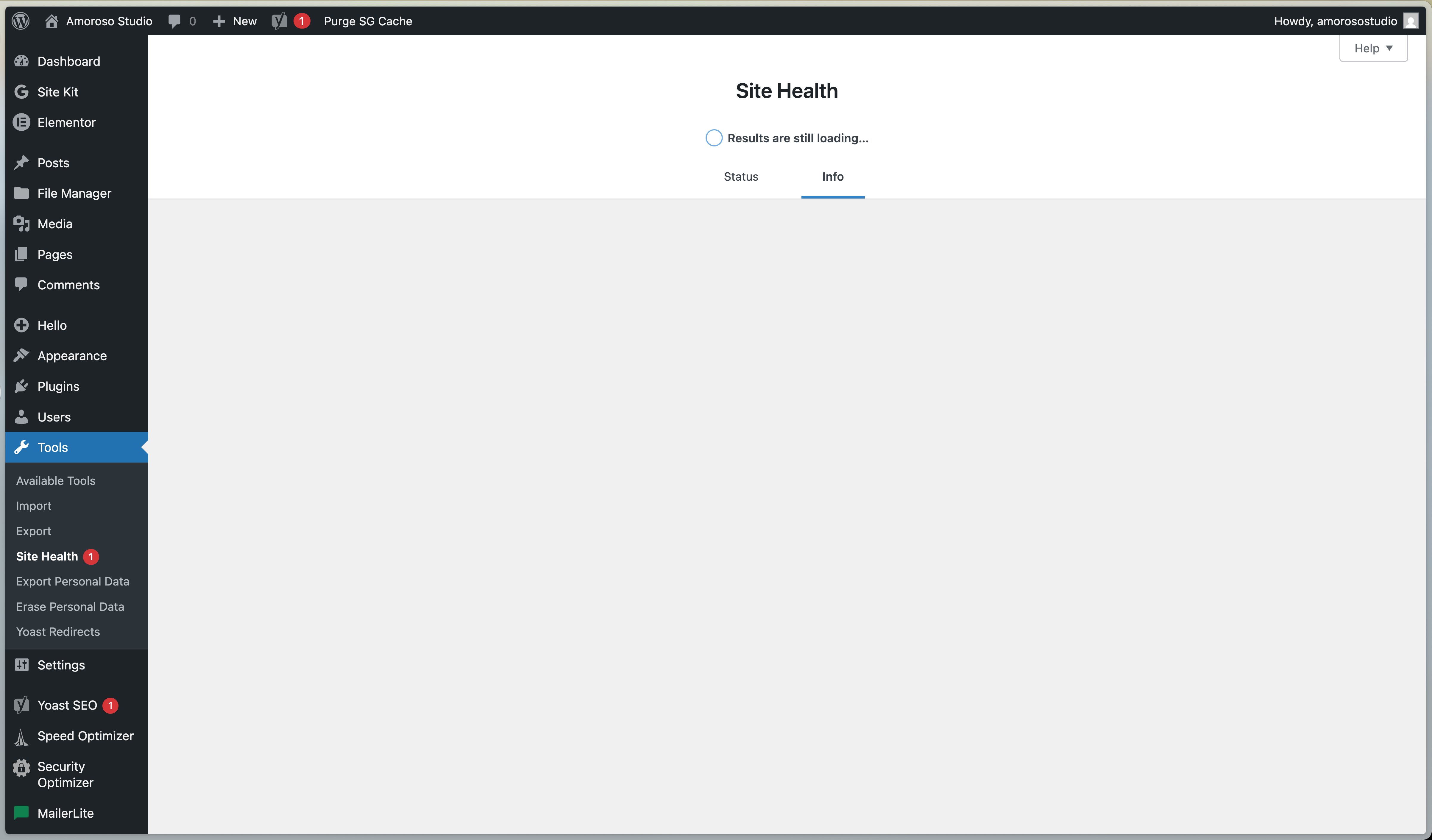 |
| March 25, 2026 at 8:55 pm #17927602 | |
|
deaV |
I sent your update to SiteGround support and this is what they said: "I revised carefully the details on my end, tested different solutions, cleared all levels of cache, but I can only confirm that I found nothing on the server side that may affect the results in such a way. Just in case though I decided to create a test website. I created a subdomain called sgtest.amorosostudio.com, installed a new WordPress and copied only the WPML related plugins to it. I confirm that on this site the page is functioning properly, so I would recommend you to check the rest of the plugins in amorosostudio.com and if necessary - disable them one by one." We already tried that, so I don't know what is next. |
| March 27, 2026 at 9:53 am #17931386 | |
|
Lucas Vidal de Andrade WPML Supporter since 11/2023 Languages: English (English ) Spanish (Español ) German (Deutsch ) Portuguese (Brazil) (Português ) Timezone: Europe/Vienna (GMT+02:00) |
Hi, Thank you for the update. What needs to be highlighted here is that this does not point to a general WPML issue, but to something specific happening on this website/server environment. As explained previously, the WordPress Site Health > Info page also fails to load on the affected site, and that page depends on the same core WordPress function, got_url_rewrite(), that WPML also relies on. Since this happens in core WordPress functionality as well, it indicates that the issue is not caused by WPML directly. The fact that the same WPML plugins work correctly on a clean test site created by the hosting provider further supports this. It suggests there is something specific in the environment/configuration of the affected website that is interfering with that WordPress core function. From our side, the evidence still points to a server/environment-specific issue on this particular site. Once the underlying issue affecting got_url_rewrite() is resolved and the Site Health > Info page loads correctly, please test WPML again. If the issue still remains after that, we can continue investigating from our side. Please check that with your hosting support and get back to us. |
| March 29, 2026 at 2:51 pm #17934734 | |
| deaV |
We managed to fix the problem with the server and I managed to translate my website. I have just one more question. I added the language switcher widget to my website, however when I go to my translated site the switched disappears. Is there a way to fix this? New threads created by Lucas Vidal de Andrade and linked to this one are listed below: https://wpml.org/forums/topic/split-language-switcher-not-working-on-secondary-languages/ |
| March 30, 2026 at 9:50 am #17935967 | |
|
Lucas Vidal de Andrade WPML Supporter since 11/2023 Languages: English (English ) Spanish (Español ) German (Deutsch ) Portuguese (Brazil) (Português ) Timezone: Europe/Vienna (GMT+02:00) |
Hello there, Thank you for confirming. I've created a new ticket to address your question with the language switcher and will answer you directly there: https://wpml.org/forums/topic/split-language-switcher-not-working-on-secondary-languages/ |
