
This thread is resolved. Here is a description of the problem and solution.
Problem:
You are transitioning to handling development internally and want to assign each country domain its own language without duplicating the site. You also need to automate country-specific legal and currency adaptations across 600 pages.
Solution:
If you're experiencing issues with assigning different languages to each country domain without duplicating content, we recommend upgrading from the WPML All Import to the newer WPML Export and Import plugin. This newer version supports various import methods that can facilitate managing translations and content adaptations more efficiently.
Please note that this solution might be outdated or not applicable to your specific case. We highly recommend checking the related known issues, verifying the version of the permanent fix, and confirming that you have installed the latest versions of themes and plugins. If the issue persists, please open a new support ticket.
This is the technical support forum for WPML - the multilingual WordPress plugin.
Everyone can read, but only WPML clients can post here. WPML team is replying on the forum 6 days per week, 22 hours per day.
Tagged: Documentation request, Large Sites
This topic contains 9 replies, has 0 voices.
Last updated by bastianM-5 6 months, 2 weeks ago.
Assisted by: Marcel.
| Author | Posts |
|---|---|
| October 17, 2025 at 11:38 am #17493899 | |
 bastianM-5 |
Background of the issue: Symptoms: Questions: |
| October 17, 2025 at 2:53 pm #17494532 | |
 Marcel Supporter Languages: English (English ) Spanish (Español ) German (Deutsch ) Timezone: Europe/Vienna (GMT+02:00) |
Hi,
Please check this guide: You can assign each domain to a specific language and then choose how to manage the content. For example, you can: - Duplicate an existing language (e.g., use CH for DE–Germany, DE–Austria, etc.), or Best regards, |
| October 17, 2025 at 4:11 pm #17494759 | |
|
bastianM-5 |
Hi Marcel, The friendly chatbot already took care of the first part of my query, which was to use unique domains. The second part is why I escalated to human support, and it looks like this was lost in the AI summary. So here it is again. My original website was targeted to Switzerland and it contains references to CHF, Swiss cities, the word Switzerland, Swiss legal references etc. Now to deal with it manually I would create a sophisticated prompt and run it through the text of each page and then make corrections, but this is a lot of work for 600 pages. I can also do search and replace in MySQL for the simpler things (e.g. change CHF to EUR, Francs to Euros, Zurich to Paris etc.) I need some guidance on what the best approach is here. In my dreams you have some beta functionality where I can just prompt WPML to do this for me. If that is not the case, which tables could I search/replace in MySQL to make these changes manually in the French translated version, and will it then stick? I hope I explained myself correctly, but if not Im happy to elaborate. Kind regards, Bastian |
| October 17, 2025 at 5:00 pm #17494795 | |
|
Marcel Supporter Languages: English (English ) Spanish (Español ) German (Deutsch ) Timezone: Europe/Vienna (GMT+02:00) |
Hi Bastian,
This type of functionality doesn’t exist and isn’t a common use case our clients request. However, you can find our database table schema here: Posts handled by WPML are stored as duplicates of the original post and are linked through the "trid" field, which connects all translations of a given post. The language code is also stored in these tables. Because your site uses the block editor, note that most block content is saved as HTML with JSON-encoded block attributes inside the post_content field — not in postmeta. However, some plugins or custom blocks may store related data in the wp_postmeta table, often as PHP-serialized values. Any automated database edits (for example, via AI or MySQL search-and-replace) that alter quotes, brackets, or serialized structures can easily break block syntax, cause layout issues, or even make the post content unreadable in the editor. Critical caution: If you overwrite or corrupt these values, you’re not just breaking WPML, you can break your entire WordPress instance. In other words, you’d be overwriting postmeta WPML created for you; if that breaks, the site breaks, not only WPML. I strongly recommend exporting your content, performing changes externally (for example, in a spreadsheet where you can safely use AI and validate the results), and then reimporting: https://wpml.org/documentation/related-projects/wpml-export-and-import/ Best regards, |
| October 17, 2025 at 6:44 pm #17495046 | |
|
bastianM-5 |
Thanks Marcel. The export seems like a great solution. I have both WP Export and WP Import installed, but I can't see the WPML → Export and Import option anywhere in my interface. |
| October 17, 2025 at 6:49 pm #17495051 | |
|
Marcel Supporter Languages: English (English ) Spanish (Español ) German (Deutsch ) Timezone: Europe/Vienna (GMT+02:00) |
Hi, it's located inside the WPML entry of your menu, as viewable on this video at around 0:55: hidden link if you don't have that, then maybe something wasn't correctly installed. Best Regards, |
| October 17, 2025 at 6:58 pm #17495113 | |
|
bastianM-5 |
No, I don't have that. This is what my menu looks like. 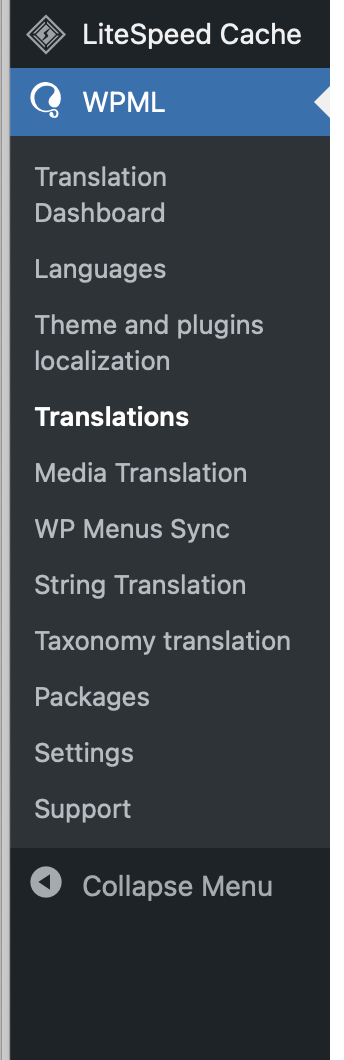 |
| October 20, 2025 at 8:16 am #17498295 | |
|
Marcel Supporter Languages: English (English ) Spanish (Español ) German (Deutsch ) Timezone: Europe/Vienna (GMT+02:00) |
Thanks for the info. I would eventually also need to request temporary access (WP-Admin and FTP) to your site Your next answer will be private which means only you and I have access to it. ❌ Please backup your database and website ❌ ✙ I would additionally need your permission to de-activate and re-activate Plugins and the Theme, and to change configurations on the site. This is also a reason the backup is really important. ✙ Please add the Links to the […] Edit Screen, the Page/Post where you insert the […] and the corresponding Front End Page/Screen Best Regards, |
| October 20, 2025 at 7:11 pm #17500830 | |
|
bastianM-5 |
Hi Marcel, I send you the requested info by secure message but there's a mistake in the WP username. Just remove the ! from the end and you'll be good. |
| October 21, 2025 at 6:58 am #17501502 | |
|
Marcel Supporter Languages: English (English ) Spanish (Español ) German (Deutsch ) Timezone: Europe/Vienna (GMT+02:00) |
Hi, You have “WPML All Import” installed, not our new plugin “WPML Export and Import.” The new plugin supports several import methods, including native WordPress, native WooCommerce, and WP All Import. The “WPML All Import” plugin can be considered a legacy version. Best regards, |
| October 21, 2025 at 6:57 pm #17504342 | |
|
bastianM-5 |
Thank you for your help Marcel! |









