Skip to content Skip to sidebar

This is the technical support forum for WPML - the multilingual WordPress plugin.

Everyone can read, but only WPML clients can post here. WPML team is replying on the forum 6 days per week, 22 hours per day.

Sun Mon Tue Wed Thu Fri Sat
- 12:00 – 16:00 10:00 – 14:00 10:00 – 14:00 9:00 – 13:00 9:00 – 13:00 -
- 17:00 – 21:00 15:00 – 19:00 15:00 – 19:00 14:00 – 18:00 14:00 – 18:00 -

Supporter timezone: Europe/Bucharest (GMT+03:00)

This topic contains 1 replies, has 1 voice.

Last updated by Mihai Apetrei 1 year, 2 months ago.

Assisted by: Mihai Apetrei.

Author Posts
February 13, 2025 at 7:34 pm #16704306

Anonymous

Background of the issue:
I bought some credits for the automatic translation on WPML. I am trying to use these credits for my site hidden link.

Symptoms:
The automatic translation is not working. It says that I don't have credits, even though I purchased them.

Questions:
Why are my purchased credits not showing up in my account?
How can I resolve the issue of automatic translation not working despite having credits?

February 13, 2025 at 9:07 pm #16704494

Mihai Apetrei
WPML Supporter since 03/2018

Languages: English (English )

Timezone: Europe/Bucharest (GMT+03:00)

Hi there.

Before this ticket gets assigned to one of my colleagues, I will try to help.

From what I can see, you had 22k credits assigned to that site, but they had already been used.

You should be able to find your Automatic Translation Usage Report if you go to WPML > Translation Management > Tools > Payment and settings > Automatic Translation Usage Reports (as you can see in the screenshot from the section below):
https://wpml.org/documentation/automatic-translation/automatic-translation-invoices/#where-to-find-your-past-pay-as-you-go-invoices

Please let us know if things are not clear or if you still have questions on this matter.

Mihai

February 14, 2025 at 11:53 am #16706143

Anonymous

Credit Not Showing on WordPress

Dear Mihai,

I recently made a payment for new credit, but it is not reflecting on my WordPress account. I would appreciate your assistance in resolving this issue.

Could you please check and let me know what steps I need to take to fix this?

Thank you for your help.

February 14, 2025 at 9:57 pm #16708120

Mihai Apetrei
WPML Supporter since 03/2018

Languages: English (English )

Timezone: Europe/Bucharest (GMT+03:00)

Hi there.

Sure, I am more than happy to investigate this matter further.

1. Can you please send me a screenshot of this page?

- https://wpml.org/account

2. Can you please go to WPML > Support > Troubleshooting > and share the ID that you see under this section: "Your Automatic Translation account ID is"?

I will be waiting for your response.

February 18, 2025 at 7:56 pm #16720773

Mihai Apetrei
WPML Supporter since 03/2018

Languages: English (English )

Timezone: Europe/Bucharest (GMT+03:00)

Thank you for the update and all the info.

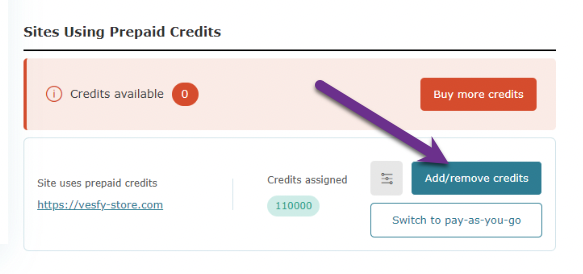
On this page (https://wpml.org/account), can you click the "add/remove credits” button and move the credits back to your WPML.org account (as you see in my screenshot)?

Then, please go here (https://wpml.org/account/sites/) > remove the current site key > generate a new one > then go to your website's backend > Plugins > Add new > Commercial > UNregister WPML from the old key > RE-register WPML with the new key.

Now, you can re-add the credits to your site by following the steps here:
https://wpml.org/documentation/automatic-translation/how-to-assign-automatic-translation-credits-to-your-sites/

Please let me know if that works fine for you.

Screenshot 2025-02-18 at 20.45.02.png

The topic ‘[Closed] Credits are not located on my account’ is closed to new replies.