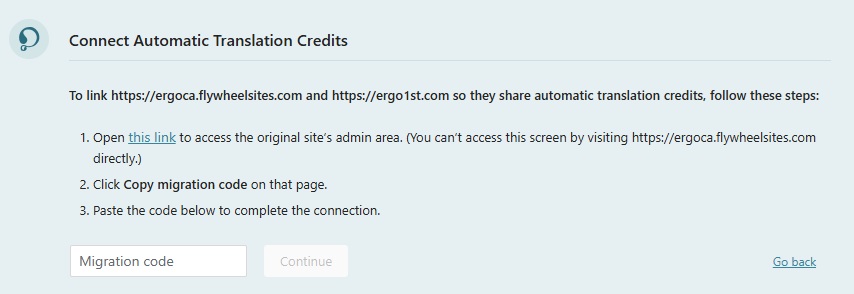
This thread is resolved. Here is a description of the problem and solution.
Problem:
You've moved your site from a temporary development domain to a live production domain and updated the WPML site to the new URL, but are now seeing a migration wizard that prompts you to return to the development URL to retrieve a code, which is no longer accessible.
Solution:
We recommend clicking "Go back" in the bottom right corner and completing the migration banner as if you were registering a completely new site. You should then register the new site URL at https://wpml.org/account/sites/ and use the new site key to register WPML on your site. After completing these steps, please leave a comment with the old and new site URLs so we can manually merge the information from the old site URL to the new one in our system.
If this solution does not apply to your case, or if it seems outdated, we highly recommend checking related known issues at https://wpml.org/known-issues/, verifying the version of the permanent fix, and confirming that you have installed the latest versions of themes and plugins. If issues persist, please open a new support ticket at WPML support forum for further assistance.
This is the technical support forum for WPML - the multilingual WordPress plugin.
Everyone can read, but only WPML clients can post here. WPML team is replying on the forum 6 days per week, 22 hours per day.
This topic contains 1 replies, has 0 voices.
Last updated by 2 months, 1 week ago.
Assisted by: Andreas W..