Skip to content Skip to sidebar

This is the technical support forum for WPML - the multilingual WordPress plugin.

Everyone can read, but only WPML clients can post here. WPML team is replying on the forum 6 days per week, 22 hours per day.

Sun Mon Tue Wed Thu Fri Sat
- 8:00 – 17:00 8:00 – 17:00 8:00 – 17:00 8:00 – 17:00 8:00 – 17:00 -
- - - - - - -

Supporter timezone: Europe/Madrid (GMT+01:00)

This topic contains 30 replies, has 0 voices.

Last updated by Paola Mendiburu 9 hours, 45 minutes ago.

Assisted by: Paola Mendiburu.

Author Posts
January 5, 2026 at 10:49 am #17703410

andreasC-8

You can get the remote url and use it to your end . Import the products filter them to 1-2 products and test it. Just get the .xml url and use it.

January 5, 2026 at 11:37 am #17703566

Carlos Rojas
WPML Supporter since 03/2017

Languages: English (English ) Spanish (Español )

Timezone: Europe/Madrid (GMT+01:00)

Hello there,

I tried to load the URLs:
- hidden link
- hidden link

But they never stop loading and crash my browser. Could you share these XML files?

January 5, 2026 at 2:15 pm #17704186

andreasC-8

No i dont and please make the threat privde as the links has API unique codes from my supplier . Also as i mentioned you cannot download the .xml . Are remote .xml files source from my supplier and you can use them via WP ALLIMPORT to download the .xml form there . You cannot download the .xml file which is big it wont work like this.

January 6, 2026 at 10:57 am #17706331

Carlos Rojas
WPML Supporter since 03/2017

Languages: English (English ) Spanish (Español )

Timezone: Europe/Madrid (GMT+01:00)

Hi,

1.- The links shared on this ticket are only visible to you and me. They are hidden from the rest of the users for security reasons.

2.- If I cannot download or you cannot share the import files, then I cannot review them and check if there is something wrong with them. So, I kindly ask you one more time to share a URL to download the import XMLs so I can review them correctly.

January 6, 2026 at 3:00 pm #17707052

andreasC-8

I really dont understand why you are not willing to help . The urls are there visible , hidden link

If you are not be able to help , please assign me to different agent. You are here telling me each day that you cannot find the .xml . The xml is on the url i have sent you .

please assign me different agent because you are here wasting my time , and not willing to help

It took us 5 days just to understand that you have all your imports there on the website, you have fully access to do your tests because the website is on develoment. And also i provided you with the .xml URLs as we use them . Which the .xml is on the cloud and you download the products through wpalllimport.

January 7, 2026 at 1:54 pm #17709615

Paola Mendiburu
WPML Supporter since 11/2020

Languages: English (English ) Spanish (Español ) Italian (Italiano )

Timezone: Europe/Madrid (GMT+01:00)

Hi there!

This is Paola and I will continue with the ticket.

Do you give me permission to run again Import with id10 from WP All Import the import?

January 7, 2026 at 5:44 pm #17710457

andreasC-8

Hello Paola,

ofc , you can do whatever is needed to be done. The website is on development mode . Make your tests.

January 8, 2026 at 8:56 am #17712030

Paola Mendiburu
WPML Supporter since 11/2020

Languages: English (English ) Spanish (Español ) Italian (Italiano )

Timezone: Europe/Madrid (GMT+01:00)

Hi there!

I have run the import from WP All import and now the featured image appears, please see product Pouf-lounger Bibloc Hm5989 Teak Wood Frame-hydrohyacinth Upholstery 84x118x73hcm.

Maybe the issue is related when running via cron wp all-import run 9,10 --force-run.

If the import is going to be executed this way, I recommend forcing a post update after the cron import runs. This can be done programmatically (for example, by running a wp post update on the imported products) so WordPress and WPML can properly finalize the product data and image associations.

Also try to run the import separately first the 9 and then the 10.

Please try one of these approaches and let me know the results.

January 8, 2026 at 2:44 pm #17713366

andreasC-8

Thank you for your feedback .

Just one question , before i test the procedure. If i want to to separete my website entirely from Greek version To English products. So the english wont be the tranlsation of Greek products but separete entities . How i can accomplish this ? What settings should i change in WPML to achieve this?

January 8, 2026 at 6:21 pm #17713965

Paola Mendiburu
WPML Supporter since 11/2020

Languages: English (English ) Spanish (Español ) Italian (Italiano )

Timezone: Europe/Madrid (GMT+01:00)

Do you mean to don´t be connected right?

You will need to delete the connector from the import setting on the english import.

January 9, 2026 at 7:38 am #17714994

andreasC-8

Only that ? Should i change some settings for WPML taxonomies settings or products settings?

January 9, 2026 at 9:44 pm #17717409

andreasC-8

Hello again ,

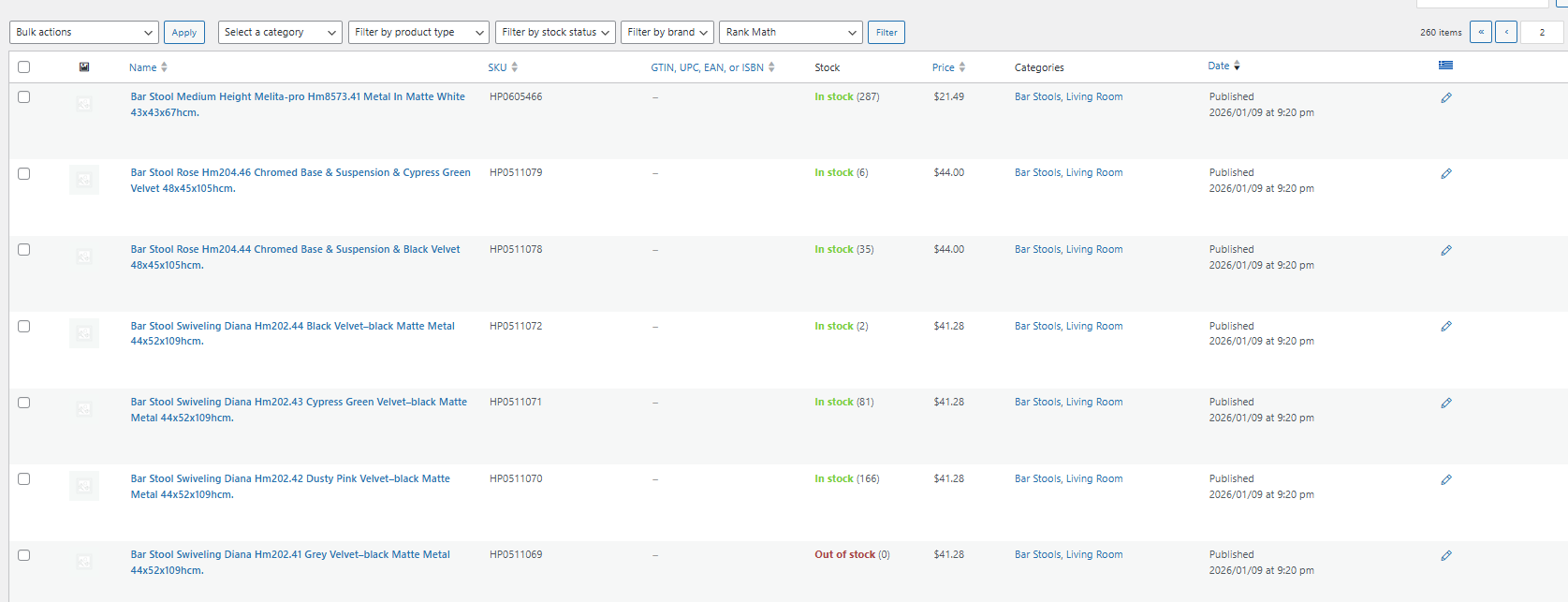
if you switch to English version and go to products , you cannot see the feature image there.

Here is a screenshot

Screenshot 2026-01-09 234414.png
January 10, 2026 at 9:49 am #17717897

Paola Mendiburu
WPML Supporter since 11/2020

Languages: English (English ) Spanish (Español ) Italian (Italiano )

Timezone: Europe/Madrid (GMT+01:00)

Have you run the import again? How did you do it via WP all import from WordPress or via cron?

Please look to the imported products.

January 10, 2026 at 5:13 pm #17718323

andreasC-8

I have done it through CLI not cron.

Running my imports first the greek import ids and then English, via command wp all-import run id --force-run

What do you mean look at the import products?

January 12, 2026 at 8:09 am #17720219

Paola Mendiburu
WPML Supporter since 11/2020

Languages: English (English ) Spanish (Español ) Italian (Italiano )

Timezone: Europe/Madrid (GMT+01:00)

Ok it seems the problem is when running via cli.

Could you please do a test to run it from WordPress WP All import?

I did a test and it was working properly.