[Resolved] Footer template is not showing on translated page
This thread is resolved. Here is a description of the problem and solution.
Problem: The client is experiencing issues with locked fields in WPML and has concerns about the translation of the footer, which does not display correctly across different language versions of the site. Solution: We clarified that the locked fields can be unlocked simply by clicking on the 'lock' icon. Regarding the footer, it appears that the client had previously attempted to fix the issue by deleting the translated footer template directly from the database. However, this did not resolve the problem as the footer still does not appear correctly. We suggested that the footer's translation issue might be due to the limitations described in the WPML errata for the Pro theme, where layout texts are not translatable via the WPML Translation Editor (https://wpml.org/errata/pro-theme-layout-texts-not-translatable-via-wpml-translation-editor/). The client can either manually translate the template or apply custom code to make it compatible with String Translation. We asked the client to confirm if they intend to use String Translation for the footer in the same way as the “Object (CPT) – Single View” template.
Please note that this solution might be outdated or not applicable to your specific case. We highly recommend checking related known issues (https://wpml.org/known-issues/), verifying the version of the permanent fix, and confirming that you have installed the latest versions of themes and plugins. If the issue persists, please open a new support ticket at WPML support forum.
This is the technical support forum for WPML - the multilingual WordPress plugin.
Everyone can read, but only WPML clients can post here. WPML team is replying on the forum 6 days per week, 22 hours per day.
Thanks for your reply. Glad that you know how to solve the footer issue. Please use that method for now until we have a better solution. Alright then, let's focus on your other ticket.
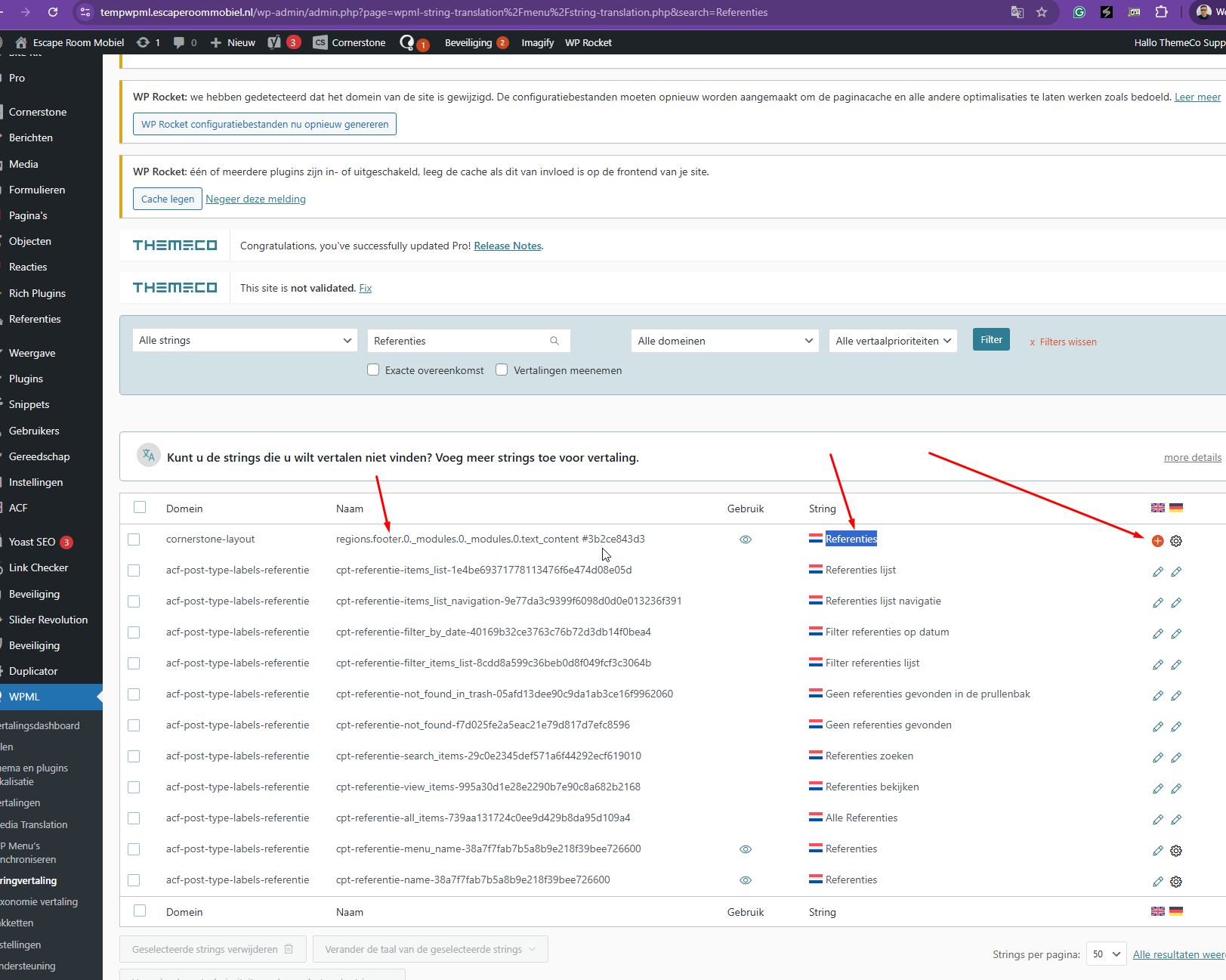
It's not completely solved: I managed to get the footer visible, thanks to your help, but the content is still not automatically translated. No widgets are used in the footer.
How can we make sure that all the text-content of the footer is available for translation as well? If we take care of that last issue, then we're completely resolved this!
Thanks for your reply. I can see that your footer contains the reference and review section, followed by the footer widgets at the bottom.
You mentioned that you fixed the footer by deleting the translated footer template directly from the database. However, I just checked the site, and the footer still appears to be missing here: hidden link
Just to clarify, are we looking at the same website?
That's a relevant question: we indeed looked at different website. I made the edits on the live website, is I thought we had been able to fix the issue of the missing footer earlier by deleting the posts from the test site.
The edits on the live website did exactly what we expected: the footer is showing up again.
I just started the process on pushing a fresh copy from live to the staging environment.
Am I correct in concluding that the code posted on https://wpml.org/errata/pro-theme-layout-texts-not-translatable-via-wpml-translation-editor/ is the code 2nd tier support came up with as a result of our discussion in the other topic, regarding the Single Layout translation?
In that case, the code is already present on my end. I've just saved the footer, just to be sure.
I'm indeed looking to translate the content of the footer translate automatically, by AI, as soon as I save the footer. How can we achieve that as well?
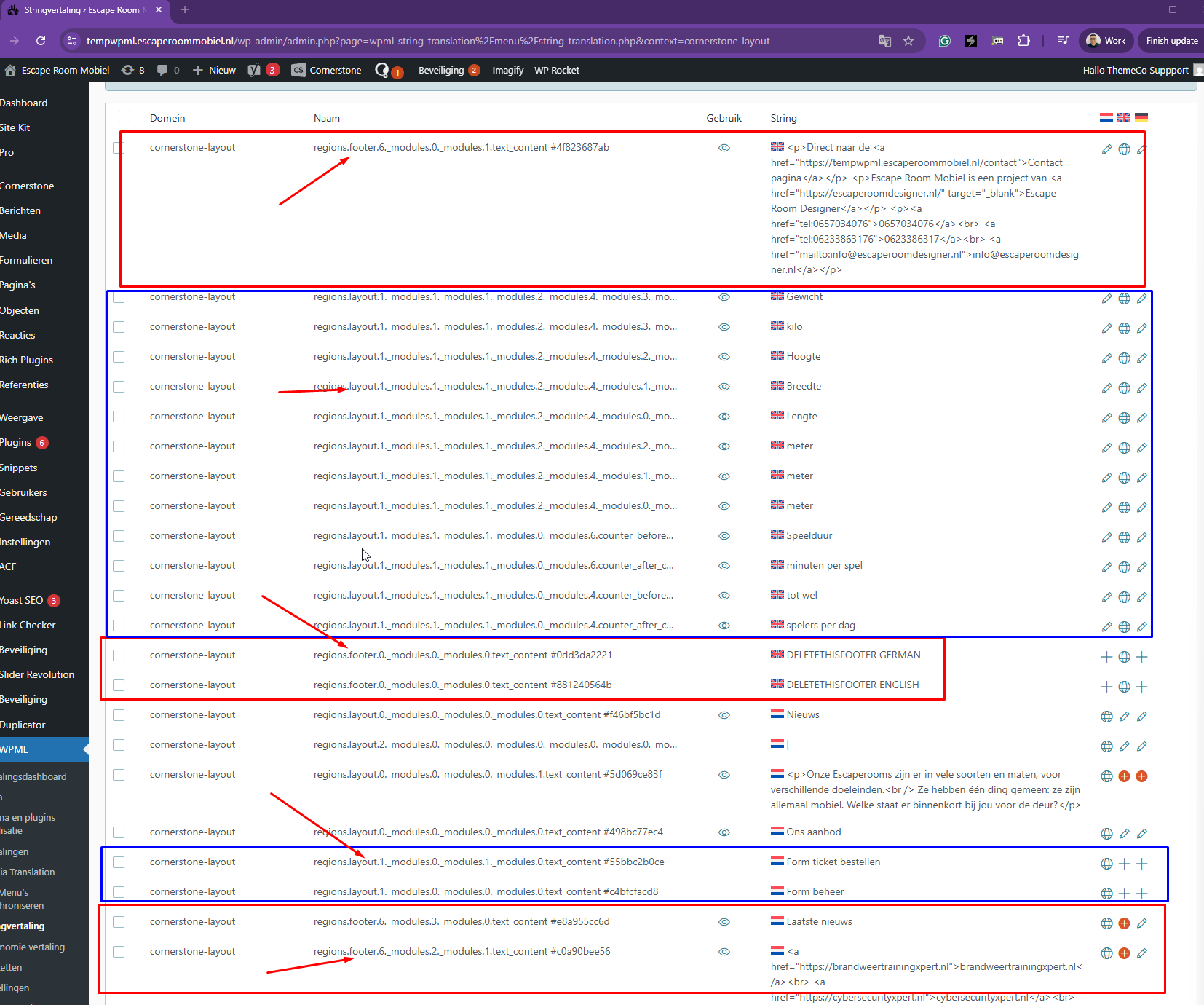
Thanks for your reply. It appears that the custom code from your other ticket is working correctly for the footer strings, as shown in the attached screenshot. The strings can be translated using String Translation.
If you’d like to translate these strings using Automatic Translation, please go to the Translation Dashboard and manually send the strings for automatic translation. The footer strings will not be translated automatically when the footer is saved; they must be sent manually through the Translation Dashboard.
Please let me know if you need any guidance with this process, and keep me posted on how it goes.
Thanks, but these strings are now also mentioned under the cornerstone-layout domain. That's incorrect. We should be able to identify the strings coming from a Single Layout or the footer.
I also noticed that on the landing page of WPML plugin, the footer content is already present. Before I'm breaking anything, is there already custom code in place that translates footers, as this listing suggests?
Thanks for your reply. The solution #2 I applied to your website from this errata https://wpml.org/errata/pro-theme-layout-texts-not-translatable-via-wpml-translation-editor/ is only a temporary workaround to allow the template to be translated using String Translation. Themeco mentioned that they will look into a better way to translate the contents, most probably using the Advanced Translation Editor.
Regarding the footer template you’re referring to, at the moment, when using the Themeco page builder, there are only two supported ways to translate the footer, as explained in the errata. One option is to manually translate the template, and the other is to translate it via String Translation. Triggering the translation for the Cornerstone Footers will not work.
Although it's not the answer that solves everything, I do understand that currently there's work going on between WPML and ThemeCo. Until that's finished, I understand that using String Translations is the way to go. But right now, the code mentioned, does not make a difference between strings coming from a footer or from a single layout. I do think it's worth adding a few lines of code to make that difference, so the code can be used better with both.
I'm a bit confused as well. Right now the custom code applies to '' cs_layout_single', 'cs_layout_archive', 'cs_layout_single_wc', 'cs_layout_archive_wc' '.That does not include the footer.
To clarify: how should the footer be translated when using String Translations? Through adding the custom code, or another way?
Thanks for your patience. I get what you mean, and I'll create a new report to check with our 2nd Tier Support. I will come back to you once I have feedback.
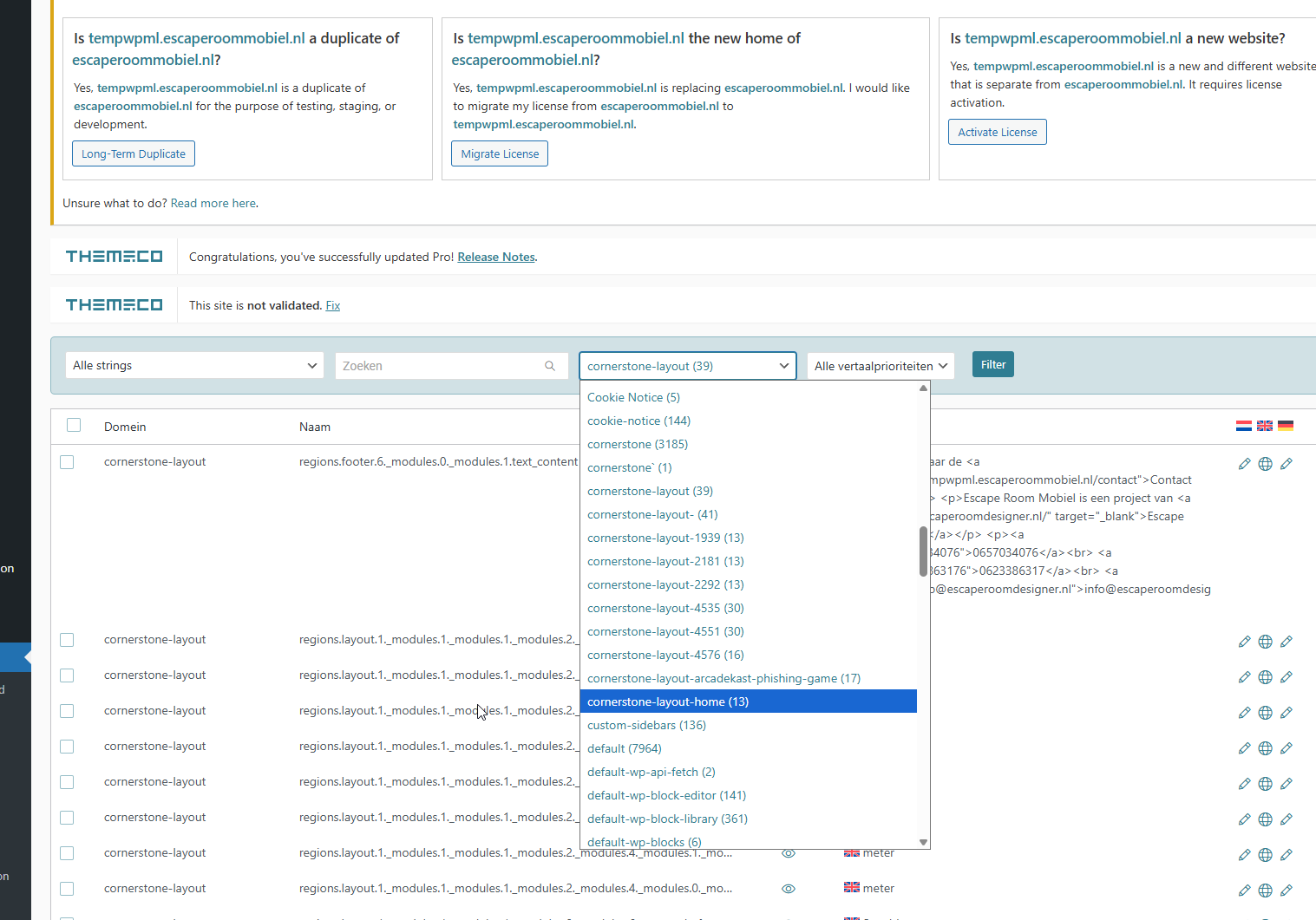
If you filter it by the Cornerstone layout hidden link , you should be able to identify the correct layout based on the text domain name, as shown in the attachment. This should help you pinpoint the correct layout, and no additional code should be required.
I understand what your saying, but that is missing one thing: really filtering/searching to ONLY translate footer-strings or ONLY one of the other strings.
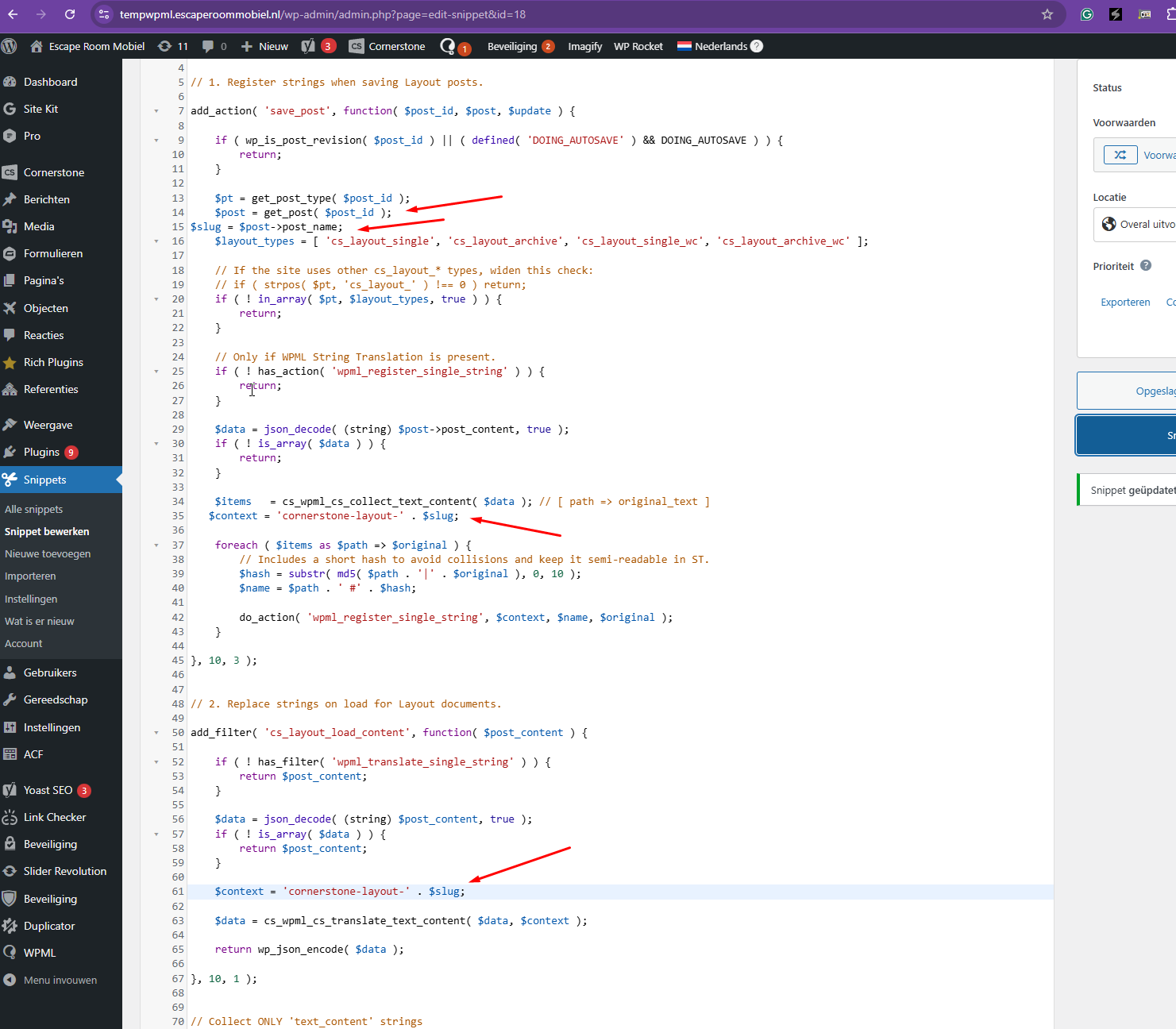
Would it be an idea to replace $context = 'cornerstone-layout'; with $context = 'cornerstone-layout_'+get_post_type;, or something similar, so we can distinguish the different contexts?
This is especially important as this code might be used to fix other Cornerstone-posttypes that are now not translatable as well.
Thanks for your patience. Our 2nd Tier Support team checked and shared some additional codes. The attached screenshot shows how it can be filtered now. You need to resave the templates so that they will show on the string translation.
Also, they mentioned that your theme author will fully integrate translations for the templates in the future, and it will be better than what you're experiencing with the workarounds provided.
DISCLAIMER: Please know that any snippet or code suggested here is for educational purposes only. they are not meant to be the final solution but instead meant to point you in the right direction and are out of the scope of our support so we can't nor will modify, improve, debug or maintain it.
Hi Kor,
Apologies for the delayed reply. I did had some time to test this code and indeed it works as expected! Not yet for the footer, and not perfectly for single layouts (post_name is 'untitled-single-layout', but I get the way the code works and I'm sure I can work this out.
For me the main goal is achieved: having a way to distinguish strings between their different Cornerstone sources.
Please send my thanks to the 2nd tier as well!
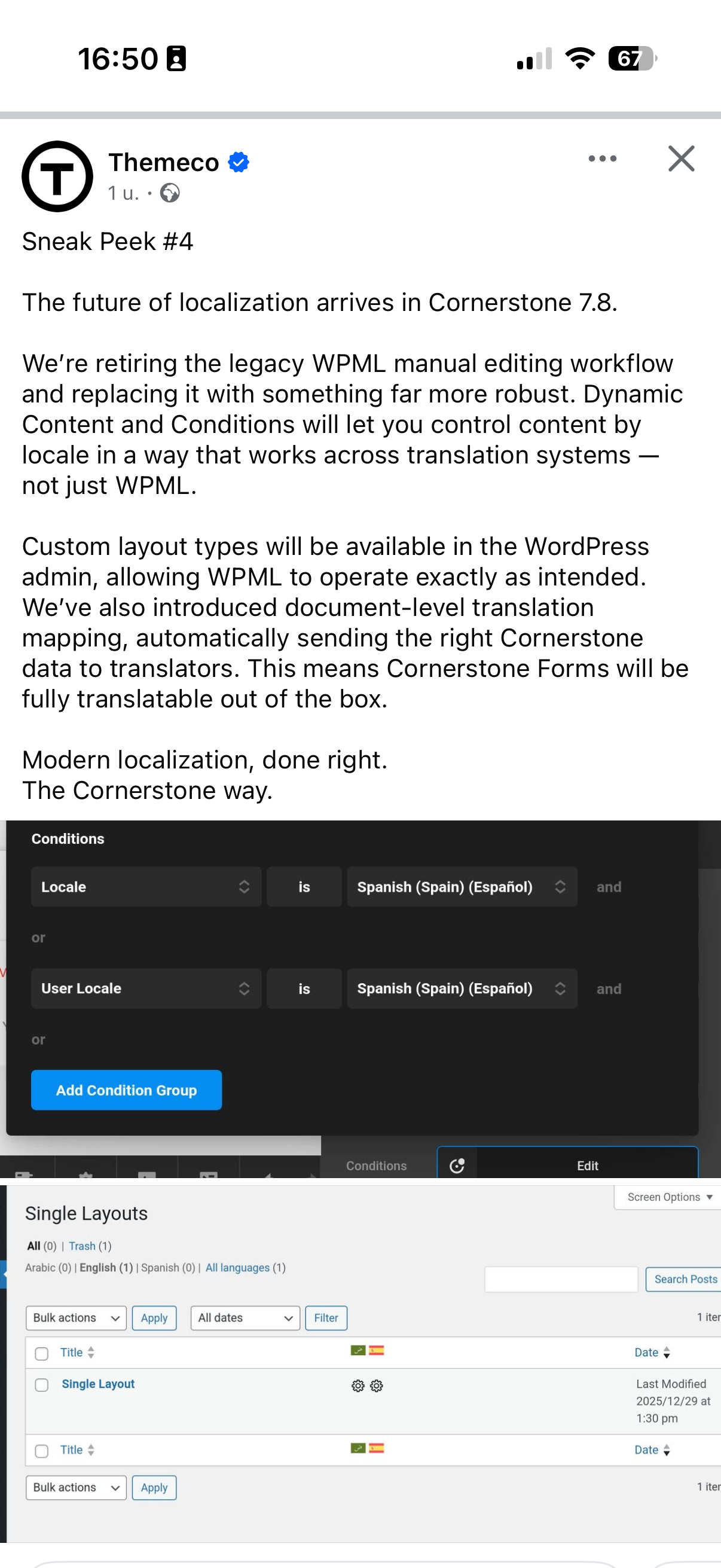
As for the deeper integration in the theme: ThemeCo has teased something on Facebook already! I've shared a screenshot.
I don't think we can take all the credit, as I do know that (redefined) WPML Integration has been on their roadmap for a while, but I do think that we have made them aware again of how their theme and WPML both have grown away from each other. With every conversation you and I had, I also posted on ThemeCo's forum, and kept shining a light on the matter. In the end their lead developer confirmed that he has been in touch with the WPML developers, and changes are coming rather soon!
Thanks a lot, I think we really contributed to making both software systems a bit better. In the meantime you helped me out a lot, and made my website running almost perfect in translations!
Thank you so much for your detailed feedback, and I really appreciate you taking the time to test everything thoroughly.
I will definitely pass your thanks to our 2nd tier team, they’ll be happy to hear that their efforts made a real difference.
Regarding the deeper integration with ThemeCo, that’s actually very exciting news. You’re right, we probably can’t take all the credit, but your persistence and feedback absolutely played a role in bringing this topic back into focus. It’s great to hear that their lead developer is already in touch with our developers and that improvements are coming soon. That’s exactly the kind of collaboration we hope for between both teams.
Thanks again for your kind words. It was a pleasure working through this with you, and I’m really happy to know your site is now running almost perfectly in terms of translations.