Skip to content Skip to sidebar

This thread is resolved. Here is a description of the problem and solution.

Problem:
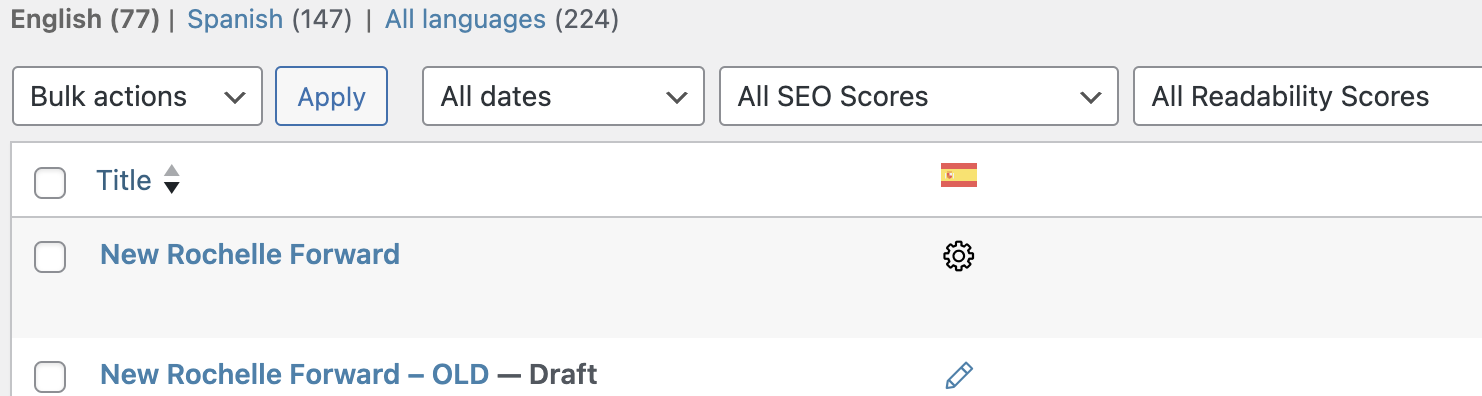
You are trying to add a manual translation to a page, but you find yourself stuck in a loop where only the title appears, and you cannot edit the rest of the content. This issue is different from your experience with other pages where you can edit translations without problems.
Solution:
We recommend updating your WPML plugin to the latest version (4.6.11) and all related add-ons to ensure you have the latest bug fixes and improvements. You can find the latest versions in your WPML account under 'My Account -> Downloads'. For update instructions, visit http://wpml.org/faq/install-wpml/. If updates are not visible, try clicking on the 'Check for updates' button in the Plugins → Add New Plugin → Commercial tab. Always back up your database before updating. After updating, try to cancel the existing page translation and start the translation process anew. For guidance on how to cancel translation jobs, visit https://wpml.org/documentation/translating-your-contents/#how-to-cancel-translation-jobs.

If this solution does not resolve your issue or seems irrelevant due to being outdated or not applicable to your case, we highly recommend checking related known issues at https://wpml.org/known-issues/, verifying the version of the permanent fix, and confirming that you have installed the latest versions of themes and plugins. If problems persist, please open a new support ticket at WPML support forum.

This is the technical support forum for WPML - the multilingual WordPress plugin.

Everyone can read, but only WPML clients can post here. WPML team is replying on the forum 6 days per week, 22 hours per day.

Tagged: 

This topic contains 3 replies, has 2 voices.

Last updated by Andrey 1 year, 11 months ago.

Assisted by: Andrey.

Author Posts
May 21, 2024 at 7:46 pm #15652529

adamS-61

I am trying to add a translation to the page. Other pages I'm able to edit the translated version. This one seems to get me to the automatic page but it only has the title. I just want to do a manual translation. No matter what I do I seem to be stuck in a loop.

Other pages I'm able to edit the translation fine. Ugh. Coming over from Polylang and feeling frustrated.

Screenshot 2024-05-21 at 3.44.09 PM.png
Screenshot 2024-05-21 at 3.43.50 PM.png
May 21, 2024 at 8:18 pm #15652639

Andrey
WPML Supporter since 06/2013

Languages: English (English ) Russian (Русский )

Timezone: Europe/Kyiv (GMT+03:00)

Thank you for contacting WPML support.

Could you please update your WPML plugin to the latest version 4.6.11 and add-ons to benefit from the latest bug fixes and improvements? This may not necessarily resolve your problem, however, in order to troubleshoot the issue best we need to work on the latest code available.

You can check the latest released versions under "My Account -> Downloads" on this site. Instructions to update can be found here: http://wpml.org/faq/install-wpml/

If you do not see the updates, you might need to click on the Check for updates button in the Plugins → Add New Plugin → Commercial tab.

Remember to backup your database first before you proceed.

Let me know if the issue persists after an update has been completed. Please try to cancel the page translation and retranslate it.

https://wpml.org/documentation/translating-your-contents/#how-to-cancel-translation-jobs

May 21, 2024 at 9:48 pm #15652723

adamS-61

I did what you asked and added all the updates. Unfortunately, I'm still having issues with the page. It says it's waiting for the translator. I don't need the translator. I need to be able to translate it myself. There doesn't seem to be anyway to cancel and then manually translate. See image.

Any assistance you can give would be helpful.

Screenshot 2024-05-21 at 5.46.24 PM.png
May 22, 2024 at 2:51 pm #15658989

Andrey
WPML Supporter since 06/2013

Languages: English (English ) Russian (Русский )

Timezone: Europe/Kyiv (GMT+03:00)

I need to request temporary access (wp-admin and FTP) to your site – preferably to a test site where the problem has been replicated if possible – in order to be of better help. You will find the needed fields for this below the comment area when you log in to leave your next reply. The information you will enter is private which means only you and I can see and have access to it.