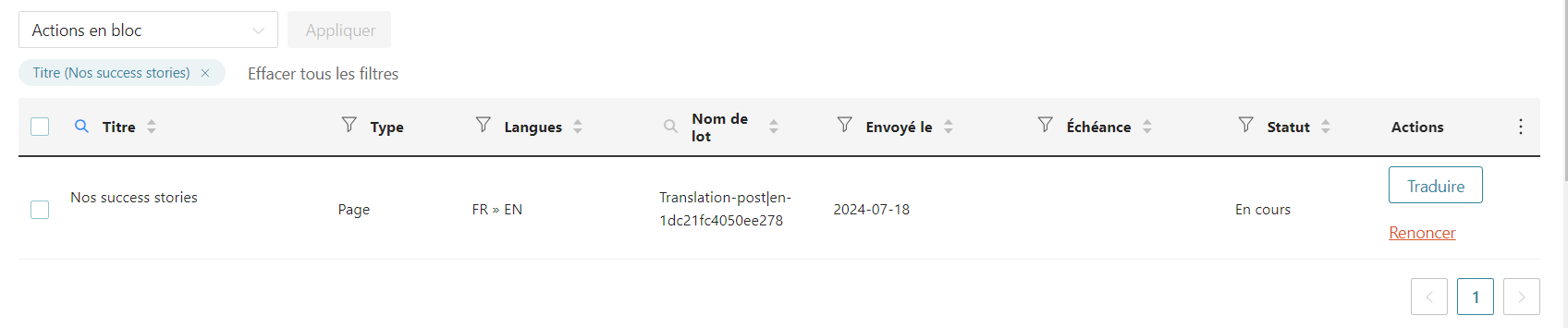
This thread is resolved. Here is a description of the problem and solution.
Problem: Since June 21, 2024, the client has been trying to automatically translate three pages into English and German, despite having sufficient credits, the translation process remains incomplete. Solution: If you're experiencing a similar issue, we recommend trying the following steps: 1. Attempt to replicate the issue on a staging site. If the issue does not occur there, proceed to the next step on your live site. 2. Deactivate the following plugins: - Head, Footer and Post Injections - Font Awesome 3. For one of the problematic pages, follow these steps: - Edit the page in the default language. - Add "V2" to the title and update it. - Remove the "V2" and update the page again. - Navigate to WPML-> Translation Management - Select the page and send it to translation. - Go to WPML-> Translation Management-> Translation Basket and complete the process. - Finally, go to WPML-> Translations and translate the page.
This solution might be outdated or not applicable to your case. We highly recommend checking related known issues at https://wpml.org/known-issues/, verifying the version of the permanent fix, and confirming that you have installed the latest versions of themes and plugins. If the issue persists, please open a new support ticket at WPML support forum.
This is the technical support forum for WPML - the multilingual WordPress plugin.
Everyone can read, but only WPML clients can post here. WPML team is replying on the forum 6 days per week, 22 hours per day.
In order to fix the issue for the problematic pages, please check the following steps:
1- Edit the page in the default language
2- Add "V2" to the title and update it
3- Delete the "V2" and update the page
4- Go to WPML-> Translation Management
5- Select the page and send to translation
6- Go to WPML-> Translation Management-> Translation Basket and complete the process
7- Go to WPML-> Translations and translate the page
Thanks for the access details. Please try to reproduce the issue on the staging site. If it didn't happen, please deactivate the following plugins on your live site.
Head, Footer and Post Injections
Font Awesome
After that, please apply the following steps on one of the problematic strings:
1- Edit the page in the default language
2- Add "V2" to the title and update it
3- Delete the "V2" and update the page
4- Go to WPML-> Translation Management
5- Select the page and send it to translation
6- Go to WPML-> Translation Management-> Translation Basket and complete the process
7- Go to WPML-> Translations and translate the page