
This is the technical support forum for WPML - the multilingual WordPress plugin.
Everyone can read, but only WPML clients can post here. WPML team is replying on the forum 6 days per week, 22 hours per day.
| Sun | Mon | Tue | Wed | Thu | Fri | Sat |
|---|---|---|---|---|---|---|
| - | 7:00 – 12:00 | 7:00 – 12:00 | 7:00 – 12:00 | 7:00 – 12:00 | 7:00 – 12:00 | - |
| - | 13:00 – 16:00 | 13:00 – 16:00 | 13:00 – 16:00 | 13:00 – 16:00 | 13:00 – 16:00 | - |
Supporter timezone: Europe/Vienna (GMT+02:00)
Tagged: WCML
Related documentation:
This topic contains 30 replies, has 0 voices.
Last updated by Marcel 5 months, 1 week ago.
Assisted by: Marcel.
| Author | Posts |
|---|---|
| October 8, 2025 at 4:04 am #17465692 | |
 xavierC-5 |
Hi Marcel, Ok all tests done. Here some observations, doubts and issues: 1/ With the new php function the url after switching languages changes correctly. 2/ When changing language with products on the cart, notification only appears when the product is a bundle product (Image 1). For single products, no notification appear and the cart just get emptied automatically when changing language. Is that the normal behaviour? I think this notification of empty cart before switching language should appear always, no matter if this is a single/variable product or a bundle product. This is the notification (Attached Image-1) 3/ Following point 2 - when switching languages on bundle products, there is a "force_switch" function (action) that makes the cart to empty and the page gets clear on the new language. e.g. url after switching language: Instead on single/variable products after the switch lanaguage is done automatically, a notification to add again the products on the cart gets on top of the cart and product pages and never disappears - it also gets duplicated over and over again. (Attached Image 2) I believe that the "force_switch" action, clears all products and thus no notifications are appearing after this action? Can you please check on the Staging site: hidden link Thanks and regards, 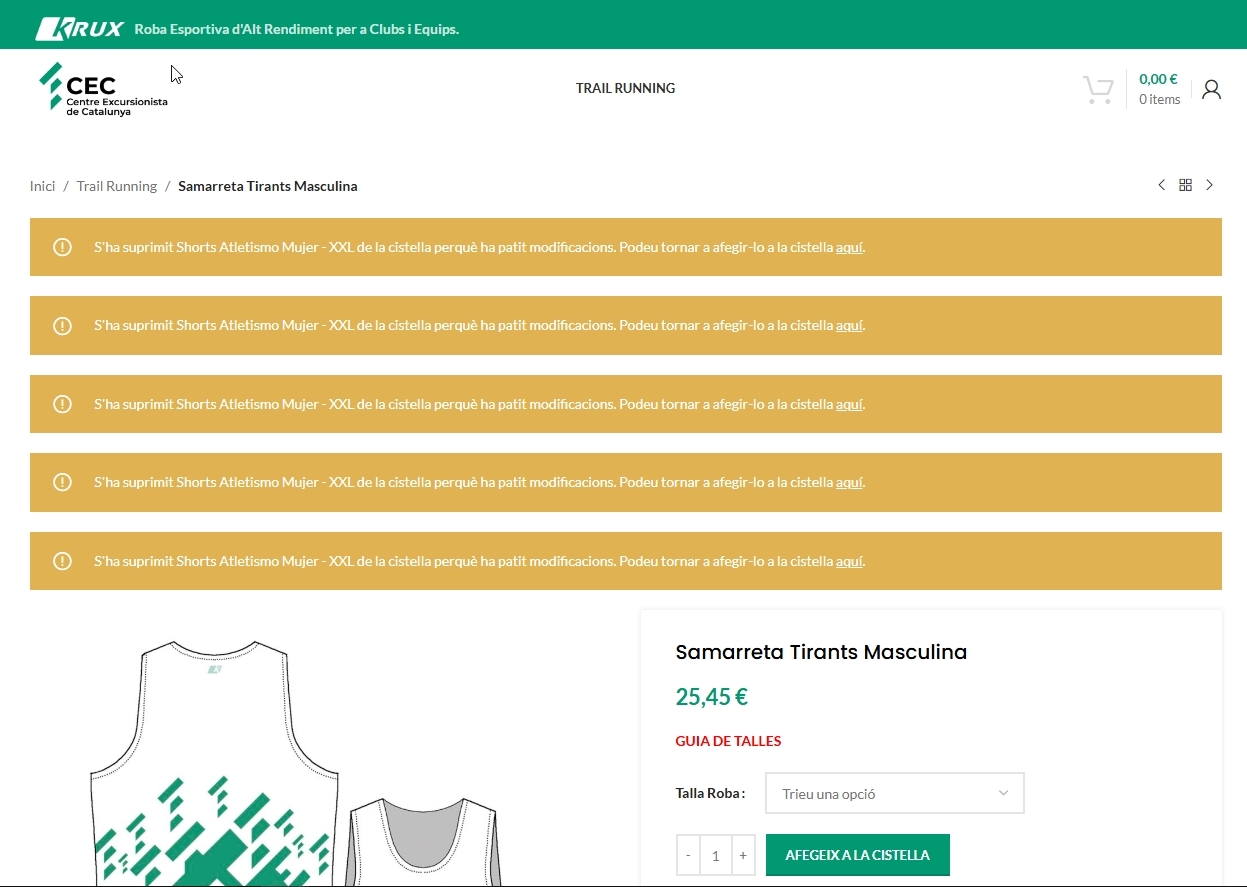 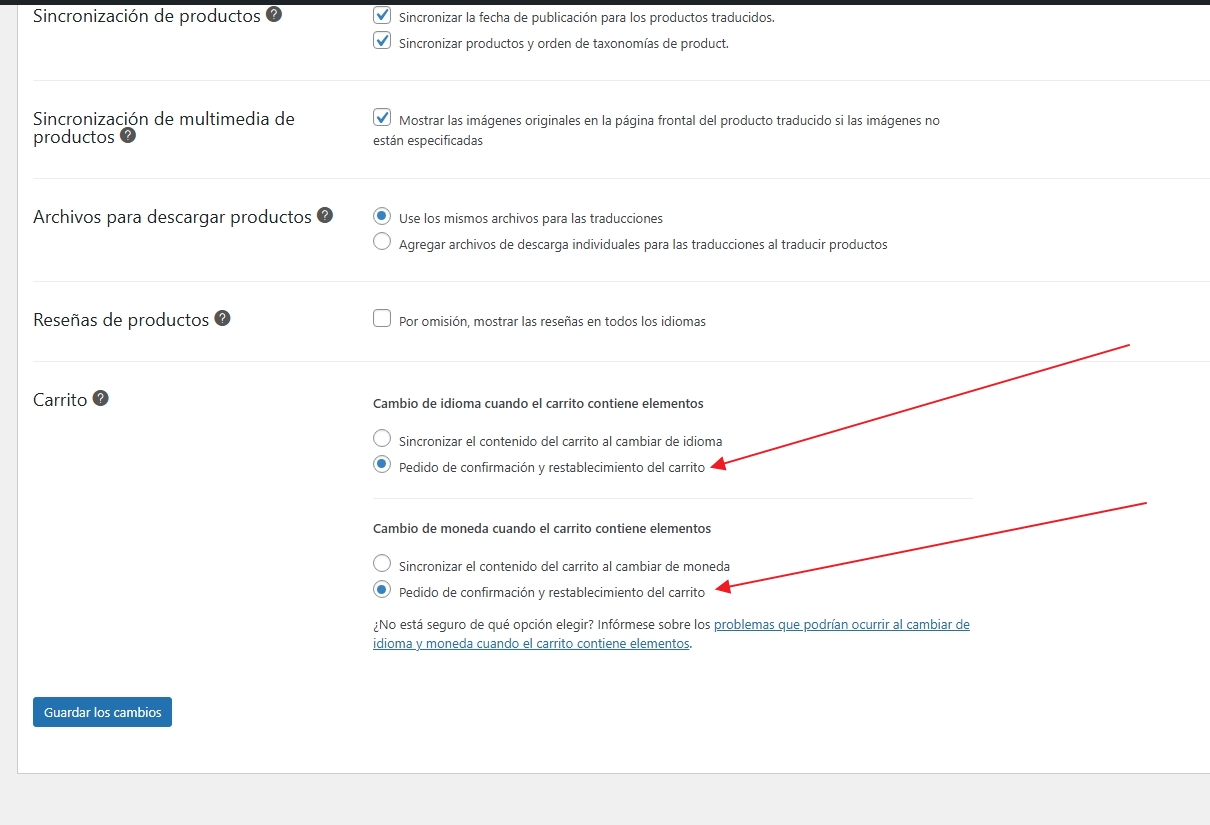 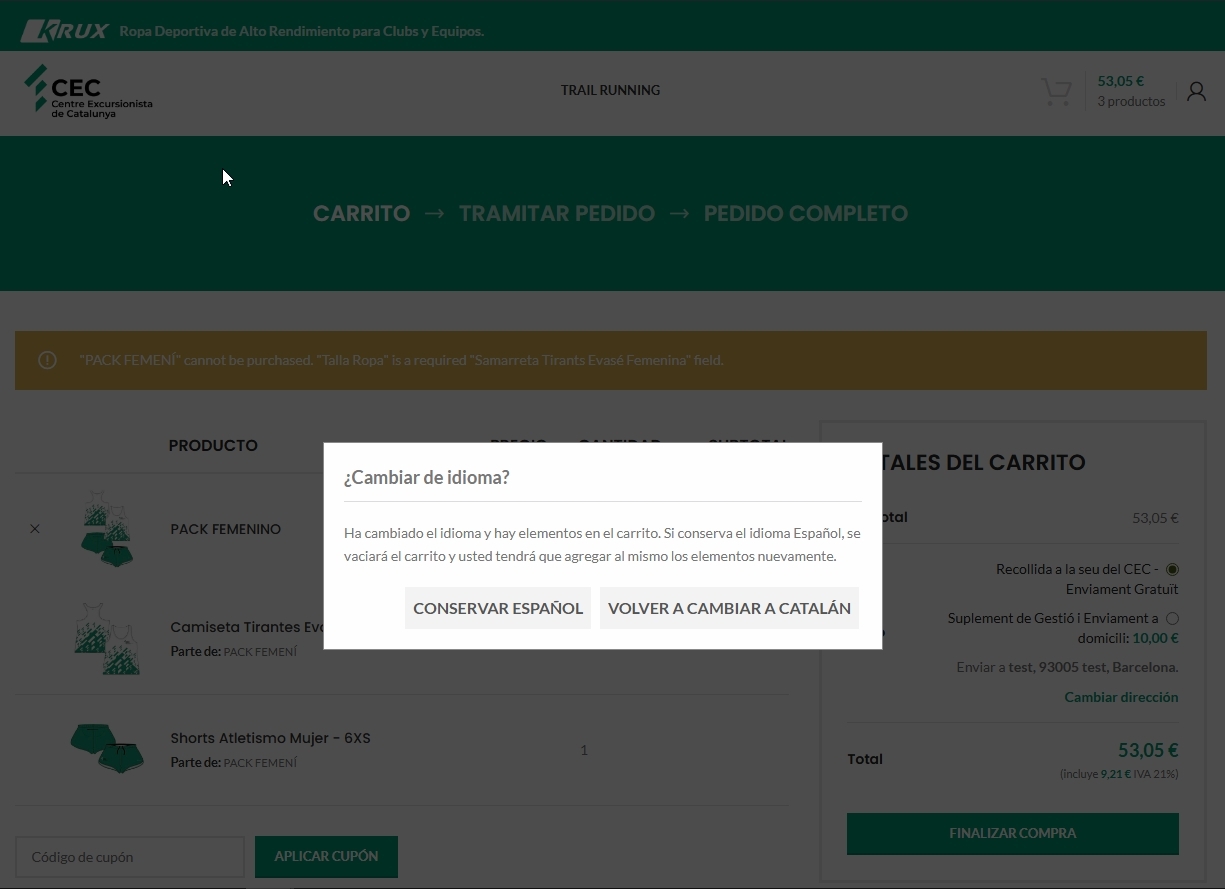 |
| October 13, 2025 at 3:23 am #17478119 | |
|
xavierC-5 |
Hi Marcel, Do you have any feedback for my last message? It's already 6 days and no answer. Please let me know something. Regards, |
| October 13, 2025 at 7:05 am #17478416 | |
 Marcel Supporter Languages: English (English ) Spanish (Español ) German (Deutsch ) Timezone: Europe/Vienna (GMT+02:00) |
Hi Xavier, Yes, our team is actively working on this. The products are being automatically removed from the cart by WooCommerce (class-wc-cart-session.php) because the data hash check on line 205 fails. This happens because the $product object ends up mixing language attributes — it’s the Catalan product, but it’s being assigned the Spanish attribute (pa_talla-roba: l-es). Although the product’s actual post meta and attributes are correctly set (and marked as “do not translate”), when WooCommerce retrieves the product data, it returns the translated Spanish attribute instead. In short, WooCommerce believes the product data has changed (due to mismatched language attributes), so it removes the item from the cart. Debugging this is complex since the meta retrieval involves multiple deeply nested filtered calls. Our team is continuing to investigate, and I’ll keep you updated as soon as we have more information. Best regards, |
| October 13, 2025 at 1:40 pm #17480019 | |
|
Marcel Supporter Languages: English (English ) Spanish (Español ) German (Deutsch ) Timezone: Europe/Vienna (GMT+02:00) |
Hi, I’ve finally identified the source of the problem: the translation setting for Products was changed to “Translatable – use translation if available or fallback to default language” instead of just “Translatable.” Our team will check a solution for that. In the meantime, if the fallback option isn’t actually needed, you can revert the setting back to “Translatable” for Products — that will fix the additional issue. Best Regards, |
| October 14, 2025 at 4:25 am #17481775 | |
|
xavierC-5 |
Hi Marcel, I don't need the fallback option - indeed I did not enable this option myself. Everything is fully translated. I've already changed to "Translatable". When you say: "Our team will check a solution for that." what is the problem now that should be fixed? Let me know what will be the next steps. Is the team still checking for the solution? Regards, |
| October 14, 2025 at 9:28 am #17482605 | |
|
Marcel Supporter Languages: English (English ) Spanish (Español ) German (Deutsch ) Timezone: Europe/Vienna (GMT+02:00) |
Hi Xavier,
Since this behavior is controlled by an option in the settings, our team will look into a solution to prevent it when the option is enabled. Specifically, when the “clear cart on language switch” setting is active and products are set as translatable-with-fallback, WooCommerce may incorrectly remove product variations from the cart due to mismatched cart hashes caused by translated product metadata. The fix will involve preventing WCML from translating product meta during the hash comparison process. Best regards, |
| October 15, 2025 at 7:39 am #17485846 | |
|
xavierC-5 |
ok, thanks. Regards, |
| October 28, 2025 at 2:04 am #17523988 | |
|
xavierC-5 |
Hi Marcel, Just a quick note to know if the fix to prevent WCML from translating product meta during the hash comparison process has been found/done? regards |
| October 28, 2025 at 7:24 am #17524411 | |
|
Marcel Supporter Languages: English (English ) Spanish (Español ) German (Deutsch ) Timezone: Europe/Vienna (GMT+02:00) |
Hi Xavier, Our developers currently have two tickets in the backlog. Unfortunately, I can’t provide an exact timeline for when they’ll be completed. Best regards, |
| October 30, 2025 at 2:54 am #17531023 | |
|
xavierC-5 |
ok thanks Marcel. |
| November 13, 2025 at 3:56 am #17573229 | |
|
xavierC-5 |
Hi Marcel, Are you planning to add this patch on future plugin updates? Or just keep it as a patch which force me to manually imput every time you release a new plugin update? This is the patch that I'm currently using: public function get_current_url() { $scheme = is_ssl() ? 'https' : 'http'; |
| November 13, 2025 at 6:53 am #17573319 | |
|
Marcel Supporter Languages: English (English ) Spanish (Español ) German (Deutsch ) Timezone: Europe/Vienna (GMT+02:00) |
Hi, yes, we plan to add this to the plugin in a future update. However, I can’t give you a specific timeline yet. Since there’s a functional workaround and no other clients have requested this feature so far, it’s currently not a high priority for our developers. At the moment, it isn’t scheduled for a specific release. Best regards, |
| November 17, 2025 at 9:23 am #17582916 | |
|
xavierC-5 |
Hi Marcel, But the functional workaround disappear every time I update WPML plugin. Is there any solution to avoid that the patch to be reinserted on each plugin update? Regards, |
| November 17, 2025 at 9:55 am #17583130 | |
|
Marcel Supporter Languages: English (English ) Spanish (Español ) German (Deutsch ) Timezone: Europe/Vienna (GMT+02:00) |
Hi, Yes, that's correct. Because of how WordPress is designed, many code changes can be added to your functions.php. However, in this specific case that won’t work, as we need to replace a direct function and those changes wouldn’t persist through updates. Best regards, |
| November 18, 2025 at 3:10 am #17586373 | |
|
xavierC-5 |
HI Marcel, But in this case, this is a WPML bug, so this temporarily workaround, while it's totally fine, I don't understand why cannot be included in the next update? If I should wait for other customers to face the same problem, I can be holding forever... One more thing. As I think is all related to the same issue. I've realized that on the translated language, the "Thank You" page at the final step of a purchase, the order details does not appear on the screen. The order works and has been sent correctly but no order details are retrieved on this page. If I disable WCML and String translation plugins, it seems it works. It uses the Catalan slug of "completed order" but retrieves the details in Spanish - even the page design is different from the original language. Have serveral customers complaining as they're not sure if the order has been correctly done. If you can please have a look and see what can be the issue. Website to test: Regards, |









