
This is the technical support forum for WPML - the multilingual WordPress plugin.
Everyone can read, but only WPML clients can post here. WPML team is replying on the forum 6 days per week, 22 hours per day.
| Sun | Mon | Tue | Wed | Thu | Fri | Sat |
|---|---|---|---|---|---|---|
| - | - | 9:00 – 18:00 | 9:00 – 18:00 | 9:00 – 18:00 | 9:00 – 18:00 | 9:00 – 18:00 |
| - | - | - | - | - | - | - |
Supporter timezone: America/Lima (GMT-05:00)
Related documentation:
This topic contains 37 replies, has 0 voices.
Last updated by Andreas W. 1 day, 21 hours ago.
Assisted by: Andreas W..
| Author | Posts |
|---|---|
| March 29, 2026 at 12:23 am #17934325 | |
 adrienL-15 |
Hi Andreas, Thank you for your reply. I followed your instructions and checked the browser console on the Translation Dashboard. Here is exactly what I did: The “Translate” button remains greyed out. I am attaching a screenshot of the console. The key issue I can see is the following error: POST /wp-json/wpml/v1/get-words-to-translate-for-items 500 (Internal Server Error) This error appears when interacting with the Translation Dashboard. I also checked the debug.log file, but there are no relevant errors related to WPML or translations. Additionally, I am currently facing another issue on my site (ticket #17933213), where variable product variations are missing or incorrect in secondary languages. Given that both issues affect WPML functionality, they might be related. Best regards, 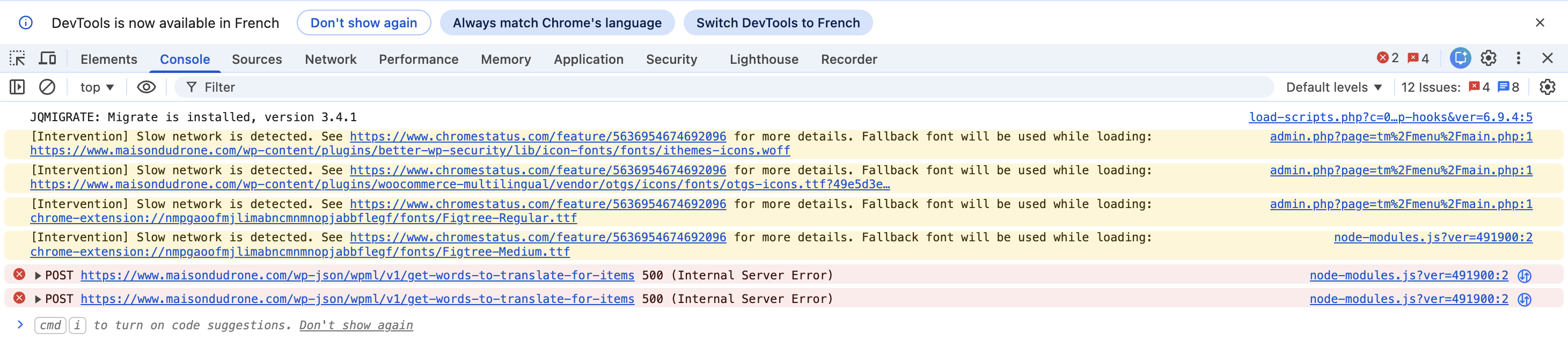 |
| March 29, 2026 at 1:06 am #17934375 | |
 Andreas W. WPML Supporter since 12/2018 Languages: English (English ) Spanish (Español ) German (Deutsch ) Timezone: America/Lima (GMT-05:00) |
It seems that the WooCommerce REST API has been disabled on your site: Result: {"code":"woocommerce_rest_cannot_view","message":"D\u00e9sol\u00e9, vous ne pouvez pas lister les ressources.","data":{"status":401}} It works if I check for posts: Also, WPML REST API Endpoints need to be functional: This could be the reason for the issue. |
| March 29, 2026 at 5:45 am #17934419 | |
|
adrienL-15 |
Hi Andreas, Thank you for your message. I performed several additional tests to isolate the issue: - Disabled Cloudflare Managed Challenge → no change However, the issue persists: - Translation Dashboard button is still greyed out In addition, I have another issue (ticket #17933213) where variable products do not work correctly in secondary languages (empty or incorrect variation dropdowns). I am not sure if both issues are related, but they appeared around the same period. At this stage, it seems that WPML is unable to properly process translation data. Please let me know what you recommend as next step. Best regards, |
| March 31, 2026 at 7:16 pm #17941231 | |
|
Andreas W. WPML Supporter since 12/2018 Languages: English (English ) Spanish (Español ) German (Deutsch ) Timezone: America/Lima (GMT-05:00) |
It appears there is a conflict between WPML and another plugin or the theme you are using. Could you please create a copy or staging environment of the website and try running it with a minimal setup to determine if the problem persists? 1) Deactivate all additional plugins apart from WooCommerce, WPML, and our add-ons. 2) If the problem disappears, start reactivating the plugins one by one, or activate them in small groups. This way, check where the problem reappears to identify the plugin causing it. 3) If this doesn't resolve the issue, please switch to a default theme like Twenty Twenty-One to see if the problem might be theme-related. Once we have identified the cause, we can try to replicate the problem and then escalate it internally. In this case, I'll provide a test site using WPML. |
| April 1, 2026 at 11:32 am #17942781 | |
|
adrienL-15 |
Hi Andreas, Thank you for your reply. I tested the issue on a staging environment. Initially, the button was greyed out due to missing translation credits. After properly linking the credits, the button now works correctly on staging. However, on the live site, the button is still greyed out. So the issue is not reproducible on staging. Best regards, |
| April 1, 2026 at 5:22 pm #17944046 | |
|
Andreas W. WPML Supporter since 12/2018 Languages: English (English ) Spanish (Español ) German (Deutsch ) Timezone: America/Lima (GMT-05:00) |
The staging you created was an exact copy of the current production site? Did you register the staging site on your wpml.org account? |
| April 2, 2026 at 12:02 am #17944565 | |
|
adrienL-15 |
Hi Andreas, Thank you for your message. Yes, the staging site is a full copy of the current production site, created using BlogVault. Regarding WPML registration, the staging site is not registered on wpml.org with a site key. However, I have connected it to my existing WPML account to share translation credits. Best regards, |
| April 2, 2026 at 2:25 am #17944659 | |
|
Andreas W. WPML Supporter since 12/2018 Languages: English (English ) Spanish (Español ) German (Deutsch ) Timezone: America/Lima (GMT-05:00) |
At this point, I am sadly out of ideas. It would be really advisable if you let us take a look at the site. You can count on the fact that we will not make any drastic changes or in any way risk the site becoming unavailable for visitors. Let me know if you would consider providing access, and I will enable the private reply form again. I am further consulting our team regarding the console error that you mentioned: I will reach out again once I have their feedback. |
| April 2, 2026 at 3:31 am #17944715 | |
|
Andreas W. WPML Supporter since 12/2018 Languages: English (English ) Spanish (Español ) German (Deutsch ) Timezone: America/Lima (GMT-05:00) |
Could you please ask your hosting support team for details from the server's error.log? |
| April 5, 2026 at 1:27 am #17949598 | |
|
adrienL-15 |
Hi Andreas, Thank you for your message. I contacted my hosting provider to check the server logs during the request that returns the 500 error. They confirmed there are no relevant server-side errors, but they were able to capture the following error from the failing request: "Cannot use positional argument after named argument during unpacking" It seems the issue may be related to the plugin itself rather than the server. Best regards, |
| April 5, 2026 at 2:08 am #17949721 | |
|
Andreas W. WPML Supporter since 12/2018 Languages: English (English ) Spanish (Español ) German (Deutsch ) Timezone: America/Lima (GMT-05:00) |
Thank you for the provided info! I need access to a staging site or a local copy of the website to debug the issue. If you can not set up a staging site, you could create a package using the plugin "All In One WP Migration", upload it to a service of your choice, and send me a download link. The private reply form is enabled again. |
| April 10, 2026 at 6:36 pm #17962789 | |
|
Andreas W. WPML Supporter since 12/2018 Languages: English (English ) Spanish (Español ) German (Deutsch ) Timezone: America/Lima (GMT-05:00) |
1) I do not see any issue here with creating translation jobs for products at WPML > Translation Dashboard. I can send products to automatic translation or create local translation jobs. I only needed to make sure to assign myself first as translator, in case I want to assign the jobs to myself. You can assign yourself as a translator at WPML > Translation Dashboard > Manage Translators & Services. Once the jobs are created, they are being accessed at WPML > Translations, which also works as expected on my test. 2) I also have no issue with accessing translations for products at Products > All Products. 3) Lately, I have not had an issue with accessing product translations from the right sidebar of the WordPress Editor while editing an original product. Can you recreate the issue on this staging site? If so, how exactly do you recreate it? |
| April 15, 2026 at 1:27 am #17970148 | |
|
adrienL-15 |
Hi Andreas, I have set up a new staging environment on my hosting (Rocket.net), where the issue is present. Could you please enable the private reply fields so I can provide you with access? Best regards, |
| April 15, 2026 at 3:27 am #17970225 | |
|
Andreas W. WPML Supporter since 12/2018 Languages: English (English ) Spanish (Español ) German (Deutsch ) Timezone: America/Lima (GMT-05:00) |
Hi Adrien, Thank you for setting up a staging site. I do understand, right, that the earlier provided staging was outdated and did not display the reported issue? I was not able to confirm them. The private reply form is enabled again. Please add a short comment again regarding: Best regards |
| April 16, 2026 at 12:18 am #17972406 | |
|
Andreas W. WPML Supporter since 12/2018 Languages: English (English ) Spanish (Español ) German (Deutsch ) Timezone: America/Lima (GMT-05:00) |
On the Dashboard, a banner was displayed that asked for synchronizing the product categories. You can synchronize them at WPML > Taxonomy Translation by selecting product categories in the dropdown and then clicking on the Hierarchy Synchronization tab and running the dialog. After completing this task, the issue was solved. |






