
This is the technical support forum for WPML - the multilingual WordPress plugin.
Everyone can read, but only WPML clients can post here. WPML team is replying on the forum 6 days per week, 22 hours per day.
| Sun | Mon | Tue | Wed | Thu | Fri | Sat |
|---|---|---|---|---|---|---|
| - | - | 9:00 – 18:00 | 9:00 – 18:00 | 9:00 – 18:00 | 9:00 – 18:00 | 9:00 – 18:00 |
| - | - | - | - | - | - | - |
Supporter timezone: America/Lima (GMT-05:00)
Tagged: Documentation request
This topic contains 0 reply, has 1 voice.
Last updated by Andreas W. 9 months, 2 weeks ago.
Assisted by: Andreas W..
| Author | Posts |
|---|---|
| February 5, 2025 at 10:40 pm #16673133 | |
 Andreas W. WPML Supporter since 12/2018 Languages: English (English ) Spanish (Español ) German (Deutsch ) Timezone: America/Lima (GMT-05:00) |
You are right, when opening the translation it was actually completed to 100%. Once I revise now the Spanish form on the backend, it actually looks as if translating the fields this way, will not be possible. There are not any fields created on the Spanish form: hidden link In this case, please go to the English form and switch the translation method to WordPress-Editor. Then open the Spanish translation and create the translation directly inside the WordPress Editor. Do this for all languages. How to translate content with the WordPress Editor: |
| February 9, 2025 at 8:52 pm #16684678 | |
 ericH-23 |
Hi, |
| February 11, 2025 at 8:10 am #16690214 | |
|
Andreas W. WPML Supporter since 12/2018 Languages: English (English ) Spanish (Español ) German (Deutsch ) Timezone: America/Lima (GMT-05:00) |
This is expected in this case, as you will need to recreate the form manually for each language. You could try to duplicate the form first or use the option "Copy form original". Please read this guide: |
| February 14, 2025 at 9:03 pm #16708045 | |
|
ericH-23 |
Hi, |
| February 15, 2025 at 10:08 am #16708692 | |
|
Andreas W. WPML Supporter since 12/2018 Languages: English (English ) Spanish (Español ) German (Deutsch ) Timezone: America/Lima (GMT-05:00) |
Hi, I would like to offer to take a closer look and request temporary access (wp-admin and FTP) to the site to investigate the issue further. The required fields are below the comment section when you log in to leave the next reply. The information you provide is private, meaning only you and I can see and access it. IMPORTANT If you can't see the "wp-admin / FTP" fields, your post and site login details will be set to "PUBLIC". DO NOT publish the data unless you see the required wp-admin / FTP fields. I may need to install a plugin called "All In One WP Migration" here to create a copy of the site that I can use to investigate the issue further. However, I would also be very grateful if you could provide a staging site or copy of the website from your server for this purpose. If you have any questions about creating such a staging site, you can consult your hosting provider. Please note that WPML must also be registered on this staging site at https://wpml.org/de/account/websites/. If you are not able to provide such a copy of the website for testing, please let me know on this ticket. The private reply form looks like this: The next time you reply, click on "I still need assistance". Video: Please note that we are obliged to request this information individually on each ticket. We are not allowed to access any credentials that were not specifically submitted on this ticket in the private response form. Best regards |
| February 18, 2025 at 4:41 pm #16720256 | |
|
Andreas W. WPML Supporter since 12/2018 Languages: English (English ) Spanish (Español ) German (Deutsch ) Timezone: America/Lima (GMT-05:00) |
On the German form, I had set it to "Translate independently". I then opened a German job and clicked the apply button. As you can see on the screenshot, the form shows up and is translated by default. In this case, you need to search the strings at WPML > String Translation and adjust them there. 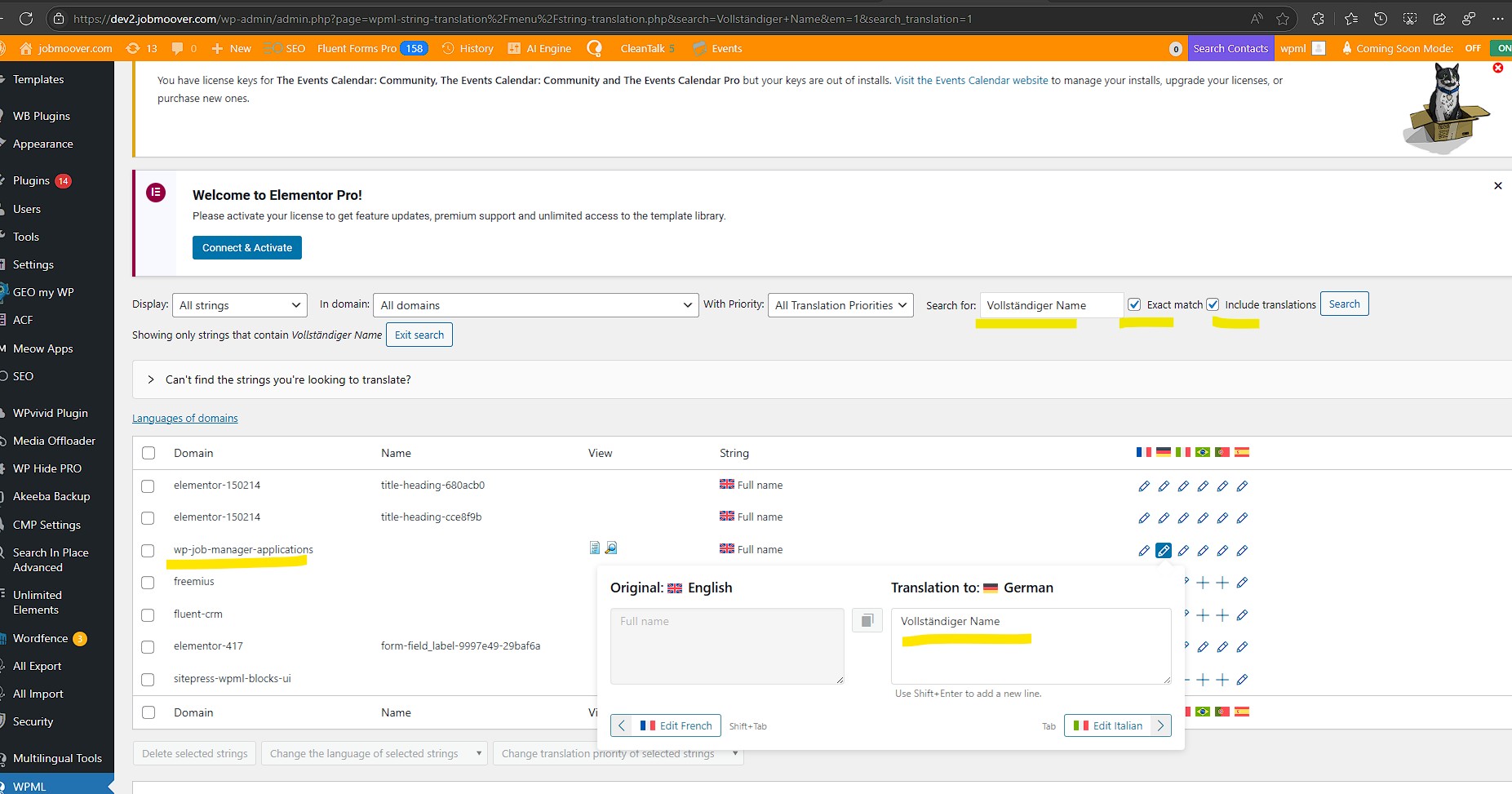 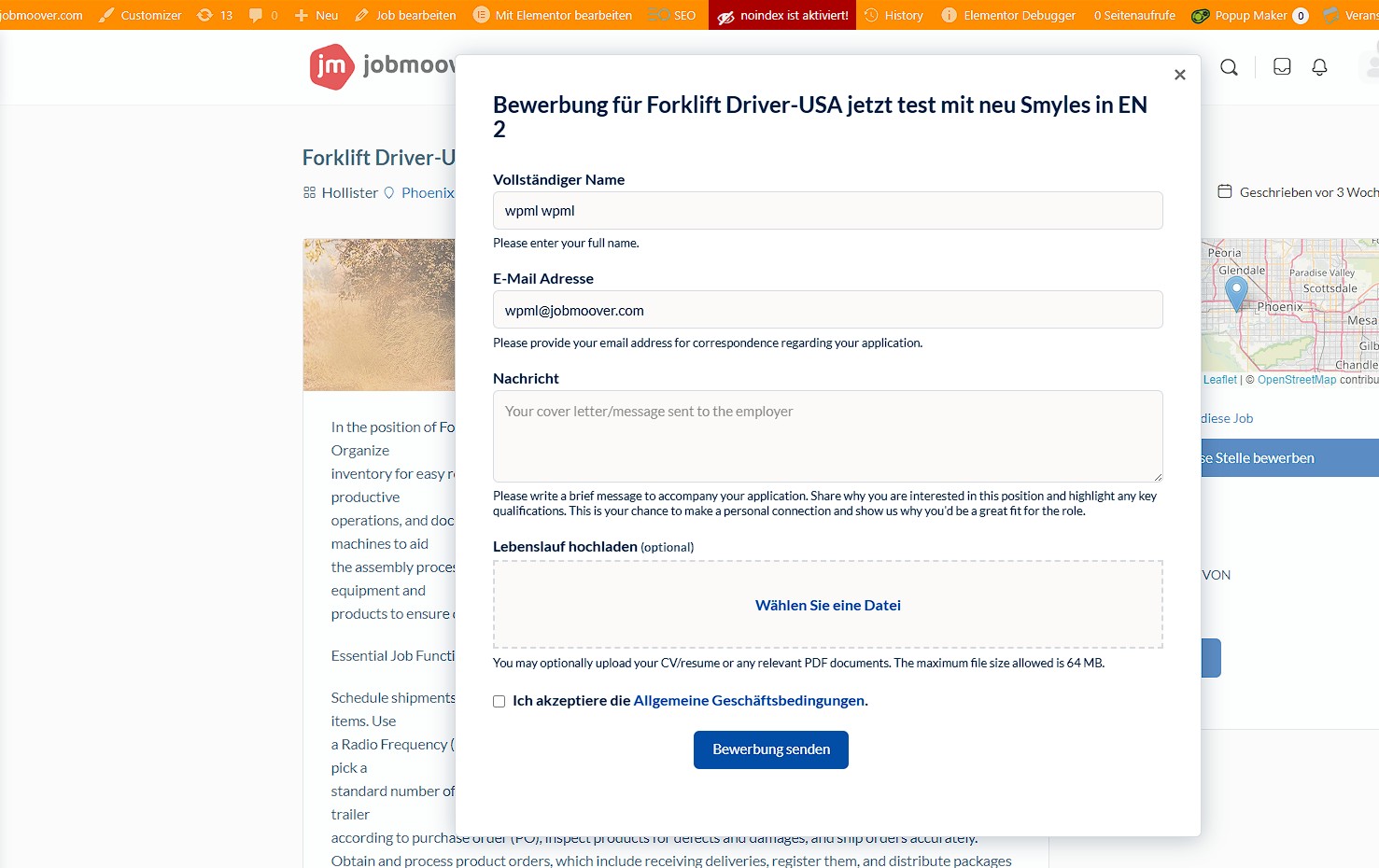 |
| February 18, 2025 at 9:23 pm #16721076 | |
|
ericH-23 |
Hi, How can I do this: "On the German form, I had set it to "Translate independently"? I have only an empty area if I nswitch the form to German. Thanks, kind regards 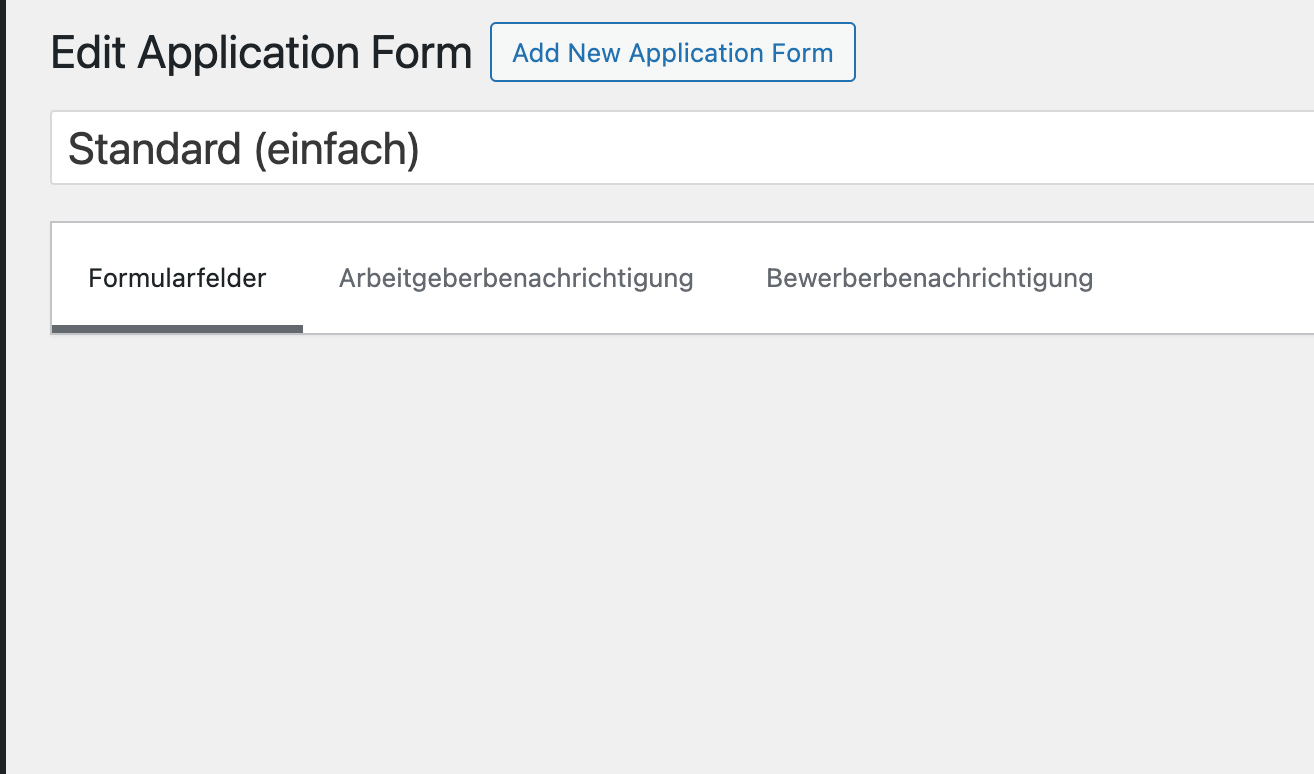 |
| February 18, 2025 at 9:45 pm #16721155 | |
|
Andreas W. WPML Supporter since 12/2018 Languages: English (English ) Spanish (Español ) German (Deutsch ) Timezone: America/Lima (GMT-05:00) |
Yes, the issue is that these forms can not be translated with the WPML Translation Editor. I suggest you set the translation method for the forms to "WordPress Editor". See screenshot. You would need to duplicate the form first. After creating a duplicate with WPML you should see the option. You can only see a duplicate option if the form has not yet been translated. This means you would need to delete the current existing translation, duplicate the original form into a second language, and then click "Translate independently" on the backend. You will not need to translate the form inside the form editor. Instead, you can adjust the already integrated translations for this form at WPML > String Translation. 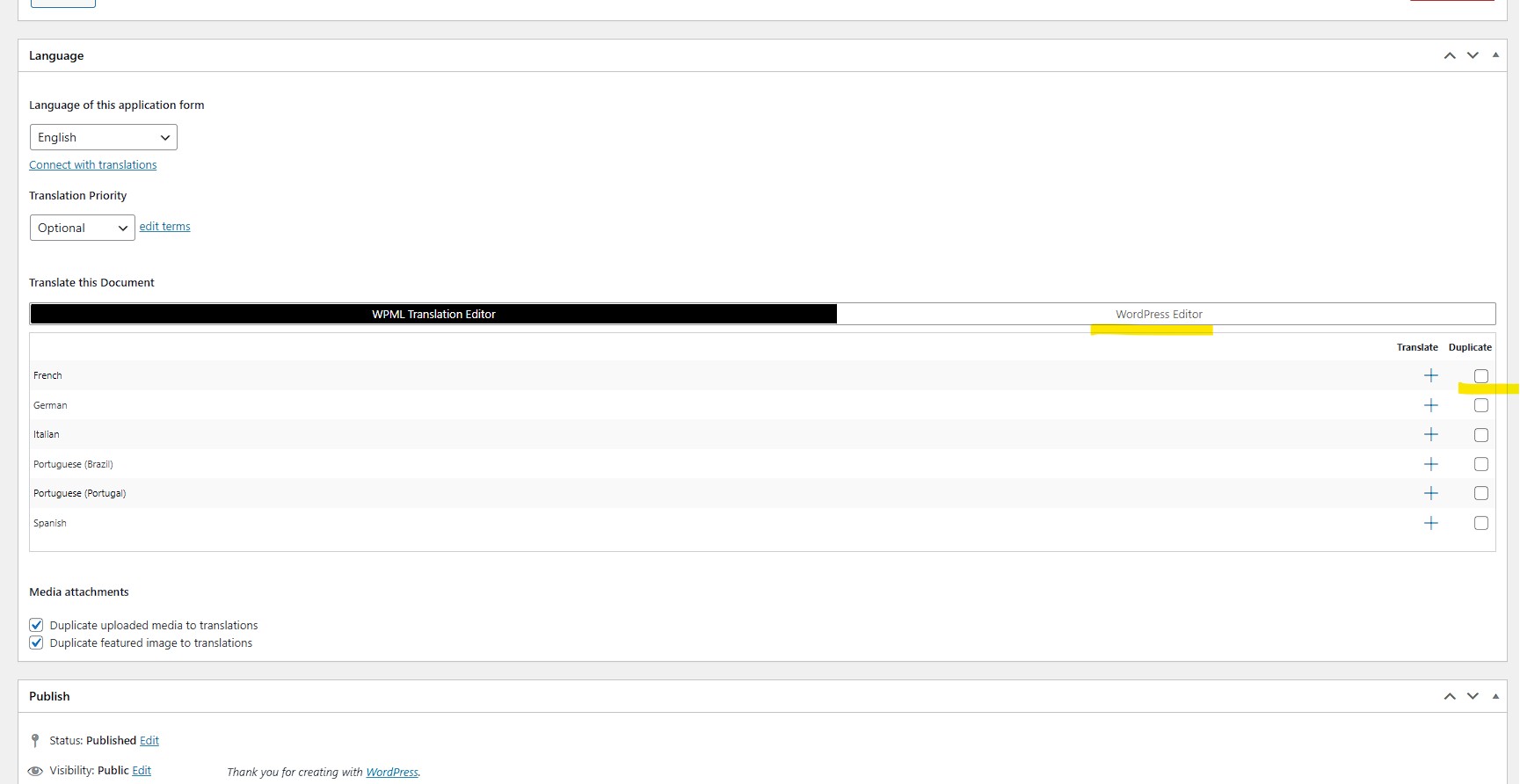 |
| February 24, 2025 at 9:18 pm #16743280 | |
|
ericH-23 |
Hi, I'm now trying to implement your recommendation and have created a new application form. However, before I can create duplicates, WPML's new automatic translation has already generated translations. Previously, I was able to control this manually - how can I now exclude application forms from automatic translation in WPML? Thanks and best regards, PS: after changing to the German translation to check the situation, the form was empty as expected, but I got also a fatal error message from wordpress, in a private message I could send it, if you want, but if the duplication is possible, such an error may be not shwon anymore |
| February 25, 2025 at 3:00 pm #16746553 | |
|
Andreas W. WPML Supporter since 12/2018 Languages: English (English ) Spanish (Español ) German (Deutsch ) Timezone: America/Lima (GMT-05:00) |
I can sadly not longer log in to your site. To avoid automatic translation change the translation method for the form to "WordPress Editor". Now try to manually create the translation. If this will not work out as expected I can offer a WPML test site on which you can replicate the issue and I will escalate it to our compatilbity team. |
| February 26, 2025 at 1:28 pm #16751182 | |
|
ericH-23 |
Hi, |
| February 26, 2025 at 2:18 pm #16751544 | |
|
Andreas W. WPML Supporter since 12/2018 Languages: English (English ) Spanish (Español ) German (Deutsch ) Timezone: America/Lima (GMT-05:00) |
Sadly, I can no longer log into your website. If the forms are automatically translatable, they must be registered at WPML > Settings > Post Type translation. Setting their post type to "Not translatable" should solve this issue and you should still be able to create different forms per language and use their unique shortcodes. If you need further assistance, let's recreate the issue on the following test site and I will have a look into this. One-Click-Login: |
| February 27, 2025 at 12:14 pm #16755945 | |
|
ericH-23 |
Hi, If I need to make any changes to the sandbox, please let me know. Thank you very much and best regards, |
| February 27, 2025 at 2:15 pm #16756585 | |
|
Andreas W. WPML Supporter since 12/2018 Languages: English (English ) Spanish (Español ) German (Deutsch ) Timezone: America/Lima (GMT-05:00) |
Translating the forms seems not to be the solution here, as even when I try to translate the form manually the translation will not show up. For now, you can translate the strings that are displayed on the form with WPML > String Translation. Set the forms in WPML > Settings > Post Type Translation to "Not translatable". Delete all translations of forms from Job Applications > Application Forms. Now, scan your plugins for new strings at WPML > Theme & Plugin Localization. Search for the default forms strings at WPML > String Translation and translate them. You will run into a few exceptions, which will not work out as expected. Like: I will take a closer look into the code of the plugin today to see if I can find a solution. |
| February 28, 2025 at 6:05 pm #16762387 | |
|
Andreas W. WPML Supporter since 12/2018 Languages: English (English ) Spanish (Español ) German (Deutsch ) Timezone: America/Lima (GMT-05:00) |
Ich konnten zu dem Problem mit den String-Übersetzungen leider keine Lösung finden und habe dies nun an das Compatibility-Team weitergeleitet. Sobald ich von dort eine Antwort habe, werde ich mich wieder bei Dir melden. |
The topic ‘[Closed] Translation of WP Jobmanager application forms’ is closed to new replies.